Dual booting Error

Navop

New member
Local time
10:05 AM
Messages
20
Ok this is my setup,

c:\ = Window 7 ultimate 64 bit, formatted as NTFS, hdd = 350gig
D:\ = windows xp sp2 32 bit, formatted as NTFS, hdd = 450gig

E:\ = files, formatted as NTFS, hdd = 450gig
F:\ = Music\movies, formatted as NTFS, hdd = 450gig

Followed the instruction in thread

http://www.sevenforums.com/tutorials/8057-dual-boot-installation-windows-7-xp.html

Method 2 windows 7 installed first

then installed window xp sp2 on 2nd hdd

Once xp installed and rebooting for the first time I get following error

Error loading operating system.

Can someone help me out?.....plz, not sure why i get an error following the above instruction to a tee...
 

My Computer

OS
Window 7 Ultimate x64 RTM
CPU
Q6600
Motherboard
Asus
Memory
8 Gig
Graphics Card(s)
Nvidia
Monitor(s) Displays
2x22" Acer Widescreen
You could try running a system repair. Otherwise, maybe try installing XP first?
 

My Computer

Computer Manufacturer/Model Number
Apple Macbook Pro (April 2009)
OS
W7 Ult. x64 | OS X
CPU
Intel Mobile Core 2 Duo 2.93Ghz [T9800 Penryn]
Motherboard
NVIDIA nForce 730i Rev. B1 [Mac-F2268EC8 (U2E1)]
Memory
4096MB Samsung DDR3 Dual Channel [PC3-8500F 1066Mhz]
Graphics Card(s)
NVIDIA GeForce 9600M GT 512MB [G96M Rev. C1]
Sound Card
SB X-Fi Surround 5.1 USB | Onboard Realtek (Disabled)
Monitor(s) Displays
Acer x223wbd 22" | Apple Anti-Glare 17" (Disabled)
Screen Resolution
{Current} 1440x900 {Acer} 1680x1050 {Apple} 1920x1200
Hard Drives
{Internal}
Seagate Momentus 320GB 2.5" 7200RPM [ST9320421AS]

{Externals}
LaCie 320GB USB 2.0 HDD [301284UR]
LaCie 750GB USB 2.0 FW400 eSATA HDD [301314U]
LaCie 1TB USB 2.0 HDD [301304UR]
PSU
Magsafe
Case
Aluminum/Unibody (MBP52)
Cooling
2 x 6000 RPM Fans
Keyboard
Logitech G-15v2 [PN 920-000379]
Mouse
Logitech G-9 [PN 910-000338]
Internet Speed
12Mbps/2.5Mbps w/ 24Mbps Speed Boost [Comcast]
Other Info
Logitech X-540 Speakers [PN 970223-0122]
Sennheiser PC-151 Headset
Are those partitions on 4 separate drives? If so, I would recommend only installing one OS per drive. Doing this, you would eliminate the use of a boot loader provided by an OS or third party source. You would then set your preferred OS as first in boot priority in the BIOS, and switch when needed by tapping F8 during the first boot screen to access the BBS Popup Menu, to select which drive to boot. This will provide a much more reliable method of dealing with multiple OSs than using a boot loader.

EDIT: I forgot to mention, while installing an OS on one drive, disconnect all others, so that as far as that installation is concerned, it is totally alone.
 

My Computer

Computer Manufacturer/Model Number
DIY
OS
W7x64 Pro, SuSe 12.1/** W7 x64 Pro, XP MCE
CPU
Phenom II 1090T w/Noctua NH-D14 /**4400+ X2 w/CM Hyper TX 3
Motherboard
ASRock 890FX Deluxe 4/**A8N-SLI
Memory
2 x 2GB Patriot PGS34g1600LLKA/**4x1GB Corsair VS
Graphics Card(s)
EVGA GTX460 SC/**EVGA 8800GTS
Sound Card
Asus Xonar D2X/**Xonar D1
Monitor(s) Displays
Acer X233H, Dell E152FPc /**LG M237-WD
Screen Resolution
1920x1080 & 1024x768/**1980x1080
Hard Drives
WDC 2TB, 1.5TB, 1TB, 500GB,Seagate 500GB , Maxtor 80GB /**500GB Seagate & WDC 1TB Black
PSU
CM RS600 w/ APC BX1000G/**Antec 500 TP w/ APC BX1000
Case
HAF922/**Antec 1040IIB
Cooling
3x200mm, 1x140 and 1x120mm/**5x80mm fans
Keyboard
Logitech Media USB/**Saitek Eclipse
Mouse
Cordless Trackman Wheel/**Ditto
Internet Speed
3.3Mbps
Other Info
SB 560 5.1 w/ Sennheiser RS140/**Creative T20 speakers, Dvico FusionHDTV7 Gold RT, Cisco E3000, HP 5510V AIO, Linksys E3000, Belkin F5U237 hub and **F5D8055 adapter
(** = 2nd rig)
They are all separate drives.
 

My Computer

OS
Window 7 Ultimate x64 RTM
CPU
Q6600
Motherboard
Asus
Memory
8 Gig
Graphics Card(s)
Nvidia
Monitor(s) Displays
2x22" Acer Widescreen
Will XP start correctly if you unplug Win7 HD? Or vice versa? Have you attempted to create a Dual boot yet using EasyBCD?

Please post back a screenshot of your full Disk Management drive map, using Snipping Tool in Start Menu, attach file using paper clip in Reply box.

You can have either a BIOS managed Dual boot where you set one HD to boot first (after DVD) or trigger the other OS HD by using the shortcut key given on first BIOS splashscreen for Boot menu. This makes the HD's independent so they can come and go as you please.

Or you can have a Windows-managed Dual boot set up using EasyBCD 2.0 which will create a Boot Menu at startup, however the drives become interdependent and cannot be easily removed without recovering MBR.

Let us know which you want and we will give you the steps based on the screenshot.
 
tried the link in previous post and i never got it to run.

Now will install win 7 to first hdd, then will install window xp to
the next hdd.

But before i install win xp will go into computer bios and remove the hdd
that contains window 7.

once all is go will try re connecting the hdd and boot system.
 

My Computer

OS
Window 7 Ultimate x64 RTM
CPU
Q6600
Motherboard
Asus
Memory
8 Gig
Graphics Card(s)
Nvidia
Monitor(s) Displays
2x22" Acer Widescreen
But before i install win xp will go into computer bios and remove the hdd that contains window 7.
Just to be sure that I was clear, by disconnecting the harddrives, I was speaking of physically disconnecting them via a cable. Pull the power cable. The only thing that you do in the BIOS is to select the booting priority of the HDs, once the OSs are installed.
 

My Computer

Computer Manufacturer/Model Number
DIY
OS
W7x64 Pro, SuSe 12.1/** W7 x64 Pro, XP MCE
CPU
Phenom II 1090T w/Noctua NH-D14 /**4400+ X2 w/CM Hyper TX 3
Motherboard
ASRock 890FX Deluxe 4/**A8N-SLI
Memory
2 x 2GB Patriot PGS34g1600LLKA/**4x1GB Corsair VS
Graphics Card(s)
EVGA GTX460 SC/**EVGA 8800GTS
Sound Card
Asus Xonar D2X/**Xonar D1
Monitor(s) Displays
Acer X233H, Dell E152FPc /**LG M237-WD
Screen Resolution
1920x1080 & 1024x768/**1980x1080
Hard Drives
WDC 2TB, 1.5TB, 1TB, 500GB,Seagate 500GB , Maxtor 80GB /**500GB Seagate & WDC 1TB Black
PSU
CM RS600 w/ APC BX1000G/**Antec 500 TP w/ APC BX1000
Case
HAF922/**Antec 1040IIB
Cooling
3x200mm, 1x140 and 1x120mm/**5x80mm fans
Keyboard
Logitech Media USB/**Saitek Eclipse
Mouse
Cordless Trackman Wheel/**Ditto
Internet Speed
3.3Mbps
Other Info
SB 560 5.1 w/ Sennheiser RS140/**Creative T20 speakers, Dvico FusionHDTV7 Gold RT, Cisco E3000, HP 5510V AIO, Linksys E3000, Belkin F5U237 hub and **F5D8055 adapter
(** = 2nd rig)
Checking Google, it appears that it depends on which Asus motherboard that you have, as to which key will produce the BBS Popup Menu. If F8 doesn't work, try Esc.

EDIT: It will probably tell you which key to use on the first BIOS screen.
 

My Computer

Computer Manufacturer/Model Number
DIY
OS
W7x64 Pro, SuSe 12.1/** W7 x64 Pro, XP MCE
CPU
Phenom II 1090T w/Noctua NH-D14 /**4400+ X2 w/CM Hyper TX 3
Motherboard
ASRock 890FX Deluxe 4/**A8N-SLI
Memory
2 x 2GB Patriot PGS34g1600LLKA/**4x1GB Corsair VS
Graphics Card(s)
EVGA GTX460 SC/**EVGA 8800GTS
Sound Card
Asus Xonar D2X/**Xonar D1
Monitor(s) Displays
Acer X233H, Dell E152FPc /**LG M237-WD
Screen Resolution
1920x1080 & 1024x768/**1980x1080
Hard Drives
WDC 2TB, 1.5TB, 1TB, 500GB,Seagate 500GB , Maxtor 80GB /**500GB Seagate & WDC 1TB Black
PSU
CM RS600 w/ APC BX1000G/**Antec 500 TP w/ APC BX1000
Case
HAF922/**Antec 1040IIB
Cooling
3x200mm, 1x140 and 1x120mm/**5x80mm fans
Keyboard
Logitech Media USB/**Saitek Eclipse
Mouse
Cordless Trackman Wheel/**Ditto
Internet Speed
3.3Mbps
Other Info
SB 560 5.1 w/ Sennheiser RS140/**Creative T20 speakers, Dvico FusionHDTV7 Gold RT, Cisco E3000, HP 5510V AIO, Linksys E3000, Belkin F5U237 hub and **F5D8055 adapter
(** = 2nd rig)
Boot to the Install DVD and go to repair, command prompt and type the following:

bootrec /fixmbr

hit enter and wait for response.

bootrec /fixboot

hit enter and wait for response.

exit out of repair and reboot.
 

My Computer

Computer Manufacturer/Model Number
Homebuilt
OS
Windows 7 x64
CPU
i7-2600K
Motherboard
Asus P8Z77-v Pro
Memory
8 G
Graphics Card(s)
GTX 480
Sound Card
Onboard
Monitor(s) Displays
LG W2753V
Screen Resolution
1920x1080
Hard Drives
Crucial M4 128 G SSD
ok installed windows 7 on one hdd and then I went to my bios and switch my drive 0 with drive 1

this is my bios setup

disk 0 = win 7
disk 1 = win xp

in the bios i just switch them around to which ever i want to boot first

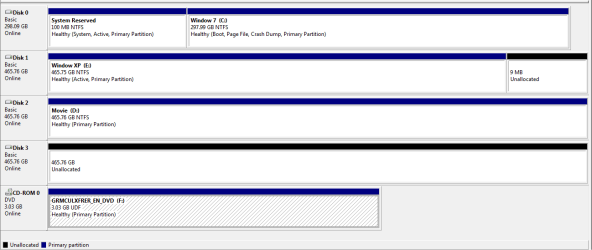
here is a view of my hdd management

Now is thier a way to switch from one os to another without going into
thew bios and switch the drives .
 

Attachments

  • Capture.PNG
    Capture.PNG
    13 KB · Views: 3

My Computer

OS
Window 7 Ultimate x64 RTM
CPU
Q6600
Motherboard
Asus
Memory
8 Gig
Graphics Card(s)
Nvidia
Monitor(s) Displays
2x22" Acer Widescreen
Set preferred OS HD to boot first in BIOS setup, after DVD drive.

Then use the key given on first boot screen for Boot Menu to trigger the other OS HD instead. This could be F10, F12, ESC, F8 - it will be revealed on the first bootup screen.

If you cannot find which key, then post back your exact computer or mobo make/model and someone will look it up for you.

Your Disk Management drive map looks correct.
 
its F8 to select the drive, will try it and see what happens
 

My Computer

OS
Window 7 Ultimate x64 RTM
CPU
Q6600
Motherboard
Asus
Memory
8 Gig
Graphics Card(s)
Nvidia
Monitor(s) Displays
2x22" Acer Widescreen
Ok rebooted the system and to switch from one os to another I just use the F8 key and boot from the right disk.

Thanks
 

My Computer

OS
Window 7 Ultimate x64 RTM
CPU
Q6600
Motherboard
Asus
Memory
8 Gig
Graphics Card(s)
Nvidia
Monitor(s) Displays
2x22" Acer Widescreen
Back
Top