
Dual Booting Windows 7 and Windows Vista

georges5443

New member
Local time
11:24 AM
Messages
3
For the last 2 years I've had my PC setup to Dual Boot from either Windows Vista Home Premium Edition x32 or Windows 7 Professional Edition x64. The Windows Vista drive had only a capacity of 34.4GBt and had given up the ghost. So I chose to format and re-install Windows Vista onto this small drive. The drive is working like new but now the PC boots into Vista and I cannot boot into Windows 7. I know that I should get a hold of the Windows 7 installation disk and repair the installation but unfortunately I've been moving around a lot and can find everyone of my installation discs except the Windows 7 Professional. Can anyone offer me advice on how to re-establish my Dual Boot without the use of an installation disc? Any advice would be appreciated.
 

My Computer My Computer

At a glance

Windows 7 Professional x64 and Windows Vista ...
OS
Windows 7 Professional x64 and Windows Vista Home Premium x32
You could try Easy BCD. But more then likely you will have to download the Iso and do a startup repair.
 

My Computer My Computer

At a glance

Windows 10 Pro x64Intel Core i7 6700KGSkill TridentZ RGB 16GB 3600 16-16-16-36EVGA GTX 980 Ti SC x2
Computer type
PC/Desktop
Computer Manufacturer/Model Number
Skylake Special #666
OS
Windows 10 Pro x64
CPU
Intel Core i7 6700K
Motherboard
Asus Sabertooth Z170 Mark 1
Memory
GSkill TridentZ RGB 16GB 3600 16-16-16-36
Graphics Card(s)
EVGA GTX 980 Ti SC x2
Sound Card
Realtek High Definition
Monitor(s) Displays
AOC G2460PG
Screen Resolution
1920 x 1080 144Hz
Hard Drives
Samsung 860 Pro 256GB, Seagate Barracuda 4TB x2
PSU
EVGA 1000 P2, EVGA White Custom Braided Cables
Case
Corsair Vengeance C70 Gunmetal Black
Cooling
Corsair H100i v2, Corsair ML120 x2, Thermal Grizzly Kryonaut
Keyboard
Logitech G910 Orion Spectrum
Mouse
Logitech G700s
Internet Speed
Verizon Fios Quantum Gateway 75/75
Antivirus
Windows Defender, Malwarebytes Free 3.8.3
Browser
Chrome
Other Info
Corsair SP120 x4, LG Blu-ray Drive, Durabrand HT-395 100 Watt Dolby Digital Amp, Corsair H2100 Wireless 7.1 Headset

My Computer My Computer

At a glance

Windows 7 Ultimate SP1 64-BitIntel Core i7 870 @ 2.93GHz8Gb Dual-Channel DDR3 @ 664MHznVidia GeForce GTX 460 1024MB dedicated RAM
Computer Manufacturer/Model Number
HP Pavilion Elite 495UK
OS
Windows 7 Ultimate SP1 64-Bit
CPU
Intel Core i7 870 @ 2.93GHz
Motherboard
MSI 2A9C (CPU1)
Memory
8Gb Dual-Channel DDR3 @ 664MHz
Graphics Card(s)
nVidia GeForce GTX 460 1024MB dedicated RAM
Sound Card
Realtek HD Audio
Monitor(s) Displays
HP2310i
Screen Resolution
1920 x 1080
Hard Drives
1x1954GB Hitachi HDS22020ALA 330 (RAID), 1x1954GB Hitachi External for backup and storage
PSU
460W
Case
HP Elite
Cooling
Air cooled
Keyboard
Logitech K750 solar-powered keyboard
Mouse
Logitech Wireless M180 mouse
Internet Speed
2Mb
Other Info
Pure Avanti Flow Internet Radio with iPod Dock, 64Gb iPod, HP USB Speakers, Sony MDR-V500 Headphones, Sony Vaio F-Series Laptop
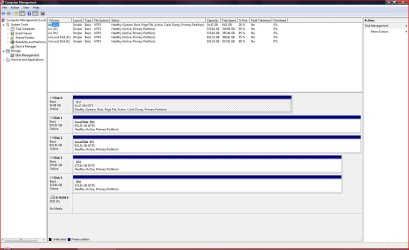
Normally Vista would configure the Dual Boot when reinstalled. There may be reasons it didn't related to the configuration which we can see better if you'll post up a screenshot of your maximized Disk Management drive map with listings. Screen Shots

If the configuration is okay then it should work to install EasyBCD to Vista to add Win7 on the Add OS tab. Choose Download free for limited, non-commercial use. You can ignore giving the email info as the download is free and will proceed just by clicking Download.
 
Disk Management Drive Map

As requested please find attached an image of my Drive Map. Any comments appreciated.
 

Attachments

  • DiskMap2012-03-02.JPG
    DiskMap2012-03-02.JPG
    149 KB · Views: 22

My Computer My Computer

At a glance

Windows 7 Professional x64 and Windows Vista ...
OS
Windows 7 Professional x64 and Windows Vista Home Premium x32
Why are all of the other HD's marked Active? Only an OS partition should be marked Active, except in a Dual Boot where the System boot files are contained on one partition - which in this case should be C.

So mark all other partitions than C Inactive: Partition - Mark as Inactive - Windows 7 Forums

Then install EasyBCD to C and add Win7 by drive letter, name and type, Save, reboot to Dual Boot menu.
 
Thank you for your feedback. I was able to locate my copy of Windows 7 Professional x64 and was able to recover Windows 7. So I can now dual boot into both Vista and Windows 7. I have checked the status of the drives in Disk Management and all drives are still marked as "active" including the OS drives C and D. Should I de-active either or these drives or the remaining drives as you recommended in your last posting? Can you please explain why they should not be marked as "active".
 

My Computer My Computer

At a glance

Windows 7 Professional x64 and Windows Vista ...
OS
Windows 7 Professional x64 and Windows Vista Home Premium x32
Gregrocker is one of our experts on partitioning and all his advice is good.

There can only be one active partition on a hard drive and that should be the partition that contains the bootloader files.

If you have more than one active partition on your hard drive it can render your computer unbootable.

Any partitions on your hard drive that do not contain the boot files need to be made inactive.

http://www.sevenforums.com/tutorials/197157-partition-mark-inactive.html

http://www.sevenforums.com/tutorials/71432-partition-mark-active.html
 

My Computer My Computer

At a glance

Windows 7 Ultimate SP1 64-BitIntel Core i7 870 @ 2.93GHz8Gb Dual-Channel DDR3 @ 664MHznVidia GeForce GTX 460 1024MB dedicated RAM
Computer Manufacturer/Model Number
HP Pavilion Elite 495UK
OS
Windows 7 Ultimate SP1 64-Bit
CPU
Intel Core i7 870 @ 2.93GHz
Motherboard
MSI 2A9C (CPU1)
Memory
8Gb Dual-Channel DDR3 @ 664MHz
Graphics Card(s)
nVidia GeForce GTX 460 1024MB dedicated RAM
Sound Card
Realtek HD Audio
Monitor(s) Displays
HP2310i
Screen Resolution
1920 x 1080
Hard Drives
1x1954GB Hitachi HDS22020ALA 330 (RAID), 1x1954GB Hitachi External for backup and storage
PSU
460W
Case
HP Elite
Cooling
Air cooled
Keyboard
Logitech K750 solar-powered keyboard
Mouse
Logitech Wireless M180 mouse
Internet Speed
2Mb
Other Info
Pure Avanti Flow Internet Radio with iPod Dock, 64Gb iPod, HP USB Speakers, Sony MDR-V500 Headphones, Sony Vaio F-Series Laptop
I have checked the status of the drives in Disk Management and all drives are still marked as "active" including the OS drives C and D. Should I de-active either or these drives or the remaining drives as you recommended in your last posting? Can you please explain why they should not be marked as "active".

I already explained why here:

Why are all of the other HD's marked Active? Only an OS partition should be marked Active, except in a Dual Boot where the System boot files are contained on one partition - which in this case should be C.

So mark all other partitions than C Inactive: Partition - Mark as Inactive - Windows 7 Forums

Then install EasyBCD to C and add Win7 by drive letter, name and type, Save, reboot to Dual Boot menu.


Please post back the latest screenshot of your maximized Disk Management drive map and listings using the Snipping TOol in Start Menu so we can see the current configuration.
 
When you use the Windows Disk Management snap-in tool to mark your primary partition as active, the computer may not start up if the partition marked as active does not contain the Windows boot files (or boot files for another operating system).

This problem occurs because on Intel-based computers, the system partition must be a primary partition that has been marked as active for startup purposes. This partition must be located on the disk that the computer gains access to when starting up the computer. There can be only one active system partition at a time. If you want to use another operating system, you must first mark its system partition as active before restarting the computer.
 

My Computer My Computer

At a glance

Windows 10 Pro x64Intel Core i7 6700KGSkill TridentZ RGB 16GB 3600 16-16-16-36EVGA GTX 980 Ti SC x2
Computer type
PC/Desktop
Computer Manufacturer/Model Number
Skylake Special #666
OS
Windows 10 Pro x64
CPU
Intel Core i7 6700K
Motherboard
Asus Sabertooth Z170 Mark 1
Memory
GSkill TridentZ RGB 16GB 3600 16-16-16-36
Graphics Card(s)
EVGA GTX 980 Ti SC x2
Sound Card
Realtek High Definition
Monitor(s) Displays
AOC G2460PG
Screen Resolution
1920 x 1080 144Hz
Hard Drives
Samsung 860 Pro 256GB, Seagate Barracuda 4TB x2
PSU
EVGA 1000 P2, EVGA White Custom Braided Cables
Case
Corsair Vengeance C70 Gunmetal Black
Cooling
Corsair H100i v2, Corsair ML120 x2, Thermal Grizzly Kryonaut
Keyboard
Logitech G910 Orion Spectrum
Mouse
Logitech G700s
Internet Speed
Verizon Fios Quantum Gateway 75/75
Antivirus
Windows Defender, Malwarebytes Free 3.8.3
Browser
Chrome
Other Info
Corsair SP120 x4, LG Blu-ray Drive, Durabrand HT-395 100 Watt Dolby Digital Amp, Corsair H2100 Wireless 7.1 Headset
Back
Top