Dual booting windows xp and windows 7 problem

Rudolph043

New member
Local time
12:58 PM
Messages
1
When i go to dual boot windows and windows xp The computer restarts several times and then it says TFGHT is compressed. Press control alt delete to restart. How to do i fix it?
 

My Computer My Computer

OS
XP
Hi Rudolph, welcome to the forums
Can you give more details? Have you been able to install Windows 7? Did you already have XP installed? If not are you trying a clean install or upgrade? Have you started booting from the DVD or running setup.exe

Can you also double check the message? There seems to be nothing about "TFGHT"
 

My Computer My Computer

Computer Manufacturer/Model Number
Wally, Innc.
OS
Windows 7 x64 finally!
CPU
AMD Athlon II X2 240
Motherboard
Biostar TA790GX XE
Memory
OCZ Platinum 4GB DDR2 1066 (will not work past 800MHz)
Graphics Card(s)
MSI R4670-MD1G Radeon HD 4670 1GB 128-bit GDDR3
Sound Card
ATI High Definition Audio Device Realtek ALC888
Monitor(s) Displays
HP w19e
Screen Resolution
1440x900
Hard Drives
Western Digital Caviar Green WD5000AADS 500GB SATA
Western Digital Caviar Blue WD5000AAKS 500GB SATA
PSU
Athena Power Micro ATX 400W
Case
HEC 6T 6T10BB Black MicroATX Mini Tower
Cooling
stock
Keyboard
wired, many keys
Mouse
HP wireless, 2 buttons, 1 wheel
Internet Speed
DSL 2Mb (recently getting 1.65M!)
This is a rather difficult problem since your PC is saying you have a compressed folder/partition or hard drive. Chances are you could try to boot up in Safe Mode by continually hitting f8 but I think you'll end up back with the same error.

If you have another PC with either Windows 7 or XP you could try to put this in as a secondary hard drive, it has been my experience that XP will find a drive that has been corrupted and report there are issues on another drive preventing access and ask if you want to repair it and 9 times out of 10 it works very well allowing the drive to be replaced in the PC it came from, I'm sure a Windows 7 PC will do this as well.

If you don't have another PC perhaps you have a friend who has one that has the same hard drive interface to allow you to do this. I'm sorry to say that if you can't fix it this way the only other solution I can give is to start over from scratch with another hard drive using your XP CD then try to fix it using that, best of luck.

 

My Computer My Computer

Computer Manufacturer/Model Number
DELL XPS Studio 435T
OS
Vista 64 Ultimate, Windows 7 64 Ultimate, Ubuntu 9.10
CPU
i7 975 3.3 GHz Extreme (Factory OC'd to 3.6 GHz)
Motherboard
DELL provided
Memory
18 Gb Tri-Channel 1066
Graphics Card(s)
ATI 5970 2048 Mb
Sound Card
X-Fi Extreme Gamer
Monitor(s) Displays
Vizio 37" HD-TV
Screen Resolution
1920 x 1080
Hard Drives
1.5 Tb HDD
1.5 Tb HDD
2.0 Tb Network Drive
512 Gb Crucial SSD
PSU
DELL Provided 475 watts
Case
DELL
Cooling
3 fans
Keyboard
Logitech Performance K350 Wireless
Mouse
Logitech Performance MX Wireless
Internet Speed
3 Mb up 750 Kb down
Other Info
Bamboo Fun Tablet, Belkin N+ Wireless router, Pioneer Dolby System Wireless Headphones, Bose 5.1 Dolby Surround Sound System, LifeCam VX 3000 Webcam, Blu-Ray/Hi Def DVD +RW combo and Blu-ray +RW,l 15 in 1 media card reader, Logitech Rumblepad 2, Hauppauge 2250 DTV Tuner with MS Media Center Remote

Laptop:Alienware M17x, Q9100 CPU, 8Gb RAM, 1920x1200 WUXGA LCD driven by 4870's in CrossFireX, Bl
Boot the Win7 DVD, choose Custom install, on "Where do you want to install Windows" screen, click on Load Driver. Now use the mini-explorer which pops up to rightclick on System HD then choose Properties. Uncheck "Compress Drive to save Disk Space" for All Files and Sub-Folders. Restart.
 
Hello, I already have windows 7 64bit installed on my laptop, but i want dual boot it with windows xp. Can any help me by clearing the simple procedure for it????
Thanks
 

My Computer My Computer

Computer Manufacturer/Model Number
Pakard Bell/Easynot Nj65
OS
Window 7 Home Premium 64bit
Memory
2GB RAM
Monitor(s) Displays
14''
Hard Drives
250GB
Hello typedat, welcome to Seven Forums!


Have a look at this tutorial at the link below and be sure to post back with any further questions you may have and to keep us informed.


Dual Boot Installation with Windows 7 and XP
 

My Computer My Computer

Computer Manufacturer/Model Number
* BFK Customs *
OS
W 7 64-bit Ultimate
CPU
Intel Q9550 Yorkfield
Motherboard
ASUS P5Q Pro
Memory
8GB Dominator 8500C5D
Graphics Card(s)
ATI : XFX 5870
Sound Card
Realtek HD Audio 7-1
Monitor(s) Displays
1x 47" LCD HDMI & 3x 26" LCD HDMI
Screen Resolution
1920x1080P & 1920x1200
Hard Drives
1x 80GB Intel X25-M G2 SSD : 1x 500GB & 1x 640GB WD Caviar Black(s)
PSU
Corsair 620HX
Case
Cooler Master RC-690
Cooling
Tuniq Tower 120, 2x 140mm and 3x 120mm case fans
Keyboard
Microsoft 500
Mouse
Razer Diamondback 3G
Internet Speed
14 Mb/s
Other Info
1x Koutech 3Gb/s SATA HDD Hot Swap Rack
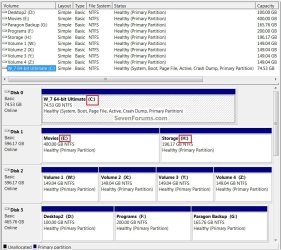
What is the meaning of driver letter... Which driver letter???
 

My Computer My Computer

Computer Manufacturer/Model Number
Pakard Bell/Easynot Nj65
OS
Window 7 Home Premium 64bit
Memory
2GB RAM
Monitor(s) Displays
14''
Hard Drives
250GB

My Computer My Computer

Computer Manufacturer/Model Number
* BFK Customs *
OS
W 7 64-bit Ultimate
CPU
Intel Q9550 Yorkfield
Motherboard
ASUS P5Q Pro
Memory
8GB Dominator 8500C5D
Graphics Card(s)
ATI : XFX 5870
Sound Card
Realtek HD Audio 7-1
Monitor(s) Displays
1x 47" LCD HDMI & 3x 26" LCD HDMI
Screen Resolution
1920x1080P & 1920x1200
Hard Drives
1x 80GB Intel X25-M G2 SSD : 1x 500GB & 1x 640GB WD Caviar Black(s)
PSU
Corsair 620HX
Case
Cooler Master RC-690
Cooling
Tuniq Tower 120, 2x 140mm and 3x 120mm case fans
Keyboard
Microsoft 500
Mouse
Razer Diamondback 3G
Internet Speed
14 Mb/s
Other Info
1x Koutech 3Gb/s SATA HDD Hot Swap Rack
Back
Top