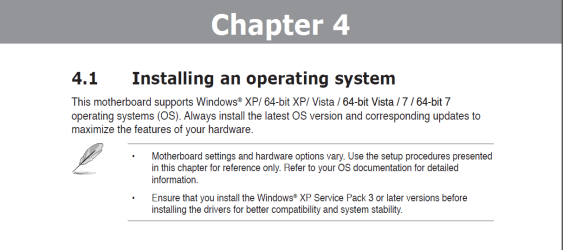
I just completed my Sandy Bridge build using the ASUS P8P67 Deluxe MOBO. I installed XP SP3 first on HD #1, and then Win7 on HD #2. The Win7 bootloader defaulted to Win7 64-bit and 30 seconds after powering up would boot into the system. I could then boot into XP from the bootloader without any problems. After a few weeks, the bootloader, after the 30 seconds, would no longer load Win7 by default, it would go to a black screen with no cursor. After a hard reboot, the bootloader would come up again and I could manually select which OS to boot into, and everything was fine; both into XP and Win7.
The other hiccups were the double POSTing, which I fixed with BIOS tweaks that I read about in other forums. And whenever I had to do a hard reboot, before I got to the bootloader, I would get an error message (just below the American Megatrends logo) which said that my overclocking failed and that I had to go into BIOS to correct it.
Today while I was downloading and installing Win7 updates, my internet connection dropped and half the updates failed to install, and it gave me a restart prompt, which I did. Now I can no longer boot into Win7. It tries to boot but it says that it tried to but failed to repair some Windows files. When I try using the recovery disk I
created, that brings me to a screen with options that include using a restore point and restoring a backup image. I don't have a restore point, and though I have a backup image, I want that to be my last resort. XP loads fine. The image I have was created using Paragon. Would Windows be able to restore that backup image?
Is there any way to fix my Win7 boot up problem without restoring the backup image? Would the Win7 OS DVD have the necessary files to correct this? Any help would be greatly appreciated!
The other hiccups were the double POSTing, which I fixed with BIOS tweaks that I read about in other forums. And whenever I had to do a hard reboot, before I got to the bootloader, I would get an error message (just below the American Megatrends logo) which said that my overclocking failed and that I had to go into BIOS to correct it.
Today while I was downloading and installing Win7 updates, my internet connection dropped and half the updates failed to install, and it gave me a restart prompt, which I did. Now I can no longer boot into Win7. It tries to boot but it says that it tried to but failed to repair some Windows files. When I try using the recovery disk I
created, that brings me to a screen with options that include using a restore point and restoring a backup image. I don't have a restore point, and though I have a backup image, I want that to be my last resort. XP loads fine. The image I have was created using Paragon. Would Windows be able to restore that backup image?
Is there any way to fix my Win7 boot up problem without restoring the backup image? Would the Win7 OS DVD have the necessary files to correct this? Any help would be greatly appreciated!
My Computer
At a glance
Windows 7 64-bit and Windows XP SP3Core i5-2500K Sandy Bridge 3.3GHz (Overclocke...Corsair Vengeance 8GB (2 x 4GB) DDR3 SDRAM DD...ATI Radeon 5870 1GB 256-bit DDR5 PCI Express ...
- Computer Manufacturer/Model Number
- Home Built
- OS
- Windows 7 64-bit and Windows XP SP3
- CPU
- Core i5-2500K Sandy Bridge 3.3GHz (Overclocked to 4.0GHz)
- Motherboard
- Asus P8P67 Deluxe Intel P67 ATX, Socket H2 (LGA 1155)
- Memory
- Corsair Vengeance 8GB (2 x 4GB) DDR3 SDRAM DDR3 1866
- Graphics Card(s)
- ATI Radeon 5870 1GB 256-bit DDR5 PCI Express 2.1 x 16
- Sound Card
- Creative Labs PCI Express Soundblaster X-Fi Titanium
- Monitor(s) Displays
- Gateway 21"
- Screen Resolution
- 1680 x 1050
- Hard Drives
- (2) 1TB Western Digital Caviar Black 7200 RPM SATA III
- PSU
- Corsair 650W HX Series 80 Plus Bronze Certified Modular PSU
- Case
- Black NZXT M59 Classic Series ATX Mid Tower
- Cooling
- Noctua NH-U12P SE2 w/ 4 Cooler Master 120mm Blue LED Fans
- Keyboard
- Logitech G15 Gaming Keyboard
- Mouse
- Kensington 4-Button USB Expert Pro Trackball
- Other Info
- ASUS DRW-24 Black SATA 24X DVD Burner