Dual Booting

blondie357

New member
Local time
5:29 AM
Messages
9
I am working on my father's pc. He currently has windows 7 pro 64-bit. He loves games..all kinds of them and of course has the issue of getting the old ones to work on windows 7. Some of them work in virtual XP..some of them dont. I want to eliminate that problem altogether and just install a dual boot with XP. My problem is with the partitions. He currently has System, OS and Recovery. I tried shrinking the C and adding a new partition for the XP but of course it wont let me create a 4th primary. (and rather then telling me reasons I shouldn't, etc...) can someone please tell me the workaround for this? I simply want a dual boot of windows XP and 7.

Thanks :)
 

My Computer

Computer type
PC/Desktop
Computer Manufacturer/Model Number
HP
OS
Windows 7 Pro 64-bit
Make the other partitions (except the active partition) logical partitions. Only the active partition has to be a primary. It is a bad habit of the manufacturers to make all partitions primaries. There is absolutely no need for that.
 

My Computer

Computer Manufacturer/Model Number
HP, Dell, Gateway, Toshiba - 4 laptops and 2 desktops
OS
Vista, Windows7, Mint Mate, Zorin, Windows 8
CPU
from 1.6GHz Duo to i7
Monitor(s) Displays
2x HP w2207
Hard Drives
5x HDD, 7x SSD, 12x Externals
Keyboard
with trackball - no mices
Mouse
Trackball mice
Internet Speed
DSL 6000
Windows will not let you create a 4th Primary partition, it never will.

Just use Partition Wizard to create your 4th Primary partition.

Best Free Partition Manager for Windows | MiniTool Partition Free

Once you install XP, Windows 7 will not boot anymore, make sure you have your install disc handy or create a system repair disc now, you`ll have to run startup repair to get windows 7 booting again.

The proper way is to install XP 1st then 7.

This will also come in handy.

EasyBCD - NeoSmart Technologies
 

My Computer

Computer type
PC/Desktop
Computer Manufacturer/Model Number
Skylake Special #666
OS
Windows 10 Pro x64
CPU
Intel Core i7 6700K
Motherboard
Asus Sabertooth Z170 Mark 1
Memory
GSkill TridentZ RGB 16GB 3600 16-16-16-36
Graphics Card(s)
EVGA GTX 980 Ti SC x2
Sound Card
Realtek High Definition
Monitor(s) Displays
AOC G2460PG
Screen Resolution
1920 x 1080 144Hz
Hard Drives
Samsung 860 Pro 256GB, Seagate Barracuda 4TB x2
PSU
EVGA 1000 P2, EVGA White Custom Braided Cables
Case
Corsair Vengeance C70 Gunmetal Black
Cooling
Corsair H100i v2, Corsair ML120 x2, Thermal Grizzly Kryonaut
Keyboard
Logitech G910 Orion Spectrum
Mouse
Logitech G700s
Internet Speed
Verizon Fios Quantum Gateway 75/75
Antivirus
Windows Defender, Malwarebytes Free 3.8.3
Browser
Chrome
Other Info
Corsair SP120 x4, LG Blu-ray Drive, Durabrand HT-395 100 Watt Dolby Digital Amp, Corsair H2100 Wireless 7.1 Headset
Windows will not let you create a 4th Primary partition, it never will.
I think this is not quite correct. You can have 4 primary partitions in MBR and 250 or so in GPT. But a 5th primary in MBR will change all partitions to dynamics.
 

My Computer

Computer Manufacturer/Model Number
HP, Dell, Gateway, Toshiba - 4 laptops and 2 desktops
OS
Vista, Windows7, Mint Mate, Zorin, Windows 8
CPU
from 1.6GHz Duo to i7
Monitor(s) Displays
2x HP w2207
Hard Drives
5x HDD, 7x SSD, 12x Externals
Keyboard
with trackball - no mices
Mouse
Trackball mice
Internet Speed
DSL 6000
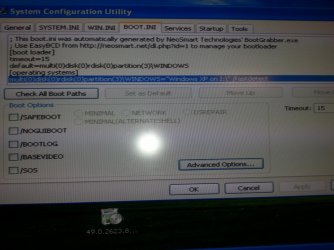
OK so I used that program to make the area I shrunk a primary partition. I then rebooted and installed XP onto it. That part went fine. I used EasyBCD to add windows 7 to the boot list. When I tried rebooting and choosing windows 7, it starts to load the logo and then reboots. I am stuck in that loop. XP will boot up fine, 7 will not. If I go into XP and look in msconfig, this is what my boot.ini looks like.


Doesn't look right does it? Please help!
 

Attachments

  • 20160316_222436.jpg
    20160316_222436.jpg
    1,008.5 KB · Views: 1

My Computer

Computer type
PC/Desktop
Computer Manufacturer/Model Number
HP
OS
Windows 7 Pro 64-bit
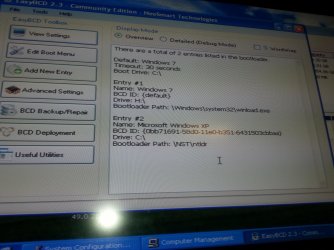
If I open EasyBCD in XP, this is what it shows. Now mind you, windows 7 was on the C drive as it was the only operating system of course. Now XP is C: and 7 is on H:
 

Attachments

  • 20160316_223233.jpg
    20160316_223233.jpg
    775.8 KB · Views: 1

My Computer

Computer type
PC/Desktop
Computer Manufacturer/Model Number
HP
OS
Windows 7 Pro 64-bit
What do you see when you click on "Add new entry"
 

My Computer

Computer Manufacturer/Model Number
HP, Dell, Gateway, Toshiba - 4 laptops and 2 desktops
OS
Vista, Windows7, Mint Mate, Zorin, Windows 8
CPU
from 1.6GHz Duo to i7
Monitor(s) Displays
2x HP w2207
Hard Drives
5x HDD, 7x SSD, 12x Externals
Keyboard
with trackball - no mices
Mouse
Trackball mice
Internet Speed
DSL 6000
Oh man I have this all screwed up. I tried removing the entries and starting over but this is so confusing. Is it possible at this point to just delete my XP installation and go back to just windows 7?
 

My Computer

Computer type
PC/Desktop
Computer Manufacturer/Model Number
HP
OS
Windows 7 Pro 64-bit

My Computer

Computer Manufacturer/Model Number
HP, Dell, Gateway, Toshiba - 4 laptops and 2 desktops
OS
Vista, Windows7, Mint Mate, Zorin, Windows 8
CPU
from 1.6GHz Duo to i7
Monitor(s) Displays
2x HP w2207
Hard Drives
5x HDD, 7x SSD, 12x Externals
Keyboard
with trackball - no mices
Mouse
Trackball mice
Internet Speed
DSL 6000
So of course upon rebooting it cant find a valid OS listed so I stuck in a windows 7 disk.. trying to let it do repairs but so far afterwards it keeps going back to that boot loop.
 

My Computer

Computer type
PC/Desktop
Computer Manufacturer/Model Number
HP
OS
Windows 7 Pro 64-bit
Try to "Add new entry" with EasyBCD.
 

My Computer

Computer Manufacturer/Model Number
HP, Dell, Gateway, Toshiba - 4 laptops and 2 desktops
OS
Vista, Windows7, Mint Mate, Zorin, Windows 8
CPU
from 1.6GHz Duo to i7
Monitor(s) Displays
2x HP w2207
Hard Drives
5x HDD, 7x SSD, 12x Externals
Keyboard
with trackball - no mices
Mouse
Trackball mice
Internet Speed
DSL 6000
I cant get to it.. i am unable to boot to any operating system now.
 

My Computer

Computer type
PC/Desktop
Computer Manufacturer/Model Number
HP
OS
Windows 7 Pro 64-bit
Use Windows 7 install dvd to repair boot . When you launch w7 dvd , then search for w7 installed Os in hdd , then repair booting process.

When w7 boot again , use easyBcd to repair/fix Windows Xp entry.

Usually installling Xp after W7 can messed up bootloader.
 

My Computer

Computer type
PC/Desktop
Computer Manufacturer/Model Number
Dell Optiplex 760
OS
Windows7 Pro
CPU
Intel Core Duo
Motherboard
Dell
Memory
4 Gb
Graphics Card(s)
ATI Radeon Hd 6450
Hard Drives
250 Gb Sata
Antivirus
Avast ! Free
Browser
Firefox 25.0
Thanks..I have tried several times now, its not repairing it. Going to try a restore next.
 

My Computer

Computer type
PC/Desktop
Computer Manufacturer/Model Number
HP
OS
Windows 7 Pro 64-bit
Windows will not let you create a 4th Primary partition, it never will.
I think this is not quite correct. You can have 4 primary partitions in MBR and 250 or so in GPT. But a 5th primary in MBR will change all partitions to dynamics.

Wolfgang, I never said you can`t have 4 Primary partitions, I said.....

Windows will not let you make 4 primary partitions, you have to use a 3rd party program.
 

My Computer

Computer type
PC/Desktop
Computer Manufacturer/Model Number
Skylake Special #666
OS
Windows 10 Pro x64
CPU
Intel Core i7 6700K
Motherboard
Asus Sabertooth Z170 Mark 1
Memory
GSkill TridentZ RGB 16GB 3600 16-16-16-36
Graphics Card(s)
EVGA GTX 980 Ti SC x2
Sound Card
Realtek High Definition
Monitor(s) Displays
AOC G2460PG
Screen Resolution
1920 x 1080 144Hz
Hard Drives
Samsung 860 Pro 256GB, Seagate Barracuda 4TB x2
PSU
EVGA 1000 P2, EVGA White Custom Braided Cables
Case
Corsair Vengeance C70 Gunmetal Black
Cooling
Corsair H100i v2, Corsair ML120 x2, Thermal Grizzly Kryonaut
Keyboard
Logitech G910 Orion Spectrum
Mouse
Logitech G700s
Internet Speed
Verizon Fios Quantum Gateway 75/75
Antivirus
Windows Defender, Malwarebytes Free 3.8.3
Browser
Chrome
Other Info
Corsair SP120 x4, LG Blu-ray Drive, Durabrand HT-395 100 Watt Dolby Digital Amp, Corsair H2100 Wireless 7.1 Headset
OK so I used that program to make the area I shrunk a primary partition. I then rebooted and installed XP onto it. That part went fine. I used EasyBCD to add windows 7 to the boot list. When I tried rebooting and choosing windows 7, it starts to load the logo and then reboots. I am stuck in that loop. XP will boot up fine, 7 will not. If I go into XP and look in msconfig, this is what my boot.ini looks like.


Doesn't look right does it? Please help!

Did I not tell you that would happen ?

And I told you how to repair it.
 

My Computer

Computer type
PC/Desktop
Computer Manufacturer/Model Number
Skylake Special #666
OS
Windows 10 Pro x64
CPU
Intel Core i7 6700K
Motherboard
Asus Sabertooth Z170 Mark 1
Memory
GSkill TridentZ RGB 16GB 3600 16-16-16-36
Graphics Card(s)
EVGA GTX 980 Ti SC x2
Sound Card
Realtek High Definition
Monitor(s) Displays
AOC G2460PG
Screen Resolution
1920 x 1080 144Hz
Hard Drives
Samsung 860 Pro 256GB, Seagate Barracuda 4TB x2
PSU
EVGA 1000 P2, EVGA White Custom Braided Cables
Case
Corsair Vengeance C70 Gunmetal Black
Cooling
Corsair H100i v2, Corsair ML120 x2, Thermal Grizzly Kryonaut
Keyboard
Logitech G910 Orion Spectrum
Mouse
Logitech G700s
Internet Speed
Verizon Fios Quantum Gateway 75/75
Antivirus
Windows Defender, Malwarebytes Free 3.8.3
Browser
Chrome
Other Info
Corsair SP120 x4, LG Blu-ray Drive, Durabrand HT-395 100 Watt Dolby Digital Amp, Corsair H2100 Wireless 7.1 Headset
Use Windows 7 install dvd to repair boot . When you launch w7 dvd , then search for w7 installed Os in hdd , then repair booting process.

When w7 boot again , use easyBcd to repair/fix Windows Xp entry.

Usually installling Xp after W7 can messed up bootloader.

I said all this in reply #3
 

My Computer

Computer type
PC/Desktop
Computer Manufacturer/Model Number
Skylake Special #666
OS
Windows 10 Pro x64
CPU
Intel Core i7 6700K
Motherboard
Asus Sabertooth Z170 Mark 1
Memory
GSkill TridentZ RGB 16GB 3600 16-16-16-36
Graphics Card(s)
EVGA GTX 980 Ti SC x2
Sound Card
Realtek High Definition
Monitor(s) Displays
AOC G2460PG
Screen Resolution
1920 x 1080 144Hz
Hard Drives
Samsung 860 Pro 256GB, Seagate Barracuda 4TB x2
PSU
EVGA 1000 P2, EVGA White Custom Braided Cables
Case
Corsair Vengeance C70 Gunmetal Black
Cooling
Corsair H100i v2, Corsair ML120 x2, Thermal Grizzly Kryonaut
Keyboard
Logitech G910 Orion Spectrum
Mouse
Logitech G700s
Internet Speed
Verizon Fios Quantum Gateway 75/75
Antivirus
Windows Defender, Malwarebytes Free 3.8.3
Browser
Chrome
Other Info
Corsair SP120 x4, LG Blu-ray Drive, Durabrand HT-395 100 Watt Dolby Digital Amp, Corsair H2100 Wireless 7.1 Headset
Windows will not let you create a 4th Primary partition, it never will.
I think this is not quite correct. You can have 4 primary partitions in MBR and 250 or so in GPT. But a 5th primary in MBR will change all partitions to dynamics.

Wolfgang, I never said you can`t have 4 Primary partitions, I said.....

Windows will not let you make 4 primary partitions, you have to use a 3rd party program.
Sure you can make 4 primaries with disk management. Try it. You only get into trouble when you attempt to make the 5th primary - then you fall into the dynamics.
 

My Computer

Computer Manufacturer/Model Number
HP, Dell, Gateway, Toshiba - 4 laptops and 2 desktops
OS
Vista, Windows7, Mint Mate, Zorin, Windows 8
CPU
from 1.6GHz Duo to i7
Monitor(s) Displays
2x HP w2207
Hard Drives
5x HDD, 7x SSD, 12x Externals
Keyboard
with trackball - no mices
Mouse
Trackball mice
Internet Speed
DSL 6000
So then, prey tel, why couldn`t he make a 4th primary partition with windows ???

Everything I`ve ever read says windows DM can only make 3 Primaries and the 4th will always be an extended partition.

Only 3 Primary Partitions, Disk Management windows 7 and 8

windows 7 - Only three primary partitions? - Super User

Windows 7 won't allow four primary partitions??? - AnandTech Forums

But if you say you`ve done it, I`m not gonna argue with you, no way :)

As you well know I would never use DM to manipulate partitions anyway :)
 

My Computer

Computer type
PC/Desktop
Computer Manufacturer/Model Number
Skylake Special #666
OS
Windows 10 Pro x64
CPU
Intel Core i7 6700K
Motherboard
Asus Sabertooth Z170 Mark 1
Memory
GSkill TridentZ RGB 16GB 3600 16-16-16-36
Graphics Card(s)
EVGA GTX 980 Ti SC x2
Sound Card
Realtek High Definition
Monitor(s) Displays
AOC G2460PG
Screen Resolution
1920 x 1080 144Hz
Hard Drives
Samsung 860 Pro 256GB, Seagate Barracuda 4TB x2
PSU
EVGA 1000 P2, EVGA White Custom Braided Cables
Case
Corsair Vengeance C70 Gunmetal Black
Cooling
Corsair H100i v2, Corsair ML120 x2, Thermal Grizzly Kryonaut
Keyboard
Logitech G910 Orion Spectrum
Mouse
Logitech G700s
Internet Speed
Verizon Fios Quantum Gateway 75/75
Antivirus
Windows Defender, Malwarebytes Free 3.8.3
Browser
Chrome
Other Info
Corsair SP120 x4, LG Blu-ray Drive, Durabrand HT-395 100 Watt Dolby Digital Amp, Corsair H2100 Wireless 7.1 Headset
Back
Top