Dual Hard Drives

TockTock

New member
Local time
2:57 AM
Messages
21
I have an HP laptop with dual 500GB hard drives. The C:/ disk is almost full. Will it automatically write to the other disk if there's no room left on C:? Or do I have to plug in some command during bootup to make this happen? Thanks.
 

My Computer

Computer Manufacturer/Model Number
HP Pavillion dv7t-3000 Notebook
OS
Windows 7 Professional 64-bit
CPU
Intel Core i7 Q720 @ 1.60 GHz
Memory
8 GB DDR3
Graphics Card(s)
Nvidia Geforce
Monitor(s) Displays
HP 2159m HD
Screen Resolution
1920 x 1080
Hard Drives
1 TB 7200 RPM (2 x 500GB)
Keyboard
Logitech Illuminated Keyboard
Mouse
Logitech
While waiting for the screenshot requested by Theog, I'm going to hazard a guess that you actually don't have 2 hard drives but instead have a single hard drive divided up into partitions that appear as different drive letters. To answer your question, no, the system will not automatically start writing to the other drive when the C: drive is full.

One we see the screenshot of your Disk Management, we can advise you as to the best way to deal with the lack of space on the C: drive.
 

My Computer

Computer type
PC/Desktop
Computer Manufacturer/Model Number
Home Built desktop, Dell G15 5511 Gaming laptop,MS Surface Pro 7 tablet
OS
W10 Pro desktop, W11 laptop, W11 Pro tablet (all 64-bit)
CPU
3.7Ghz 8700K i7, i7-11800H, i7-1065G7
Motherboard
ASUS TUF Z370-Pro Gaming in desktop
Memory
16G desktop, 16G laptop, 4G tablet
Graphics Card(s)
AMD Radeon RX580, RTX 3060, Intel Iris Plus
Sound Card
High Definition Audio (Built-in to mobo)
Monitor(s) Displays
Samsung U32J59 32" (2x), 15.6", 12"
Screen Resolution
3840x2160, 3840x2160, 1920x1080, 2160x1440
Hard Drives
500G SSD for OS; 2T, 10T & 15T HDDs for Data on Desktop, 1TB SSD laptop, 128G SSD tablet.
PSU
Corsair CX 750M
Case
Antec 100
Cooling
CM 212+
Keyboard
IBM Model M - used continuously since 1986
Mouse
Microsoft Pro IntelliMouse
Internet Speed
400M down 8M up
Antivirus
Windows Defender
Browser
FireFox
Other Info
Built my first computer (8Mhz 8088cpu, 640K RAM, 20MB HDD, 2 360K floppy drives) in 1985 and have been building them for myself, relatives and friends ever since.
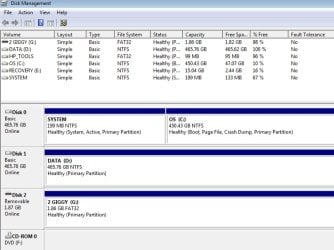
Here you go...
diskmgt.jpg
 

My Computer

Computer Manufacturer/Model Number
HP Pavillion dv7t-3000 Notebook
OS
Windows 7 Professional 64-bit
CPU
Intel Core i7 Q720 @ 1.60 GHz
Memory
8 GB DDR3
Graphics Card(s)
Nvidia Geforce
Monitor(s) Displays
HP 2159m HD
Screen Resolution
1920 x 1080
Hard Drives
1 TB 7200 RPM (2 x 500GB)
Keyboard
Logitech Illuminated Keyboard
Mouse
Logitech
Hush my mouth! You actually do have 2 physical hard drives in your laptop! Not unheard of but not very common either.

My advice in this case would be to move all of your data that is currently stored on the C: drive to the D: drive (which is appropriately labeled "Data". Keep the C: drive for your OS and apps and save all of your data to the D: drive. That will also make it easier to do regular backups of your data.

Music, picture, Doc and spreadsheets are typical data files.
 

My Computer

Computer type
PC/Desktop
Computer Manufacturer/Model Number
Home Built desktop, Dell G15 5511 Gaming laptop,MS Surface Pro 7 tablet
OS
W10 Pro desktop, W11 laptop, W11 Pro tablet (all 64-bit)
CPU
3.7Ghz 8700K i7, i7-11800H, i7-1065G7
Motherboard
ASUS TUF Z370-Pro Gaming in desktop
Memory
16G desktop, 16G laptop, 4G tablet
Graphics Card(s)
AMD Radeon RX580, RTX 3060, Intel Iris Plus
Sound Card
High Definition Audio (Built-in to mobo)
Monitor(s) Displays
Samsung U32J59 32" (2x), 15.6", 12"
Screen Resolution
3840x2160, 3840x2160, 1920x1080, 2160x1440
Hard Drives
500G SSD for OS; 2T, 10T & 15T HDDs for Data on Desktop, 1TB SSD laptop, 128G SSD tablet.
PSU
Corsair CX 750M
Case
Antec 100
Cooling
CM 212+
Keyboard
IBM Model M - used continuously since 1986
Mouse
Microsoft Pro IntelliMouse
Internet Speed
400M down 8M up
Antivirus
Windows Defender
Browser
FireFox
Other Info
Built my first computer (8Mhz 8088cpu, 640K RAM, 20MB HDD, 2 360K floppy drives) in 1985 and have been building them for myself, relatives and friends ever since.
I agree with Strollin, Move all user files to the second hard drive, thus freein up space on the C drive. When C is full it will not start using the second Hard Drive

Move user files
 

My Computers

System One System Two

  • Computer type
    PC/Desktop
    Computer Manufacturer/Model Number
    ALWAYS UNDER CONSTRUCTION
    OS
    Windows 11 Pro
    CPU
    Ryzen 9 5900X
    Motherboard
    Asus X570 Crosshair Viii Hero
    Memory
    32GB G Skill DDR4-3600
    Graphics Card(s)
    EVGA RTX 3080 FTW 3 Ultra
    Sound Card
    On Board/Sennheiser PC37X Headset
    Monitor(s) Displays
    3 X Asus 27"
    Screen Resolution
    2560x1440
    Hard Drives
    2 X 1 TB NVME drives
    PSU
    EVGA 850
    Case
    Phanteks Eclipse P400A
    Cooling
    EVGA 280 AIO
    Keyboard
    Logitech G510s/ Logitech G13
    Mouse
    Logitech G502
    Internet Speed
    24/1
    Antivirus
    ESET/MBAM Pro/SAS Pro
    Browser
    Chrome/ Firefox/ Edge
  • Computer type
    Laptop
    System Manufacturer/Model Number
    Dell 16 Plus
    OS
    Windows 11 Pro
    CPU
    Intel Ultra 9 288V
    Memory
    32 GB LPDDR5X 8533
    Monitor(s) Displays
    16" Mini-LED HDR600 Touch 90 Hz
    Screen Resolution
    2560X1600
    Hard Drives
    1 TB NVME
Back
Top