Solved Dual Monitor Boundary Issue

ChrisR24

New member
Local time
10:27 AM
Messages
4
Hi everybody,

First off, this is my first post around here, so hello, my name's Chris, I live in Ontario and I use a computer.

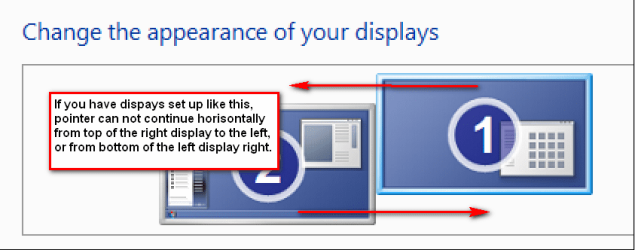
Anyways, a few weeks about I spent around $2100 building a new computer, and everything has been going smoothly. One of the more expensive components of this new computer was the video card, the EVGA GeForce GTX 570. Up until today, I've had no issues with it. However, today I went out and bought a second monitor, knowing that my video card would be capable of handling it. While the dual monitor function works almost flawlessly, there seems to be some sort of boundary issue. For example, when I move my mouse from the bottom left corner of the right monitor over to the left monitor, the mouse ends up about 3 1/2" from the bottom of the left screen. Similarly, when I move the mouse from the top right of the left monitor to the right monitor, the mouse appears around 3 1/2" from the top of the right screen. When I try to reverse these scenarios (e.g move the mouse from the top left of the right monitor to the left monitor) it stops at the left side of the right monitor as though the left monitor wasn't connected.

So, hoping that you've managed to navigate through my labyrinth of 'right's and 'left's, I was wondering if any of you Windows 7 Professionals might be able to lend me a hand in perfecting my dual monitor setup.
Thanks for reading,
Chris
 

My Computer My Computer

At a glance

Microsoft Windows 7 Home Premium 64-bit 7601 ...Intel(R) Core(TM) i7-2600K CPU @ 3.40GHz8.00 GB(1) NVIDIA GeForce GTX 570 (2) Intel(R) HD Gr...
OS
Microsoft Windows 7 Home Premium 64-bit 7601 Multiprocessor Free Service Pack 1
CPU
Intel(R) Core(TM) i7-2600K CPU @ 3.40GHz
Motherboard
ASUSTeK Computer INC. P8Z68-V PRO
Memory
8.00 GB
Graphics Card(s)
(1) NVIDIA GeForce GTX 570 (2) Intel(R) HD Graphics Family
Sound Card
(1) NVIDIA High Definition Audio (2) Bluetooth Audio Devic
PSU
Corsair TX850 V2 850W ATX 12V
Case
Cooler Master Haf 932 Advanced Full Tower EATX Case
Hi Chris - welcome to SevenForums.

First off, can we start by collecting some information about your system? Please use this tutorial and the tool therein to collect information about your hardware:

http://www.sevenforums.com/tutorials/180324-system-info-see-your-system-specs.html

If you click on the grey link titled "My System Specs" on the bottom left-hand corner of my reply here, you will see the sort of information that is collected.

Once we have that, it will make it easier to help solve this issue.

Regards,
Golden
 
Last edited:

My Computer My Computer

At a glance

Windows 10 Pro x64 ; Xubuntu x64Intel i7 860 @ 2.80 GHz O/C'ed to 4.0GHz16GB Corsair Vengance DDR3 @ 661 MHz Dual Cha...EVGA NVidia GTX 560 1024MB
Computer type
PC/Desktop
Computer Manufacturer/Model Number
Golden Mk. I.4
OS
Windows 10 Pro x64 ; Xubuntu x64
CPU
Intel i7 860 @ 2.80 GHz O/C'ed to 4.0GHz
Motherboard
Gigabyte P55A-UD3R Rev.1. Award BIOS F13
Memory
16GB Corsair Vengance DDR3 @ 661 MHz Dual Channel (9-9-9-24)
Graphics Card(s)
EVGA NVidia GTX 560 1024MB
Sound Card
Realtek Integrated
Monitor(s) Displays
Dual Samsung SyncMaster 2494HS
Screen Resolution
1920*1080 and 1920*1080
Hard Drives
1*Samsung 840 EVO 120GB SSD;
1*OCZ Vertex 2 60GB SSD;
2*Samsung F3 SpinPoint 1TB in RAID0;
1*Samsung F1 SpinPoint 1TB;
2*Western Digital 1TB External USB 3.0
1*Western Digital 500GB External USB 3.0
1*Seagate 500GB External USB 2.0
PSU
Thermaltake ToughPower QFan 750W
Case
Thermaltake Element S VK60001W2Z
Cooling
Corsair H60 Water Cooling, 2*230mm and 2*80mm case fans
Keyboard
Logitech G110
Mouse
Logitech MX518
Hi Chris - welcome to SevenForums.

First off, can we start by collecting some information about your system? Please use this tutorial and the tool therein to collect information about your hardware:

http://www.sevenforums.com/tutorials/180324-system-info-see-your-system-specs.html

If you click on the grey link titled "My System Specs" on the bottom left-hand corner of my reply here, you will see the sort of information that is collected.

Once we have that, it will make it easier to help solve this issue.

Regards,
Golden

Thanks for the almost immediate response, I didn't know these forums were so active. I updated all of my system specs on my profile, I'm not sure why I didn't post them in the first place.
 

My Computer My Computer

At a glance

Microsoft Windows 7 Home Premium 64-bit 7601 ...Intel(R) Core(TM) i7-2600K CPU @ 3.40GHz8.00 GB(1) NVIDIA GeForce GTX 570 (2) Intel(R) HD Gr...
OS
Microsoft Windows 7 Home Premium 64-bit 7601 Multiprocessor Free Service Pack 1
CPU
Intel(R) Core(TM) i7-2600K CPU @ 3.40GHz
Motherboard
ASUSTeK Computer INC. P8Z68-V PRO
Memory
8.00 GB
Graphics Card(s)
(1) NVIDIA GeForce GTX 570 (2) Intel(R) HD Graphics Family
Sound Card
(1) NVIDIA High Definition Audio (2) Bluetooth Audio Devic
PSU
Corsair TX850 V2 850W ATX 12V
Case
Cooler Master Haf 932 Advanced Full Tower EATX Case
Thanks Chris.

Can you tell us about the two monitors? Make, model and size?

Is your graphics card and monitors updated with the latest drivers? What resolution are you using?

Regards,
Golden
 

My Computer My Computer

At a glance

Windows 10 Pro x64 ; Xubuntu x64Intel i7 860 @ 2.80 GHz O/C'ed to 4.0GHz16GB Corsair Vengance DDR3 @ 661 MHz Dual Cha...EVGA NVidia GTX 560 1024MB
Computer type
PC/Desktop
Computer Manufacturer/Model Number
Golden Mk. I.4
OS
Windows 10 Pro x64 ; Xubuntu x64
CPU
Intel i7 860 @ 2.80 GHz O/C'ed to 4.0GHz
Motherboard
Gigabyte P55A-UD3R Rev.1. Award BIOS F13
Memory
16GB Corsair Vengance DDR3 @ 661 MHz Dual Channel (9-9-9-24)
Graphics Card(s)
EVGA NVidia GTX 560 1024MB
Sound Card
Realtek Integrated
Monitor(s) Displays
Dual Samsung SyncMaster 2494HS
Screen Resolution
1920*1080 and 1920*1080
Hard Drives
1*Samsung 840 EVO 120GB SSD;
1*OCZ Vertex 2 60GB SSD;
2*Samsung F3 SpinPoint 1TB in RAID0;
1*Samsung F1 SpinPoint 1TB;
2*Western Digital 1TB External USB 3.0
1*Western Digital 500GB External USB 3.0
1*Seagate 500GB External USB 2.0
PSU
Thermaltake ToughPower QFan 750W
Case
Thermaltake Element S VK60001W2Z
Cooling
Corsair H60 Water Cooling, 2*230mm and 2*80mm case fans
Keyboard
Logitech G110
Mouse
Logitech MX518
Well.
My first monitor is a 21.5" 1680x1050 TV connected by a VGA jack, and my second monitor is a 24" 1920x1080 Samsung SyncMaster B2430 connected by a DVI jack. I've tried setting the resolutions the same, that didn't work. I know very little about hardware, so the different jacks might be causing the issue, would I need some sort of splitter? Also, considering the graphics card was installed last week, I'm pretty sure it is up to date, but I'll check it out.
 

My Computer My Computer

At a glance

Microsoft Windows 7 Home Premium 64-bit 7601 ...Intel(R) Core(TM) i7-2600K CPU @ 3.40GHz8.00 GB(1) NVIDIA GeForce GTX 570 (2) Intel(R) HD Gr...
OS
Microsoft Windows 7 Home Premium 64-bit 7601 Multiprocessor Free Service Pack 1
CPU
Intel(R) Core(TM) i7-2600K CPU @ 3.40GHz
Motherboard
ASUSTeK Computer INC. P8Z68-V PRO
Memory
8.00 GB
Graphics Card(s)
(1) NVIDIA GeForce GTX 570 (2) Intel(R) HD Graphics Family
Sound Card
(1) NVIDIA High Definition Audio (2) Bluetooth Audio Devic
PSU
Corsair TX850 V2 850W ATX 12V
Case
Cooler Master Haf 932 Advanced Full Tower EATX Case
Mmm. OK, I'm almost sure its not the connections/jacks. I suspect its the TV, but can't quite be sure. I'll see if one of the graphics experts can help you out here.

In the meantime, ensure you have the latest driver for your card.

Regards,
Golden
 

My Computer My Computer

At a glance

Windows 10 Pro x64 ; Xubuntu x64Intel i7 860 @ 2.80 GHz O/C'ed to 4.0GHz16GB Corsair Vengance DDR3 @ 661 MHz Dual Cha...EVGA NVidia GTX 560 1024MB
Computer type
PC/Desktop
Computer Manufacturer/Model Number
Golden Mk. I.4
OS
Windows 10 Pro x64 ; Xubuntu x64
CPU
Intel i7 860 @ 2.80 GHz O/C'ed to 4.0GHz
Motherboard
Gigabyte P55A-UD3R Rev.1. Award BIOS F13
Memory
16GB Corsair Vengance DDR3 @ 661 MHz Dual Channel (9-9-9-24)
Graphics Card(s)
EVGA NVidia GTX 560 1024MB
Sound Card
Realtek Integrated
Monitor(s) Displays
Dual Samsung SyncMaster 2494HS
Screen Resolution
1920*1080 and 1920*1080
Hard Drives
1*Samsung 840 EVO 120GB SSD;
1*OCZ Vertex 2 60GB SSD;
2*Samsung F3 SpinPoint 1TB in RAID0;
1*Samsung F1 SpinPoint 1TB;
2*Western Digital 1TB External USB 3.0
1*Western Digital 500GB External USB 3.0
1*Seagate 500GB External USB 2.0
PSU
Thermaltake ToughPower QFan 750W
Case
Thermaltake Element S VK60001W2Z
Cooling
Corsair H60 Water Cooling, 2*230mm and 2*80mm case fans
Keyboard
Logitech G110
Mouse
Logitech MX518
Hi Chris, welcome to the Seven Forums.

It seems you do not have an issue, for what you describe is only natural behavior of multi display setup when used displays have different resolutions. Here's what I mean:

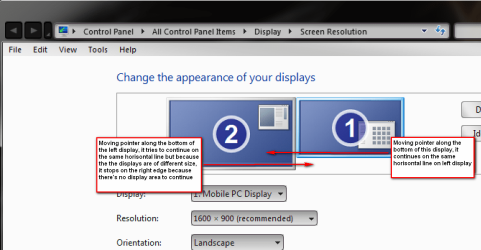
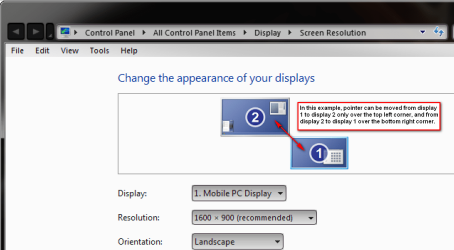
You can drag and drop your displays on Screen Resolution tool as you wish. This tool shows you how they are in reference to each other. Screenshots below should tell you how it works.

First, two displays lined so that the top of both are on the same horisontal line:

Dual_1.png

Then a bit more unusual setup, displays "touching" each other only from one corner:

Dual_2.png

This can also happen when displays are using the same resolution, if they are not properly lined on Screen Resolution tool:

Dual_3.png

That's it. Completely natural behavior.

Kari
 
Last edited:

My Computer My Computer

At a glance

Windows 10 Pro x64 EN-GB1.6 GHz Intel Core i7-720QM Processor6 GBATI Mobility Radeon HD 5850 Graphics
Computer type
Laptop
Computer Manufacturer/Model Number
HP ENVY 17-1150eg
OS
Windows 10 Pro x64 EN-GB
CPU
1.6 GHz Intel Core i7-720QM Processor
Memory
6 GB
Graphics Card(s)
ATI Mobility Radeon HD 5850 Graphics
Sound Card
Beats sound system with integrated subwoofer
Monitor(s) Displays
17" laptop display, 22" LED and 32" Full HD TV through HDMI
Screen Resolution
1600*900 (1), 1920*1080 (2&3)
Hard Drives
Internal: 2 x 500 GB SATA Hard Disk Drive 7200 rpm
External: 2TB for backups, 3TB USB3 network drive for media
Cooling
As Envy runs a bit warm, I have it on a Cooler Master pad
Keyboard
Logitech diNovo Media Desktop Laser (bluetooth)
Mouse
Logitech Performance Mouse MX
Internet Speed
50/10 Mbps VDSL
Antivirus
Windows Defender 4.3.9431.0
Browser
Maxthon 3.5.2., IE11
I'm a bit surprised at a VGA connection on a GTX570??? As far as I know (+ I have a GTX570 myself) these only come in 1HDMI + 2x DVI? If, as Kari correctly showed, res and positioning is set equal then there should not be a problem other than that the cursor will allays seem to jump going from a smaller to a larger screen...
 

My Computer My Computer

At a glance

Windows 7 64b UltimateI7-2600 3.40GHz - testing various OC levels..2x 4Gb DDR3/1333GTX570 - testing OC levels
Computer Manufacturer/Model Number
custom build
OS
Windows 7 64b Ultimate
CPU
I7-2600 3.40GHz - testing various OC levels..
Motherboard
ASUS Sabretooth
Memory
2x 4Gb DDR3/1333
Graphics Card(s)
GTX570 - testing OC levels
Sound Card
motherboard 7.1 DIG.
Monitor(s) Displays
2x Ilyama 24" E2409HDS-B1 2ms/DVI
Screen Resolution
1920 x 1080
Hard Drives
120 GB Intel Elmcrest SSD
1 TB SATAII 7200RPM/32MB
External 2TB USB3
PSU
Corsair Pro HX850W
Cooling
Coolermaster Hyper V8
Keyboard
Logitech G110
Mouse
Logitech G700
Internet Speed
25Mb
Other Info
CPU: 7,7 RAM: 7,7 GTX: 7,9 GTX 3D : 7,9 SSD 7,6
Overall 7,6 ...... now to speed up the SSD... ;)

Also use a Dell XPS M1710 on Vista 32b
Asus LT on Vista 32
3 older machines still doing fine on Linux/ubuntu but not used much anymore...
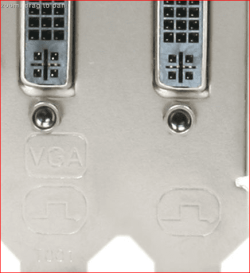
I'm a bit surprised at a VGA connection on a GTX570??? As far as I know (+ I have a GTX570 myself) these only come in 1HDMI + 2x DVI?

That's why they all come with one DVI-VGA adapter, one (and only one) of the DVI ports on those cards can do VGA via adapter. The fun part sometimes is figuring out which is the dual port and which is DVI only, usually trial and error as most of the card manufacturers don't say in the manual or mark it on the backplate of the card,

backplate.PNG
 

My Computer My Computer

At a glance

Win 7 Ultimate x64FX-8350 @ 4.6 GHz so farADATA XPG V1 Series Black 8GB DDR3 1600Sapphire R9 270x Dual-X
Computer type
PC/Desktop
Computer Manufacturer/Model Number
Me
OS
Win 7 Ultimate x64
CPU
FX-8350 @ 4.6 GHz so far
Motherboard
Asus M5A97 EVO
Memory
ADATA XPG V1 Series Black 8GB DDR3 1600
Graphics Card(s)
Sapphire R9 270x Dual-X
Sound Card
Xonar DGX w/ Corsair Vengence 1300
Monitor(s) Displays
Acer S232HL Abid
Screen Resolution
1920x1080
Hard Drives
120 GB OCZ Vertex 3
500 GB Seagate 7200.12
PSU
Antec Earthwatts 650W Green
Case
Antec Three Hundred
Cooling
Cooler Master 212 EVO
Keyboard
Logitech G510
Mouse
Logitech G500s
Internet Speed
35000/3000
Wow, you guys know your stuff. Thanks to those who helped out, I didn't know you could fine-tune the relationship between monitors like that, it's working perfectly now. I'm using a VGA simply because I had a spare VGA cable, and I guess I just got lucky with the port. Thanks for helping me out.
 

My Computer My Computer

At a glance

Microsoft Windows 7 Home Premium 64-bit 7601 ...Intel(R) Core(TM) i7-2600K CPU @ 3.40GHz8.00 GB(1) NVIDIA GeForce GTX 570 (2) Intel(R) HD Gr...
OS
Microsoft Windows 7 Home Premium 64-bit 7601 Multiprocessor Free Service Pack 1
CPU
Intel(R) Core(TM) i7-2600K CPU @ 3.40GHz
Motherboard
ASUSTeK Computer INC. P8Z68-V PRO
Memory
8.00 GB
Graphics Card(s)
(1) NVIDIA GeForce GTX 570 (2) Intel(R) HD Graphics Family
Sound Card
(1) NVIDIA High Definition Audio (2) Bluetooth Audio Devic
PSU
Corsair TX850 V2 850W ATX 12V
Case
Cooler Master Haf 932 Advanced Full Tower EATX Case
You are welcome, nice you got it sorted out.

Kari
 

My Computer My Computer

At a glance

Windows 10 Pro x64 EN-GB1.6 GHz Intel Core i7-720QM Processor6 GBATI Mobility Radeon HD 5850 Graphics
Computer type
Laptop
Computer Manufacturer/Model Number
HP ENVY 17-1150eg
OS
Windows 10 Pro x64 EN-GB
CPU
1.6 GHz Intel Core i7-720QM Processor
Memory
6 GB
Graphics Card(s)
ATI Mobility Radeon HD 5850 Graphics
Sound Card
Beats sound system with integrated subwoofer
Monitor(s) Displays
17" laptop display, 22" LED and 32" Full HD TV through HDMI
Screen Resolution
1600*900 (1), 1920*1080 (2&3)
Hard Drives
Internal: 2 x 500 GB SATA Hard Disk Drive 7200 rpm
External: 2TB for backups, 3TB USB3 network drive for media
Cooling
As Envy runs a bit warm, I have it on a Cooler Master pad
Keyboard
Logitech diNovo Media Desktop Laser (bluetooth)
Mouse
Logitech Performance Mouse MX
Internet Speed
50/10 Mbps VDSL
Antivirus
Windows Defender 4.3.9431.0
Browser
Maxthon 3.5.2., IE11
Good tips. Now I must check out my system. I've just been living with it working as it does.
 

My Computer My Computer

At a glance

Windows 7x32 Home Premium & XP SP3 x86Athlon 64FXCorsair CM2X1024-8500C5GeForce 7950X2 (Dual)
Computer Manufacturer/Model Number
Polywell
OS
Windows 7x32 Home Premium & XP SP3 x86
CPU
Athlon 64FX
Motherboard
ASUS M2N32SLI Delux
Memory
Corsair CM2X1024-8500C5
Graphics Card(s)
GeForce 7950X2 (Dual)
Monitor(s) Displays
ViewSonic A90f+ (Two)
Screen Resolution
1280x1024
Hard Drives
WD1500ADFD-00NLR1 (Originally Raid5)

Changed to three individual drives after HD crashed. May return to RAID5 if I locate a suitable HD.
PSU
TurboColl 1KW
Case
Polywell
Cooling
Cool'n'Quiet (Questionable Operation)
Keyboard
Logitech
Mouse
Logitech
Internet Speed
1GHertz (I think)
Other Info
Sony CD-RW CRX320EE

HP DVD Writer 1140d (may need to replace??)
Good tips. Now I must check out my system. I've just been living with it working as it does.
:)

It's quite common to read or hear of an user who swaps displays on the table, or switches VGA cables on PC, to solve an issue where he first had to move mouse over the left edge of the left display to get pointer to the right display. Unnecessary headache ;)

Display icons on Screen Resolution Tool can be freely dragged and dropped, to any combination user wants to. It's easy and fast.

Kari
 

My Computer My Computer

At a glance

Windows 10 Pro x64 EN-GB1.6 GHz Intel Core i7-720QM Processor6 GBATI Mobility Radeon HD 5850 Graphics
Computer type
Laptop
Computer Manufacturer/Model Number
HP ENVY 17-1150eg
OS
Windows 10 Pro x64 EN-GB
CPU
1.6 GHz Intel Core i7-720QM Processor
Memory
6 GB
Graphics Card(s)
ATI Mobility Radeon HD 5850 Graphics
Sound Card
Beats sound system with integrated subwoofer
Monitor(s) Displays
17" laptop display, 22" LED and 32" Full HD TV through HDMI
Screen Resolution
1600*900 (1), 1920*1080 (2&3)
Hard Drives
Internal: 2 x 500 GB SATA Hard Disk Drive 7200 rpm
External: 2TB for backups, 3TB USB3 network drive for media
Cooling
As Envy runs a bit warm, I have it on a Cooler Master pad
Keyboard
Logitech diNovo Media Desktop Laser (bluetooth)
Mouse
Logitech Performance Mouse MX
Internet Speed
50/10 Mbps VDSL
Antivirus
Windows Defender 4.3.9431.0
Browser
Maxthon 3.5.2., IE11
Back
Top