ShandyBass
New member
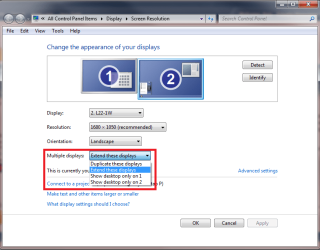
Ok so I am trying to change my current display so that I have dual screen but I have a problem. When I plug in my second screen it recognizes it is plugged it but wont connect. However if I remove the cable to my main display the computer then changes the display to the 2nd monitor. When I plug my main display back in it then converts back to my main display leaving the second black again.
My main display is connected via HDMI and my new display is a VGA 17" Starlogic LCD monitor the rest of my specs are in the spec box.
Any help would be much appreciated.
My main display is connected via HDMI and my new display is a VGA 17" Starlogic LCD monitor the rest of my specs are in the spec box.
Any help would be much appreciated.
My Computer
At a glance
Windows 7 Ultimate 64 BitAMD Athlon II X2 3.00Ghz4GB Corsair DDR3 1333512MB Asus HD 4670, PCI-E 2.0 (x16)
- Computer Manufacturer/Model Number
- HomeBuilt
- OS
- Windows 7 Ultimate 64 Bit
- CPU
- AMD Athlon II X2 3.00Ghz
- Motherboard
- Gigabyte GA-MA78LMT-S2, AMD 760G
- Memory
- 4GB Corsair DDR3 1333
- Graphics Card(s)
- 512MB Asus HD 4670, PCI-E 2.0 (x16)
- Monitor(s) Displays
- Samsung 21" SyncMaster 2333HD
- Screen Resolution
- 1680x1050
- Hard Drives
- 1TB Samsung HD103SJ Spinpoint F3
- PSU
- 500W Antec Basiq Power PSU, 80mm
- Case
- Antec VSK-2000, Black, Mid Tower Case
- Cooling
- Lolll



 your card is nice