
Dual Monitors not working

SheepNutz

New member
Local time
10:27 AM
Messages
6
Hello, I just installed win7 pro 64 bit on the system I built tonight, and only one of my monitors will work. I installed the latest drivers for my ATI 5770, and windows is recognizing both monitors, but only one comes on. The other stays in standby mode. I made sure both monitors are enabled. If I switch the cables in the back of the video card, then the opposite monitor works. I can also drag monitor 2 to the left of monitor one, and it takes the taskbar away from the working monitor as expected, moving it to the monitor that won't turn on. Has anyone seen this issue before? Thanks in advance for any help.
 

My Computer

OS
Windows 7 Professional 64 bit
CPU
Intel Core i7 920
Motherboard
Gigabyte EX58-UD3R
Memory
6GB Corsair XMS3 PC1600
Graphics Card(s)
XFX ATI Radeon HD 5770
Sound Card
Creative Labs X-Fi Extreme Music PCI
Monitor(s) Displays
Two Westinghouse LCM-19w4 19"
Screen Resolution
1440x900x60Hz
Hard Drives
Hitachi Deskstar 500GB IDE
PSU
Thermaltake TR2 600W
Case
Cooler Master HAF 932
Cooling
Cooler Master V8
Keyboard
1st Gen Logitech G15
Mouse
Logitech G7
Internet Speed
10 Mbit
Other Info
Happauge PCI TV Tuner
Samsung SATA DVD Burner
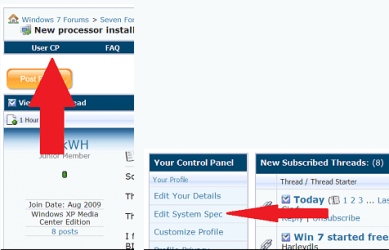
Welcome to seven forums SheepNuts. I know someone on this forum can help you but they are going to need your system specs to do so. You can fill them in here. Thanks usercp 1.png
 

My Computer

Computer Manufacturer/Model Number
Self Built
OS
Windows 7 ultimate 64 bit / XP Home sp3
CPU
intel Core 2 Duo E8400 3.0ghz
Motherboard
Asus P5ND bios 1401
Memory
8 gigs 1066 OCZ Fata1ty
Graphics Card(s)
EVGA GTX 580 Call of Duty Black Ops Edition
Sound Card
Creative Soundblaster Audigy 2zs
Monitor(s) Displays
Asus 24in LCD's 2MS X2
Screen Resolution
1920x1080p @60Hz
Hard Drives
WD Caviar 500 Black/ WD Caviar 200 Blue
PSU
OCZ 700W GameXtreme
Case
NZXT Apollo
Cooling
Corsair H50 CPU/120mm x3 /60mm x2 /Corsair Dominator Ram
Keyboard
Logitech Bluetooth Wireless MX5000
Mouse
Logitech Bluetooth Wireless MX1000
Internet Speed
Download 19.83 Upload 0.97
Other Info
Logitech Z2300 Speakers/ Bose Noise Cancelling Headphones/Avermedia PCI-e Hybrid TV Bravo/Epson NX415 all in one/ 4 Port Powered USB Hub/ LG 10x Bluray Burner /TSST Corp DVDRW External
It's probably a refresh rate issue. Set Windows to 60 Hz for the monitor not working well.
 

My Computer

Computer Manufacturer/Model Number
self built
OS
7600.20510 x86
CPU
P4 550 3.4 GHz HT running at 3.5 GHz
Motherboard
MSI PM8M3-V (MS-7211 v1.x) Micro-ATX mainboard
Memory
OCZ 2 GB(2x1GB) DDR400mHz running @ 414 mHz
Graphics Card(s)
HIS Radeon HD 3850 IceQ 3 Turbo HDMI Dual DL-DVI AGP
Sound Card
MOTU Traveler firewire studio interface 192 kHz 24 bit
Monitor(s) Displays
22" widescreen Acer X223W LCD, 17" Compaq P75 CRT
Screen Resolution
1680x1050 and 1280x1024
Hard Drives
SATA I x2 WD, 400 GB and 120 GB, SATA 2 WD Caviar Black 1 TB
PSU
350W generic
Case
Cybertronpc, it glows blue
Cooling
stock cpu fan, Ice-Q 3 gpu and system, many case fans
Keyboard
Logitch Classical Keyboard 200
Mouse
Logitech Mediaplay cordless
Internet Speed
1792/448 kbits/sec
Other Info
SATA II PCI fake RAID adapter, 1 GB Readyboost, original ATI Remote Wonder (even works with WMC perfectly), Logitech Rumblepad 2 game controller x2
Thanks for the welcome! Here are my system specs:
Intel Core i7 920 (not overclocked...yet)
Gigabyte EX58-UD3R motherboard
6GB Corsair XMS3 1600 ram
XFX ATI Radeon HD 5770
Two Westinghouse LCM-19w4 monitors (both at 1440x900x60Hz)
Thermaltake TR2 600W psu
Hitachi deskstar 500gb IDE HDD
Other things hooked up include a card reader, samsung SATA dvd burner, old Happauge PCI TV tuner, and Creative X-Fi extreme music PCI sound card.

Hopefully that should be everything he needs. I also put those specs into the form as you suggested.

torrentg: I just checked, and both windows screen resolution section and the ATI catalyst software says that both monitors are correctly at 1440x900x60Hz. I was so hoping that your suggestion would have fixed it. That would have been a nice easy fix!

Once again, thank you all for the help and the warm welcome!
 

My Computer

OS
Windows 7 Professional 64 bit
CPU
Intel Core i7 920
Motherboard
Gigabyte EX58-UD3R
Memory
6GB Corsair XMS3 PC1600
Graphics Card(s)
XFX ATI Radeon HD 5770
Sound Card
Creative Labs X-Fi Extreme Music PCI
Monitor(s) Displays
Two Westinghouse LCM-19w4 19"
Screen Resolution
1440x900x60Hz
Hard Drives
Hitachi Deskstar 500GB IDE
PSU
Thermaltake TR2 600W
Case
Cooler Master HAF 932
Cooling
Cooler Master V8
Keyboard
1st Gen Logitech G15
Mouse
Logitech G7
Internet Speed
10 Mbit
Other Info
Happauge PCI TV Tuner
Samsung SATA DVD Burner
Here's an update. It appears that there are some damaged pins on one of the DVI sockets on my video card. This would explain why whatever monitor is plugged into one slot always works, but never works in the other slot. When looking at the back of the video card, there are two female pins that are pushed too far in, so when you plug in the DVI cable, the male pins on the DVI cable aren't able to make contact with the female socket. I'll be replacing the video card tomorrow to see if that solves the problem, and report back here with the results. Thanks again for the help.
 

My Computer

OS
Windows 7 Professional 64 bit
CPU
Intel Core i7 920
Motherboard
Gigabyte EX58-UD3R
Memory
6GB Corsair XMS3 PC1600
Graphics Card(s)
XFX ATI Radeon HD 5770
Sound Card
Creative Labs X-Fi Extreme Music PCI
Monitor(s) Displays
Two Westinghouse LCM-19w4 19"
Screen Resolution
1440x900x60Hz
Hard Drives
Hitachi Deskstar 500GB IDE
PSU
Thermaltake TR2 600W
Case
Cooler Master HAF 932
Cooling
Cooler Master V8
Keyboard
1st Gen Logitech G15
Mouse
Logitech G7
Internet Speed
10 Mbit
Other Info
Happauge PCI TV Tuner
Samsung SATA DVD Burner
It will definitely solve the problem but you can too.

Pull the card out of the machine. Then use something like a sewing needle or jewelers screwdriver to bend the pins back to their proper position. If they're not too far off, it's easy to fix if you do it carefully and have good eyesight.

But if you completely bent them by forcing the connection onto it, that will be a lot more difficult to repair.
 

My Computer

Computer Manufacturer/Model Number
self built
OS
7600.20510 x86
CPU
P4 550 3.4 GHz HT running at 3.5 GHz
Motherboard
MSI PM8M3-V (MS-7211 v1.x) Micro-ATX mainboard
Memory
OCZ 2 GB(2x1GB) DDR400mHz running @ 414 mHz
Graphics Card(s)
HIS Radeon HD 3850 IceQ 3 Turbo HDMI Dual DL-DVI AGP
Sound Card
MOTU Traveler firewire studio interface 192 kHz 24 bit
Monitor(s) Displays
22" widescreen Acer X223W LCD, 17" Compaq P75 CRT
Screen Resolution
1680x1050 and 1280x1024
Hard Drives
SATA I x2 WD, 400 GB and 120 GB, SATA 2 WD Caviar Black 1 TB
PSU
350W generic
Case
Cybertronpc, it glows blue
Cooling
stock cpu fan, Ice-Q 3 gpu and system, many case fans
Keyboard
Logitch Classical Keyboard 200
Mouse
Logitech Mediaplay cordless
Internet Speed
1792/448 kbits/sec
Other Info
SATA II PCI fake RAID adapter, 1 GB Readyboost, original ATI Remote Wonder (even works with WMC perfectly), Logitech Rumblepad 2 game controller x2
I might try that. It's not that the pins are bent, they just look like they're recessed, like pushed straight back in toward the card. The female part consists of two opposite contacts in each hole, and in this case, both opposite contacts are pushed back. I may try a sewing needle to try and pry them back out. Thanks for the tip!
 

My Computer

OS
Windows 7 Professional 64 bit
CPU
Intel Core i7 920
Motherboard
Gigabyte EX58-UD3R
Memory
6GB Corsair XMS3 PC1600
Graphics Card(s)
XFX ATI Radeon HD 5770
Sound Card
Creative Labs X-Fi Extreme Music PCI
Monitor(s) Displays
Two Westinghouse LCM-19w4 19"
Screen Resolution
1440x900x60Hz
Hard Drives
Hitachi Deskstar 500GB IDE
PSU
Thermaltake TR2 600W
Case
Cooler Master HAF 932
Cooling
Cooler Master V8
Keyboard
1st Gen Logitech G15
Mouse
Logitech G7
Internet Speed
10 Mbit
Other Info
Happauge PCI TV Tuner
Samsung SATA DVD Burner
New video card fixed the issue. Thanks again for the help guys!
 

My Computer

OS
Windows 7 Professional 64 bit
CPU
Intel Core i7 920
Motherboard
Gigabyte EX58-UD3R
Memory
6GB Corsair XMS3 PC1600
Graphics Card(s)
XFX ATI Radeon HD 5770
Sound Card
Creative Labs X-Fi Extreme Music PCI
Monitor(s) Displays
Two Westinghouse LCM-19w4 19"
Screen Resolution
1440x900x60Hz
Hard Drives
Hitachi Deskstar 500GB IDE
PSU
Thermaltake TR2 600W
Case
Cooler Master HAF 932
Cooling
Cooler Master V8
Keyboard
1st Gen Logitech G15
Mouse
Logitech G7
Internet Speed
10 Mbit
Other Info
Happauge PCI TV Tuner
Samsung SATA DVD Burner
Back
Top