Solved Dual monitors using wrong graphics cards

Mauvai

New member
Local time
4:39 PM
Messages
17
Setup
dell xps 15 l502x laptop, running an intel integrated graphics card and an nVidia GeForce GT 525m dedicated graphics card. Also a VGA plug and play Dell IN1910N monitor connected through a HDMI to VGA converter to the laptops HDMI out port.

The problem
Each monitor is running off a separate graphics card, according the the nVidia control panel, which is fine, but they are each running the wrong one. The laptop by default uses the integrated graphics, and the external monitor uses the dedicated card, which is useless, a i really only use it as extra desktop space or for playing movies, which doesn't require the dedicated graphics. Then when i go to play a game on the laptop screen, it switches to the dedicated card AS WELL, which then struggles to keep up.
How can i set the external monitor to run on the integrated graphics always?
I don't care if the laptop screen doesn't auto switch, so long as it runs the dedicated card at the right times and doesn't struggle, like it doesn't when the other monitor isn't connected.

This image tellsme it should be possible, but i cant get it to work
imgur: the simple image sharer
 

My Computer

Computer type
Laptop
Computer Manufacturer/Model Number
Dell Xps L502x
OS
windows 7 home premium 64 bit
CPU
i7-2630QM 2-2.9gHz (2nd gen)
Memory
6 GB 1333Mhz DDR3 SDRAM
Graphics Card(s)
intel integratded, nVidia GeForce GT 525m
Monitor(s) Displays
Laptop display & dell IN1910N through a HDMI-VGA converter
Screen Resolution
1366 x 768 (both)
Hard Drives
640 gig (unkown make)
Mouse
CM storm Xornet
Internet Speed
6 Gb
Antivirus
Bullguard
Browser
chrome
Please, anyone have any ideas?
 

My Computer

Computer type
Laptop
Computer Manufacturer/Model Number
Dell Xps L502x
OS
windows 7 home premium 64 bit
CPU
i7-2630QM 2-2.9gHz (2nd gen)
Memory
6 GB 1333Mhz DDR3 SDRAM
Graphics Card(s)
intel integratded, nVidia GeForce GT 525m
Monitor(s) Displays
Laptop display & dell IN1910N through a HDMI-VGA converter
Screen Resolution
1366 x 768 (both)
Hard Drives
640 gig (unkown make)
Mouse
CM storm Xornet
Internet Speed
6 Gb
Antivirus
Bullguard
Browser
chrome
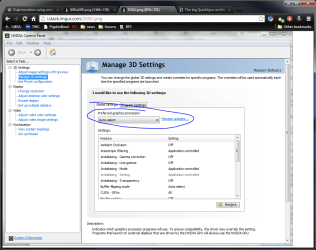
Try switching the connectors, also try switching the preferred graphics in the nvidia panel as shown in this pick to what you want

preffered graphics.png
 
Last edited:

My Computer

Computer type
PC/Desktop
Computer Manufacturer/Model Number
Dude Build
OS
Windows 10 Pro X64
CPU
Intel(R) Core(TM) i5-3570K CPU OC@ 4.5GHZ Turbo
Motherboard
MSI Z77A-G45 Gaming
Memory
8.00 GB DDR3 1600Mhz
Graphics Card(s)
MSI Gaming X GTX 1070
Sound Card
Realtek High Definition
Monitor(s) Displays
Dell S23O9W, HP L1710
Screen Resolution
DELL-1920 x 1080 HP-1280 x1024
Hard Drives
Crucial m4 256 SSD, WD 7200RPM 500GB WD 1TB
PSU
Seasonic X650 GOLD
Case
Zalman Z12
Cooling
Antec Kuhler 920
Keyboard
Logitech
Mouse
MSI DS100 Interceptor
Internet Speed
50 down and 5 up
Antivirus
MSE
Browser
Chrome, IE 11
Other Info
Logitech X-620 Speakers
Ehm... wihtout meaning to sound to smart, its going to be very difficult to switch the connectors, seeing as i did specify im using a laptop...
Also the second thing you posted wont work, as i need the second screen to ALWAYS run the integrated graphics, and the laptop screen to be able to use the dedicated as needed
 

My Computer

Computer type
Laptop
Computer Manufacturer/Model Number
Dell Xps L502x
OS
windows 7 home premium 64 bit
CPU
i7-2630QM 2-2.9gHz (2nd gen)
Memory
6 GB 1333Mhz DDR3 SDRAM
Graphics Card(s)
intel integratded, nVidia GeForce GT 525m
Monitor(s) Displays
Laptop display & dell IN1910N through a HDMI-VGA converter
Screen Resolution
1366 x 768 (both)
Hard Drives
640 gig (unkown make)
Mouse
CM storm Xornet
Internet Speed
6 Gb
Antivirus
Bullguard
Browser
chrome
Ehm... wihtout meaning to sound to smart, its going to be very difficult to switch the connectors, seeing as i did specify im using a laptop...
Also the second thing you posted wont work, as i need the second screen to ALWAYS run the integrated graphics, and the laptop screen to be able to use the dedicated as needed


No worries I realized that and posted the screen shot but forgot to remove the connectors.
Check in your bios settings for options under the integrated graphics for different modes.
Does your computer support Lucid, that might help. The setting should work (from the Sceenshot I posted) to force whatever game to run off the IGPU.
 

My Computer

Computer type
PC/Desktop
Computer Manufacturer/Model Number
Dude Build
OS
Windows 10 Pro X64
CPU
Intel(R) Core(TM) i5-3570K CPU OC@ 4.5GHZ Turbo
Motherboard
MSI Z77A-G45 Gaming
Memory
8.00 GB DDR3 1600Mhz
Graphics Card(s)
MSI Gaming X GTX 1070
Sound Card
Realtek High Definition
Monitor(s) Displays
Dell S23O9W, HP L1710
Screen Resolution
DELL-1920 x 1080 HP-1280 x1024
Hard Drives
Crucial m4 256 SSD, WD 7200RPM 500GB WD 1TB
PSU
Seasonic X650 GOLD
Case
Zalman Z12
Cooling
Antec Kuhler 920
Keyboard
Logitech
Mouse
MSI DS100 Interceptor
Internet Speed
50 down and 5 up
Antivirus
MSE
Browser
Chrome, IE 11
Other Info
Logitech X-620 Speakers
How does one check bios settings (f2 at startup?)?
Also what is lucid?

Edit: If the lucid you mean is the programming language, then no, i highly doubt it (unless it came preinstalled somehow)
 

My Computer

Computer type
Laptop
Computer Manufacturer/Model Number
Dell Xps L502x
OS
windows 7 home premium 64 bit
CPU
i7-2630QM 2-2.9gHz (2nd gen)
Memory
6 GB 1333Mhz DDR3 SDRAM
Graphics Card(s)
intel integratded, nVidia GeForce GT 525m
Monitor(s) Displays
Laptop display & dell IN1910N through a HDMI-VGA converter
Screen Resolution
1366 x 768 (both)
Hard Drives
640 gig (unkown make)
Mouse
CM storm Xornet
Internet Speed
6 Gb
Antivirus
Bullguard
Browser
chrome
Yes F2, look at the settings.
 

My Computer

Computer type
PC/Desktop
Computer Manufacturer/Model Number
Dude Build
OS
Windows 10 Pro X64
CPU
Intel(R) Core(TM) i5-3570K CPU OC@ 4.5GHZ Turbo
Motherboard
MSI Z77A-G45 Gaming
Memory
8.00 GB DDR3 1600Mhz
Graphics Card(s)
MSI Gaming X GTX 1070
Sound Card
Realtek High Definition
Monitor(s) Displays
Dell S23O9W, HP L1710
Screen Resolution
DELL-1920 x 1080 HP-1280 x1024
Hard Drives
Crucial m4 256 SSD, WD 7200RPM 500GB WD 1TB
PSU
Seasonic X650 GOLD
Case
Zalman Z12
Cooling
Antec Kuhler 920
Keyboard
Logitech
Mouse
MSI DS100 Interceptor
Internet Speed
50 down and 5 up
Antivirus
MSE
Browser
Chrome, IE 11
Other Info
Logitech X-620 Speakers
Had a look, nothing mentioned about graphics cards at all... about the closest i got was the order that hardware was booted (hard disk, usb, eSata, etc), but nothing mentioned anywhere about graphics cards
 

My Computer

Computer type
Laptop
Computer Manufacturer/Model Number
Dell Xps L502x
OS
windows 7 home premium 64 bit
CPU
i7-2630QM 2-2.9gHz (2nd gen)
Memory
6 GB 1333Mhz DDR3 SDRAM
Graphics Card(s)
intel integratded, nVidia GeForce GT 525m
Monitor(s) Displays
Laptop display & dell IN1910N through a HDMI-VGA converter
Screen Resolution
1366 x 768 (both)
Hard Drives
640 gig (unkown make)
Mouse
CM storm Xornet
Internet Speed
6 Gb
Antivirus
Bullguard
Browser
chrome
I will search to see if I can find your bios settings to look. What game are you having a problem with?
 

My Computer

Computer type
PC/Desktop
Computer Manufacturer/Model Number
Dude Build
OS
Windows 10 Pro X64
CPU
Intel(R) Core(TM) i5-3570K CPU OC@ 4.5GHZ Turbo
Motherboard
MSI Z77A-G45 Gaming
Memory
8.00 GB DDR3 1600Mhz
Graphics Card(s)
MSI Gaming X GTX 1070
Sound Card
Realtek High Definition
Monitor(s) Displays
Dell S23O9W, HP L1710
Screen Resolution
DELL-1920 x 1080 HP-1280 x1024
Hard Drives
Crucial m4 256 SSD, WD 7200RPM 500GB WD 1TB
PSU
Seasonic X650 GOLD
Case
Zalman Z12
Cooling
Antec Kuhler 920
Keyboard
Logitech
Mouse
MSI DS100 Interceptor
Internet Speed
50 down and 5 up
Antivirus
MSE
Browser
Chrome, IE 11
Other Info
Logitech X-620 Speakers

My Computer

Computer Manufacturer/Model Number
homegrown
OS
Windows 7 Pro X64 SP1
CPU
Intel Core I7-3930k
Motherboard
Asus P9X79 Pro
Memory
16 GB Gskill DDR3-2133
Graphics Card(s)
eVGA GTX680
Sound Card
Creative X-Fi Titanium
Monitor(s) Displays
As PA246Q
Screen Resolution
1920 X 1200
Hard Drives
Corsair Force GT, 120 GB
WDC 1.5TB Caviar Black
PSU
PCP&C Silencer 750 Crossfire
Case
Silverstone FT02
Cooling
Noctua NH-D14
Keyboard
cheap Logitech USB
Mouse
Microsoft Intellimouse Explorer (old optical) USB
Internet Speed
6Mb cable
Other Info
Pioneer BDR-205
Samsung SH-203B
Monsoon 5.1 speakers
I cant seem to find the bios, but found this

:ar:Optimus

Reading through it it would seem that you would have to use my suggestion in the nvidia control panel to force a certain game to use either the IGPU or the nvidia. Somewhere you have settings for switchable graphics.

Your processor has Intel HD3000, and you also have the Nvidia GT 525m. Out of those two the 525m will do better in games. Maybe some one else can find your BIOS and help you with the settings.

I think your problem is neither gpu is powerful enough to run the game (not sure which, you haven't said that yet) at the resolution and settings you are trying to run it at.


The XPS L502X laptop uses an nVidia Optimus setup. I think that may not be controlled through BIOS settings.

See the manual:

ftp://ftp.dell.com/Manuals/all-products/esuprt_laptop/esuprt_xps_laptop/xps-l502x_setup%20guide_en-us.pdf

There's not a lot of detail there, but I hope that you find it helpful.

Thankyou bobkn, didn't notice you posted.


from page 56 of BOBKN's link

NVIDIA Optimus
Technology (Optional)
Your XPS laptop is equipped with NVIDIA’s
Optimus technology. The Optimus
technology enhances the performance of
your computer, while minimizing the impact
on battery life. It enables you to combine the
graphic processing capability of the integrated
Intel graphic processing unit (GPU) with the
discrete NVIDIA GPU while running graphic‑
intensive applications such as 3D games.
The NVIDIA GPU is turned on only for preset
applications and thus extends the battery life.
The Optimus technology is enabled through
an application profile. When an application
is launched, the video drivers check if the
application has an associated application
profile.
• If an application profile exists, the NVIDIA
GPU is enabled and the application
runs in performance mode. The NVIDIA
GPU is disabled automatically when the
application is closed.
• If an application profile does not exist, only
the integrated Intel GPU is used.
The default list of application profiles
is updated frequently by NVIDIA and is
automatically downloaded to your computer
when you are connected to the Internet.
You can also create application profiles for
any application on your computer. This
may be required for newly released games
or applications that do not have a default
application profile.
 

My Computer

Computer type
PC/Desktop
Computer Manufacturer/Model Number
Dude Build
OS
Windows 10 Pro X64
CPU
Intel(R) Core(TM) i5-3570K CPU OC@ 4.5GHZ Turbo
Motherboard
MSI Z77A-G45 Gaming
Memory
8.00 GB DDR3 1600Mhz
Graphics Card(s)
MSI Gaming X GTX 1070
Sound Card
Realtek High Definition
Monitor(s) Displays
Dell S23O9W, HP L1710
Screen Resolution
DELL-1920 x 1080 HP-1280 x1024
Hard Drives
Crucial m4 256 SSD, WD 7200RPM 500GB WD 1TB
PSU
Seasonic X650 GOLD
Case
Zalman Z12
Cooling
Antec Kuhler 920
Keyboard
Logitech
Mouse
MSI DS100 Interceptor
Internet Speed
50 down and 5 up
Antivirus
MSE
Browser
Chrome, IE 11
Other Info
Logitech X-620 Speakers
nothing relevant in it :(
 

My Computer

Computer type
Laptop
Computer Manufacturer/Model Number
Dell Xps L502x
OS
windows 7 home premium 64 bit
CPU
i7-2630QM 2-2.9gHz (2nd gen)
Memory
6 GB 1333Mhz DDR3 SDRAM
Graphics Card(s)
intel integratded, nVidia GeForce GT 525m
Monitor(s) Displays
Laptop display & dell IN1910N through a HDMI-VGA converter
Screen Resolution
1366 x 768 (both)
Hard Drives
640 gig (unkown make)
Mouse
CM storm Xornet
Internet Speed
6 Gb
Antivirus
Bullguard
Browser
chrome

My Computer

Computer type
PC/Desktop
Computer Manufacturer/Model Number
Dude Build
OS
Windows 10 Pro X64
CPU
Intel(R) Core(TM) i5-3570K CPU OC@ 4.5GHZ Turbo
Motherboard
MSI Z77A-G45 Gaming
Memory
8.00 GB DDR3 1600Mhz
Graphics Card(s)
MSI Gaming X GTX 1070
Sound Card
Realtek High Definition
Monitor(s) Displays
Dell S23O9W, HP L1710
Screen Resolution
DELL-1920 x 1080 HP-1280 x1024
Hard Drives
Crucial m4 256 SSD, WD 7200RPM 500GB WD 1TB
PSU
Seasonic X650 GOLD
Case
Zalman Z12
Cooling
Antec Kuhler 920
Keyboard
Logitech
Mouse
MSI DS100 Interceptor
Internet Speed
50 down and 5 up
Antivirus
MSE
Browser
Chrome, IE 11
Other Info
Logitech X-620 Speakers
The information provided was relevant to making individual programs run a certain graphics card, which i have set up already. i am trying to prevent the second monitor from EVER running the dedicated card, which it does even when running things which normally on the laptop would not use the dedicated card
 

My Computer

Computer type
Laptop
Computer Manufacturer/Model Number
Dell Xps L502x
OS
windows 7 home premium 64 bit
CPU
i7-2630QM 2-2.9gHz (2nd gen)
Memory
6 GB 1333Mhz DDR3 SDRAM
Graphics Card(s)
intel integratded, nVidia GeForce GT 525m
Monitor(s) Displays
Laptop display & dell IN1910N through a HDMI-VGA converter
Screen Resolution
1366 x 768 (both)
Hard Drives
640 gig (unkown make)
Mouse
CM storm Xornet
Internet Speed
6 Gb
Antivirus
Bullguard
Browser
chrome
The information provided was relevant to making individual programs run a certain graphics card, which i have set up already. i am trying to prevent the second monitor from EVER running the dedicated card, which it does even when running things which normally on the laptop would not use the dedicated card

That is what the info was telling you. that is how optimus works. If you want that you have to disable the discrete card. Sorry if I caused any confusion.
 

My Computer

Computer type
PC/Desktop
Computer Manufacturer/Model Number
Dude Build
OS
Windows 10 Pro X64
CPU
Intel(R) Core(TM) i5-3570K CPU OC@ 4.5GHZ Turbo
Motherboard
MSI Z77A-G45 Gaming
Memory
8.00 GB DDR3 1600Mhz
Graphics Card(s)
MSI Gaming X GTX 1070
Sound Card
Realtek High Definition
Monitor(s) Displays
Dell S23O9W, HP L1710
Screen Resolution
DELL-1920 x 1080 HP-1280 x1024
Hard Drives
Crucial m4 256 SSD, WD 7200RPM 500GB WD 1TB
PSU
Seasonic X650 GOLD
Case
Zalman Z12
Cooling
Antec Kuhler 920
Keyboard
Logitech
Mouse
MSI DS100 Interceptor
Internet Speed
50 down and 5 up
Antivirus
MSE
Browser
Chrome, IE 11
Other Info
Logitech X-620 Speakers
Missed your long post: let me clarify again.
The problem arises when i am playing minecraft on the laptop screen and watching a video on the spare. The dedicated card is capable of running minecraft (on high) when the second monitor is NOT connected, but when it is, the dedicated card has to render 2 displays, which it struggles with (as minecraft is relatively taxing). The secondary monitor should be running on the integrated card, but it doesn't, even when its not showing anything other than the background.

From what i read about the optimus in that document, it should be possible, with the correct setting, though you may well know more than me about this.
 

My Computer

Computer type
Laptop
Computer Manufacturer/Model Number
Dell Xps L502x
OS
windows 7 home premium 64 bit
CPU
i7-2630QM 2-2.9gHz (2nd gen)
Memory
6 GB 1333Mhz DDR3 SDRAM
Graphics Card(s)
intel integratded, nVidia GeForce GT 525m
Monitor(s) Displays
Laptop display & dell IN1910N through a HDMI-VGA converter
Screen Resolution
1366 x 768 (both)
Hard Drives
640 gig (unkown make)
Mouse
CM storm Xornet
Internet Speed
6 Gb
Antivirus
Bullguard
Browser
chrome
Mauvai, I am trying to figure it out too. I think playing minecraft and watching a video on your spare might be too much for your system. Let's see if someone else with more knowledge on the subject can help.

I am not familiar with optimus so I don't have the answer for you.
 

My Computer

Computer type
PC/Desktop
Computer Manufacturer/Model Number
Dude Build
OS
Windows 10 Pro X64
CPU
Intel(R) Core(TM) i5-3570K CPU OC@ 4.5GHZ Turbo
Motherboard
MSI Z77A-G45 Gaming
Memory
8.00 GB DDR3 1600Mhz
Graphics Card(s)
MSI Gaming X GTX 1070
Sound Card
Realtek High Definition
Monitor(s) Displays
Dell S23O9W, HP L1710
Screen Resolution
DELL-1920 x 1080 HP-1280 x1024
Hard Drives
Crucial m4 256 SSD, WD 7200RPM 500GB WD 1TB
PSU
Seasonic X650 GOLD
Case
Zalman Z12
Cooling
Antec Kuhler 920
Keyboard
Logitech
Mouse
MSI DS100 Interceptor
Internet Speed
50 down and 5 up
Antivirus
MSE
Browser
Chrome, IE 11
Other Info
Logitech X-620 Speakers
ok, thanks. I highly doubt its too much, im using an i7 after all, and i can run 2 instances of the game on one screen quite comfortably. Thanks anyway
 

My Computer

Computer type
Laptop
Computer Manufacturer/Model Number
Dell Xps L502x
OS
windows 7 home premium 64 bit
CPU
i7-2630QM 2-2.9gHz (2nd gen)
Memory
6 GB 1333Mhz DDR3 SDRAM
Graphics Card(s)
intel integratded, nVidia GeForce GT 525m
Monitor(s) Displays
Laptop display & dell IN1910N through a HDMI-VGA converter
Screen Resolution
1366 x 768 (both)
Hard Drives
640 gig (unkown make)
Mouse
CM storm Xornet
Internet Speed
6 Gb
Antivirus
Bullguard
Browser
chrome
ok, thanks. I highly doubt its too much, im using an i7 after all, and i can run 2 instances of the game on one screen quite comfortably. Thanks anyway


I see your point. I have asked for help from someone. Hopeful to hear something soon.
 

My Computer

Computer type
PC/Desktop
Computer Manufacturer/Model Number
Dude Build
OS
Windows 10 Pro X64
CPU
Intel(R) Core(TM) i5-3570K CPU OC@ 4.5GHZ Turbo
Motherboard
MSI Z77A-G45 Gaming
Memory
8.00 GB DDR3 1600Mhz
Graphics Card(s)
MSI Gaming X GTX 1070
Sound Card
Realtek High Definition
Monitor(s) Displays
Dell S23O9W, HP L1710
Screen Resolution
DELL-1920 x 1080 HP-1280 x1024
Hard Drives
Crucial m4 256 SSD, WD 7200RPM 500GB WD 1TB
PSU
Seasonic X650 GOLD
Case
Zalman Z12
Cooling
Antec Kuhler 920
Keyboard
Logitech
Mouse
MSI DS100 Interceptor
Internet Speed
50 down and 5 up
Antivirus
MSE
Browser
Chrome, IE 11
Other Info
Logitech X-620 Speakers
Hi Mauvai,

You may not be able to run the external display with the 'integrated GPU'. This is functional as per the notebook design. The HDMI port on XPS L502 is built on the dedicated nVidia GPU; therefore the external display runs only through the discrete card.

The laptop is designed to run on the integrated graphics by design; and switch to the discrete graphics, based on the demands of the application in use. This is in harmony with the Optimus technology that intends to save battery power whenever possible.

Unfortunately, what you are trying to achieve may not be possible with this system model. Usually, basic systems with 'Optimus technology' seldom allow selection of desired graphic card through BIOS (System Setup). 'bobkn' has correctly stated that BIOS in this system will not support custom graphic card choices. It is logical for the discrete GPU to under-perform if exposed to heavy pressure (due to the external display & the game on the notebook at the same time).

The notebook is designed to auto-switch when needed; you may not be able to control its functionality. However, apart from the 'HDMI port', it is built with a mini-display port also. I tried, but could not find enough information (so far) to verify if it is connected to the 'integrated GPU'. You may want to try using the external display with that port to see if that helps.

Hope you find the information useful. Do reply if you have any further questions; would be glad to assist.


My Computer

OS
Windows 7 64bit
Back
Top