Dual Network cards

Jonher937

New member
Hi everyone :)

I've got a problem.
I can't get two network cards to corporate.
I have attached a schedule of how I want it to be.

The switch gives external and not internal IP's.
Is that a problem in this case?

I know that this is possible in WinXP but I use W7 on the server.

Thanks in advance
 

Attachments

  • network.jpg
    network.jpg
    48.8 KB · Views: 4

My Computer

OS
Windows 7 Ultimate x64
CPU
i5 750 @ 3GHz
Motherboard
Asus P7P55D-PRO
Memory
Corsair XMS3 4GB DDR3 1600MHz CL9 (2x2GB)
Graphics Card(s)
XFX GEFORCE GTS 250 1GB DDR3 PCI-E DVI
Sound Card
Internal
Monitor(s) Displays
1x LG 24" 1xPhilips 19" Wide
Screen Resolution
1920x1080 + 1440x900
Hard Drives
OS HDD: Intel X25-M 80GB SSD
OSX HDD: Seagate 500gb 7200rpm
Storage HDD's: 1xSeagate 500gb 7200rpm + 1x 2TB WD 5400rpm
How you want to it to be and how it CAN be are two separate things in this case.

Internet > Modem > ROUTER > Switch > Card 1 & 2 > Server

Only way to do it.
 

My Computer

OS
Windows 7 Ultimate 64-bit
CPU
AMD Phenom II X6 1090T 3.2GHZ
Motherboard
MSI 890FXA-GD70
Memory
G.SKILL RipJaw 3x2GB DDR3-1066
Graphics Card(s)
2x HIS Radeon HD 6850 1 GB
Sound Card
VIA 8-channel
Monitor(s) Displays
2x 20 inch Acer LCDs, 1x 32" Sony LCD TV
Screen Resolution
4480x900
Hard Drives
1x Crucial 64GB SSD
3x 1TB HDDs (WD, Seagate, Hitatchi)
1x 500GB Seagate External
PSU
Kingwin 1000W Modular
Case
Coolermaster HAF 932
Cooling
1x 120mm, 3x 200mm, CoolerMaster Hyper 212+
Keyboard
Microsoft Wireless Keyboard 1000
Mouse
Microsoft Wiresless Mouse 5000
Internet Speed
20mbps
Other Info
Samsung BD-ROM/DVD-RW
Hi everyone :)

I've got a problem.
I can't get two network cards to corporate.
I have attached a schedule of how I want it to be.

The switch gives external and not internal IP's.
Is that a problem in this case?

I know that this is possible in WinXP but I use W7 on the server.

Thanks in advance

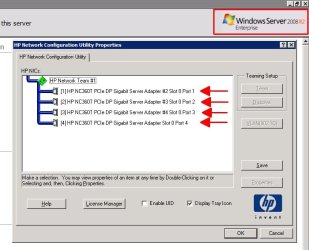
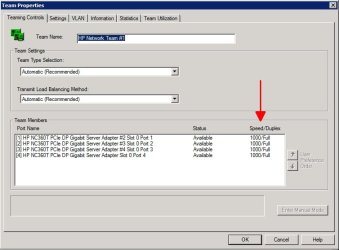
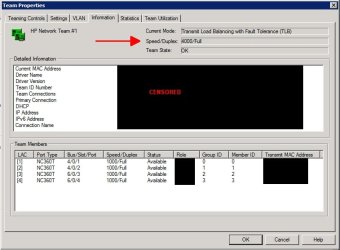
If your network cards are Intel, HP or Broadcom you can download their teaming software and team the cards together. Then you can set one as output and the other as input.

The catch on this is that you have to have NICs that support this function and the teaming software must support this function. Most desktop teaming software will only allow you to team the cards, making them look like one card but doubling the bandwidth.

If you are using Windows Server then you can do much more built-in as well as use the teaming software for server that has many options. -WS


Attachments

  • TeamPix1.jpg
    TeamPix1.jpg
    126.7 KB · Views: 111
  • TeamPix2.jpg
    TeamPix2.jpg
    121.3 KB · Views: 68
  • TeamPix3.jpg
    TeamPix3.jpg
    130.2 KB · Views: 62

My Computer

Computer type
PC/Desktop
Computer Manufacturer/Model Number
Dell OP7010
OS
Windows 7 Enterprise (x64); Windows Server 2008 R2 (x64)
Memory
16GB
Monitor(s) Displays
4 Dell 24" LCD
Screen Resolution
1280x1024
Keyboard
Dell
Mouse
Dell Optical
Internet Speed
40meg
The fact of the matter is "and as far as I know" teaming worked with Vista and does not work with Windows 7. This fact has already been discussed on other forums.

The reason I know this is because my Nvidia board has dual ethernet plugs for teaming but there was no way to make it work with Win7 because this functionality isn't included with Win7 like it was with Vista or XP.
 

My Computer

Computer type
PC/Desktop
Computer Manufacturer/Model Number
Home built
OS
Windows 7 Ult, Windows 8.1 Pro,
CPU
Q9650-4.275GHz, E8600 4.5GHz, E6750-3.8GHz
Motherboard
Evga 780i FTW
Memory
G.Skill PC2 9600 1200Mhz 5 5 5 15 2T
Graphics Card(s)
GTX480
Sound Card
Asus Xonar D2
Monitor(s) Displays
HannsG
Screen Resolution
1680X1050
Hard Drives
GSkill Phoenix Pro 120GB SSD
PSU
ThermalTake Toughpower 1000Watt modular
Case
ThermalTake XaserV
Cooling
Xigmatek S1283
Keyboard
Logitech G15
Mouse
Logitech G9
Internet Speed
T1
The fact of the matter is "and as far as I know" teaming worked with Vista and does not work with Windows 7. This fact has already been discussed on other forums.

The reason I know this is because my Nvidia board has dual ethernet plugs for teaming but there was no way to make it work with Win7 because this functionality isn't included with Win7 like it was with Vista or XP.

You are right Windows 7 does not have any built-in way to team. Howerver with OEM teaming software you can team the cards in Windows 7.

In my screen shots above, you can use the HP teaming software on Windows Server 2008 R2 or Windows 7 to team HP NICs. -WS
 

My Computer

Computer type
PC/Desktop
Computer Manufacturer/Model Number
Dell OP7010
OS
Windows 7 Enterprise (x64); Windows Server 2008 R2 (x64)
Memory
16GB
Monitor(s) Displays
4 Dell 24" LCD
Screen Resolution
1280x1024
Keyboard
Dell
Mouse
Dell Optical
Internet Speed
40meg
Back
Top