
You are using an out of date browser. It may not display this or other websites correctly.
You should upgrade or use an alternative browser.
You should upgrade or use an alternative browser.
dual os
- Thread starter con
- Start date

- Local time
- 8:53 AM
- Messages
- 7,146
not sure if you could run it on an external drive.
you could certainly dual-boot off another internal drive, or another partition of the same drive as win 7.
check out this excellent tutorial for more details - look at 'method two'
you could certainly dual-boot off another internal drive, or another partition of the same drive as win 7.
check out this excellent tutorial for more details - look at 'method two'
My Computer
- Computer Manufacturer/Model Number
- mickey megabyte 1234
- OS
- ultimate 64 sp1
- CPU
- i5 2500K [email protected]
- Motherboard
- MSI P67A-GD53
- Memory
- 8 gigs GSkill Ripjaws 1600
- Graphics Card(s)
- amd hd6950
- Sound Card
- creative x-fi gamer
- Monitor(s) Displays
- samsung 24"
- Screen Resolution
- 1920x1080
- Hard Drives
- ocz vertex 2e 60 gig, samsung f3 1tb, buffalo 2tb ext
- PSU
- antec 550
- Case
- antec three hundred
- Cooling
- i'm a cooling fan
- Keyboard
- saitek eclipse ii
- Mouse
- logitech g3
- Internet Speed
- about 4 Mbps
- Other Info
- i love win7

Hello con Welcome to the Seven Forums!
The first thing to know is that the Windows installer will halt when trying to install Windows through the usb bus if you are planning this for an external usb HD. You would likely see results with the eSata however simply seeing the drive in an external enclosure rather then in a drive bay.
Once you installed Windows on the drive if installed internally first it may work later when used externally. The best results however tend to be seen when both drives are internal. This is mainly due to how Windows works while other non MS OSs tend to be different when custom installed.
The first thing to know is that the Windows installer will halt when trying to install Windows through the usb bus if you are planning this for an external usb HD. You would likely see results with the eSata however simply seeing the drive in an external enclosure rather then in a drive bay.
Once you installed Windows on the drive if installed internally first it may work later when used externally. The best results however tend to be seen when both drives are internal. This is mainly due to how Windows works while other non MS OSs tend to be different when custom installed.
My Computers
System One System Two
-
- Computer type
- PC/Desktop
- Computer Manufacturer/Model Number
- Custom builds = 2
- OS
- W7 Ultimate x64/W10 Pro x64/W11 Pro Triple Boot - Main PC W7 Remote PC Micro ATX W7 Pro x64/W11 Pro
- CPU
- AMD Phenom II X4 975 Deneb 3.6ghz - 965 2nd remote pc
- Motherboard
- Gigabyte GA-790XTA-UD4-Gigabyte GA-880GM-D2H remote pc
- Memory
- Kingston Hyper X DDR3 1600 1.5v 16gb - Hyper X Fury 8gb 2nd
- Graphics Card(s)
- MSI HD Radeon 5750 1gb - MSI HD Radeon 6450 on mini tower
- Sound Card
- Creative Labs X-Fi Xtreme Audio P - Realtek onooard 2nd case
- Monitor(s) Displays
- ASUS VW199T-P 19" HP 2082a Main-HP 2082a 20" remote pc
- Screen Resolution
- Asus 1440x900 - HP 1600x900
- Hard Drives
- WD Black 1TB HD per OS W7, W10, and pending W11 presently on 500gb OS Drive - Pending Triple 1TB HDs for Spanned Storage/backup volume
Single 2TB external USB enclosure, single 1TB System 7 Host/Boot drive, Pending 8TB external HD for system image b
- PSU
- Corsair 750TX - primary / Corsair CX600 - second
- Case
- Antec 900-2 - SSD compatible / NZXT Vulcan mini tower
- Cooling
- Zalman CNPS9900A
- Keyboard
- AZIO L70 Backlit Letters Gaming - ONN Cordless/USB
- Mouse
- MSI DS200 Programmable, Logitech Cordless
- Internet Speed
- 30mbps upgrade - primary hard wired - mini tower usb WiFi
- Antivirus
- GFI VIPRE Internet Security 2014 on W7 2016 beta on W10,
- Browser
- Cyberfox, WaterFox 64bit FF variants, FireFox x64, Pale Moon
- Other Info
- Accomdata fan cooled usb 2.0 PIDE/Sata II, III external enclosure.
Sambient usb/eSata PATA/Sata II, III external enclosure.
-
- Computer type
- PC/Desktop
- System Manufacturer/Model Number
- CUSTOM ASSEMBLY
- OS
- W7 Pro x64/W11 Pro
- CPU
- AMD Deneb 3.6ghz - 965
- Motherboard
- Gigabyte GA-880GM-D2H remote pc
- Memory
- Kingston Hyper X Fury 8gb
- Graphics Card(s)
- MSI HD Radeon 6450 DVI Output
- Sound Card
- Realtek onooard Creative or Other separate PENDING
- Monitor(s) Displays
- VIZIO 32" LCD TV Separate LCD Pending
- Screen Resolution
- 1600x1080
- Hard Drives
- WD 500GB OS Host/Boot WD Green 1TB Storage/Backup
- PSU
- Corsair 600W - THERMALTAKE 600W spare case
- Case
- NZXT Vulcan mini tower
- Cooling
- Twin 120mm Top Fans - 240mm Side Cover
- Keyboard
- ONN Cordless/USB Logitech Cordless
- Mouse
- ONN USB/Cordless - Logitech Cordless
- Internet Speed
- DSL 5G
- Browser
- MS Edge, FireFox, WaterFox x64, FireFox Nightly
- Other Info
- OS Testing-Remote Access to Main TeamViewer
thanks for the replys i think it may be easier to upgrade to win 7 pro i really only
need to use xp mode to acess some of my programs that dont work in w7 i believe
pro &ultimate have a way to make this work thanks again
con
need to use xp mode to acess some of my programs that dont work in w7 i believe
pro &ultimate have a way to make this work thanks again
con
My Computer
- OS
- win 7 home premium 32bit
- Local time
- 8:53 AM
- Messages
- 7,146
My Computer
- Computer Manufacturer/Model Number
- mickey megabyte 1234
- OS
- ultimate 64 sp1
- CPU
- i5 2500K [email protected]
- Motherboard
- MSI P67A-GD53
- Memory
- 8 gigs GSkill Ripjaws 1600
- Graphics Card(s)
- amd hd6950
- Sound Card
- creative x-fi gamer
- Monitor(s) Displays
- samsung 24"
- Screen Resolution
- 1920x1080
- Hard Drives
- ocz vertex 2e 60 gig, samsung f3 1tb, buffalo 2tb ext
- PSU
- antec 550
- Case
- antec three hundred
- Cooling
- i'm a cooling fan
- Keyboard
- saitek eclipse ii
- Mouse
- logitech g3
- Internet Speed
- about 4 Mbps
- Other Info
- i love win7

You can also run XP Mode under Windows 7 or install Oracle VirtualBox, install a XP client there and run it whenever you want. I do this for testing purposes and just because I can 
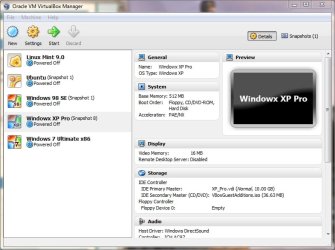
My Computer
- Computer type
- PC/Desktop
- Computer Manufacturer/Model Number
- Lenovo IdeaCenter 450
- OS
- Windows 10 Pro X64
- CPU
- Intel Quad Core i7-4770 @ 3.4Ghz
- Memory
- 16.0GB PC3-12800 DDR3 SDRAM 1600 MHz
- Graphics Card(s)
- Intel Integrated HD Graphics
- Sound Card
- Realtek HD Audio
- Monitor(s) Displays
- HP 22" LCD
- Screen Resolution
- 1680 x 1050
- Hard Drives
- 250GB Samsung EVO SATA-3 SSD
2TB Seagate ST2000DM001 SATA-2
1.5TB Seagate ST3150041AS SATA
- Keyboard
- Dell USB
- Mouse
- Lenovo USB
- Internet Speed
- Cable via Road Runner 3MB Upload, 30MB Download
- Antivirus
- Windows Defender, MBAM Pro, MBAE
- Browser
- Seamonkey
- Other Info
- UEFI/GPT
PLDS DVD-RW DH16AERSH
Actually the VMLite Workstation for XP Mode option will also include the integrated components support for direct access to physcal drives. I ran that on a temp 32bit 7 on an old non VPC supported XP case, single core cpu and it ran well there for a quick test. The latest VMLite XP Mode 3.2.6 version is now seen at Welcome to the VMLite
Custom installs of XP on VBox wouldn't see the integrated components feature in most installs. For both I also found that VMs on VBox seem to become useless after any lengthy period of inactivity. The VMs will simply refuse to start up.
For seeing the XP Mode itself on the Home Premium edition this would be the better option before a change of 7 editions to Pro.
Custom installs of XP on VBox wouldn't see the integrated components feature in most installs. For both I also found that VMs on VBox seem to become useless after any lengthy period of inactivity. The VMs will simply refuse to start up.
For seeing the XP Mode itself on the Home Premium edition this would be the better option before a change of 7 editions to Pro.
My Computers
System One System Two
-
- Computer type
- PC/Desktop
- Computer Manufacturer/Model Number
- Custom builds = 2
- OS
- W7 Ultimate x64/W10 Pro x64/W11 Pro Triple Boot - Main PC W7 Remote PC Micro ATX W7 Pro x64/W11 Pro
- CPU
- AMD Phenom II X4 975 Deneb 3.6ghz - 965 2nd remote pc
- Motherboard
- Gigabyte GA-790XTA-UD4-Gigabyte GA-880GM-D2H remote pc
- Memory
- Kingston Hyper X DDR3 1600 1.5v 16gb - Hyper X Fury 8gb 2nd
- Graphics Card(s)
- MSI HD Radeon 5750 1gb - MSI HD Radeon 6450 on mini tower
- Sound Card
- Creative Labs X-Fi Xtreme Audio P - Realtek onooard 2nd case
- Monitor(s) Displays
- ASUS VW199T-P 19" HP 2082a Main-HP 2082a 20" remote pc
- Screen Resolution
- Asus 1440x900 - HP 1600x900
- Hard Drives
- WD Black 1TB HD per OS W7, W10, and pending W11 presently on 500gb OS Drive - Pending Triple 1TB HDs for Spanned Storage/backup volume
Single 2TB external USB enclosure, single 1TB System 7 Host/Boot drive, Pending 8TB external HD for system image b
- PSU
- Corsair 750TX - primary / Corsair CX600 - second
- Case
- Antec 900-2 - SSD compatible / NZXT Vulcan mini tower
- Cooling
- Zalman CNPS9900A
- Keyboard
- AZIO L70 Backlit Letters Gaming - ONN Cordless/USB
- Mouse
- MSI DS200 Programmable, Logitech Cordless
- Internet Speed
- 30mbps upgrade - primary hard wired - mini tower usb WiFi
- Antivirus
- GFI VIPRE Internet Security 2014 on W7 2016 beta on W10,
- Browser
- Cyberfox, WaterFox 64bit FF variants, FireFox x64, Pale Moon
- Other Info
- Accomdata fan cooled usb 2.0 PIDE/Sata II, III external enclosure.
Sambient usb/eSata PATA/Sata II, III external enclosure.
-
- Computer type
- PC/Desktop
- System Manufacturer/Model Number
- CUSTOM ASSEMBLY
- OS
- W7 Pro x64/W11 Pro
- CPU
- AMD Deneb 3.6ghz - 965
- Motherboard
- Gigabyte GA-880GM-D2H remote pc
- Memory
- Kingston Hyper X Fury 8gb
- Graphics Card(s)
- MSI HD Radeon 6450 DVI Output
- Sound Card
- Realtek onooard Creative or Other separate PENDING
- Monitor(s) Displays
- VIZIO 32" LCD TV Separate LCD Pending
- Screen Resolution
- 1600x1080
- Hard Drives
- WD 500GB OS Host/Boot WD Green 1TB Storage/Backup
- PSU
- Corsair 600W - THERMALTAKE 600W spare case
- Case
- NZXT Vulcan mini tower
- Cooling
- Twin 120mm Top Fans - 240mm Side Cover
- Keyboard
- ONN Cordless/USB Logitech Cordless
- Mouse
- ONN USB/Cordless - Logitech Cordless
- Internet Speed
- DSL 5G
- Browser
- MS Edge, FireFox, WaterFox x64, FireFox Nightly
- Other Info
- OS Testing-Remote Access to Main TeamViewer