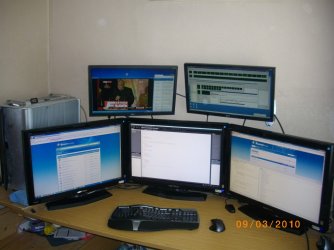
Dual screen, or not dual screen?

nickyp

New member
Local time
6:34 PM
Messages
1
Hey guys,

Obviously Windows 7 pushes through the advantages of having dual screens and the extra efficiency that is/can be created by having this.

Are people finding that there is a definite benefit by using 2 screens and are you mounting them on monitor arms or just having them side by side on the desktop, as a few people have mentioned that monitor arms are beneficial as well, not just for efficiency, but for the added desk space it creates?

Cheers for your comments, hopefully they will push me into a decision!
 

My Computer My Computer

OS
windows xp
Hello Nicky, welcome to the Seven Forums.

My main rig for private use is a 17" laptop (see the specs). When home, it stays on top of an extra cooling pad, connected to two other displays: a VGA to an external 22" display and HDMI to a 32" LCD-TV on the other corner of the room to be used when I occasionally want to watch BD's / DVD's and / or use Media Center without leaving my study.

Windows 7 Screen Resolution tool shows it like this:

screen_resolution.PNG

In real life my working corner looks like this:

Study.jpg
(The netbook in the middle does not belong there, it stays normally always in it's case)

Using external wireless keyboard and mouse, this setup is ideal for me. I've tried almost everything. Different display sizes, working only with one display etc. For me, this is the best. I really love the ability to have a video or Media Center TV running on one display while surfing / working on another display, or ability to to keep different files open on different displays while working. Quite often I have a Virtual PC / XP Mode running on the other display, while staying on Seven on another. It really makes computing a lot easier.

However, according to an old Finnish saying some like the mother, some prefer the daughter; it's up to you to decide what do you need. I am quite sure that if you try a dual display system, you don't want to go back to single display.

Just my 2 cents...

Kari
 

My Computer My Computer

Computer type
Laptop
Computer Manufacturer/Model Number
HP ENVY 17-1150eg
OS
Windows 10 Pro x64 EN-GB
CPU
1.6 GHz Intel Core i7-720QM Processor
Memory
6 GB
Graphics Card(s)
ATI Mobility Radeon HD 5850 Graphics
Sound Card
Beats sound system with integrated subwoofer
Monitor(s) Displays
17" laptop display, 22" LED and 32" Full HD TV through HDMI
Screen Resolution
1600*900 (1), 1920*1080 (2&3)
Hard Drives
Internal: 2 x 500 GB SATA Hard Disk Drive 7200 rpm
External: 2TB for backups, 3TB USB3 network drive for media
Cooling
As Envy runs a bit warm, I have it on a Cooler Master pad
Keyboard
Logitech diNovo Media Desktop Laser (bluetooth)
Mouse
Logitech Performance Mouse MX
Internet Speed
50/10 Mbps VDSL
Antivirus
Windows Defender 4.3.9431.0
Browser
Maxthon 3.5.2., IE11
However, according to an old Finnish saying some like the mother, some prefer the daughter; it's up to you to decide what do you need.

So many answers to the that.... all of them lewd ;)


As for myself, I have two 24" on the desktop and hope to add a 3rd sometime in the future.

Dual/multi screens can be very beneficial in regards to work productivity and non- work related activities. There are a multitude of different things you can use them for.

I assume this is a work orientated question?
 

My Computer My Computer

Computer type
PC/Desktop
Computer Manufacturer/Model Number
Systems by SmartEyeball
OS
8 Pro x64
CPU
i7 3770K 4.6GHz
Motherboard
ASUS P8Z77 WS
Memory
16GB G.Skill Trident X 2666mhz
Graphics Card(s)
x2 EVGA 780 Ti Superclocked SLI
Sound Card
SB X-FI Surround 5.1 PRO USB / ATH-AD900 Headphones
Monitor(s) Displays
x3 Dell U2410 / 58" Samsung
Screen Resolution
5760*1200/ 1920*1200
Hard Drives
2x Intel 520 240GB (RAID 0) * 2x WD Caviar Blacks 2TB (RAID 0) * 2TB WD Caviar Black * Sony Optirac DVD
PSU
Silverstone Strider Evolution 1200W
Case
Thermaltake Level 10 GT Snow Edition
Cooling
Noctua NH-D14
Keyboard
Topre Realforce // Ducky Shine MX Black // Filco Ninja TKL
Mouse
Thermaltake Theron (Highly Recommended) + Razer Imperator
Antivirus
MSE
Browser
IE, FF, WaterFox
Other Info
GT Extreme V2 Sim Racing Cockpit + 40" LCD and K/B Mouse stand ▼
Fanatec CSR Elite Wheel + Clubsport V1 Pedals + CSR shifter/7G-H ▼Saitek X52 Pro ▼ TrackIR 5 Pro
Buttkicker v2 Seat Rumbler with Dedicated 5.1 and Sub Woofer attached to frame ▼
=
Bloody Big Grin
I think it depends all on how you use your computer.

Eg. My mom uses her computer to check her hotmail. That's about it. Does she require dual screen?
 

My Computer My Computer

Computer type
PC/Desktop
Computer Manufacturer/Model Number
DELL VOSTRO 3650
OS
Windows 8.1 PRO
CPU
3rd Generation Intel Core i7‐3612QM CPU @ 2.10GHZ
Memory
8GB DDR3
Graphics Card(s)
NVIDIA GeForce GT 525M (128 bit), 1GB Grpahics
Screen Resolution
1920X1080
Hard Drives
750GB 5400RPM
I use dual screens and I find it hard to use a computer with 1 screen.
Been using duals since 2000/2001.
desk-9-09.jpg
 

My Computer My Computer

Computer Manufacturer/Model Number
HAL-9000
OS
Windows 7 Ultimate 64bit
CPU
Intel i7 3770K
Motherboard
Asus Sabertooth Z77
Memory
16GB DDR3 1333 Corsair XMS3
Graphics Card(s)
XFX HD6950 2GB EyeFinity
Sound Card
Logitech G35 & Sennheiser PC135 & VIA HD
Monitor(s) Displays
23" HP 2310e, 23" Samsung B2230, 21.5" Viewsonic
Screen Resolution
5760x1080
Hard Drives
16TB of Storage
128GB & 256GB Crucial M4 SSD's, 2X 1TB WD Black, 3x 2TB WD, 3x 2TB Samsung F4, 1.5TB Seagate, WD 500GB,
PSU
Antec True Power New 650watt
Case
Cooler Master HAF-932
Cooling
Corsair H60 Hydro Cooler, 3x 230mm Fans, 2x120mm Fan
Keyboard
Logitech G15 and G13
Mouse
Logitech G700 Gaming Mouse
Internet Speed
50/10 Mbit
Other Info
Speakers : Alesis M1 Active Mk2 Studio Monitors , APC RS 1200 UPS, HP 4500DN Color Laser, HP P1006 mono Laser, Kodak 8500 Dye-Sub, Epson 1280 inkjet, Epson Worforce 610 MFC
I use dual screens and I find it hard to use a computer with 1 screen.
Been using duals since 2000/2001.
desk-9-09.jpg

I'm so jealous! I can't keep my corner so tidy.
 

My Computer My Computer

Computer type
Laptop
Computer Manufacturer/Model Number
HP ENVY 17-1150eg
OS
Windows 10 Pro x64 EN-GB
CPU
1.6 GHz Intel Core i7-720QM Processor
Memory
6 GB
Graphics Card(s)
ATI Mobility Radeon HD 5850 Graphics
Sound Card
Beats sound system with integrated subwoofer
Monitor(s) Displays
17" laptop display, 22" LED and 32" Full HD TV through HDMI
Screen Resolution
1600*900 (1), 1920*1080 (2&3)
Hard Drives
Internal: 2 x 500 GB SATA Hard Disk Drive 7200 rpm
External: 2TB for backups, 3TB USB3 network drive for media
Cooling
As Envy runs a bit warm, I have it on a Cooler Master pad
Keyboard
Logitech diNovo Media Desktop Laser (bluetooth)
Mouse
Logitech Performance Mouse MX
Internet Speed
50/10 Mbps VDSL
Antivirus
Windows Defender 4.3.9431.0
Browser
Maxthon 3.5.2., IE11
Dual 28's here :D Great for video editing..
28dwidescreenediting.jpg
 

My Computer My Computer

Computer Manufacturer/Model Number
HomeBrew
OS
Win7/XP
CPU
INTEL E8600 @ 4.2GHz
Motherboard
Asus P5E w/Formula Rampage BIOS
Memory
8GB PC8500 Corsiar Dominator
Graphics Card(s)
nVidia GTX 280
Sound Card
Asus FXII (SoundMax controlled)
Monitor(s) Displays
2 x I-INC 28'
Screen Resolution
1920x1200
Hard Drives
2 x Seagate 1.5TB
PSU
Ultra 700W
Case
Something..with alot of air
Cooling
Tuniq 120 CPU - Several 80mm and one 120MM fan
Keyboard
IBM MODEL M - YA BABY!!! NEVER SAY DIE!
Mouse
MS Intellimouse
Internet Speed
50/5
Back
Top