dual screens with different resolution

JM123

New member
Local time
1:41 PM
Messages
2
I have windows 7 ultimate 64x with 2 screens. Is it possible to set each screen t o have its own display resolution when they are Mirrored? The screens are not the same and (one is a basic dell flat screen, and one is my hd 52" tv) and i prefer not to use the extend screen choice, but i rather would like to just mirror them but have 800x600 on one, and 1024x768 on the other (just for example). When i watch dvd movies, the entire hd tv is not using the full screen and only shows as a sqware instead of wide screen. I use to have this working before, but not sure how i did it, and i just reinstalled windows 7.

Possible?, and how (i could not see how to do this)?
thanks.
 

My Computer

OS
Windows 7 Ultimate 64x

My Computer

Computer Manufacturer/Model Number
home built
OS
windows 7 64bit build 7600
CPU
Intel I7 920
Motherboard
ASUS P6T Deluxe V2
Memory
Corsair 6GB (3x2GB) 1600MHz Triple Channel i7
Graphics Card(s)
XFX RADEON HD 5870
Sound Card
Creative Xfi Elite pro
Monitor(s) Displays
Hyundai W240D 24" Samsung Syncmaster 930
Screen Resolution
1920x1200 and 1280x1024
Hard Drives
WD Velociraptor 150gb
Western Digital WD7502ABYS 750GB Raid Edition
PSU
Corsair 850W TX Series PSU
Case
Coolermaster HAF 932 Full Tower
Cooling
Noctua NH-U12P
Keyboard
logitech G15 orange
Mouse
logitech mx revolution
Internet Speed
13mb
Hello JM123, welcome to Seven Forums!


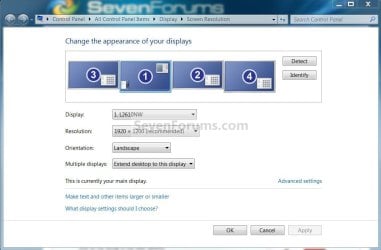
Right click an empty spot on the desktop and select screen resolution, select the resolution for the monitor of your choosing in the window that opens.

Monitors.jpg
 

My Computer

Computer Manufacturer/Model Number
* BFK Customs *
OS
W 7 64-bit Ultimate
CPU
Intel Q9550 Yorkfield
Motherboard
ASUS P5Q Pro
Memory
8GB Dominator 8500C5D
Graphics Card(s)
ATI : XFX 5870
Sound Card
Realtek HD Audio 7-1
Monitor(s) Displays
1x 47" LCD HDMI & 3x 26" LCD HDMI
Screen Resolution
1920x1080P & 1920x1200
Hard Drives
1x 80GB Intel X25-M G2 SSD : 1x 500GB & 1x 640GB WD Caviar Black(s)
PSU
Corsair 620HX
Case
Cooler Master RC-690
Cooling
Tuniq Tower 120, 2x 140mm and 3x 120mm case fans
Keyboard
Microsoft 500
Mouse
Razer Diamondback 3G
Internet Speed
14 Mb/s
Other Info
1x Koutech 3Gb/s SATA HDD Hot Swap Rack
Hello JM123, welcome to Seven Forums!


Right click an empty spot on the desktop and select screen resolution, select the resolution for the monitor of your choosing in the window that opens.

View attachment 63818

i am not in a place to test this, but i don't think you get this option when they are mirrored and not extended like you have in the picture. When they are mirrored i only see the option (last time i tried) to adjust the size that is compatible with both screens which is the max size of my dell. I will double check tonight though.
 

My Computer

OS
Windows 7 Ultimate 64x
Hello JM123, welcome to Seven Forums!


Right click an empty spot on the desktop and select screen resolution, select the resolution for the monitor of your choosing in the window that opens.

View attachment 63818

i am not in a place to test this, but i don't think you get this option when they are mirrored and not extended like you have in the picture. When they are mirrored i only see the option (last time i tried) to adjust the size that is compatible with both screens which is the max size of my dell. I will double check tonight though.
That is true. Without third party applications duplicated screens have the same resolution. Max resolution is then the max resolution of the display that has smaller max resolution.
 

My Computer

Computer type
Laptop
Computer Manufacturer/Model Number
HP ENVY 17-1150eg
OS
Windows 10 Pro x64 EN-GB
CPU
1.6 GHz Intel Core i7-720QM Processor
Memory
6 GB
Graphics Card(s)
ATI Mobility Radeon HD 5850 Graphics
Sound Card
Beats sound system with integrated subwoofer
Monitor(s) Displays
17" laptop display, 22" LED and 32" Full HD TV through HDMI
Screen Resolution
1600*900 (1), 1920*1080 (2&3)
Hard Drives
Internal: 2 x 500 GB SATA Hard Disk Drive 7200 rpm
External: 2TB for backups, 3TB USB3 network drive for media
Cooling
As Envy runs a bit warm, I have it on a Cooler Master pad
Keyboard
Logitech diNovo Media Desktop Laser (bluetooth)
Mouse
Logitech Performance Mouse MX
Internet Speed
50/10 Mbps VDSL
Antivirus
Windows Defender 4.3.9431.0
Browser
Maxthon 3.5.2., IE11
Hello JM123, welcome to Seven Forums!


Right click an empty spot on the desktop and select screen resolution, select the resolution for the monitor of your choosing in the window that opens.

View attachment 63818

i am not in a place to test this, but i don't think you get this option when they are mirrored and not extended like you have in the picture. When they are mirrored i only see the option (last time i tried) to adjust the size that is compatible with both screens which is the max size of my dell. I will double check tonight though.


My apologies, I wasn't sure if that's what you meant; maybe the suggestion by Maxheadroom above is your best bet, I think DisplayFusion is only like $15.00 USD for a basic sub, I fooled around with it briefly once.
 

My Computer

Computer Manufacturer/Model Number
* BFK Customs *
OS
W 7 64-bit Ultimate
CPU
Intel Q9550 Yorkfield
Motherboard
ASUS P5Q Pro
Memory
8GB Dominator 8500C5D
Graphics Card(s)
ATI : XFX 5870
Sound Card
Realtek HD Audio 7-1
Monitor(s) Displays
1x 47" LCD HDMI & 3x 26" LCD HDMI
Screen Resolution
1920x1080P & 1920x1200
Hard Drives
1x 80GB Intel X25-M G2 SSD : 1x 500GB & 1x 640GB WD Caviar Black(s)
PSU
Corsair 620HX
Case
Cooler Master RC-690
Cooling
Tuniq Tower 120, 2x 140mm and 3x 120mm case fans
Keyboard
Microsoft 500
Mouse
Razer Diamondback 3G
Internet Speed
14 Mb/s
Other Info
1x Koutech 3Gb/s SATA HDD Hot Swap Rack
"Mirror" = same resolutions on both screens, you can't have "mirror" at different resolutions. If you want to make the TV one show as full screen image on TV, if you have NVIDIA card, you can set it up in "NVIDIA control panel" -> "Adjust desktop size and position" (provided that you're using a digital connection, either HDMI/DVI/DP). I don't know how to set it as such on an ATi card, so I don't know. Other than that, I don't think other manufacturer has the display setup flexibility of NVIDIA's driver.

zzz2496
 

My Computer

Computer Manufacturer/Model Number
Self Built
OS
Windows7 Ultimate 64bit
CPU
Intel Core 2 Quad Q6600
Motherboard
Abit IN9-32X-MMAX
Memory
DDR2 Adata 4GB
Graphics Card(s)
Nvidia GeForce GTX 285 1024 and Nvidia GeForce 8800GT 512
Sound Card
Asus Xonar HDAV 1.3
Monitor(s) Displays
Dell 2407WFP and BenQ 2400v and Philips 150v3
Screen Resolution
3840x1200 and 1024x768
Hard Drives
2 WDC 1TB
1 WDC 1.5TB
1 WDC 640GB
1 WDC 320GB
1 Seagate 200GB
PSU
Corsair TX 850W
Case
Cooler Master HAF932
Cooling
Arctic Cooling Freezer Extreme and plenty of fans...
Keyboard
MicrosoftNaturalKeyboard 4000/Apple Alu keyboard/Dinovo mini
Mouse
Logitech G5/MarbleMouseTrackball/PerformanceMX/SpacePilotPRO
Internet Speed
1.5Mbps down/384Kbps up
Other Info
APC SURT 1000XL
Logitech Z-560
Wiimote
Mikrotik Router
Linksys (now Cisco) SD2008 8 port Gigabit switch
Linksys WRT54G (acting as AP)
Apple wireless Aluminium keyboard
Apple Magic Mouse
Xbox360 wired controller
Back
Top