Dual Screens.

badclone

New member
Local time
3:28 PM
Messages
28
Hi :)i really wanted to have 2 screens , so i went an baught the Sansui SV-1750LCD
screen, i plugged it in changed the settings ,but nothing happens if tried everything ,When i change the computer Display settings the other screen refreshes ? wat could be wrong ?

Thanks :)
 

My Computer

OS
Windows 7
CPU
(CPU):Intel(R) Core(TM)2 Duo CPU E8400 @3.00GHZ
Motherboard
MS-7357
Memory
2GB
Graphics Card(s)
NVIDIA GEFORCE 250 GTX
Case
Gigabite
Hi :)i really wanted to have 2 screens , so i went an baught the Sansui SV-1750LCD
screen, i plugged it in changed the settings ,but nothing happens if tried everything ,When i change the computer Display settings the other screen refreshes ? wat could be wrong ?

Thanks :)

Hi Dual Clone and Welcome,

Could you please fill in your system specs on your forum profile so we know what we're working with?

Importantly:
  • what make/model is your graphics card?
  • Does it support two screens?
  • Have you loaded the graphics card software and drivers that came with it?
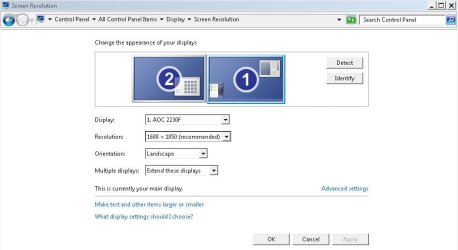
  • Can you see two screens in display settings (Control Panel | Display | Screen
    Resolution)?
  • If you see 2 screens are both enabled?
    display.JPG
  • Did your new monitor come with an install disk?

I'm sure we'll be able to help you further, hang in there and get back to me. :D

-Timo
 

My Computer

Computer Manufacturer/Model Number
Custom Hack job
OS
Windows 7 Ultimate 64 bit
CPU
Intel(R) Core(TM)2 Quad CPU Q8200 @ 2.33GHz
Motherboard
GigaByte EP45-UD3
Memory
8 GB Kingston
Graphics Card(s)
Nvidia GeForce 9600GT
Sound Card
Soundblaster Audigy
Monitor(s) Displays
AOC x2 22"
Hard Drives
2 x Samsung 500GB (RAID)
2 x Samsung 2TB
1 x WD Green 2TB
1 x Seagate 1TB
1 x Samsung 500GB
PSU
Thermaltake QFan 750W
Case
CM Scout Gaming
Cooling
Coolermaster V10
Keyboard
Microsoft Wireless Keyboard 1000
Mouse
Microsoft Wireless Optical 2000
Internet Speed
320
Other Info
Winfast PVR2000CP
LG DVD-RAM DVD/RW/DL Super Multi
Linksys WMP300Nx2 Wireless Adapter
Hi There , And thx :) Will upload it now

what make/model is your graphics card? - 250 gtx nvidia
Does it support two screens? - yes it has 2 of those adaptors at the back
Have you loaded the graphics card software and drivers that came with it? - i have installed the stuff that was on the CD
Can you see two screens in display settings (Control Panel | Display | Screen
Resolution)?- Yes i can :)
The screen im using is a TV SCREen

Ok so while i was waiting for an reply i was playing around if i change an certan setting the items disappear , so it looks like it moves to the other screen , but my other screen stays blue
 

My Computer

OS
Windows 7
CPU
(CPU):Intel(R) Core(TM)2 Duo CPU E8400 @3.00GHZ
Motherboard
MS-7357
Memory
2GB
Graphics Card(s)
NVIDIA GEFORCE 250 GTX
Case
Gigabite
Hi There , And thx :) Will upload it now

what make/model is your graphics card? - 250 gtx nvidia
Does it support two screens? - yes it has 2 of those adaptors at the back
Have you loaded the graphics card software and drivers that came with it? - i have installed the stuff that was on the CD
Can you see two screens in display settings (Control Panel | Display | Screen
Resolution)?- Yes i can :)

Ok so while i was waiting for an reply i was playing around if i change an certan setting the items disappear , so it looks like it moves to the other screen , but my other screen stays blue


Two other thoughts based on the new info:

Your monitor may have a swtich on the front to change from VGA to HD, have a look for that and press it. It also might be in the monitor configuration menu, or accessed via an AUTO button.

For testing purposes, lower your screen resolution to the monitors native resolution. This should be written somewhere in it's documentation.
 

My Computer

Computer Manufacturer/Model Number
Custom Hack job
OS
Windows 7 Ultimate 64 bit
CPU
Intel(R) Core(TM)2 Quad CPU Q8200 @ 2.33GHz
Motherboard
GigaByte EP45-UD3
Memory
8 GB Kingston
Graphics Card(s)
Nvidia GeForce 9600GT
Sound Card
Soundblaster Audigy
Monitor(s) Displays
AOC x2 22"
Hard Drives
2 x Samsung 500GB (RAID)
2 x Samsung 2TB
1 x WD Green 2TB
1 x Seagate 1TB
1 x Samsung 500GB
PSU
Thermaltake QFan 750W
Case
CM Scout Gaming
Cooling
Coolermaster V10
Keyboard
Microsoft Wireless Keyboard 1000
Mouse
Microsoft Wireless Optical 2000
Internet Speed
320
Other Info
Winfast PVR2000CP
LG DVD-RAM DVD/RW/DL Super Multi
Linksys WMP300Nx2 Wireless Adapter
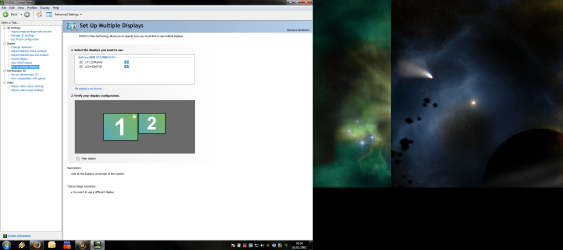
Also open the Nvida control panel and use it to configure your two monitors, it will be a lot easier. You can usually find this in windows control panel. Good luck. I'll wait to see how you go. :)

EDIT: Mine is a much older card, but your set up (in the NVIDIA control panel) should like something like this screen. Try to swap them around like I have as well (i.e. 2,1 as apposed to 1,2).
 

Attachments

  • nvidia.JPG
    nvidia.JPG
    57.5 KB · Views: 2

My Computer

Computer Manufacturer/Model Number
Custom Hack job
OS
Windows 7 Ultimate 64 bit
CPU
Intel(R) Core(TM)2 Quad CPU Q8200 @ 2.33GHz
Motherboard
GigaByte EP45-UD3
Memory
8 GB Kingston
Graphics Card(s)
Nvidia GeForce 9600GT
Sound Card
Soundblaster Audigy
Monitor(s) Displays
AOC x2 22"
Hard Drives
2 x Samsung 500GB (RAID)
2 x Samsung 2TB
1 x WD Green 2TB
1 x Seagate 1TB
1 x Samsung 500GB
PSU
Thermaltake QFan 750W
Case
CM Scout Gaming
Cooling
Coolermaster V10
Keyboard
Microsoft Wireless Keyboard 1000
Mouse
Microsoft Wireless Optical 2000
Internet Speed
320
Other Info
Winfast PVR2000CP
LG DVD-RAM DVD/RW/DL Super Multi
Linksys WMP300Nx2 Wireless Adapter
Hi, i have tried all mention above, but nothing works , i dunno why its very weird .
 

My Computer

OS
Windows 7
CPU
(CPU):Intel(R) Core(TM)2 Duo CPU E8400 @3.00GHZ
Motherboard
MS-7357
Memory
2GB
Graphics Card(s)
NVIDIA GEFORCE 250 GTX
Case
Gigabite
Hi, i have tried all mention above, but nothing works , i dunno why its very weird .

Hmm... I need to take a closer look then :)

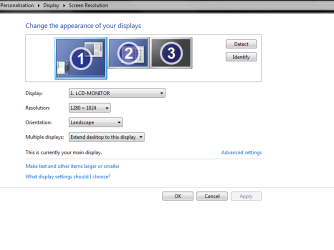
Could you please upload a screen print of the nvidia control panel and the windows display settings (the same two that I posted). Also please let me know the resolution and refresh rate for each display.

   Tip
Take the screen print using the Snipping Tool (available in the accessories folder on the Start Menu. Upload it using the Paper Clip icon on your seven forums post window.


EDIT: Lastly double check those cables and make sure they are in nice and solid.

-Timo
 

My Computer

Computer Manufacturer/Model Number
Custom Hack job
OS
Windows 7 Ultimate 64 bit
CPU
Intel(R) Core(TM)2 Quad CPU Q8200 @ 2.33GHz
Motherboard
GigaByte EP45-UD3
Memory
8 GB Kingston
Graphics Card(s)
Nvidia GeForce 9600GT
Sound Card
Soundblaster Audigy
Monitor(s) Displays
AOC x2 22"
Hard Drives
2 x Samsung 500GB (RAID)
2 x Samsung 2TB
1 x WD Green 2TB
1 x Seagate 1TB
1 x Samsung 500GB
PSU
Thermaltake QFan 750W
Case
CM Scout Gaming
Cooling
Coolermaster V10
Keyboard
Microsoft Wireless Keyboard 1000
Mouse
Microsoft Wireless Optical 2000
Internet Speed
320
Other Info
Winfast PVR2000CP
LG DVD-RAM DVD/RW/DL Super Multi
Linksys WMP300Nx2 Wireless Adapter
WIll do!
 

My Computer

OS
Windows 7
CPU
(CPU):Intel(R) Core(TM)2 Duo CPU E8400 @3.00GHZ
Motherboard
MS-7357
Memory
2GB
Graphics Card(s)
NVIDIA GEFORCE 250 GTX
Case
Gigabite
Ok i was taking the photo and i posted it into my Paint.net This is how it looked! The PIC01 Clearly shows that it was expaned
 

Attachments

  • PIC01.png
    PIC01.png
    380.3 KB · Views: 6
  • PIC02.png
    PIC02.png
    19.5 KB · Views: 5

My Computer

OS
Windows 7
CPU
(CPU):Intel(R) Core(TM)2 Duo CPU E8400 @3.00GHZ
Motherboard
MS-7357
Memory
2GB
Graphics Card(s)
NVIDIA GEFORCE 250 GTX
Case
Gigabite

My Computer

Computer type
PC/Desktop
Computer Manufacturer/Model Number
Me
OS
Win 7 Ultimate x64
CPU
FX-8350 @ 4.6 GHz so far
Motherboard
Asus M5A97 EVO
Memory
ADATA XPG V1 Series Black 8GB DDR3 1600
Graphics Card(s)
Sapphire R9 270x Dual-X
Sound Card
Xonar DGX w/ Corsair Vengence 1300
Monitor(s) Displays
Acer S232HL Abid
Screen Resolution
1920x1080
Hard Drives
120 GB OCZ Vertex 3
500 GB Seagate 7200.12
PSU
Antec Earthwatts 650W Green
Case
Antec Three Hundred
Cooling
Cooler Master 212 EVO
Keyboard
Logitech G510
Mouse
Logitech G500s
Internet Speed
35000/3000
HI Stormy13 :) its connected the same way as the screen im using :)
 

My Computer

OS
Windows 7
CPU
(CPU):Intel(R) Core(TM)2 Duo CPU E8400 @3.00GHZ
Motherboard
MS-7357
Memory
2GB
Graphics Card(s)
NVIDIA GEFORCE 250 GTX
Case
Gigabite
Could you please upload a screen print of the nvidia control panel and the windows display settings (the same two that I posted). Also please let me know the resolution and refresh rate for each display.

Could you please post what both are set too.
 

My Computer

Computer type
PC/Desktop
Computer Manufacturer/Model Number
Me
OS
Win 7 Ultimate x64
CPU
FX-8350 @ 4.6 GHz so far
Motherboard
Asus M5A97 EVO
Memory
ADATA XPG V1 Series Black 8GB DDR3 1600
Graphics Card(s)
Sapphire R9 270x Dual-X
Sound Card
Xonar DGX w/ Corsair Vengence 1300
Monitor(s) Displays
Acer S232HL Abid
Screen Resolution
1920x1080
Hard Drives
120 GB OCZ Vertex 3
500 GB Seagate 7200.12
PSU
Antec Earthwatts 650W Green
Case
Antec Three Hundred
Cooling
Cooler Master 212 EVO
Keyboard
Logitech G510
Mouse
Logitech G500s
Internet Speed
35000/3000

My Computer

OS
Windows 7
CPU
(CPU):Intel(R) Core(TM)2 Duo CPU E8400 @3.00GHZ
Motherboard
MS-7357
Memory
2GB
Graphics Card(s)
NVIDIA GEFORCE 250 GTX
Case
Gigabite
That seems a little on the high side for a 17" LCD TV. If you can find them, you might want to find the proper specs for it and see what the supported resolutions are.
 

My Computer

Computer type
PC/Desktop
Computer Manufacturer/Model Number
Me
OS
Win 7 Ultimate x64
CPU
FX-8350 @ 4.6 GHz so far
Motherboard
Asus M5A97 EVO
Memory
ADATA XPG V1 Series Black 8GB DDR3 1600
Graphics Card(s)
Sapphire R9 270x Dual-X
Sound Card
Xonar DGX w/ Corsair Vengence 1300
Monitor(s) Displays
Acer S232HL Abid
Screen Resolution
1920x1080
Hard Drives
120 GB OCZ Vertex 3
500 GB Seagate 7200.12
PSU
Antec Earthwatts 650W Green
Case
Antec Three Hundred
Cooling
Cooler Master 212 EVO
Keyboard
Logitech G510
Mouse
Logitech G500s
Internet Speed
35000/3000
Ok cool thx :), But my screen is still showing blue ? Shows Nothing
 

My Computer

OS
Windows 7
CPU
(CPU):Intel(R) Core(TM)2 Duo CPU E8400 @3.00GHZ
Motherboard
MS-7357
Memory
2GB
Graphics Card(s)
NVIDIA GEFORCE 250 GTX
Case
Gigabite
But my screen is still showing blue

Could be its attempt at trying to tell you that the resolution it is set to is too high. Try setting the resolution to something smaller like 1024x768, and if that doesn't do it go lower to 800x600.
 

My Computer

Computer type
PC/Desktop
Computer Manufacturer/Model Number
Me
OS
Win 7 Ultimate x64
CPU
FX-8350 @ 4.6 GHz so far
Motherboard
Asus M5A97 EVO
Memory
ADATA XPG V1 Series Black 8GB DDR3 1600
Graphics Card(s)
Sapphire R9 270x Dual-X
Sound Card
Xonar DGX w/ Corsair Vengence 1300
Monitor(s) Displays
Acer S232HL Abid
Screen Resolution
1920x1080
Hard Drives
120 GB OCZ Vertex 3
500 GB Seagate 7200.12
PSU
Antec Earthwatts 650W Green
Case
Antec Three Hundred
Cooling
Cooler Master 212 EVO
Keyboard
Logitech G510
Mouse
Logitech G500s
Internet Speed
35000/3000
Ok cool ! thanks
 

My Computer

OS
Windows 7
CPU
(CPU):Intel(R) Core(TM)2 Duo CPU E8400 @3.00GHZ
Motherboard
MS-7357
Memory
2GB
Graphics Card(s)
NVIDIA GEFORCE 250 GTX
Case
Gigabite
Thanks dude !!!!!!!!! Omw ta!!!!!!!!!!!!!!!!!!!
 

My Computer

OS
Windows 7
CPU
(CPU):Intel(R) Core(TM)2 Duo CPU E8400 @3.00GHZ
Motherboard
MS-7357
Memory
2GB
Graphics Card(s)
NVIDIA GEFORCE 250 GTX
Case
Gigabite
So is this the only way i can run it ? Cuz its really really BIG
 

My Computer

OS
Windows 7
CPU
(CPU):Intel(R) Core(TM)2 Duo CPU E8400 @3.00GHZ
Motherboard
MS-7357
Memory
2GB
Graphics Card(s)
NVIDIA GEFORCE 250 GTX
Case
Gigabite
You need to find the exact specs for that TV and what resolutions it is capable of supporting (wouldn't happen to have the owners manual would you?). Using the model number that you posted all I can find on it that link I posted a while ago and a link back to this thread,

Sansui SV-1750LCD - Google Search

without that information anything is trial and error, and even then you won't jknow if it is correct or not.
 

My Computer

Computer type
PC/Desktop
Computer Manufacturer/Model Number
Me
OS
Win 7 Ultimate x64
CPU
FX-8350 @ 4.6 GHz so far
Motherboard
Asus M5A97 EVO
Memory
ADATA XPG V1 Series Black 8GB DDR3 1600
Graphics Card(s)
Sapphire R9 270x Dual-X
Sound Card
Xonar DGX w/ Corsair Vengence 1300
Monitor(s) Displays
Acer S232HL Abid
Screen Resolution
1920x1080
Hard Drives
120 GB OCZ Vertex 3
500 GB Seagate 7200.12
PSU
Antec Earthwatts 650W Green
Case
Antec Three Hundred
Cooling
Cooler Master 212 EVO
Keyboard
Logitech G510
Mouse
Logitech G500s
Internet Speed
35000/3000
Back
Top