Dual Windows 7 install independent (HDD1 work & HDD2 Personal)

poetsdoek

New member
Local time
3:49 AM
Messages
4
Hi all,

This is my first post after reading a lot of posts in the past of course.

I have recently been provided with a work laptop. It's a dell e6430 running Win7 Enterprise. It has Symantec Endpoint Protection on it and some corporate backup software.I believe it is encrypted, but I am not sure.

My wish is to invest in a modular bay ( don't use optical drive ) with a SSD and to run my own Win7 on it. Completely independent from each other.

I did some research and if I understand correctly I can do two independent install, by removing the first HDD ( work ) and install the second Win7 with only the SSD in the bay. I will have my work HDD1 as boot 1 and in case I want to switch to my personal install -> reboot, F12, select SSD,etc..

I don't want to mess this up. My questions to you guys is am I missing anything?
If I boot to the SSD will my internal drive be completely left alone? No changes in logs or any other stuff that would/could upset my IT department? I am also a little frightened for the Endpoint protection, should I be?

So in Short:

c:\Windows 7 Enterprise
d:\Data Partition ( to maybe use to transfer files from HDD to SSD.
e:\Windows 7 Professional
f:\ Data Partition2 (backups and stuff )

Thanks in advance for the help.
 

My Computer My Computer

At a glance

windows 7 Enterprisei54gb
Computer type
Laptop
Computer Manufacturer/Model Number
dell
OS
windows 7 Enterprise
CPU
i5
Memory
4gb
Hard Drives
HDD1 = WD 320GB 7200rpm
HDD2 = SSD ( in order )
Antivirus
Symantec Endpoint Pretection
You got the right idea. It is only important that you remove the HDD whilst you are installing on the SSD. Then you change the BIOS boot order to boot from the SSD. You can do that at power-on by tapping F12 or permanently in the BIOS manu by tapping F2.

The data files on the HDD you could INCLUDE into the SSD libraries when you right click on them from the SSD system.
 

My Computer My Computer

At a glance

Vista, Windows7, Mint Mate, Zorin, Windows 8from 1.6GHz Duo to i7
Computer Manufacturer/Model Number
HP, Dell, Gateway, Toshiba - 4 laptops and 2 desktops
OS
Vista, Windows7, Mint Mate, Zorin, Windows 8
CPU
from 1.6GHz Duo to i7
Monitor(s) Displays
2x HP w2207
Hard Drives
5x HDD, 7x SSD, 12x Externals
Keyboard
with trackball - no mices
Mouse
Trackball mice
Internet Speed
DSL 6000
Thanks for the quick reply, whs. And I will use your tip. Only thing that is still bothering me is the encryption part. How can I be sure if it is encrypred? I think it is, but don't know for sure. And if it is encrypted, can I still copy,edit paste files if I start through the SSD?
 

My Computer My Computer

At a glance

windows 7 Enterprisei54gb
Computer type
Laptop
Computer Manufacturer/Model Number
dell
OS
windows 7 Enterprise
CPU
i5
Memory
4gb
Hard Drives
HDD1 = WD 320GB 7200rpm
HDD2 = SSD ( in order )
Antivirus
Symantec Endpoint Pretection
Depends how those files were encrypted. If you use EFS then the folder and file names become green.
 

My Computer My Computer

At a glance

Vista, Windows7, Mint Mate, Zorin, Windows 8from 1.6GHz Duo to i7
Computer Manufacturer/Model Number
HP, Dell, Gateway, Toshiba - 4 laptops and 2 desktops
OS
Vista, Windows7, Mint Mate, Zorin, Windows 8
CPU
from 1.6GHz Duo to i7
Monitor(s) Displays
2x HP w2207
Hard Drives
5x HDD, 7x SSD, 12x Externals
Keyboard
with trackball - no mices
Mouse
Trackball mice
Internet Speed
DSL 6000
From post #1

I have recently been provided with a work laptop.
I hate to be a stick in the mud but I recommend doing nothing to the workplace provided laptop with out confiding with the workplace I.T. Department.
They could get angry in a heart beat.
 

My Computer My Computer

At a glance

Windows 10 Pro. 64/ version 1709 Windows 7 Pr...Intel i7-6800K @ 4.3Corsair Platinum 16 gig @2400EVGA GTX 1070 OC
Computer type
PC/Desktop
Computer Manufacturer/Model Number
Home made Desktop
OS
Windows 10 Pro. 64/ version 1709 Windows 7 Pro/64
CPU
Intel i7-6800K @ 4.3
Motherboard
ASUS X-99 Deluxe II
Memory
Corsair Platinum 16 gig @2400
Graphics Card(s)
EVGA GTX 1070 OC
Monitor(s) Displays
Asus 27" LED LCD/VE278Q
Screen Resolution
1920-1080 or 1280-720 HDMI
Hard Drives
INTEL SSD 730-240 Gb Sata 3.0/
PSU
EVGA Platium 1200W
Case
Phanteks Luxe Tempered Glass 8 fans/ one radiator
Cooling
XSPC/ Water Cooled CPU
Keyboard
Das 4 Professional
Mouse
Logitech M705/MX Anywhere 2-S
Internet Speed
100 mbits
Antivirus
Microsoft Security Essentials/ Malwarebytes Premium 3.0/ SAS
Browser
I.E. 11 default/Firefox/ ISP Time Warner Cable/Spectrum
Other Info
LG BluRay Burner/
Sound system-KLipsch-THX/
Icy Dock ssd Hot Swap bays.
Yes, it`s a real NO NO to do anything to a computer provided by your employer, buy your own. ;)
 

My Computer My Computer

At a glance

Windows 10 Pro x64Intel Core i7 6700KGSkill TridentZ RGB 16GB 3600 16-16-16-36EVGA GTX 980 Ti SC x2
Computer type
PC/Desktop
Computer Manufacturer/Model Number
Skylake Special #666
OS
Windows 10 Pro x64
CPU
Intel Core i7 6700K
Motherboard
Asus Sabertooth Z170 Mark 1
Memory
GSkill TridentZ RGB 16GB 3600 16-16-16-36
Graphics Card(s)
EVGA GTX 980 Ti SC x2
Sound Card
Realtek High Definition
Monitor(s) Displays
AOC G2460PG
Screen Resolution
1920 x 1080 144Hz
Hard Drives
Samsung 860 Pro 256GB, Seagate Barracuda 4TB x2
PSU
EVGA 1000 P2, EVGA White Custom Braided Cables
Case
Corsair Vengeance C70 Gunmetal Black
Cooling
Corsair H100i v2, Corsair ML120 x2, Thermal Grizzly Kryonaut
Keyboard
Logitech G910 Orion Spectrum
Mouse
Logitech G700s
Internet Speed
Verizon Fios Quantum Gateway 75/75
Antivirus
Windows Defender, Malwarebytes Free 3.8.3
Browser
Chrome
Other Info
Corsair SP120 x4, LG Blu-ray Drive, Durabrand HT-395 100 Watt Dolby Digital Amp, Corsair H2100 Wireless 7.1 Headset
You really need to obtain written permission from the company IT department before proceeding. There are serious security implications in what you are proposing and the IT department would likely be very concerned.
 

My Computer My Computer

At a glance

Windows 7 Pro 64 bitXeon W35208 GBNvidia Geforce 210
Computer type
PC/Desktop
Computer Manufacturer/Model Number
HP
OS
Windows 7 Pro 64 bit
CPU
Xeon W3520
Memory
8 GB
Graphics Card(s)
Nvidia Geforce 210
Hi all, thanks for the replies. I am not trying to make it right, but I thought if I could make the installs completely independent from eachother, this would be fine. Maybe even set a password for the work hdd. I know the IT guys are never saying yes ( because some people really don't know how to operate a pc/laptop ) to anything.

I already have another laptop, but didn't want to maintain 2 laptops. I think I will give it a rest then. I more and more get the feeling that it isn't 100% foul proof.Thanks everyone for the comments and advice.
 

My Computer My Computer

At a glance

windows 7 Enterprisei54gb
Computer type
Laptop
Computer Manufacturer/Model Number
dell
OS
windows 7 Enterprise
CPU
i5
Memory
4gb
Hard Drives
HDD1 = WD 320GB 7200rpm
HDD2 = SSD ( in order )
Antivirus
Symantec Endpoint Pretection
Installing on 2 seperate drives is fool proof - really very easy. Replacing the optical reader with a HDD is less obvious. I would not do that. I would rather run the second system in virtual. That is just as good and really simple. Have a look. The virtual system is just a folder that you can put anywhere - on the internal disk or an external disk.

https://skydrive.live.com/view.aspx?cid=475A0A48CA6D4035&resid=475A0A48CA6D4035%211888&app=WordPdf&wdo=1

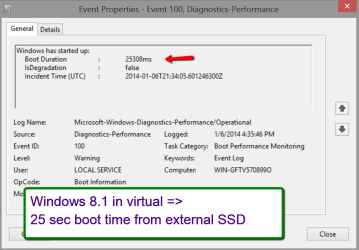
On an external disk is what I prefer. Then you can run this system from any PC. And the performance is excellent. This is an example running Windows 8.1 from an external disk.
 

Attachments

  • 2014-01-07_1407.png
    2014-01-07_1407.png
    34.3 KB · Views: 0

My Computer My Computer

At a glance

Vista, Windows7, Mint Mate, Zorin, Windows 8from 1.6GHz Duo to i7
Computer Manufacturer/Model Number
HP, Dell, Gateway, Toshiba - 4 laptops and 2 desktops
OS
Vista, Windows7, Mint Mate, Zorin, Windows 8
CPU
from 1.6GHz Duo to i7
Monitor(s) Displays
2x HP w2207
Hard Drives
5x HDD, 7x SSD, 12x Externals
Keyboard
with trackball - no mices
Mouse
Trackball mice
Internet Speed
DSL 6000
Could this also be done through a usb3 32GB drive? I just googled and saw alot of Virtualbox tutorials. Will look and read into this, thx guys.
 

My Computer My Computer

At a glance

windows 7 Enterprisei54gb
Computer type
Laptop
Computer Manufacturer/Model Number
dell
OS
windows 7 Enterprise
CPU
i5
Memory
4gb
Hard Drives
HDD1 = WD 320GB 7200rpm
HDD2 = SSD ( in order )
Antivirus
Symantec Endpoint Pretection

My Computer My Computer

At a glance

Vista, Windows7, Mint Mate, Zorin, Windows 8from 1.6GHz Duo to i7
Computer Manufacturer/Model Number
HP, Dell, Gateway, Toshiba - 4 laptops and 2 desktops
OS
Vista, Windows7, Mint Mate, Zorin, Windows 8
CPU
from 1.6GHz Duo to i7
Monitor(s) Displays
2x HP w2207
Hard Drives
5x HDD, 7x SSD, 12x Externals
Keyboard
with trackball - no mices
Mouse
Trackball mice
Internet Speed
DSL 6000
Back
Top