Dualboot problem

melandor0

New member
Local time
4:42 PM
Messages
6
Dualboot problem (Solved)

I've had Windows XP installed on my desktop for quite some time and I wanted to dualboot with Win7 for Dx10/11 support for some games. I have three HDD's, with XP installed on "1" and the new Win7 installed on "2", "3" is purely for mass data storage. I decided to install Win7 on 2 without formatting the drive and almost everything went as well as one could hope.

However, Win7 changed the name of the drives (all three are SATA btw) so that now 2 is C: and 1 is D: and XP won't start at all. I tried using EasyBCD from this tutorial: http://www.sevenforums.com/tutorials/8057-dual-boot-installation-windows-7-xp.html

but when I try to start XP it gives me the "NTLDR missing" error. I'm wondering if the problem lies within Win7 changing the drive letters for me (I had no fingers in that happening, I'm sure.) and XP refusing to boot from anything but C:

So I'm asking if there's another solution or how I should go about changing the drive letters without messing everything up even more.
 
Last edited:

My Computer

OS
Windows 7 Professional x86
Welcome!

The drive letter change is normal; each OS will change the letter of its volume to C.

Try marking the Windows 7 partition as active and running a startup repair.

Hopefully that will add XP to the boot loader.
 

My Computer

Computer Manufacturer/Model Number
Custom
OS
Windows 7 Professional x64
CPU
Intel i7 2600K OC'd @ 4620 MHz
Motherboard
Asus P8Z68-V Pro
Memory
16GB GSkill Sniper 2133 Mhz (4x4GB)
Graphics Card(s)
EVGA GeForce GTX 480 SuperClocked+
Sound Card
Realtek High Definition Audio
Monitor(s) Displays
2x Acer S273HLbmii 27"
Screen Resolution
2 x 1920x1080
Hard Drives
64GB Crucial M4 SSD

Storage: Hitachi 1TB 5400RPM, Samsung 1.5TB 5400RPM
PSU
Corsair HW Series 750w (modular)
Case
Cooler Master HAF 932 Advanced Blue Edition
Cooling
CM Hyper 212+ CPU cooler, 3x 230mm + 1x 140mm case fans
Keyboard
Logitech MK320 (wireless)
Mouse
Logitech MK320 (wireless)
Internet Speed
30 Mb/s : 2 Mb/s
Will do, thanks a lot. I'll be back in a while :D
 

My Computer

OS
Windows 7 Professional x86
"Startup repair could not detect a problem"
However, I have two active HDDs in the discmanager, the XP one and the Win7 one. Could this be a problem?
 

My Computer

OS
Windows 7 Professional x86
No, that's not a problem. Each hard drive will have its active partition; that is the one that is looked at during the boot.

Now what happens if you remove the Windows 7 drive, and just try to boot from the XP one?
 

My Computer

Computer Manufacturer/Model Number
Custom
OS
Windows 7 Professional x64
CPU
Intel i7 2600K OC'd @ 4620 MHz
Motherboard
Asus P8Z68-V Pro
Memory
16GB GSkill Sniper 2133 Mhz (4x4GB)
Graphics Card(s)
EVGA GeForce GTX 480 SuperClocked+
Sound Card
Realtek High Definition Audio
Monitor(s) Displays
2x Acer S273HLbmii 27"
Screen Resolution
2 x 1920x1080
Hard Drives
64GB Crucial M4 SSD

Storage: Hitachi 1TB 5400RPM, Samsung 1.5TB 5400RPM
PSU
Corsair HW Series 750w (modular)
Case
Cooler Master HAF 932 Advanced Blue Edition
Cooling
CM Hyper 212+ CPU cooler, 3x 230mm + 1x 140mm case fans
Keyboard
Logitech MK320 (wireless)
Mouse
Logitech MK320 (wireless)
Internet Speed
30 Mb/s : 2 Mb/s
I physically unplugged everthing except the XP drive and XP booted just fine.
EDIT: It's C: again, pretty obviously. But I wanted to say that I noticed that only the Win7 drive had one of those things on it's pins. Plastic cap that used to set slave/master on old ATA drives (don't know english name sry)
 

My Computer

OS
Windows 7 Professional x86
It looks like the Windows 7 BCD isn't working right.

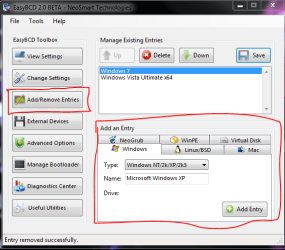
Download EasyBCD 2.0 (free, but you have to register first), and install it.

In the Add or Remove Entries tab, create a new entry for XP.

Capture.PNG
 

My Computer

Computer Manufacturer/Model Number
Custom
OS
Windows 7 Professional x64
CPU
Intel i7 2600K OC'd @ 4620 MHz
Motherboard
Asus P8Z68-V Pro
Memory
16GB GSkill Sniper 2133 Mhz (4x4GB)
Graphics Card(s)
EVGA GeForce GTX 480 SuperClocked+
Sound Card
Realtek High Definition Audio
Monitor(s) Displays
2x Acer S273HLbmii 27"
Screen Resolution
2 x 1920x1080
Hard Drives
64GB Crucial M4 SSD

Storage: Hitachi 1TB 5400RPM, Samsung 1.5TB 5400RPM
PSU
Corsair HW Series 750w (modular)
Case
Cooler Master HAF 932 Advanced Blue Edition
Cooling
CM Hyper 212+ CPU cooler, 3x 230mm + 1x 140mm case fans
Keyboard
Logitech MK320 (wireless)
Mouse
Logitech MK320 (wireless)
Internet Speed
30 Mb/s : 2 Mb/s
It's working now!
Thanks a lot, 2.0 solved it. (I also had to overhaul the HDD boot order because my PC is speshool.)
 

My Computer

OS
Windows 7 Professional x86
Great, thanks for keeping us posted.

Glad it's working out now.

Let us know if you have any more questions.
 

My Computer

Computer Manufacturer/Model Number
Custom
OS
Windows 7 Professional x64
CPU
Intel i7 2600K OC'd @ 4620 MHz
Motherboard
Asus P8Z68-V Pro
Memory
16GB GSkill Sniper 2133 Mhz (4x4GB)
Graphics Card(s)
EVGA GeForce GTX 480 SuperClocked+
Sound Card
Realtek High Definition Audio
Monitor(s) Displays
2x Acer S273HLbmii 27"
Screen Resolution
2 x 1920x1080
Hard Drives
64GB Crucial M4 SSD

Storage: Hitachi 1TB 5400RPM, Samsung 1.5TB 5400RPM
PSU
Corsair HW Series 750w (modular)
Case
Cooler Master HAF 932 Advanced Blue Edition
Cooling
CM Hyper 212+ CPU cooler, 3x 230mm + 1x 140mm case fans
Keyboard
Logitech MK320 (wireless)
Mouse
Logitech MK320 (wireless)
Internet Speed
30 Mb/s : 2 Mb/s
Back
Top