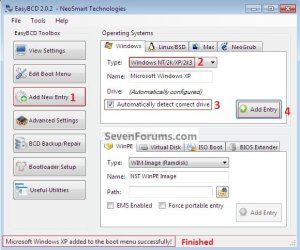
This afternoon I went ahead and tried to do a Windows xp and 7 dualboot setup. I installed Windows 7, resized the partitions, and loaded up xp. Only problem was that because I installed 7 first, the xp installer overwrote the bootloader, so Windows xp was the only thing I could boot. I found a tool called "EasyBCD" and went with the instructions in this tutorial to restore the Windows 7 updated bootloader. At this point, It booted straight to 7, so I signed in, did the "BCDEDIT" thing in the command prompt so that it would give me a reasonable amount of time to actually select xp and label it as something other than "Earlier Version of Windows". Only now I found that it could not find the xp bootloader ("ntldr"). So, now I'm stuck with the opposite problem. Is there any way to just make it as if I had not made the mistake of installing Win7 first "go away"? LOL!
Thanks.
- 2 Bunny
Thanks.
- 2 Bunny
My Computer
- Computer type
- Laptop
- Computer Manufacturer/Model Number
- Lenovo N200 0769-AUU
- OS
- Windows 7 64Bit
- CPU
- Intel Pentium T2390 1.87Ghz (Dual Core)
- Motherboard
- Lenovo IEL10
- Memory
- 1.5GB DDR2 PC2-5300 (Soon to Upgrade)
- Graphics Card(s)
- Intel GMA X3100
- Sound Card
- Lenovo Motherboard Standard Built in (HD)
- Monitor(s) Displays
- Built in display (Usable Quality)
- Screen Resolution
- 1280X800
- Hard Drives
- SEAGATE!
- PSU
- External Lenovo (20Volt, 65Watt)
- Case
- Lenovo stock case
- Cooling
- Generic Lenovo Cooler
- Keyboard
- Stock Standard Lenovo Keyboard (High quality)
- Mouse
- Built in high quality trackpad
- Internet Speed
- As fast as it goes
- Antivirus
- Avast! Free
- Browser
- Firefox (2006-2014), Pale Moon (2014-?)