Dumping XP partition

Well, I used sisparV5 and that was the one of the easiest things to use. Worked like a charm. Ok new question. It removed the xp boot option but prior to my current windows 7 I had the beta windows 7 as a dual boot so consequently I now have 2 windows 7 boot options. How do I id the beta option and delete it.
 

My Computer

Computer type
PC/Desktop
Computer Manufacturer/Model Number
Custom Build
OS
Windows 7 Pro 64bit build 7601 SP1
CPU
Intel Core I5 3570K 3.4Ghz w/ Zalman CNPS9900NT RT
Motherboard
MSI Z77A-G45 Gaming
Memory
G.Skill F3-12800CL9D-8GbXL ; 4Gx2
Graphics Card(s)
EVGA Geforce GTX 770 Superclocked
Sound Card
Creative Sound Blaster Z
Monitor(s) Displays
Dual ViewSonic VX2770Smh-LED Black 27"IPS-Panel
Screen Resolution
1920x1080
Hard Drives
Kingston Hyper X 240GB SSD Win8 Pro 64bit 6GB/s Sata III
Intel 335 Series SSD 240GB Win8 Storage 6GB/s Sata III
Intel 320 Series SSD 600GB Storage 3GB/s Sata II
Western Digital Scorpio Black 1TB - Docked via Esata
PSU
Coolermaster GX 750W
Case
Corsair Vengence C70
Cooling
Coolermaster 120mm and Enermax 140mm
Keyboard
Corsair Vengence K70
Mouse
Logitech G500
Internet Speed
22mbps+
Browser
Firefox, Chrome, IE
Other Info
Swan M50W 2.1 speakers
APC UPS
Thermaltake BlacX HDD Dock
Samsung BD Optical Drive
Netgear WNDR4500
Does msconfig (<BOOT> tab) show both options having the same paths?

Monk
 

My Computer

Computer Manufacturer/Model Number
Custom
OS
Dual boot XP Pro SP3x86 and Win7 Pro x64
CPU
AMD Phenom II x3 720 BE OCed to 3.3 GHz
Motherboard
Asus M3A79T Deluxe
Memory
2x2GB OCZ OCZ2RPR10664GK PC2-8500 DDR2
Graphics Card(s)
Sapphire ATi Radeon 4830 HD x2 (XFire)
Sound Card
Integrated (SoundMax)
Monitor(s) Displays
Dual: LG L227WTG/LG M237WD
Screen Resolution
1680 x 1050; 1920 x1280
Hard Drives
3 WDC WD7501AALS-00J7B0
PSU
Zalman 750HD Modular
Case
Antec 900
Cooling
4 120mm, 1 200mm fans
Keyboard
Black with lots of keys
Mouse
Razer Lachesis, Logitech RumbePad2, Logitech Marble
Internet Speed
Who counts
Other Info
7:1 SS

My Computer

Computer Manufacturer/Model Number
Custom
OS
Windows 7 Professional x64
CPU
Intel i7 2600K OC'd @ 4620 MHz
Motherboard
Asus P8Z68-V Pro
Memory
16GB GSkill Sniper 2133 Mhz (4x4GB)
Graphics Card(s)
EVGA GeForce GTX 480 SuperClocked+
Sound Card
Realtek High Definition Audio
Monitor(s) Displays
2x Acer S273HLbmii 27"
Screen Resolution
2 x 1920x1080
Hard Drives
64GB Crucial M4 SSD

Storage: Hitachi 1TB 5400RPM, Samsung 1.5TB 5400RPM
PSU
Corsair HW Series 750w (modular)
Case
Cooler Master HAF 932 Advanced Blue Edition
Cooling
CM Hyper 212+ CPU cooler, 3x 230mm + 1x 140mm case fans
Keyboard
Logitech MK320 (wireless)
Mouse
Logitech MK320 (wireless)
Internet Speed
30 Mb/s : 2 Mb/s
Actually nevermind I spoke too soon. I had to fix the boot files with my install disk. After that it boots directly to the log-in screen. Thanks for all the help people. Really appreciate it.
 

My Computer

Computer type
PC/Desktop
Computer Manufacturer/Model Number
Custom Build
OS
Windows 7 Pro 64bit build 7601 SP1
CPU
Intel Core I5 3570K 3.4Ghz w/ Zalman CNPS9900NT RT
Motherboard
MSI Z77A-G45 Gaming
Memory
G.Skill F3-12800CL9D-8GbXL ; 4Gx2
Graphics Card(s)
EVGA Geforce GTX 770 Superclocked
Sound Card
Creative Sound Blaster Z
Monitor(s) Displays
Dual ViewSonic VX2770Smh-LED Black 27"IPS-Panel
Screen Resolution
1920x1080
Hard Drives
Kingston Hyper X 240GB SSD Win8 Pro 64bit 6GB/s Sata III
Intel 335 Series SSD 240GB Win8 Storage 6GB/s Sata III
Intel 320 Series SSD 600GB Storage 3GB/s Sata II
Western Digital Scorpio Black 1TB - Docked via Esata
PSU
Coolermaster GX 750W
Case
Corsair Vengence C70
Cooling
Coolermaster 120mm and Enermax 140mm
Keyboard
Corsair Vengence K70
Mouse
Logitech G500
Internet Speed
22mbps+
Browser
Firefox, Chrome, IE
Other Info
Swan M50W 2.1 speakers
APC UPS
Thermaltake BlacX HDD Dock
Samsung BD Optical Drive
Netgear WNDR4500
You delete your XP partition in Disk Mgmt yet? What do both partitions say in listings?

Still hard to believe that sispar works so well to do all those things at once, except deleting the old OS partition.

Do you need to recover the deleted partition's space into Win7 to move it into preferred lower HD address?
 
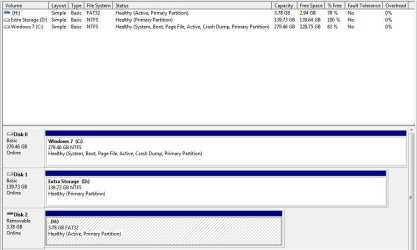
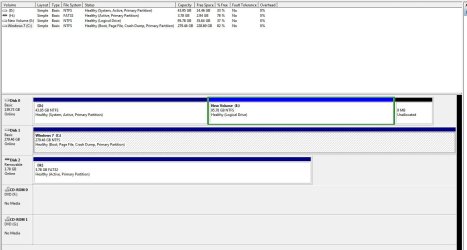
Yes I deleted. That's when I found out I had to fix the boot files. I then physically swapped the SATA cables and then loaded the install disk to fix the boot files and once that was successful I changed the boot order back to the HDD. The xp drive was now marked as unallocated space after I deleted the volume to make it all one again since I had 2 partitions on it originally. So now I have an extra 139G of storage. I'll attach a before and after. I don't know why it did it the way it did, sisparV5. It did mark my Win7 as active and I was able to boot into windows 7. But after I deleted my XP and the rebooted to my dismay I couldn't, which led to what I described above.
 

Attachments

  • Diskmng1.JPG
    Diskmng1.JPG
    97.2 KB · Views: 7
  • Diskmng2.JPG
    Diskmng2.JPG
    69.4 KB · Views: 7

My Computer

Computer type
PC/Desktop
Computer Manufacturer/Model Number
Custom Build
OS
Windows 7 Pro 64bit build 7601 SP1
CPU
Intel Core I5 3570K 3.4Ghz w/ Zalman CNPS9900NT RT
Motherboard
MSI Z77A-G45 Gaming
Memory
G.Skill F3-12800CL9D-8GbXL ; 4Gx2
Graphics Card(s)
EVGA Geforce GTX 770 Superclocked
Sound Card
Creative Sound Blaster Z
Monitor(s) Displays
Dual ViewSonic VX2770Smh-LED Black 27"IPS-Panel
Screen Resolution
1920x1080
Hard Drives
Kingston Hyper X 240GB SSD Win8 Pro 64bit 6GB/s Sata III
Intel 335 Series SSD 240GB Win8 Storage 6GB/s Sata III
Intel 320 Series SSD 600GB Storage 3GB/s Sata II
Western Digital Scorpio Black 1TB - Docked via Esata
PSU
Coolermaster GX 750W
Case
Corsair Vengence C70
Cooling
Coolermaster 120mm and Enermax 140mm
Keyboard
Corsair Vengence K70
Mouse
Logitech G500
Internet Speed
22mbps+
Browser
Firefox, Chrome, IE
Other Info
Swan M50W 2.1 speakers
APC UPS
Thermaltake BlacX HDD Dock
Samsung BD Optical Drive
Netgear WNDR4500
You know after doing this Greg I think the way you initially laid it out would have been the better method. Physically swap the drive sata cables and then boot with the install disk go into the cmd and set the active/inactive that you want and then reboot. Then boot back in from the disk again and fix the boot files with bootrec.exe /fixmbr and bootrec.exe /fixboot. Then reboot to make sure it works and reset the boot order.
 

My Computer

Computer type
PC/Desktop
Computer Manufacturer/Model Number
Custom Build
OS
Windows 7 Pro 64bit build 7601 SP1
CPU
Intel Core I5 3570K 3.4Ghz w/ Zalman CNPS9900NT RT
Motherboard
MSI Z77A-G45 Gaming
Memory
G.Skill F3-12800CL9D-8GbXL ; 4Gx2
Graphics Card(s)
EVGA Geforce GTX 770 Superclocked
Sound Card
Creative Sound Blaster Z
Monitor(s) Displays
Dual ViewSonic VX2770Smh-LED Black 27"IPS-Panel
Screen Resolution
1920x1080
Hard Drives
Kingston Hyper X 240GB SSD Win8 Pro 64bit 6GB/s Sata III
Intel 335 Series SSD 240GB Win8 Storage 6GB/s Sata III
Intel 320 Series SSD 600GB Storage 3GB/s Sata II
Western Digital Scorpio Black 1TB - Docked via Esata
PSU
Coolermaster GX 750W
Case
Corsair Vengence C70
Cooling
Coolermaster 120mm and Enermax 140mm
Keyboard
Corsair Vengence K70
Mouse
Logitech G500
Internet Speed
22mbps+
Browser
Firefox, Chrome, IE
Other Info
Swan M50W 2.1 speakers
APC UPS
Thermaltake BlacX HDD Dock
Samsung BD Optical Drive
Netgear WNDR4500
Thanks for the feedback, MM. I am also reluctant to change the method that has worked to help remove over a hundred dual boots here since Win7 release.

Since I learned this method and much else from SIW2, I'm also eager to keep up with his own advancements like the Sispar tool. However it seems safer when helping others to stick with the Diskpart commands with repair afterward, or use outstanding Partition Wizard bootable CD for a graphical interface that makes resizing into deleted OS space easy, too.

Glad it worked out for you. Your new screenshot looks good. I try to stick with Logical partitions for data, since they can't later be accidentally marked Active to derail the MBR.
 
Back
Top