
Duplicate Bookmarks

Stockman

New member
Local time
9:43 PM
Messages
4
Whenever I right click in IE8 and select 'add to favorites' - I get two new bookmarks in my drop down favorites menu instead of just the one. They have different titles but both point to the same page, sometimes only one will work, sometimes they both do. For example, I used the search facility on this forum and saved the first page of results to my favorites. I got the following two new entries as a result:

1) bookmarks Google search

2) bookmarks - Google Search

In this case, the first bookmark doesn't work, but the second does. How do I make IE8 only save the one (working one)?

Cheers

Edit to add that option two has abbreviated itself for the benefit iof this thread, whereas in my favorites menu it appears as it's full url (a very long one at that)
 

My Computer

OS
windows 7 home 64 bit
Hi Stockman & welcome,

I'm curious -
Does the same thing happen if you save to Favorites [ IE8] this way?

Left click Favorites [upper left hand side] - Add to Favorites.
 

My Computer

Computer Manufacturer/Model Number
LAPTOP. HP Pavilion dv7-4010TX .
OS
Win 7 Ultimate 64-bit. SP1.
CPU
Intel i7 -720QM.[1.6GHz Turbo Boost 2.8GHz. 6MB Cache.]
Memory
8 DDR 3 RAM. 1066MHZ
Graphics Card(s)
ATI 1024 MB. DDR3. Radeon HD5650
Monitor(s) Displays
17.3" High Definition Brightview LCD. LED Backlit.
Screen Resolution
1600 x 900.
Hard Drives
640GB
Case
Laptop / notebook.
Mouse
Logitech Anywhere mouse. MX.
Internet Speed
ADSL [ but too slow ]
Hi JMH - thanks for replying. I rarely save by that method, but just did so 3 times so I could answer your question. Two times, only the one new entry appeared, but on the third occassion, two entries appeared
 

My Computer

OS
windows 7 home 64 bit
Many IE8 problems can be fixed with a reset: Tools>Internet Options>Advanced>Reset
 

My Computer

Computer type
PC/Desktop
Computer Manufacturer/Model Number
OQO 2+
OS
Windows 8 Pro w/MC 32-bit
CPU
Intel Atom 1.86 GHz
Motherboard
OQO 2+
Memory
2 GB
Graphics Card(s)
Intel GMA 500
Sound Card
IDT
Monitor(s) Displays
LCD
Screen Resolution
800 x 480 (portable) 1280 x 1024 (docked)
Hard Drives
64 GB SSD
PSU
9 Ah Battery (portable) or OQO Brick (docked)
Case
Shirt Pocket Sized
Cooling
Tiny Fan
Keyboard
Slide out (portable) DiNovo Edge (docked)
Mouse
Eraser head (portable) Logitech Bluetooth (docked)
Internet Speed
WWAN or 802.11G (portable) T1 (docked)
Browser
IE 10
Other Info
DVD-RW OQO Docking Station
I am having the same problem. I reset IE and tried to save a bookmark again. This time it only saved one copy, but the copy saved didn't work. :mad: Does anyone have any other suggestions?
 

My Computer

OS
Windows 7 Home x64
I am having the same problem. I reset IE and tried to save a bookmark again. This time it only saved one copy, but the copy saved didn't work. :mad: Does anyone have any other suggestions?
Post the bookmark here so we can try it.
 

My Computer

Computer type
PC/Desktop
Computer Manufacturer/Model Number
OQO 2+
OS
Windows 8 Pro w/MC 32-bit
CPU
Intel Atom 1.86 GHz
Motherboard
OQO 2+
Memory
2 GB
Graphics Card(s)
Intel GMA 500
Sound Card
IDT
Monitor(s) Displays
LCD
Screen Resolution
800 x 480 (portable) 1280 x 1024 (docked)
Hard Drives
64 GB SSD
PSU
9 Ah Battery (portable) or OQO Brick (docked)
Case
Shirt Pocket Sized
Cooling
Tiny Fan
Keyboard
Slide out (portable) DiNovo Edge (docked)
Mouse
Eraser head (portable) Logitech Bluetooth (docked)
Internet Speed
WWAN or 802.11G (portable) T1 (docked)
Browser
IE 10
Other Info
DVD-RW OQO Docking Station
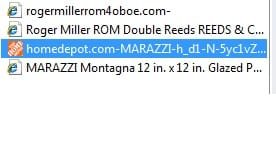
I just went to both sites and saved them by left clicking on favorites/add to favorites. I have only one copy of each. I even went to Windows Explorer displaying Favorites and searched for the words "roger" and "marazzi" to make sure there was only one version of each site. I'm using IE8 on a 32-bit Windows 7 PC. Other than an IE reset, I don't know what else to suggest, except perhaps some routine Windows maintenance. If you look in an Explorer window and order the list by modified date, you can see better what was just added (new additions at the top).
 

My Computer

Computer type
PC/Desktop
Computer Manufacturer/Model Number
OQO 2+
OS
Windows 8 Pro w/MC 32-bit
CPU
Intel Atom 1.86 GHz
Motherboard
OQO 2+
Memory
2 GB
Graphics Card(s)
Intel GMA 500
Sound Card
IDT
Monitor(s) Displays
LCD
Screen Resolution
800 x 480 (portable) 1280 x 1024 (docked)
Hard Drives
64 GB SSD
PSU
9 Ah Battery (portable) or OQO Brick (docked)
Case
Shirt Pocket Sized
Cooling
Tiny Fan
Keyboard
Slide out (portable) DiNovo Edge (docked)
Mouse
Eraser head (portable) Logitech Bluetooth (docked)
Internet Speed
WWAN or 802.11G (portable) T1 (docked)
Browser
IE 10
Other Info
DVD-RW OQO Docking Station
Same Problem - Never fixed

I know this is an old thread, but it's weird because I used "Bing.com" to search for ["Windows 7" + "Saving Favorites" + "2 entries"] and this was the only search result found.

So, small bit of background, this is a good lappy, powerful enough to run Second Life without any lag. It's just a little over a year old now and still working flawlessly. I keep it mean and lean and always up-to-date with all the Microsoft and HP updates that are recommended. I run the AVG Pro security suite with the Windows Firewall disabled because I like AVG's Firewall better. (just to keep you from having to go to my profile, it's an HP Pavilion dv6 with a core i7 and 4GB of ram and a 500GB HD. Windows 7 Home Premium 64-bit)

Since the day I brought this home from the store, it has been doing exactly as the OP described. I get two entries in my favorites menu and usually, only one works. The other is usually just the "name" of the favorite.

I've been to many forums with the same question, never a resolution.

About three months ago, I got the Office 2010 Suite. I was using openOffice because my old Office 2000 doesn't work on Windows 7. Big change over so I decided to do a complete wipe and restore. I reformatted and re-installed everything from the restore partition installed on the restore partition.

Guess what, it still saves two entries nearly every time I save a favorite, no matter how I save a favorite. Pretty much gave up on it but I was bored this morning.
 

My Computer

Computer Manufacturer/Model Number
HP Pavilion lappy dv6
OS
Win 7 Home Premium 64bit
CPU
1.6 core i7
Motherboard
?
Memory
4GB
Graphics Card(s)
NVIDIA GeForce GT 230M
Sound Card
NVIDIA High Definition Audio?
Monitor(s) Displays
generic lappy wide display
Hard Drives
500 GB
Take a look at this path in Windows Explorer:
C:/Users/<username>/Favorites. Organize the list for details view, add the "modified date" column, then click on the modified date column so that the most recently dated item is at the top. Is there one or two entries for each item?
 

My Computer

Computer type
PC/Desktop
Computer Manufacturer/Model Number
OQO 2+
OS
Windows 8 Pro w/MC 32-bit
CPU
Intel Atom 1.86 GHz
Motherboard
OQO 2+
Memory
2 GB
Graphics Card(s)
Intel GMA 500
Sound Card
IDT
Monitor(s) Displays
LCD
Screen Resolution
800 x 480 (portable) 1280 x 1024 (docked)
Hard Drives
64 GB SSD
PSU
9 Ah Battery (portable) or OQO Brick (docked)
Case
Shirt Pocket Sized
Cooling
Tiny Fan
Keyboard
Slide out (portable) DiNovo Edge (docked)
Mouse
Eraser head (portable) Logitech Bluetooth (docked)
Internet Speed
WWAN or 802.11G (portable) T1 (docked)
Browser
IE 10
Other Info
DVD-RW OQO Docking Station
Thank you for replying

I did as you said, actually, I have a shortcut to my "Favorites" directory so I can sort it easier. My shortcut opens Explorer in that directory in the "Details" view.

This is not something that happens every time. It occurs probably about 25 to 33% of the time. I have made a habit out of deleting the entries that don't work but luckily, I haven't done that for a while. So I just looked them over and I have about a dozen bookmarks that were saved like I described, one entry that is the name of the site but doesn't contain a working URL. If you open the "Properties" of the non-functional entry, there are only 4 tabs instead of a fifth tab that says, "Web Document" where it should have a working URL in it. In the "General" tab, it says "Internet URL" for "Type of File" but of course, it isn't really.

To answer your question more presicely, yes, there are duplicate entries and the date and time of the saved entries are exactly the same.
 

My Computer

Computer Manufacturer/Model Number
HP Pavilion lappy dv6
OS
Win 7 Home Premium 64bit
CPU
1.6 core i7
Motherboard
?
Memory
4GB
Graphics Card(s)
NVIDIA GeForce GT 230M
Sound Card
NVIDIA High Definition Audio?
Monitor(s) Displays
generic lappy wide display
Hard Drives
500 GB
...To answer your question more presicely, yes, there are duplicate entries and the date and time of the saved entries are exactly the same.
Is Favorites the only folder with duplicates?
 

My Computer

Computer type
PC/Desktop
Computer Manufacturer/Model Number
OQO 2+
OS
Windows 8 Pro w/MC 32-bit
CPU
Intel Atom 1.86 GHz
Motherboard
OQO 2+
Memory
2 GB
Graphics Card(s)
Intel GMA 500
Sound Card
IDT
Monitor(s) Displays
LCD
Screen Resolution
800 x 480 (portable) 1280 x 1024 (docked)
Hard Drives
64 GB SSD
PSU
9 Ah Battery (portable) or OQO Brick (docked)
Case
Shirt Pocket Sized
Cooling
Tiny Fan
Keyboard
Slide out (portable) DiNovo Edge (docked)
Mouse
Eraser head (portable) Logitech Bluetooth (docked)
Internet Speed
WWAN or 802.11G (portable) T1 (docked)
Browser
IE 10
Other Info
DVD-RW OQO Docking Station
Not sure what you're asking...

This computer is a year and a half old now and I have only reformatted it once. And that was only because I finally got Office 2010 and wanted to clean up and get rid of all the OpenOffice and some other programs that I tried and decided not to use. I typically run a very lean system and can go for many years without a reformat.

I say this because my "Favorites" folder tends to become quite big after years of saving bookmarks. I am fairly diligent about sorting my favorites into various folders to keep some order to it. If they were all in one folder, it would take forever to find any one particular Favorite.

So I have maybe close to a dozen sub-directories in my "Favorites" directory where I will save various bookmarks. Occasionally, when I save them, I just save them to the root "Favorites" directory and move it later and sometimes, I will save a bookmark to one of the sub-directories. I also use the "Favorites Bar" a lot too.

Basically, it doesn't matter where or how I save them. As I said, it's hard to predict because it is intermittent but it can happen in any directory. I get it a lot when I save to the "Favorites Bar". Maybe more than if I save it to the root "Favorites" directory. But it really doesn't seem to matter which directory I save to, I seem to always have a chance that I'm going to get two entries instead of one.
 

My Computer

Computer Manufacturer/Model Number
HP Pavilion lappy dv6
OS
Win 7 Home Premium 64bit
CPU
1.6 core i7
Motherboard
?
Memory
4GB
Graphics Card(s)
NVIDIA GeForce GT 230M
Sound Card
NVIDIA High Definition Audio?
Monitor(s) Displays
generic lappy wide display
Hard Drives
500 GB
When you said you did a clean install with a stored image you already had, that image already had the same problem so all you did was bring the problem with you. Do a clean install of the os with the Win 7 dvd and it will probably cure the problem. Then get rid of the old image and create a new one without the problem.
 

My Computer

Computer Manufacturer/Model Number
Dell XPS 730
OS
Windows 7 Home Premium 64 bit
CPU
Intel Core 2 quad Extreme Q9770 @ 3.2 GHz
Memory
4x2 GB Muskin 1600 MHz ram
Graphics Card(s)
NVidia GTX 250
Sound Card
Soundblaster X-Fi Fatality Champion
Monitor(s) Displays
2 Dell 2007WFP Ultrascans
Screen Resolution
3360 x 1050
Hard Drives
WD Black 1TB sata, 2-WD Black 500 sata, 2-Seagate 500 Go external
PSU
1000 Watt
Cooling
air
Keyboard
MS Natrual Keyboard Pro
Mouse
Logitech Wireless Trackball
Internet Speed
DSL Elite
...Basically, it doesn't matter where or how I save them...
I was asking about folders and files other than Favorites like Documents, Music, Video, etc. Windows Explorer is a hugh window into all the files on your computer. Also if you drag either or both of two duplicate favorites files into Documents, do they look and behave as they did in the Favorites folder?

Here is a thought: When you save a url using IE, that process appears to be a function of IE vs. Windows itself. It may be worth it to do a reset of IE to "fix" this IE issue: Tools/Internet Options/Advanced/Reset.
 

My Computer

Computer type
PC/Desktop
Computer Manufacturer/Model Number
OQO 2+
OS
Windows 8 Pro w/MC 32-bit
CPU
Intel Atom 1.86 GHz
Motherboard
OQO 2+
Memory
2 GB
Graphics Card(s)
Intel GMA 500
Sound Card
IDT
Monitor(s) Displays
LCD
Screen Resolution
800 x 480 (portable) 1280 x 1024 (docked)
Hard Drives
64 GB SSD
PSU
9 Ah Battery (portable) or OQO Brick (docked)
Case
Shirt Pocket Sized
Cooling
Tiny Fan
Keyboard
Slide out (portable) DiNovo Edge (docked)
Mouse
Eraser head (portable) Logitech Bluetooth (docked)
Internet Speed
WWAN or 802.11G (portable) T1 (docked)
Browser
IE 10
Other Info
DVD-RW OQO Docking Station
First, I want to thank you both for putting your effort and time into my problem. I'm not holding my breath on this one because, as I indicated, the problem is a year and a half old now. I kind of gave up trying to fix it even though I'm still curious as to "why" it happens.

So, this post has multiple replies...

Ron, I tried dragging the duplicate Favs to another folder, actually, I just drug them into the root, "My Documents" folder. They still have the same properties, one works and the other gives me this error pop-up that says, "Problem With Shortcut" and then in the description, it says, "The target """ of this Internet shortcut is not valid. Go to the Internet Shortcut Property Sheet and make sure the target is correct."

I have reached the point where I can recognize the difference in the icon and already know which one will work so I don't even bother with the ones that don't. I usually just delete them as I come across them.

Also, I did do an IE reset. I was using some Privacy or tracking filters and messed them up so I deleted them and reset IE. IE seems to work fine aside from this peculiarity.

And Bowtie, I'm not sure that's going to help. This 2010 version of an HP Pavilion lappy didn't come with a physical Windows 7 CD, only a program to "create" your own "Restore" CDs which is/are actually 3 DVD's and I created them about a week after I bought this thing. But the problem was already there and I would have to believe it would also be in my Restore DVDs since I made them while the problem existed.

Please don't lose any sleep over this one. I'm not. I'm way past that. The computer is and works awesome except for that. That and the fact that the battery went defective at eleven months old. Lucky for me, HP gave me a new one under warranty. But, aside from that, this is a screaming computer and pretty much error-free.
 

My Computer

Computer Manufacturer/Model Number
HP Pavilion lappy dv6
OS
Win 7 Home Premium 64bit
CPU
1.6 core i7
Motherboard
?
Memory
4GB
Graphics Card(s)
NVIDIA GeForce GT 230M
Sound Card
NVIDIA High Definition Audio?
Monitor(s) Displays
generic lappy wide display
Hard Drives
500 GB
It's just one of those things, simple as it may be that just drives you up a wall. What you will find on this forum is people hate to give up on a simple problem or a big problem for that matter. So hang in there and keep checking back somebody will find a solution. Good luck
 

My Computer

Computer Manufacturer/Model Number
Dell XPS 730
OS
Windows 7 Home Premium 64 bit
CPU
Intel Core 2 quad Extreme Q9770 @ 3.2 GHz
Memory
4x2 GB Muskin 1600 MHz ram
Graphics Card(s)
NVidia GTX 250
Sound Card
Soundblaster X-Fi Fatality Champion
Monitor(s) Displays
2 Dell 2007WFP Ultrascans
Screen Resolution
3360 x 1050
Hard Drives
WD Black 1TB sata, 2-WD Black 500 sata, 2-Seagate 500 Go external
PSU
1000 Watt
Cooling
air
Keyboard
MS Natrual Keyboard Pro
Mouse
Logitech Wireless Trackball
Internet Speed
DSL Elite
Thank you! I've kind of accepted it as one of the idiosyncrasies of this computer. I don't even remember what I was searching for when I stumbled on this forum and saw someone else asking about the same kind of problem. I just wondered if anyone had ever found a definite cause for it. But it's no biggy and like I said, I have been working around it for a long time. I did the HP "support" thing when it was new and they had me go through all kinds of steps all the way up to where they wanted me to do a restore. After that, they wanted me to send it in for repair. That's when I said "the heck with it" I'm not going without my computer for that little problem.

HP was good enough to give me a battery at eleven months old so I don't have any bad feeling about them. It's just a trivial issue that you have to get used to I guess.
 

My Computer

Computer Manufacturer/Model Number
HP Pavilion lappy dv6
OS
Win 7 Home Premium 64bit
CPU
1.6 core i7
Motherboard
?
Memory
4GB
Graphics Card(s)
NVIDIA GeForce GT 230M
Sound Card
NVIDIA High Definition Audio?
Monitor(s) Displays
generic lappy wide display
Hard Drives
500 GB
same problem

I just started having the same problem except I use IE9. I also get duplcate shortcuts on desktop when right click a web page & click "create shortcut". Have used both favorites & desktop shortcuts for years with no problem. Got new computer with Win7 Jan 2011. Problem just started Mar 2012. Does not always happen. About half the time.
 

My Computer

OS
windows 7 home premium 64bit
futhermore

the useless link says
‘The target “ “ of this Internet Shortcut is not valid. Go to the Internet Shortcut property sheet and make sure the target is correct.’
 

My Computer

OS
windows 7 home premium 64bit
Back
Top