Duplicate Icons in User Folder

martinm

New member
Local time
4:12 PM
Messages
3
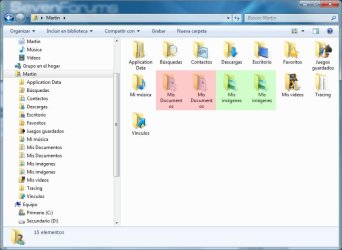
Hi everyone, I have the following problem in my user folder: there's 2 My Documents and 2 My Images, and if I try to rename one of them the other one gets renamed too. If I dare to delete one of them I'll surely lose all my data. Is there a solution to this odd problem?

Thanks in advance
 

Attachments

  • error_winexplorer.jpg
    error_winexplorer.jpg
    74.7 KB · Views: 41

My Computer

Computer Manufacturer/Model Number
N/A
OS
Windows 7 Professional x64
CPU
Intel Quad Core Q8400 @ 2.66GHz
Motherboard
ASUS P5Q
Memory
8GB DDR2 800MHz Kingston
Graphics Card(s)
GeForce 7300 MSI
Monitor(s) Displays
ViewSonic VA2016w
Hard Drives
Samsung 1TB
Hi everyone, I have the following problem in my user folder: there's 2 My Documents and 2 My Images, and if I try to rename one of them the other one gets renamed too. If I dare to delete one of them I'll surely lose all my data. Is there a solution to this odd problem?

Thanks in advance


There is probably a shortcut from one in the other.

Has it always done this?

When did it start?

Do you have a backup to restore from?


Ken
 

My Computer

Computer Manufacturer/Model Number
HP Pavillion dv-7 1005 Tx
OS
Win 8 Release candidate 8400
CPU
[email protected]
Memory
4 gigs
Graphics Card(s)
Nvidia 9600M
Sound Card
HD built-in
Monitor(s) Displays
17" Wxga
Screen Resolution
1440x900
Cooling
none
Internet Speed
45Mb down 5Mb up
It would just be the "desktop.ini" file located inside. The name explorer shows is just for show.
There is an entry to remove from the desktop.ini file that will make explorer use the real folder name.
 

My Computer

Computer type
PC/Desktop
Computer Manufacturer/Model Number
Alienware Aurora ALX R4
OS
Windows 10 Pro (x64)
CPU
Intel Core i7-3930K (3.2GHz - 4.5GHz)
Motherboard
Alienware Aurora-R4 x79
Memory
4x Samsung 4GB PC3-12800 DDR3 (16GB 1600MHz)
Graphics Card(s)
Nvidia Geforce GTX 690
Sound Card
SteelSeries Siberia Elite
Monitor(s) Displays
Dell UltraSharp U3011
Screen Resolution
2560x1600
Hard Drives
Samsung 850 Pro 256 GB, Seagate 1TB Desktop Hybrid HDD, 2x Western Digital 4TB Green HDD
PSU
875W Some Dell PSU <.<
Case
Alienware Aurora ALX
Cooling
Custom Liquid Cooling (EK CPU & GPU blocks) dual EK 480RAD
Keyboard
Logitech G710+ Mechanical
Mouse
Logitech G700s
Internet Speed
Verizon Fios (50 mbps average)
Other Info
Server: Intel NUC D54250WYK: i5-4250U, 16GB, 256 GB mSATA, Windows Server 2012 R2
Thanks Ken for your soon answer.
I reinstalled everything in my system last week, and the problem started last weekend.
To be honest I didn't care about making backups or system restore at this point. So I think this is not an option for me.
I'm not sure about the shortcut thing, shortcuts get just deleted. I tried to delete one of my "My Images" and both went to the trash bin, they both disappeared from the user folder but only one appears as deleted in the trash bin. Restoring it from the trash bin I get both folders again in the user folder. Nuts.
Could it be something related to registry?
 

My Computer

Computer Manufacturer/Model Number
N/A
OS
Windows 7 Professional x64
CPU
Intel Quad Core Q8400 @ 2.66GHz
Motherboard
ASUS P5Q
Memory
8GB DDR2 800MHz Kingston
Graphics Card(s)
GeForce 7300 MSI
Monitor(s) Displays
ViewSonic VA2016w
Hard Drives
Samsung 1TB

My Computer

OS
Win7U 64 RTM
CPU
Q9550
Motherboard
GA-EP45-UD3R
Memory
8GB Gskill
Graphics Card(s)
ASUS|EAH4850/HTDI/1GD3/A
Sound Card
xfi Plat
Monitor(s) Displays
Dell 2405fpw
Screen Resolution
1920x1200
Hard Drives
Seagate & WD sata Drives
PSU
Antec
Case
Antec
Keyboard
MS Natural Ergonomic 4000
Mouse
Logitech MX610 USB Cordless
You were right James, and thank you very much!!
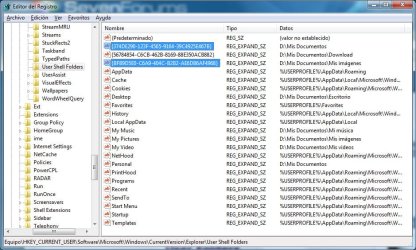
I had relocated these folders to drive D: and that originated the problem, somewhere I did things wrong when moving to the new locations.
I went to the registry like in your tutorial, made a backup of User Shell Folders and then removed the 2 keys highlighted in blue, restarted the pc and that was all!!

Thank you all guys
See you

MartinM
 

Attachments

  • correccion registro.jpg
    correccion registro.jpg
    133.7 KB · Views: 76

My Computer

Computer Manufacturer/Model Number
N/A
OS
Windows 7 Professional x64
CPU
Intel Quad Core Q8400 @ 2.66GHz
Motherboard
ASUS P5Q
Memory
8GB DDR2 800MHz Kingston
Graphics Card(s)
GeForce 7300 MSI
Monitor(s) Displays
ViewSonic VA2016w
Hard Drives
Samsung 1TB
Back
Top