Duplicate Icons On Taskbar

Phantasma14

Requested account to be closed
Local time
6:36 PM
Messages
7
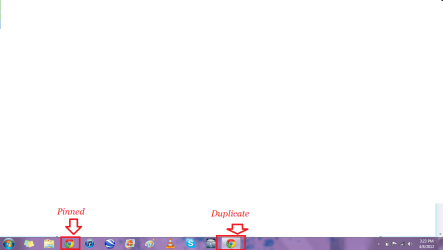
Whenever I click on my pinned Google Chrome app on my taskbar it makes a duplicate icon, I have tried re-installing but it still does it. Untitled.png
 

My Computer

OS
Windows 7
did you try unpinning the duplicate?
 

My Computer

Computer Manufacturer/Model Number
Emachines
OS
Windows 7 Ultimate x64 SP1
CPU
AMD Athlon II X2 235
Motherboard
eMachines MCP61PM-GM
Memory
6.00 GB Dual-Channel DDR2 @ 401MHz (5-5-5-18)
Graphics Card(s)
1024MB GeForce 9800 GT (PNY)
Sound Card
Realtek
Monitor(s) Displays
LG 1080P Monitor
Screen Resolution
1920x1080
Hard Drives
733GB Seagate ST375052 8AS SCSI Disk Device (ATA)
PSU
Cooler-master 460w 80 Plus Bronze
Case
Emachines
Cooling
Cooler master CPU cooler
Keyboard
Emachines keyboard
Internet Speed
36 Megabits per second (3.6 MEGABYTES per second)
Close any chrome window and remove the pinned item.
Open chrome and at the taskbar on chrome's icon, select pin to taskbar. This should do it.
 

My Computer

Computer Manufacturer/Model Number
HCL
OS
Winbdows 7 ultimate x64 | Ubuntu 12.04 x64 LTS
CPU
Core 2 Duo e7400 @ 2.90GHz
Motherboard
Gigabyte G31M-ES2L
Memory
3GB DDR2
Graphics Card(s)
Asus Nvidia GTX 560Ti 1GB
Sound Card
On-board
Monitor(s) Displays
HCL eZeeBee 18.5" LCD
Screen Resolution
1366x768 @ 60Hz
Hard Drives
Western Digital 320GB
PSU
Corsair CX500 V2 500W
Cooling
Stock
Keyboard
Stock
Mouse
Stock
Internet Speed
15-25kBps D/L | 10kBps U/L | Hey Don't laugh
And I have tried that numerous times without success
 

My Computer

OS
Windows 7
Whenever I click on my pinned Google Chrome app on my taskbar it makes a duplicate icon, I have tried re-installing but it still does it. View attachment 206310

Right click on the original Google Chrome icon and and from the resulting list right click on Google Chrome "Properties". What are the "Target" and "Start In" locations? Make a note of each. Now do the same for the duplicate icon. Are they the same or different? Please post back the results.
 

My Computer

Computer type
PC/Desktop
Computer Manufacturer/Model Number
Custom Built
OS
Windows 7 Professional x64
CPU
Intel i5 quad processor
Motherboard
DP67BG
Memory
16 GB
Graphics Card(s)
Radeon HD 5770
Sound Card
Realtek High Definition Audio
Monitor(s) Displays
Samsung SyncMaster
Screen Resolution
1920X1080
Hard Drives
WD 2TB (SATA Internal)
WD 1TB (USB External)
PSU
Corsair GS800
Case
Tower (Generic)
Cooling
3 Internal Fans
Keyboard
MS Wireless
Mouse
MS Optical Wired
Internet Speed
54 mbps
Antivirus
Emsisoft
Browser
IE-Version 9, Palemoon-Version 24.2.0
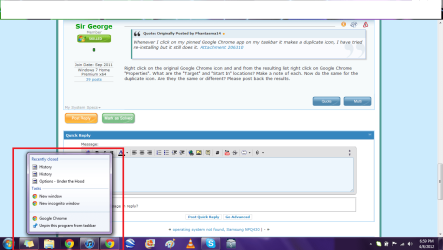
I am not given those options, see pictureUntitled.png
 

My Computer

OS
Windows 7
I am not given those options, see pictureView attachment 206331

The 6th item in your attachment is "Google Chrome". Right click it and from the resulting list choose "Properties".

My original post didn't make that point clear. Sorry for the confusion.
 

My Computer

Computer type
PC/Desktop
Computer Manufacturer/Model Number
Custom Built
OS
Windows 7 Professional x64
CPU
Intel i5 quad processor
Motherboard
DP67BG
Memory
16 GB
Graphics Card(s)
Radeon HD 5770
Sound Card
Realtek High Definition Audio
Monitor(s) Displays
Samsung SyncMaster
Screen Resolution
1920X1080
Hard Drives
WD 2TB (SATA Internal)
WD 1TB (USB External)
PSU
Corsair GS800
Case
Tower (Generic)
Cooling
3 Internal Fans
Keyboard
MS Wireless
Mouse
MS Optical Wired
Internet Speed
54 mbps
Antivirus
Emsisoft
Browser
IE-Version 9, Palemoon-Version 24.2.0
C:\Users\*******\AppData\Local\Google\Chrome\Application\chrome.exe

C:\Users\*******\AppData\Local\Google\Chrome\Application

Are the target and start in for the pined icon, it does not give any information like that in the second, duplicate icon
 

My Computer

OS
Windows 7
C:\Users\*******\AppData\Local\Google\Chrome\Application\chrome.exe

C:\Users\*******\AppData\Local\Google\Chrome\Application

Are the target and start in for the pined icon, it does not give any information like that in the second, duplicate icon

Try this as a solution. Open Google Chrome, then select the wrench in the upper right hand corner, from the ensuing list choose About Google Chrome. This will update to the latest version, which is; 180.1025.151. After confirming you have the latest version, unpin the icon from the taskbar and then add it again. If that corrects the problem, you're done.

If no joy, try this as the next solution. Open up the program, so that you have duplicate icons. Then right click the duplicate icon (the new one) and click Pin this program to taskbar. Next, right click the original and select Unpin this program from taskbar.

Let me know how it goes.
 

My Computer

Computer type
PC/Desktop
Computer Manufacturer/Model Number
Custom Built
OS
Windows 7 Professional x64
CPU
Intel i5 quad processor
Motherboard
DP67BG
Memory
16 GB
Graphics Card(s)
Radeon HD 5770
Sound Card
Realtek High Definition Audio
Monitor(s) Displays
Samsung SyncMaster
Screen Resolution
1920X1080
Hard Drives
WD 2TB (SATA Internal)
WD 1TB (USB External)
PSU
Corsair GS800
Case
Tower (Generic)
Cooling
3 Internal Fans
Keyboard
MS Wireless
Mouse
MS Optical Wired
Internet Speed
54 mbps
Antivirus
Emsisoft
Browser
IE-Version 9, Palemoon-Version 24.2.0
Neither of these options worked.
 

My Computer

OS
Windows 7
Neither of these options worked.

Well partner, I have hit the trails end and run out of suggestions. I hope someone else can provide a solution for you.

Good luck.
 

My Computer

Computer type
PC/Desktop
Computer Manufacturer/Model Number
Custom Built
OS
Windows 7 Professional x64
CPU
Intel i5 quad processor
Motherboard
DP67BG
Memory
16 GB
Graphics Card(s)
Radeon HD 5770
Sound Card
Realtek High Definition Audio
Monitor(s) Displays
Samsung SyncMaster
Screen Resolution
1920X1080
Hard Drives
WD 2TB (SATA Internal)
WD 1TB (USB External)
PSU
Corsair GS800
Case
Tower (Generic)
Cooling
3 Internal Fans
Keyboard
MS Wireless
Mouse
MS Optical Wired
Internet Speed
54 mbps
Antivirus
Emsisoft
Browser
IE-Version 9, Palemoon-Version 24.2.0
If it makes you feel any better I'm having the same problem after installing a fresh version of chrome (18.0.1025.152 m). No idea how to fix it, but this problem is killing my productivity.
 

My Computer

OS
32 Pro
For what it's worth, i came around this problem:

1) Right click in the shortcut or the pinned item itself.
2) Select Properties from the displayed menu.
3) Go to the Compatibility Tab.
4) Select the Windows Vista Compatibility Mode (or whatever works for you)

That's about it, now I only have one icon.
Remember from time to time to check the updates for Google Chrome in case they solve this on their own, I'm not much of a fan of compatibility mode.
 

My Computer

OS
Windows 7 x64 Ultimate
It's kinda a janky solution (posted above), but it works.

Thanks.
 

My Computer

OS
32 Pro
I had tried many things:
reinstalling Chrome,
many pin/unpin tips from other forums

but finally someone gave a tip that works ! Thanks a lot
 

My Computer

OS
Windows 7 Ultimate x32
Back
Top