
Bubblegum Tate
New member
- Local time
- 2:30 AM
- Messages
- 22
mystery duplicated users and programs files created on separate drive
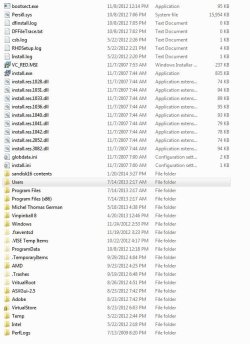
Hi, I have an odd problem where contents on my C: drive seem to be duplicated on another drive. 28.2 gb worth. I bought this extra drive several months ago for storage and I haven't used it much. Now I do want to use it and I see all these weird duplicate files and folders on it.
I make routine backups with Macrium on another drive so I don't know what's going on. I'm wondering how I can determine if I can throw these files away without harming my Windows 7 installation. I put all the duplicate files/folders in new folder called 'hide me'. Is there a way I can lock this 'hide me' folder so that upon boot Win7 can't see it? Then I'll know if I can delete all this stuff. Thanks.
Hi, I have an odd problem where contents on my C: drive seem to be duplicated on another drive. 28.2 gb worth. I bought this extra drive several months ago for storage and I haven't used it much. Now I do want to use it and I see all these weird duplicate files and folders on it.
I make routine backups with Macrium on another drive so I don't know what's going on. I'm wondering how I can determine if I can throw these files away without harming my Windows 7 installation. I put all the duplicate files/folders in new folder called 'hide me'. Is there a way I can lock this 'hide me' folder so that upon boot Win7 can't see it? Then I'll know if I can delete all this stuff. Thanks.
Attachments
Last edited:
My Computer
- OS
- Microsoft Windows 7 Ultimate 64-bit sp1
- CPU
- Intel(R) Core(TM) i5-2500K CPU @ 3.30GHz
- Motherboard
- Gigabyte Technology Co., Ltd. Z68X-UD3H-B3
- Memory
- 8.00 GB
- Graphics Card(s)
- Radeon HD 6800 Series
- Sound Card
- (1) Realtek High Definition Audio (2) TC Near Audio (3)
- Monitor(s) Displays
- Asus


