Solved Duplicating Icons On Taskbar

Feathers

New member
Local time
2:38 AM
Messages
8
Hi,

I've been searching high and low for a way to do this but I can't seem to find anything. First off, I do NOT want to install or download any program whatsoever. I want to do this with what I have, aka Windows 7.

Let's say I have 2 or more Firefox profiles. I'd like to open them in separate windows. This is easily done with -no-remote, correct? Well, what if I want them to open as two different icons on the taskbar?

Currently, I can open both profiles but they will be grouped in the Firefox icon. I don't want them to be grouped. I could customise my taskbar and choose something other than 'always combine, hide labels'. Unfortunately, I don't want the labels. And I want every other icon to combine. It's only the different Firefox profiles that I want separate.

Is this possible?
 

My Computer

OS
Windows 7 Home Premium 64bit
Hi,

I've been searching high and low for a way to do this but I can't seem to find anything. First off, I do NOT want to install or download any program whatsoever. I want to do this with what I have, aka Windows 7.

Let's say I have 2 or more Firefox profiles. I'd like to open them in separate windows. This is easily done with -no-remote, correct? Well, what if I want them to open as two different icons on the taskbar?

Currently, I can open both profiles but they will be grouped in the Firefox icon. I don't want them to be grouped. I could customise my taskbar and choose something other than 'always combine, hide labels'. Unfortunately, I don't want the labels. And I want every other icon to combine. It's only the different Firefox profiles that I want separate.

Is this possible?

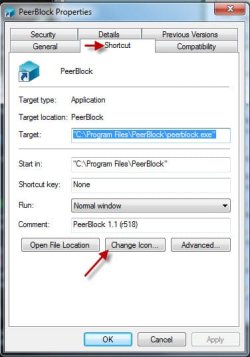
Without trying this myself, I believe you could solve the icon probem by creating a shortcut to Firefox on your desktop and right-click the shortcut and under the Shortcut tab choose "Chang Icon..."

HTH
 

Attachments

  • Change Icon.jpg
    Change Icon.jpg
    28.8 KB · Views: 6
Last edited:

My Computer

Computer type
PC/Desktop
Computer Manufacturer/Model Number
Custom Built
OS
Windows 7 Professional x64
CPU
Intel i5 quad processor
Motherboard
DP67BG
Memory
16 GB
Graphics Card(s)
Radeon HD 5770
Sound Card
Realtek High Definition Audio
Monitor(s) Displays
Samsung SyncMaster
Screen Resolution
1920X1080
Hard Drives
WD 2TB (SATA Internal)
WD 1TB (USB External)
PSU
Corsair GS800
Case
Tower (Generic)
Cooling
3 Internal Fans
Keyboard
MS Wireless
Mouse
MS Optical Wired
Internet Speed
54 mbps
Antivirus
Emsisoft
Browser
IE-Version 9, Palemoon-Version 24.2.0
Without trying this myself, I believe you could solve the icon probem by creating a shortcut to Firefox on your desktop and right-click the shortcut and under the Shortcut tab choose "Chang Icon..."

HTH

I tried this myself. Unfortunately, it doesn't work. The new window with the changed icon still comes up as the default FF icon and gets grouped with the other profile...
 

My Computer

OS
Windows 7 Home Premium 64bit

My Computer

Computer Manufacturer/Model Number
Hewlett packard/p6512uk
OS
Microsoft Windows 7 Home Premium 64-bit 7600
CPU
IIx4 amd athelon 635 processor
Motherboard
FOXCONN 2AA9
Memory
2x2gb
Graphics Card(s)
ati radeon HD 5450
Sound Card
(1) Realtek High Definition Audio (2) AMD High Definition
Monitor(s) Displays
samsung lcd tv 32"
Screen Resolution
1360x 768
Hard Drives
(1) WDC WD10 01FAES-60Z2A0 SATA Disk Device (2) Maxtor OneTouch USB Device (3) ST310003 33AS USB Device (4) WD My Book 1111 USB Device
PSU
?
Cooling
air!
Keyboard
wireless hp
Mouse
wireless Hp,optical
Internet Speed
1.10mb/s
Antivirus
MSE
Browser
Firefox

Yes, I tried this as well. It still opened Firefox under the same button. I'm not sure how to show you guys what I mean... Maybe pics will make it clearer?

In the first attachment, you can see that there are two firefox windows open. This is what happens whenever I try to do what that article said to do. This also happens when I try changing the icon of the shortcut.

I have tried making the shortcut in desktop, it combined. Tried dragging shortcut to the taskbar, it created a second button for about a minute. Once I clicked the new button, it opens a new window and combines with the original again. I have even tried making a new shortcut directly in the folder where all pinned shortcuts of apps on taskbar is kept. Again, it didn't work.

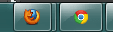
What I want, is in the second attachment. Two different buttons, both leading to two different profiles. I read somewhere that someone used a firefox normal version and a portable version. Is this possible WITHOUT using a portable version? If not, how limited is the portable version? Does it have all the features a full Firefox has?
 

Attachments

  • FF1.png
    FF1.png
    2 KB · Views: 122
  • FF2.png
    FF2.png
    3.5 KB · Views: 124

My Computer

OS
Windows 7 Home Premium 64bit

My Computer

OS
Windows 7 Professional 32bit
im not sure if it can be done, have you considered asking over at the mozilla forum?
 

My Computer

Computer Manufacturer/Model Number
Hewlett packard/p6512uk
OS
Microsoft Windows 7 Home Premium 64-bit 7600
CPU
IIx4 amd athelon 635 processor
Motherboard
FOXCONN 2AA9
Memory
2x2gb
Graphics Card(s)
ati radeon HD 5450
Sound Card
(1) Realtek High Definition Audio (2) AMD High Definition
Monitor(s) Displays
samsung lcd tv 32"
Screen Resolution
1360x 768
Hard Drives
(1) WDC WD10 01FAES-60Z2A0 SATA Disk Device (2) Maxtor OneTouch USB Device (3) ST310003 33AS USB Device (4) WD My Book 1111 USB Device
PSU
?
Cooling
air!
Keyboard
wireless hp
Mouse
wireless Hp,optical
Internet Speed
1.10mb/s
Antivirus
MSE
Browser
Firefox
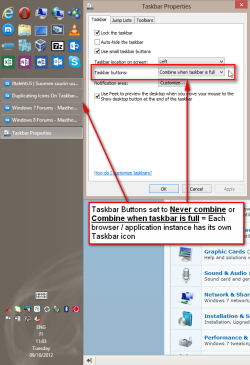
Works for me, using Maxthon browser:

2012-10-09_110753.png

Kari
 

My Computer

Computer type
Laptop
Computer Manufacturer/Model Number
HP ENVY 17-1150eg
OS
Windows 10 Pro x64 EN-GB
CPU
1.6 GHz Intel Core i7-720QM Processor
Memory
6 GB
Graphics Card(s)
ATI Mobility Radeon HD 5850 Graphics
Sound Card
Beats sound system with integrated subwoofer
Monitor(s) Displays
17" laptop display, 22" LED and 32" Full HD TV through HDMI
Screen Resolution
1600*900 (1), 1920*1080 (2&3)
Hard Drives
Internal: 2 x 500 GB SATA Hard Disk Drive 7200 rpm
External: 2TB for backups, 3TB USB3 network drive for media
Cooling
As Envy runs a bit warm, I have it on a Cooler Master pad
Keyboard
Logitech diNovo Media Desktop Laser (bluetooth)
Mouse
Logitech Performance Mouse MX
Internet Speed
50/10 Mbps VDSL
Antivirus
Windows Defender 4.3.9431.0
Browser
Maxthon 3.5.2., IE11
Firefox Portable - Wikipedia, the free encyclopedia

Firefox Portable retains all of Mozilla Firefox's abilities such as extensions and automatic updating.

Thanks. I guess I'll be using this if I can't find an alternative.

im not sure if it can be done, have you considered asking over at the mozilla forum?

Mozilla forum? I would've thought this was a Windows 7 thing. I guess I'll try over there...

Works for me, using Maxthon browser:
Kari

I could customise my taskbar and choose something other than 'always combine, hide labels'. Unfortunately, I don't want the labels. And I want every other icon to combine. It's only the different Firefox profiles that I want separate.
 

My Computer

OS
Windows 7 Home Premium 64bit
Mozilla forum? I would've thought this was a Windows 7 thing. I guess I'll try over there...


im not so sure it is a win 7 thing , it cant harm to have a look over at mozilla, more irons in the fire etc
 

My Computer

Computer Manufacturer/Model Number
Hewlett packard/p6512uk
OS
Microsoft Windows 7 Home Premium 64-bit 7600
CPU
IIx4 amd athelon 635 processor
Motherboard
FOXCONN 2AA9
Memory
2x2gb
Graphics Card(s)
ati radeon HD 5450
Sound Card
(1) Realtek High Definition Audio (2) AMD High Definition
Monitor(s) Displays
samsung lcd tv 32"
Screen Resolution
1360x 768
Hard Drives
(1) WDC WD10 01FAES-60Z2A0 SATA Disk Device (2) Maxtor OneTouch USB Device (3) ST310003 33AS USB Device (4) WD My Book 1111 USB Device
PSU
?
Cooling
air!
Keyboard
wireless hp
Mouse
wireless Hp,optical
Internet Speed
1.10mb/s
Antivirus
MSE
Browser
Firefox
As shown in my previous post, the only thing you need to do to get own taskbar icon for each instance of your browser you have open, is to set Taskbar Buttons to Never combine or Combine when taskbar is full.

Kari
 

My Computer

Computer type
Laptop
Computer Manufacturer/Model Number
HP ENVY 17-1150eg
OS
Windows 10 Pro x64 EN-GB
CPU
1.6 GHz Intel Core i7-720QM Processor
Memory
6 GB
Graphics Card(s)
ATI Mobility Radeon HD 5850 Graphics
Sound Card
Beats sound system with integrated subwoofer
Monitor(s) Displays
17" laptop display, 22" LED and 32" Full HD TV through HDMI
Screen Resolution
1600*900 (1), 1920*1080 (2&3)
Hard Drives
Internal: 2 x 500 GB SATA Hard Disk Drive 7200 rpm
External: 2TB for backups, 3TB USB3 network drive for media
Cooling
As Envy runs a bit warm, I have it on a Cooler Master pad
Keyboard
Logitech diNovo Media Desktop Laser (bluetooth)
Mouse
Logitech Performance Mouse MX
Internet Speed
50/10 Mbps VDSL
Antivirus
Windows Defender 4.3.9431.0
Browser
Maxthon 3.5.2., IE11
im not so sure it is a win 7 thing , it cant harm to have a look over at mozilla, more irons in the fire etc

Thanks. I've posted there. We'll see if they can help me.

As shown in my previous post, the only thing you need to do to get own taskbar icon for each instance of your browser you have open, is to set Taskbar Buttons to Never combine or Combine when taskbar is full.

Kari

I'm not sure if you're just not reading what I typed or if you don't understand what I typed. If I changed my taskbar settings to other than always combine, hide labels, this is what will happen:

Never combine
- Every other program will not combine either
- This will clutter my taskbar unnecessarily
- I only want 2 icons for FIREFOX... ONLY... THAT'S ALL...
- It shows labels. I do NOT want labels. I don't need to know what all my programs are with words. Icons are enough.

Combine when taskbar is full
- Same problem as above. Only difference? It combines when taskbar is full.

- I have TWELVE icons pinned to the taskbar at the moment. My laptop is only 14". What do you think that means? IT IS ALWAYS FULL. Which only makes things VERY confusing.

- Not every person in the world likes having the taskbar on the left of the screen like you do. It's not ergonomically comfortable for a person who grew up with the taskbar at the bottom and it eats up space horizontally. I don't like scrolling to the left and right, thank you.
 

My Computer

OS
Windows 7 Home Premium 64bit
I read everything you wrote. However, as far as I know not combining is the only solution to get it as you want to.

You might want to try some of the third party docks? I think you can customize for instance ObjectDock to show own icon for each Firefox profile.

Kari
 

My Computer

Computer type
Laptop
Computer Manufacturer/Model Number
HP ENVY 17-1150eg
OS
Windows 10 Pro x64 EN-GB
CPU
1.6 GHz Intel Core i7-720QM Processor
Memory
6 GB
Graphics Card(s)
ATI Mobility Radeon HD 5850 Graphics
Sound Card
Beats sound system with integrated subwoofer
Monitor(s) Displays
17" laptop display, 22" LED and 32" Full HD TV through HDMI
Screen Resolution
1600*900 (1), 1920*1080 (2&3)
Hard Drives
Internal: 2 x 500 GB SATA Hard Disk Drive 7200 rpm
External: 2TB for backups, 3TB USB3 network drive for media
Cooling
As Envy runs a bit warm, I have it on a Cooler Master pad
Keyboard
Logitech diNovo Media Desktop Laser (bluetooth)
Mouse
Logitech Performance Mouse MX
Internet Speed
50/10 Mbps VDSL
Antivirus
Windows Defender 4.3.9431.0
Browser
Maxthon 3.5.2., IE11
This has been solved. For future reference for those who might be interested in creating two icons:

What you do is go to your C drive, or whatever drive that programs install into usually (Program Files), copy the entire folder of the program you want 2 icons of, and paste it again as [Program] 2. Then from [Program] 2, you create a new shortcut that leads to that folder and pin it to your taskbar. An example:

- I went into C:\Program Files (x86) and copied the folder Mozilla Firefox.
- Pasted it into C:\Program Files (x86) as Mozilla Firefox 2.
- Inside C:\Program Files (x86)\Mozilla Firefox 2, I renamed firefox.exe as firefox2.exe
- Made a shortcut with firefox2.exe to desktop.
- Opened 1st FF's properties and changed Target to "C:\Program Files (x86)\Mozilla Firefox\firefox.exe" -p "Profile 1" -no-remote and saved.
- Opened 2nd FF's properties and changed Target to "C:\Program Files (x86)\Mozilla Firefox 2\firefox2.exe" -p "Profile 2" -no-remote and saved.
- Start In for 2nd FF MUST be "C:\Program Files (x86)\Mozilla Firefox 2" or this will not work.
- Pin 2nd FF shortcut to taskbar.
- Restarted computer.

And done. I hope this will help others who wish to create 2 identical but not really identical icons on their taskbar. :) Don't even need to change icon image if you don't want to.
 

My Computer

OS
Windows 7 Home Premium 64bit
Back
Top