DVB-T2 tv usb stick

sinbin

MR poon
Power User
Local time
5:30 AM
Messages
347
HI i was looking for a dvb-t2 usb freeview tv stick for pc.
Any one know if there about and if they work with windows 7 64:p
 

My Computer

Computer Manufacturer/Model Number
home build/gigabyte mobo
OS
windows 7 64 bit premium
CPU
q6600 2.4 overclocked to 3.2 ghz
Motherboard
gigabyte ga_73pvm.s2h rev 1.0
Memory
4 gb 800 mhz corsair
Graphics Card(s)
gtx 480 mbfg o/c
Sound Card
onboard realtek hd audio
Monitor(s) Displays
benq 24 inch (led)
Screen Resolution
1920x1080p
Hard Drives
barracuda 7200rpm 320gb
PSU
jeantech 900watts
Case
Novatech prowler midi tower v2 gaming case
Cooling
artic cooling 7 pro rev 2.0, 120mm front,rear and side
Keyboard
saitek eclipse 2
Mouse
mad catz mw2 laser mouse
Internet Speed
50mb virgin
Other Info
Adding a raptor hdd for gaming use only.

My Computer

Computer Manufacturer/Model Number
Dell and Custom
OS
Systems 1 and 2: Windows 7 Enterprise x64, Win 8 Developer
CPU
System 1: i7 [email protected], System 2: AMD FX-4100 Zambezi 3.6G
Motherboard
System 1:Dell 06NWYK System 2: ASUS M5A97 AM3+
Memory
System 1: 8GB System 2: 8GB
Graphics Card(s)
System 1: ATI FirePro V4800 System 2: Radeon HD 6850
Sound Card
System 1: onboard System 2: onboard
Monitor(s) Displays
System1: Viewsonic HDMI 24"
Screen Resolution
System 1: 1920x1080 System 2: 1920x1080
Hard Drives
System 1: Mirrored .5B drives System 2: Seagate Barracuda ST1000DM003 1TB 7200 RPM 64MB Cache SATA 6.0Gb/s
Case
System 1: Dell System 2: Cooler Master
Internet Speed
10 MBPS
hi
I used to watch tv with one of these DVB-T 2 usb digtal tv that comes with a arcsoft totalmedia 3.5 software . it worked fine until i got problem with my loptop that i have to turn back my loptop to it's factory setting (use F10) , but since then , I lost my signal , better to say even my totalmedia 3.5 cant recognise my usb , . I have to say , when I came back to my new factory setting windows , I also insert the usb device as usuall and it got the driver from the internet , but I also use the cd driver and install the driver from the CD to , but as i said i couldn't work with it . I tried the F10 again , but it never fix the problem .
at first is there any way to mack my usb devise work ?
and is there in history for usb that could cuse this problem , I mean could the problem is there in history (somwhere) and it coulden't get to work because of that , something like temporery internet files for some error web page that dont let you open that page fine until you delet the temporary internet files and then when you refresh the page it's there .
thank you
 

My Computer

Computer Manufacturer/Model Number
Sony / CW1LFX/ B
OS
Windows 7 Home Premium 64bit
CPU
intel
Hi there
Where are you.

For Europe the Hauppage sticks work fine -- you can even get HD receivers although I think you need FREESAT rather than Freeview for HD.

Hauppage TV HVR H006 works fine on W7 X-64 as well as W7 x-86. Windows has Native driver for this.

Works directly with Windows Media Centre too -- you don't even need to load the Hauppage application unless you also want to use the Composite Video / Audio in. This stick allows Audio / Video composite input from things like a SKY box so you can for example use a Video sender to transmit signals from a Satellite receiver as well.

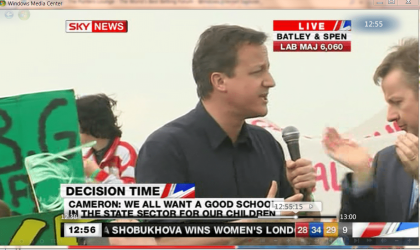
Here's a snapshot of the Screen when watching Sky News with one of these sticks. Was a while ago during UK General Election but it's the only screenshot I've got currently as I'm on a different machine at the moment.


Cheers
jimbo
 

Attachments

  • tories.png
    tories.png
    307.3 KB · Views: 29

My Computer

Computer type
PC/Desktop
Computer Manufacturer/Model Number
Custom built, several laptops HP/ASUS
OS
Linux CENTOS 7 / various Windows OS'es and servers
CPU
Intel i7 Intel i5
Memory
8GB, 16GB
Graphics Card(s)
On Motherboard
Sound Card
Realtek HD audio
Monitor(s) Displays
Apple Cinema display, Samsung LCD
Screen Resolution
1920 X 1080
Hard Drives
4 X 1TB SATA
Mouse
Toshiba wireless laser
Internet Speed
> 20MB up
Back
Top