
DVC100 Driver Installation Interrupted - Win 7

Phantomist

New member
Local time
7:00 AM
Messages
4
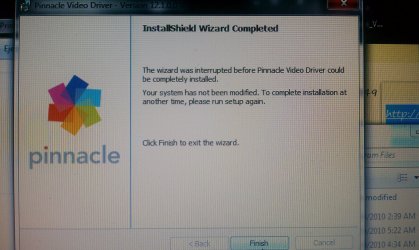
Seeing as how no one replied to my last post due to no one actually knowing the problem, I am posting a new thread, hopefully giving you all a more understanding of my situation. Ive been reading everywhere that people are having driver installation issues with the DVC100 from the Dazzle cards. I am using Windows 7. I recently noticed that when i try to install my DVC100 driver, before finishing the installation it gives me a message saying "Installation was interrupted before finishing the installation." I've tried everything INCLUDING running the setup wizard as administrator. Even the drivers off Pinnacle's website get interrupted. Can ANYONE help me?
 

Attachments
  • IMAG0033.jpg
    IMAG0033.jpg
    999.1 KB · Views: 58

My Computer

OS
Windows 7 Ultimate x64
I don't own the device, but Pinnacle Systems (the manufacturer) lists Vista drivers for the DVC100:
Pinnacle - Dazzle* Hardware Installer for Studio 10

They could probably work with Windows 7 as well (If they've issued Vista drivers, they will probably have official Windows 7 drivers when Windows 7 is released.)

If you are having problems - try running in compatibility mode (i.e: admin privileges, run in Vista/Server 2008)
 

My Computer

Computer Manufacturer/Model Number
Macbook Pro 15" (2011) (Matte Version)
OS
Win 7 Pro x64 SP1 OS X Snow Leopard 10.6.7
CPU
Intel Core i7 2820QM 2.3GHz (Quad-Core)
Motherboard
N/A
Memory
8GB 1333 MHz PC3-10600 DDR3 SDRAM
Graphics Card(s)
ATI Radeon HD 6750M (1GB, GDDR5)
Sound Card
N/A
Monitor(s) Displays
1 Display
Screen Resolution
1,680 x 1050 (Matte Screen, Anti-Glare)
Hard Drives
750GB SATA (5400 rpm)
WD My Passport Essential 1TB Portable Hard Drive
PSU
N/A
Case
N/A
Cooling
N/A
Keyboard
Apple Wireless Keyboard
Mouse
Apple Wireless Magic Mouse
Internet Speed
Max - 2.2MB/sec; DSL provided by Telecom NZ
Other Info
MS Office Professional 2010
McAfee Total Protection 2011
On a Laptop Stand (Hand-Built)
I already ran it in compatibility mode AND with admin privileges. I have a brand new HP compaq laptop and it meets all of the minimal requirements to run this device. It must be something with my laptop but the question is, what? I've turned my firewall AND Norton off. so everything should run just fine. Another thought was that maybe it doesn't run with Windows 7, but two of my friends have Dazzle cards, one HD and one regular, and they both run off of Windows 7 and they had NO problems.
 

My Computer

OS
Windows 7 Ultimate x64
I already ran it in compatibility mode AND with admin privileges. I have a brand new HP compaq laptop and it meets all of the minimal requirements to run this device. It must be something with my laptop but the question is, what? I've turned my firewall AND Norton off. so everything should run just fine. Another thought was that maybe it doesn't run with Windows 7, but two of my friends have Dazzle cards, one HD and one regular, and they both run off of Windows 7 and they had NO problems.

Hi Phantomist ,Welcome to the forums , It may be the program is trying to write to a file which it cannot , try this http://www.sevenforums.com/tutorials/1911-take-ownership-shortcut.html if needed, take control of the entire c drive ;)
 

My Computer

Computer type
PC/Desktop
Computer Manufacturer/Model Number
self build
OS
win 7 ultimate32bit, Win8.1pro wmc 32bit
CPU
amd phenom x4 9600
Motherboard
asus m2n32-sli deluxe
Memory
corsair twinxs 2x2gb
Graphics Card(s)
2x nvidia 1gb 8500gt
Sound Card
onboard
Monitor(s) Displays
23" PB Viseo 233d
Screen Resolution
1920x1080
Hard Drives
maxtor sata 500gb
maxtor sata 320gb
fujitsu sata200gb
PSU
oryxx tornado 750w
Case
thermaltake xaser lll
Cooling
artic freezer64 pro + 7 case fans
It says not to take control of the c drive with this.
 

My Computer

OS
Windows 7 Ultimate x64
Found a solution!

Hi, just to let you know i found a solution at the age of 15 before the useless customer service at pinnacle;

1. Uninstall your dazzle dv100 in the device manager.
2. Download uniblue driver scanner 2011 (NOTE HAS TO BE 2011) link; http://www.mediafire.com/?4kyky8b86u7johp
3. Hit register and enter in;
4. A seral key for it is; PS-FAQ2S-KCVE7-3JWEA-YNUK5-X57S9-D25YZ
5. After this you shouldbe registered; scan for drivers and if the program finds the dv100 skip to step 7.
6. In the right hand side of the prgram you should be able to update to a newer version; by doing this you allow the program to find your dv100.
7. After following the instructions; scan again.
8. Now click on the driver updates tab; and look for dv100 driver; ten click download.
9. Then follow the on screen instructions and a driver should be installed.
10. Now you can use your dv100!

I found this solution myself so it should work!
Thanks! :D
 
Last edited:

My Computer

OS
Windows ultimate x64
Back
Top