DVD Authoring

noyb

New member
Local time
2:52 PM
Messages
1,040
Now that Windows Movie Maker has been updated to 2011 …
I might be able to use W7 for my video project.

It’s compatible with my Sony camcorder MPG2 videos .. And I don’t have to convert the Video format.
I’m now looking for a good DVD authoring app for W7.

I liked the old Sonic in my XP computer so I tried the new Roxio version in W7.
It’s not as good as the old Sonic .. Can’t control the Menu .. Each menu is limited to 4 clips ..
And of all the transition options .. There’s no fade To/From black that I can find …
And why not a WS menu format ???


W7’s version of DVD maker seems to be a joke.
Any suggestions ??? .. Just something to make reasonably simple DVDs ??

I'm thinking Studio is like Photoshop .. It requires a long learning time.
 
Last edited:

My Computer

Computer Manufacturer/Model Number
HP d4996t (upgraded)
OS
XP MCE .... XP Pro 64 .... W7 U x64
CPU
E6750, 2.67GHz C2D
Memory
4GB, PC2 6400
Graphics Card(s)
GeForce 9400GT
Monitor(s) Displays
Twin Samsung 2443BWT
Screen Resolution
1920x1200
Hard Drives
Many .. 3 Installed
PSU
460W
Internet Speed
Cable

My Computer

Computer Manufacturer/Model Number
Pugh Technologies
OS
W7 Professional x64
CPU
AMD Athlon II X3 445 Rana 3.10 GHz
Motherboard
MSI 870A-G54
Memory
PNY XLR DDR3 1600 4x2GB
Graphics Card(s)
NVIDIA GeForce GTS 450 (fermi) 1GB GDDR5
Sound Card
Realtek ALC892 onboard
Monitor(s) Displays
ASUS VE205t, Viewsonic VX2035WM
Screen Resolution
1600x900, 1600x1050
Hard Drives
977GB Hitachi Hitachi HDS721010CLA332
244GB Western Digital WDC WD2500AAJS-65B4A0
488GB Western Digital WDC WD5000AAJS-00A8B0
488GB Western Digital WDC WD5000AAKS-00UU3A0
PSU
Antec EarthWatts EA650 650W
Case
ThermalTake Armor A90 Mid Tower
Cooling
3x 120mm in, 1x 120mm & 200mm out, self built hydro-cooler
Keyboard
Logitec 55
Mouse
Razer Deathadder
Internet Speed
20 Mbps D/L, 9 Mbps U/L
If you are looking for a paid for Video Editor/DVD Authoring software then Corel Video Studio Version X2 will do you proud. If you consider going to HD in the near future then go fo Version X3 but X2 has a better built in authoring tool than X3 which needs an extra stand alone piece of kit (free when you puchase the full program.) X2 is still available on Amazon here in the UK, I dont know about the US though. Would be very happy to assist with either version if you wish. Can use PM if you prefer!
 
Last edited:

My Computer

Computer type
PC/Desktop
OS
Microsoft Windows 7 Home Premium 64-bit 7601 Multiprocessor Free Service Pack 1
CPU
Intel(R) Core(TM) i7-3770 CPU @ 3.40GHz
Motherboard
ASUSTeK COMPUTER INC. P8H77-M
Memory
8.00 GB
Graphics Card(s)
Intel(R) HD Graphics 4000
Sound Card
On Board
Monitor(s) Displays
Dell 24"
Screen Resolution
1920 x 1080
Hard Drives
(1) INTEL SSDSC2CT180A3 ATA Device (2) ST500DM002-1BD142 ATA Device (3) WDC WD3200AAKS-75L9A0 ATA Device (4) Generic- Compact Flash USB Device (5) Generic- MS/MS-Pro USB Device (6) Generic- SD/MMC USB Device (7) Generic- SM/xD-Picture USB
PSU
500w Corsair
Case
Cooler Master
Cooling
3 Fans
Keyboard
Logitech MK300
Mouse
Logitech WOM
Internet Speed
75Mb
Antivirus
Norton 360
Browser
Firefox, Opera, IE
Lol, two votes for the same product at the same time ;)
 

My Computer

Computer Manufacturer/Model Number
Pugh Technologies
OS
W7 Professional x64
CPU
AMD Athlon II X3 445 Rana 3.10 GHz
Motherboard
MSI 870A-G54
Memory
PNY XLR DDR3 1600 4x2GB
Graphics Card(s)
NVIDIA GeForce GTS 450 (fermi) 1GB GDDR5
Sound Card
Realtek ALC892 onboard
Monitor(s) Displays
ASUS VE205t, Viewsonic VX2035WM
Screen Resolution
1600x900, 1600x1050
Hard Drives
977GB Hitachi Hitachi HDS721010CLA332
244GB Western Digital WDC WD2500AAJS-65B4A0
488GB Western Digital WDC WD5000AAJS-00A8B0
488GB Western Digital WDC WD5000AAKS-00UU3A0
PSU
Antec EarthWatts EA650 650W
Case
ThermalTake Armor A90 Mid Tower
Cooling
3x 120mm in, 1x 120mm & 200mm out, self built hydro-cooler
Keyboard
Logitec 55
Mouse
Razer Deathadder
Internet Speed
20 Mbps D/L, 9 Mbps U/L
Lol, two votes for the same product at the same time ;)
Maybe I ought to try it then .. You think ???
This will take me a while .. I'll be back.
Got some more Videos to shoot this evening .. Now the gang on dial up want DVDs.
I've got a few more video questions .. Later and Thanks
 

My Computer

Computer Manufacturer/Model Number
HP d4996t (upgraded)
OS
XP MCE .... XP Pro 64 .... W7 U x64
CPU
E6750, 2.67GHz C2D
Memory
4GB, PC2 6400
Graphics Card(s)
GeForce 9400GT
Monitor(s) Displays
Twin Samsung 2443BWT
Screen Resolution
1920x1200
Hard Drives
Many .. 3 Installed
PSU
460W
Internet Speed
Cable
Lol, two votes for the same product at the same time ;)
Maybe I ought to try it then .. You think ???
This will take me a while .. I'll be back.
Got some more Videos to shoot this evening .. Now the gang on dial up want DVDs.
I've got a few more video questions .. Later and Thanks
Well worth a try. You can download X3 on trial basis for 30 days but you can't download the new authoring module until you buy.
We await your further video questions with baited breath:D
 

My Computer

Computer type
PC/Desktop
OS
Microsoft Windows 7 Home Premium 64-bit 7601 Multiprocessor Free Service Pack 1
CPU
Intel(R) Core(TM) i7-3770 CPU @ 3.40GHz
Motherboard
ASUSTeK COMPUTER INC. P8H77-M
Memory
8.00 GB
Graphics Card(s)
Intel(R) HD Graphics 4000
Sound Card
On Board
Monitor(s) Displays
Dell 24"
Screen Resolution
1920 x 1080
Hard Drives
(1) INTEL SSDSC2CT180A3 ATA Device (2) ST500DM002-1BD142 ATA Device (3) WDC WD3200AAKS-75L9A0 ATA Device (4) Generic- Compact Flash USB Device (5) Generic- MS/MS-Pro USB Device (6) Generic- SD/MMC USB Device (7) Generic- SM/xD-Picture USB
PSU
500w Corsair
Case
Cooler Master
Cooling
3 Fans
Keyboard
Logitech MK300
Mouse
Logitech WOM
Internet Speed
75Mb
Antivirus
Norton 360
Browser
Firefox, Opera, IE
Got several hours of uploading to Utube ... Then I have to update the web page .. before I can get to trying something.
I'm wondering if there's a limit to how much I can upload to UTube ??
Adding about 1.75gig today.

Don't think HD is in my future .. My new cam isn't really HD .. (Sony DCR-SX63)
and HD would be overkill for what I'm recording.
Better sound would be nice .. It sounds much better in live surround sound.
When I bought it .. The saleslady said something about a better USB plugin Mic ???

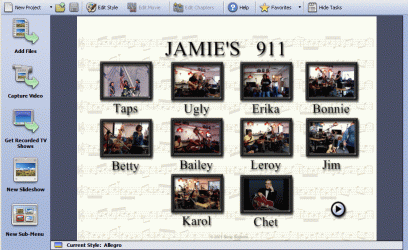
Attached is the DVD menu (page 1 of 2) that I can create in my Old Sonic .. And I kinda like it.
The default was music which fits what I'm recording .. But maybe I'd like to make my own background.
The new Roxio only allows about 4 Thumbs per menu ... and I usually have a bunch.
Something like this is what I'm looking for .. hope this makes sense
 

Attachments

  • 99.gif
    99.gif
    164.8 KB · Views: 11
Last edited:

My Computer

Computer Manufacturer/Model Number
HP d4996t (upgraded)
OS
XP MCE .... XP Pro 64 .... W7 U x64
CPU
E6750, 2.67GHz C2D
Memory
4GB, PC2 6400
Graphics Card(s)
GeForce 9400GT
Monitor(s) Displays
Twin Samsung 2443BWT
Screen Resolution
1920x1200
Hard Drives
Many .. 3 Installed
PSU
460W
Internet Speed
Cable
Ulead/corel (same product) is at least as user friendly, but has more options as to what you can do with the video itself (since it is video editing software). I haven't played around too much with their standalone authoring program, but it is solid as far as I have used it.
 

My Computer

Computer Manufacturer/Model Number
Pugh Technologies
OS
W7 Professional x64
CPU
AMD Athlon II X3 445 Rana 3.10 GHz
Motherboard
MSI 870A-G54
Memory
PNY XLR DDR3 1600 4x2GB
Graphics Card(s)
NVIDIA GeForce GTS 450 (fermi) 1GB GDDR5
Sound Card
Realtek ALC892 onboard
Monitor(s) Displays
ASUS VE205t, Viewsonic VX2035WM
Screen Resolution
1600x900, 1600x1050
Hard Drives
977GB Hitachi Hitachi HDS721010CLA332
244GB Western Digital WDC WD2500AAJS-65B4A0
488GB Western Digital WDC WD5000AAJS-00A8B0
488GB Western Digital WDC WD5000AAKS-00UU3A0
PSU
Antec EarthWatts EA650 650W
Case
ThermalTake Armor A90 Mid Tower
Cooling
3x 120mm in, 1x 120mm & 200mm out, self built hydro-cooler
Keyboard
Logitec 55
Mouse
Razer Deathadder
Internet Speed
20 Mbps D/L, 9 Mbps U/L
Still uploading to Utube ...
But I'll have to get the trial and see what you're talking about ...
avatar.gif

He's actually trying to uncoil the mic cord ...
But that's not what it looks like in the video ..
This gave me a chance to play with captions in WLMM .. Here
 

My Computer

Computer Manufacturer/Model Number
HP d4996t (upgraded)
OS
XP MCE .... XP Pro 64 .... W7 U x64
CPU
E6750, 2.67GHz C2D
Memory
4GB, PC2 6400
Graphics Card(s)
GeForce 9400GT
Monitor(s) Displays
Twin Samsung 2443BWT
Screen Resolution
1920x1200
Hard Drives
Many .. 3 Installed
PSU
460W
Internet Speed
Cable

My Computer

Computer Manufacturer/Model Number
Pugh Technologies
OS
W7 Professional x64
CPU
AMD Athlon II X3 445 Rana 3.10 GHz
Motherboard
MSI 870A-G54
Memory
PNY XLR DDR3 1600 4x2GB
Graphics Card(s)
NVIDIA GeForce GTS 450 (fermi) 1GB GDDR5
Sound Card
Realtek ALC892 onboard
Monitor(s) Displays
ASUS VE205t, Viewsonic VX2035WM
Screen Resolution
1600x900, 1600x1050
Hard Drives
977GB Hitachi Hitachi HDS721010CLA332
244GB Western Digital WDC WD2500AAJS-65B4A0
488GB Western Digital WDC WD5000AAJS-00A8B0
488GB Western Digital WDC WD5000AAKS-00UU3A0
PSU
Antec EarthWatts EA650 650W
Case
ThermalTake Armor A90 Mid Tower
Cooling
3x 120mm in, 1x 120mm & 200mm out, self built hydro-cooler
Keyboard
Logitec 55
Mouse
Razer Deathadder
Internet Speed
20 Mbps D/L, 9 Mbps U/L
Want a new Avatar .. go fetch
 

My Computer

Computer Manufacturer/Model Number
HP d4996t (upgraded)
OS
XP MCE .... XP Pro 64 .... W7 U x64
CPU
E6750, 2.67GHz C2D
Memory
4GB, PC2 6400
Graphics Card(s)
GeForce 9400GT
Monitor(s) Displays
Twin Samsung 2443BWT
Screen Resolution
1920x1200
Hard Drives
Many .. 3 Installed
PSU
460W
Internet Speed
Cable
Hi Noyb
As you say your camcorder is not HD but it does give very good quality standard definition videos and records in an easy to edit fomat so Video Studio will like that!!
The authoring software will certainly give you a thumnail menu and you can cusstomise it o give you the background and music that you want.
One of the very simple but useful things you can do in VS is to use say a still image to fade in whilst the sound is still playing and I imagine something like a typical Indiana country scene being interposed over the video clip and fade out again after a few seconds. If you use a pan and zoom on the image as well this gives it a sense of movement that adds to the interest. After all with these types of videos the visual aspect should support the music not the other way round IMHO. With your screenshot sample it looks as if there are two pages to this menu that makes upwards of 16 or so chapters. Seems a bit heavy for one video. If each chapter is say 5 mins long, when you add a few transitions, titles, overlays, and then a fairly sophisticated menu then the overall size is growing alarmingly. You can always cut back the bit rate to get the size down but you will loose quality that way and that seems a shame! It doesn't take long to get 4Gb of material together.
One final point and forgive my being pedantic but in your sample video of "The lost Cord" in the first few seconds there is an annoying Light flickering,in the top right corner, this looks like a fan turning. As you have fortunately used a tripod for this clip it will be fairly easy to overlay that light with a still image of the "God Bless America" Poster taken from another clip somewhere. There is a distort facility in VS so the angle wont matter too much.
BTW I do hope you realise that you have just embarked on a new way of life that is likely to take you over like the plague, it is quite time consuming (Ask my wife if you don't believe me;) )
 

My Computer

Computer type
PC/Desktop
OS
Microsoft Windows 7 Home Premium 64-bit 7601 Multiprocessor Free Service Pack 1
CPU
Intel(R) Core(TM) i7-3770 CPU @ 3.40GHz
Motherboard
ASUSTeK COMPUTER INC. P8H77-M
Memory
8.00 GB
Graphics Card(s)
Intel(R) HD Graphics 4000
Sound Card
On Board
Monitor(s) Displays
Dell 24"
Screen Resolution
1920 x 1080
Hard Drives
(1) INTEL SSDSC2CT180A3 ATA Device (2) ST500DM002-1BD142 ATA Device (3) WDC WD3200AAKS-75L9A0 ATA Device (4) Generic- Compact Flash USB Device (5) Generic- MS/MS-Pro USB Device (6) Generic- SD/MMC USB Device (7) Generic- SM/xD-Picture USB
PSU
500w Corsair
Case
Cooler Master
Cooling
3 Fans
Keyboard
Logitech MK300
Mouse
Logitech WOM
Internet Speed
75Mb
Antivirus
Norton 360
Browser
Firefox, Opera, IE
Studio 10 hasn't had a good start with me.
After I fought off an attack from the Borg, trying to assimilate my computer ..
by adding about a dozen startups .. several task schedules ..
adding a bunch of browser tool bars .. and changing my Browser .. I got it installed.
Why do Software manufactures do that ??? :cry:

After playing a while .. It froze up in my computer ..
Then I found out, the only to kill a task in W7 .. was with the power button.

Sorry about the Ceiling fan Glare .. But this isn't a studio environment :D
This one is just a 2 car garage and I set where I'm out of the way.
It's just a Jam session wherever they can find a place.

Not sure I understand "Chapters" ... I want the viewer to be able to select individual performances .. They've asked for that.

I've bit off more that I chew with this project ..
Then the gang of Music lovers got me down and is force feeding me more.
The interest has amazed me.

With Halloween coming up .. I expect some special Performances and they will want DVDs.
My wife has just completed building her Poodle Skirt.
Think I'll go as a famous movie producer ..
Anyone know were I can get an Alfred Hitchcock mask.

I'll Play with Studio some more .. Maybe I can figure it out
 

My Computer

Computer Manufacturer/Model Number
HP d4996t (upgraded)
OS
XP MCE .... XP Pro 64 .... W7 U x64
CPU
E6750, 2.67GHz C2D
Memory
4GB, PC2 6400
Graphics Card(s)
GeForce 9400GT
Monitor(s) Displays
Twin Samsung 2443BWT
Screen Resolution
1920x1200
Hard Drives
Many .. 3 Installed
PSU
460W
Internet Speed
Cable
Why are you using such an old version of Video Studio? It is known to have problems ith Win 7! Not too sure what this paragaph means "After I fought off an attack from the Borg, trying to assimilate my computer ..
by adding about a dozen startups .. several task schedules ..
adding a bunch of browser tool bars .. and changing my Browser .. I got it installed."

Chapters are the individual performances that you designate in the menu with those thumnails that appear in your screnshot.
This is such a big subject that I would be concerned that you expect to produce good DVD's within a couple of weeks from a standing start.
Did your software come with the Camcorder? If so is it an SE edition?
 

My Computer

Computer type
PC/Desktop
OS
Microsoft Windows 7 Home Premium 64-bit 7601 Multiprocessor Free Service Pack 1
CPU
Intel(R) Core(TM) i7-3770 CPU @ 3.40GHz
Motherboard
ASUSTeK COMPUTER INC. P8H77-M
Memory
8.00 GB
Graphics Card(s)
Intel(R) HD Graphics 4000
Sound Card
On Board
Monitor(s) Displays
Dell 24"
Screen Resolution
1920 x 1080
Hard Drives
(1) INTEL SSDSC2CT180A3 ATA Device (2) ST500DM002-1BD142 ATA Device (3) WDC WD3200AAKS-75L9A0 ATA Device (4) Generic- Compact Flash USB Device (5) Generic- MS/MS-Pro USB Device (6) Generic- SD/MMC USB Device (7) Generic- SM/xD-Picture USB
PSU
500w Corsair
Case
Cooler Master
Cooling
3 Fans
Keyboard
Logitech MK300
Mouse
Logitech WOM
Internet Speed
75Mb
Antivirus
Norton 360
Browser
Firefox, Opera, IE
Winpatrol was busy trying to stop all the startups from being added ..
and a bunch of other things that I don't want changed.

I'm using the trial download from Here .. as linked to by LiquidSnak.
Not much came with the camcorder ...

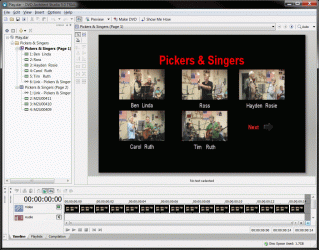
I also tried This Trial ... It did what I wanted .. BUT ..
It will only play one clip .. Then you have to Manually select the next.
My old Sonic would continue to play the remaining clips after a menu selection.
Not sure if I missed something ??
 

Attachments

  • Clipboard.gif
    Clipboard.gif
    249.3 KB · Views: 5

My Computer

Computer Manufacturer/Model Number
HP d4996t (upgraded)
OS
XP MCE .... XP Pro 64 .... W7 U x64
CPU
E6750, 2.67GHz C2D
Memory
4GB, PC2 6400
Graphics Card(s)
GeForce 9400GT
Monitor(s) Displays
Twin Samsung 2443BWT
Screen Resolution
1920x1200
Hard Drives
Many .. 3 Installed
PSU
460W
Internet Speed
Cable
Your Video Studio trial is the latest version X3. You threw me a bit but calling it Studio 10 earlier and there was indeed a version 10 some years ago. When Corel bought out Ulead they changed some of the nomenclture of theuir products bu basically Video Studio X3 is in fact VS 13 (they just used a Roman X to make the ten. Daft isn't it!
Shall we stick with just the Corel program then I can help but I don't know the other one. Suffice to say there is probably an element of "Options" in the burn windows that allows you to decide what happens when one clip finishes on a DVD. Either go back to Main menu or continue with the next clip. As I say I don't know that prog. so can't say for sure.
 

My Computer

Computer type
PC/Desktop
OS
Microsoft Windows 7 Home Premium 64-bit 7601 Multiprocessor Free Service Pack 1
CPU
Intel(R) Core(TM) i7-3770 CPU @ 3.40GHz
Motherboard
ASUSTeK COMPUTER INC. P8H77-M
Memory
8.00 GB
Graphics Card(s)
Intel(R) HD Graphics 4000
Sound Card
On Board
Monitor(s) Displays
Dell 24"
Screen Resolution
1920 x 1080
Hard Drives
(1) INTEL SSDSC2CT180A3 ATA Device (2) ST500DM002-1BD142 ATA Device (3) WDC WD3200AAKS-75L9A0 ATA Device (4) Generic- Compact Flash USB Device (5) Generic- MS/MS-Pro USB Device (6) Generic- SD/MMC USB Device (7) Generic- SM/xD-Picture USB
PSU
500w Corsair
Case
Cooler Master
Cooling
3 Fans
Keyboard
Logitech MK300
Mouse
Logitech WOM
Internet Speed
75Mb
Antivirus
Norton 360
Browser
Firefox, Opera, IE
Looked like Studio would only allow 4 thumbs per menu ... And I'd like to have a bunch.
I was a little confused how to add a movie segment .. Drag n Drop didn't seem to work.
Seemed like Studio was great .. But it was a Movie Maker and a DVD Authoring app ..
If I understand it correctly .. I didn't get to burning a test DVD.

I'd really like to have a simple DVD Authoring only app ..
Windows Movie Maker is a little limited but it works good enough for now ..
and it's much faster than my old method that requires format conversion.

I need more Time and Wetware to get into this .. I'm getting a little busy right now.
Two friends are bringing me their computers today for repair.
For the DVDs next weekend .. I'll probably let my XP Computer (Sonic) do it.
It's just too simple .. Drag, Drop n Burn .. and I don't have to convert the video format ..
for Sonic like I do for XP's Movie Maker.

I'm thinking Studio is like Photoshop .. It requires a long learning time and wetware.
 

My Computer

Computer Manufacturer/Model Number
HP d4996t (upgraded)
OS
XP MCE .... XP Pro 64 .... W7 U x64
CPU
E6750, 2.67GHz C2D
Memory
4GB, PC2 6400
Graphics Card(s)
GeForce 9400GT
Monitor(s) Displays
Twin Samsung 2443BWT
Screen Resolution
1920x1200
Hard Drives
Many .. 3 Installed
PSU
460W
Internet Speed
Cable
I'm thinking Studio is like Photoshop .. It requires a long learning time and wetware.
Indeed it does. if anything it is a little more complex than Photoshop. There are so many twists and turns in video editing and there is so much more you and indeed need to do to get really good results.
As you say stick to the easy path for now and leave the learning curve until later. Would encourage you, though to go ahea when time permits as you have a good camcorder plus the interest so the world is your oyster so to speak. It's a short step to printing you own DVD's on an Ink Jet printer, fascinating as I am learning!!!!
 

My Computer

Computer type
PC/Desktop
OS
Microsoft Windows 7 Home Premium 64-bit 7601 Multiprocessor Free Service Pack 1
CPU
Intel(R) Core(TM) i7-3770 CPU @ 3.40GHz
Motherboard
ASUSTeK COMPUTER INC. P8H77-M
Memory
8.00 GB
Graphics Card(s)
Intel(R) HD Graphics 4000
Sound Card
On Board
Monitor(s) Displays
Dell 24"
Screen Resolution
1920 x 1080
Hard Drives
(1) INTEL SSDSC2CT180A3 ATA Device (2) ST500DM002-1BD142 ATA Device (3) WDC WD3200AAKS-75L9A0 ATA Device (4) Generic- Compact Flash USB Device (5) Generic- MS/MS-Pro USB Device (6) Generic- SD/MMC USB Device (7) Generic- SM/xD-Picture USB
PSU
500w Corsair
Case
Cooler Master
Cooling
3 Fans
Keyboard
Logitech MK300
Mouse
Logitech WOM
Internet Speed
75Mb
Antivirus
Norton 360
Browser
Firefox, Opera, IE
I'm already Ink Jetting my DVDs .. Thanks to Photoshop.
Now I'm waiting on my head to stop spinning about this DVD authoring stuff.
avatar5.gif
 

Attachments

  • DVD Cover.jpg
    DVD Cover.jpg
    48.3 KB · Views: 0

My Computer

Computer Manufacturer/Model Number
HP d4996t (upgraded)
OS
XP MCE .... XP Pro 64 .... W7 U x64
CPU
E6750, 2.67GHz C2D
Memory
4GB, PC2 6400
Graphics Card(s)
GeForce 9400GT
Monitor(s) Displays
Twin Samsung 2443BWT
Screen Resolution
1920x1200
Hard Drives
Many .. 3 Installed
PSU
460W
Internet Speed
Cable
I was running a little low on my supply of Jetable DVDs
I was using the Verbatum brand with the large Spindle ... Hole .. I hated that.

I went back to the place were I get them .. (Sams Club here) ..
and they've switched to a Memorex Brand with a small hole ..
This will be great .. I just hope the Memorex is as good as the Verbatums ..
I've never had a Verbatum fail.
 

My Computer

Computer Manufacturer/Model Number
HP d4996t (upgraded)
OS
XP MCE .... XP Pro 64 .... W7 U x64
CPU
E6750, 2.67GHz C2D
Memory
4GB, PC2 6400
Graphics Card(s)
GeForce 9400GT
Monitor(s) Displays
Twin Samsung 2443BWT
Screen Resolution
1920x1200
Hard Drives
Many .. 3 Installed
PSU
460W
Internet Speed
Cable
Back
Top