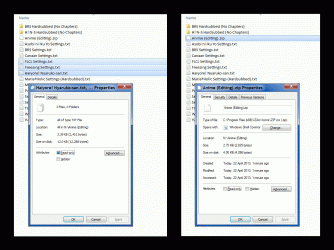
This is most probably not going to help you at all but as it IMO is important to understand the difference between the actual size of a file and the space it needs on various storage media, I thought it would be useful to post this here.
All storage media consist of so called
allocation units or
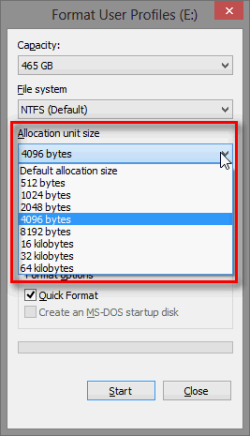
clusters. Default cluster size on NTFS hard disks up to 16 TB is 4 KB. When formatting an NTFS hard disk partition, this cluster size will be used if the user does not manually change it:
One cluster can only store data from one file. If the cluster is not completely used by a file, the remaining free space is marked as reserved and used by the system and will not be available to other files. Take for example the two screenshots Lehnerus posted here above, the PNG file 8.3 KB and the JPG file 20.8 KB. When stored to an NTFS disk using default cluster size it would look something like this:
JPG 20.8 KB:

PNG 8.3 KB

One box represents one 4 KB cluster, yellow highlight the actual space the file needs, red the "wasted" space (not used but reserved) and empty box a free cluster after the file ready to store first 4 KB of the next file. If you look closer for instance the latter (PNG file) and check its properties you'll notice that although the file itself only needs a bit over 2 clusters, the system gives it full 3 clusters:
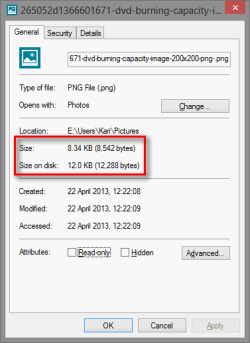
The difference, amount of empty but not available disk space used by this file is almost 50% more than the actual file size. Multiply this with thousands of files and you'll see why your HDD is filling up faster than it should. Let's say we had to save 1000 images exactly the same size as this example PNG file on an NTFS disk. We would need 12,288,000 bytes = 11.7 MB disk space although the actual combined file size would only be 8,542,000 bytes = 8.15 MB. We lost 3,746,000 bytes = 3.58 MB of our storage space.
In your case though this should only matter if you are not using default cluster size on HDD but have instead formatted HDD with smaller clusters. A usual CD and DVD cluster size is 2 KB so theoretically you images with total size of 4.14 GB should take a bit less than that on DVD as the extra reserved space for each file, the last not totally filled cluster could be at max a bit under 2 KB compared to that of 4 KB on HDD.
In any case I hope this have given you some useful information.
Kari