DVD/CD won't autorun

bertie11

New member
Member
VIP
Local time
3:23 PM
Messages
254
I'm pretty sure I have set all the options so that the disks _ought_ to autorun but they won't. I have to go into Powerdesk (File Manager) and select a vob file.

I' installed a codec package but that made no difference.

I have had problems with this drive, Samsung TSST CDDVDW 288BB, in fact I've had to swap it out twice already. I'm wondering if it has gone yest again?

HP Pavilion DV6-2113SA notebook
 

My Computer My Computer

At a glance

Windows 8.1.1AMD A10-5750M APU with Radeon(tm) HD Graphics8gb
Computer type
Laptop
Computer Manufacturer/Model Number
HP Envy 15
OS
Windows 8.1.1
CPU
AMD A10-5750M APU with Radeon(tm) HD Graphics
Memory
8gb
Hard Drives
1TB Serial ATA 16mb buffer
If you change the setting to disable autorun your drive cannot autoplay/autorun. Please check your setting

To enable autorun/autoplay please follow the instructions :
1. Open Run dialogue box by pressing Win + R
2. Type " gpedit.msc "
3. When The Local Group Policy Editor launched, click Computer Configuration > Administrative Templates > Windows Components > AutoPlay Policies
4. Right-Click on Turn off Autoplay and select Edit
5. Click the Enabled option
6. Click Drop Down Menu under "Turn off Autoplay on :" on box "Options :" and select All Drive
7. Click Apply and click OK

I hope this helps :)

DragonARMY www.facebook.com/100003250779989
 

My Computer My Computer

At a glance

Dual Booting Windows 7 Ultimate x64 & BackTra...@2.53GHz
OS
Dual Booting Windows 7 Ultimate x64 & BackTrack 5
CPU
@2.53GHz
Screen Resolution
1366 X 768 (Higher)
My Win7 64 doesn't recognise gpedit.msc in Run, and I cannot find it in help or Control Panel either!
 

My Computer My Computer

At a glance

Windows 8.1.1AMD A10-5750M APU with Radeon(tm) HD Graphics8gb
Computer type
Laptop
Computer Manufacturer/Model Number
HP Envy 15
OS
Windows 8.1.1
CPU
AMD A10-5750M APU with Radeon(tm) HD Graphics
Memory
8gb
Hard Drives
1TB Serial ATA 16mb buffer
Hi bertie11, Welcome to SF.

I believe that your computer is infected, you might want to scan your system for viruses.
Download and install MSE. Run a scan and post the results

YBL.
 

My Computer My Computer

At a glance

Dual Booting Windows 7 64-Bit Ultimate Editio...AMD Phenom X4 9254gb DDR3 G.skill RipJawsATI Radeon HD 6770
Computer Manufacturer/Model Number
AMD _(Assembled)_
OS
Dual Booting Windows 7 64-Bit Ultimate Edition and Fedora 16.
CPU
AMD Phenom X4 925
Motherboard
MSI 785g-E53
Memory
4gb DDR3 G.skill RipJaws
Graphics Card(s)
ATI Radeon HD 6770
Sound Card
Realtek
Monitor(s) Displays
Dell IN2020M LED
Screen Resolution
1600*900 20"
Hard Drives
Seagate 500 Gibs
External 320 Gb Western Digital(Got Glitchy)
PSU
Cooler Master
Case
Cooler Master
Cooling
Cooler Master
Keyboard
Logitech K100
Mouse
Razor Death Adder v2 3500 dPi (Razer Goliathus Pad)
Internet Speed
Back to college Internet with Cyberroam X|
Sorry, but are you saying my computer is infected because I can't run gpedit.msc as I just discovered that I don't get that option in Home Premium?

I just need another way to get to the Policy Editor.
 

My Computer My Computer

At a glance

Windows 8.1.1AMD A10-5750M APU with Radeon(tm) HD Graphics8gb
Computer type
Laptop
Computer Manufacturer/Model Number
HP Envy 15
OS
Windows 8.1.1
CPU
AMD A10-5750M APU with Radeon(tm) HD Graphics
Memory
8gb
Hard Drives
1TB Serial ATA 16mb buffer

My Computer My Computer

At a glance

Windows 10 Pro x64 ; Xubuntu x64Intel i7 860 @ 2.80 GHz O/C'ed to 4.0GHz16GB Corsair Vengance DDR3 @ 661 MHz Dual Cha...EVGA NVidia GTX 560 1024MB
Computer type
PC/Desktop
Computer Manufacturer/Model Number
Golden Mk. I.4
OS
Windows 10 Pro x64 ; Xubuntu x64
CPU
Intel i7 860 @ 2.80 GHz O/C'ed to 4.0GHz
Motherboard
Gigabyte P55A-UD3R Rev.1. Award BIOS F13
Memory
16GB Corsair Vengance DDR3 @ 661 MHz Dual Channel (9-9-9-24)
Graphics Card(s)
EVGA NVidia GTX 560 1024MB
Sound Card
Realtek Integrated
Monitor(s) Displays
Dual Samsung SyncMaster 2494HS
Screen Resolution
1920*1080 and 1920*1080
Hard Drives
1*Samsung 840 EVO 120GB SSD;
1*OCZ Vertex 2 60GB SSD;
2*Samsung F3 SpinPoint 1TB in RAID0;
1*Samsung F1 SpinPoint 1TB;
2*Western Digital 1TB External USB 3.0
1*Western Digital 500GB External USB 3.0
1*Seagate 500GB External USB 2.0
PSU
Thermaltake ToughPower QFan 750W
Case
Thermaltake Element S VK60001W2Z
Cooling
Corsair H60 Water Cooling, 2*230mm and 2*80mm case fans
Keyboard
Logitech G110
Mouse
Logitech MX518
I need to go back a few steps here. My win 7 64 HP used to autoplay but doesn't now ( for some time). I've been working round it as I don't play many DVDs these days but have been while I test out the new DVD drive I just fitted.

What might have caused autoplay to turn off? I was told that MS installed an update to turn it off as they were worried that just autoplaying a disk or usb stick could allow a virus to get onto the system. Is this true?

In any case, if I connect a usb stick or external drive, that does autoplay/run, I'm only getting problems trying to autoplay/run DVDs.

So is there another reason for this? I'm a bit overwhelmed with all the other stuff (Group Policy Settings Reference for Windows and Windows Server), I'm happy with just a fairly simple registry tweak though, I just need to find out what it is! If that is what is needed.

Thanks.
 

My Computer My Computer

At a glance

Windows 8.1.1AMD A10-5750M APU with Radeon(tm) HD Graphics8gb
Computer type
Laptop
Computer Manufacturer/Model Number
HP Envy 15
OS
Windows 8.1.1
CPU
AMD A10-5750M APU with Radeon(tm) HD Graphics
Memory
8gb
Hard Drives
1TB Serial ATA 16mb buffer
Hi,

I don't think any update would turn auto-run off, without your express approval.

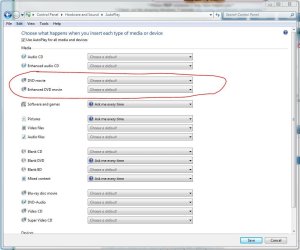
To change autoplay settings, please check adjust the settings shown in the image below.

Regards,
Golden
 

Attachments

  • Capture.JPG
    Capture.JPG
    81.2 KB · Views: 370

My Computer My Computer

At a glance

Windows 10 Pro x64 ; Xubuntu x64Intel i7 860 @ 2.80 GHz O/C'ed to 4.0GHz16GB Corsair Vengance DDR3 @ 661 MHz Dual Cha...EVGA NVidia GTX 560 1024MB
Computer type
PC/Desktop
Computer Manufacturer/Model Number
Golden Mk. I.4
OS
Windows 10 Pro x64 ; Xubuntu x64
CPU
Intel i7 860 @ 2.80 GHz O/C'ed to 4.0GHz
Motherboard
Gigabyte P55A-UD3R Rev.1. Award BIOS F13
Memory
16GB Corsair Vengance DDR3 @ 661 MHz Dual Channel (9-9-9-24)
Graphics Card(s)
EVGA NVidia GTX 560 1024MB
Sound Card
Realtek Integrated
Monitor(s) Displays
Dual Samsung SyncMaster 2494HS
Screen Resolution
1920*1080 and 1920*1080
Hard Drives
1*Samsung 840 EVO 120GB SSD;
1*OCZ Vertex 2 60GB SSD;
2*Samsung F3 SpinPoint 1TB in RAID0;
1*Samsung F1 SpinPoint 1TB;
2*Western Digital 1TB External USB 3.0
1*Western Digital 500GB External USB 3.0
1*Seagate 500GB External USB 2.0
PSU
Thermaltake ToughPower QFan 750W
Case
Thermaltake Element S VK60001W2Z
Cooling
Corsair H60 Water Cooling, 2*230mm and 2*80mm case fans
Keyboard
Logitech G110
Mouse
Logitech MX518
I already have those setting set to autorun using VLC player. I used the same disk on another laptop and that started OK so I know the disk is OK.

I only mentioned the Win updates, as when I told the company who supplied my new DVD drive I was told that an update had caused this problem, suggesting they had come across it before.
 

My Computer My Computer

At a glance

Windows 8.1.1AMD A10-5750M APU with Radeon(tm) HD Graphics8gb
Computer type
Laptop
Computer Manufacturer/Model Number
HP Envy 15
OS
Windows 8.1.1
CPU
AMD A10-5750M APU with Radeon(tm) HD Graphics
Memory
8gb
Hard Drives
1TB Serial ATA 16mb buffer
Autorun oughta Run.

I'm pretty sure I have set all the options so that the disks _ought_ to autorun but they won't. I have to go into Powerdesk (File Manager) and select a vob file.

I' installed a codec package but that made no difference.

I have had problems with this drive, Samsung TSST CDDVDW 288BB, in fact I've had to swap it out twice already. I'm wondering if it has gone yest again?

HP Pavilion DV6-2113SA notebook

I had exactly the same problem, but with an LG drive. I replaced it with a LiteOn, which works fine. However, I do not like Autorun as I have read elsewhere that it can lead to infections, which may be a pointer to the earlier advice from youlbelost. I have therefore disabled Autorun, but I do like to know that I can use it if necessary.

Stranger still: the friend who took the LG drive reports no problem in his XP machine.:rolleyes: Computing throws up these anomalies all the time.
 
Last edited:

My Computer My Computer

At a glance

Windows 7/64 HPremium.AMD FX-6300.Corsair (2x4) GB DDR3 CMXGX3M2A1337CL9.NVidia/Gigabyte GT730 (2GB) GDDR5.
Computer type
PC/Desktop
Computer Manufacturer/Model Number
bertison
OS
Windows 7/64 HPremium.
CPU
AMD FX-6300.
Motherboard
Asus M5A78L-M LE/USB3.
Memory
Corsair (2x4) GB DDR3 CMXGX3M2A1337CL9.
Graphics Card(s)
NVidia/Gigabyte GT730 (2GB) GDDR5.
Sound Card
Onboard.
Monitor(s) Displays
Iiyama PLE2407HDS.
Screen Resolution
1920 x 1280
Hard Drives
Desktop: 1TB. WD10EZEX-00BN5A0.
Zyxel nsa310 NAS: 2TB Seagate Barracuda 7200.14.
Cache Drive: Sandisk SDSSDRC032G.
Laptop Lenovo B50/80 128 GB SSD.
PSU
Corsair 750M.
Case
Coolermaster N300.
Cooling
FRONT: (2X) 140mm. TOP: (1x) 120mm. REAR: (1x) 120mm.
Keyboard
Logitech K290
Mouse
Trust Optical Wired
Internet Speed
15 Mb Down, 0.55 Up.
Antivirus
Kaspersky Total Security 2017, Hitman Pro.
Browser
Firefox.
Other Info
NETWORK:
Sky "Q box" and router.
Desktop & NAS - 30 Metres Cat6 Ethernet wired, via TP-Link 4-port switch.
Lenovo B50/80 Laptop, 2x Wileyfox phones, Lenovo TAB3-8 tablet - all wireless.
Grandchildren, their parents and friends as bandwidth 'parasites' at various times!
Hi,

How old is the drive? have you tried a driver and/or firmware update?

Regards,
Golden
 

My Computer My Computer

At a glance

Windows 10 Pro x64 ; Xubuntu x64Intel i7 860 @ 2.80 GHz O/C'ed to 4.0GHz16GB Corsair Vengance DDR3 @ 661 MHz Dual Cha...EVGA NVidia GTX 560 1024MB
Computer type
PC/Desktop
Computer Manufacturer/Model Number
Golden Mk. I.4
OS
Windows 10 Pro x64 ; Xubuntu x64
CPU
Intel i7 860 @ 2.80 GHz O/C'ed to 4.0GHz
Motherboard
Gigabyte P55A-UD3R Rev.1. Award BIOS F13
Memory
16GB Corsair Vengance DDR3 @ 661 MHz Dual Channel (9-9-9-24)
Graphics Card(s)
EVGA NVidia GTX 560 1024MB
Sound Card
Realtek Integrated
Monitor(s) Displays
Dual Samsung SyncMaster 2494HS
Screen Resolution
1920*1080 and 1920*1080
Hard Drives
1*Samsung 840 EVO 120GB SSD;
1*OCZ Vertex 2 60GB SSD;
2*Samsung F3 SpinPoint 1TB in RAID0;
1*Samsung F1 SpinPoint 1TB;
2*Western Digital 1TB External USB 3.0
1*Western Digital 500GB External USB 3.0
1*Seagate 500GB External USB 2.0
PSU
Thermaltake ToughPower QFan 750W
Case
Thermaltake Element S VK60001W2Z
Cooling
Corsair H60 Water Cooling, 2*230mm and 2*80mm case fans
Keyboard
Logitech G110
Mouse
Logitech MX518
It's a brand new drive, the driver is already the latest and the firmware is latest as well.

I am using Zentimo Storage Manager and tried turning it off but no difference. I'll try some different settings, just in case the problem is with Zentimo.
 

My Computer My Computer

At a glance

Windows 8.1.1AMD A10-5750M APU with Radeon(tm) HD Graphics8gb
Computer type
Laptop
Computer Manufacturer/Model Number
HP Envy 15
OS
Windows 8.1.1
CPU
AMD A10-5750M APU with Radeon(tm) HD Graphics
Memory
8gb
Hard Drives
1TB Serial ATA 16mb buffer
Back
Top