Solved DVD copy - help needed

gemini2010

New member
Member
Local time
11:41 AM
Messages
60
Location
Playford
I posted in another thread, but thought I should likely start my own.
I have been trying for days now to come up with a way to copy my original dvds to another disk so I can store the original. I want to eliminate the need to re-purchase damaged disks.
I have tried dvdfab which I can get to work but the quality is quite bad when it does happen to work. I used this to rip and burn which gives a double dvdfab logo in the top corner, how very annoying.
I have tried copying through my other computer only using nero with anydvd running in the background, and while the operation of this application works well, it is not a dvd ripper as such, it just makes a disc image to the hard drive which you later burn to disc. This has given me the best quality in itself but it pauses momentarily throughout the movie.
I more recently downloaded dvdcloner but this will only seem to work if I have two dvd drives and he trial version only gives you one shot to try it.
Any suggestions are welcome. I don't mind if I have to pay a little money, just so long as I can try it first and it works with what I want to do.
 

My Computer

OS
Windows 7 Home Premium
Hi gemini2010,
I have been exploring this also but have not tried it yet. If you rip the dvd with DVDfab HD Decrypyer without changing its default settings, then use Freemake Video Converter to burn to DVD as it is not limited to the usual 2 hours of most other apps.
 

My Computer

Computer Manufacturer/Model Number
Look in my Signature.
OS
Win7 H.Prem. 32bit+SP1
Hi Roderunner,
Thanks for your reply. I clicked on the link you have for DVDfab HD Decrypter. That come up in the list when I open up DVDfab but it says I haven't used it... I don't know what is the best way to rip.
I'll check out Freemake Video Converter!
 

My Computer

OS
Windows 7 Home Premium
To rip, just highlight the dvd drive then click copy and save to your desktop.
 

My Computer

Computer Manufacturer/Model Number
Look in my Signature.
OS
Win7 H.Prem. 32bit+SP1
So far the best that I use in my office is Ultra Iso. It is a real concise and best copier I ever seen. But its price labelled at almost U$30. It can do most various copying mode.


Kevin.
 

My Computers

System One System Two

  • Computer type
    PC/Desktop
    Computer Manufacturer/Model Number
    MSI
    OS
    Windows 11 Prerelease
    CPU
    CORE i5 10400
    Motherboard
    MSI H510M Pro
    Memory
    16GB
    Graphics Card(s)
    GTX 750Ti
    Sound Card
    Realtek HD Integrated
    Monitor(s) Displays
    Samsung Curved 24"; Samsung TV 50"
    Screen Resolution
    1920 x 1080
    Hard Drives
    Vi-Gen NVMe 256GB
    WD 3 TB
    Seagate 2 TB
    Seagate 4TB
    PSU
    Power Striker
    Case
    VBR
    Cooling
    Conventional
    Keyboard
    Logitech Wireless
    Mouse
    Logitech Wireless
    Internet Speed
    2MBPs
  • Computer type
    Laptop
    System Manufacturer/Model Number
    Apple MacBook
    OS
    BigSur
    CPU
    Core i5
    Memory
    8 GB
    Monitor(s) Displays
    13 "
    Screen Resolution
    1366 x 768
    Hard Drives
    SSD 256 GB
Thanks Kevin!

Roderunner,
For some reason your post prompted me to look a little differently at this, and I found that while I was looking for all the different settings, I missed the one that made all the difference. I have managed to achieve my full quality copy by using DVDcopy [DVDfab] and making sure that the button next to the output source is selecting ".iso" I knew it would have to be something simple like that...
Also, I just used DVD disc creator [double click the file to open up disc creator] through win7 to burn it to disc, never been so easy and with such excellent quality, no loss at all!
 

My Computer

OS
Windows 7 Home Premium
AnyDVD + Nero is really one of the better methods. Or at least has been for me for just copies.
You can copy the entire DVD or just the Main Movie.

However, Neros default settings are meant for speed, not quality.
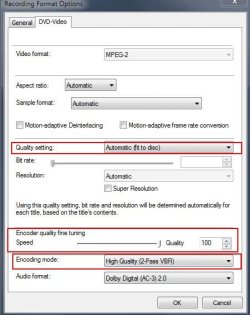
I would use: 2 Pass Encode, Best Quality in the encode options. Also, for De-Interlacing settings, have it keep original settings and framerates.
1.jpg

Also, for the Copy setting after importing the DVD, I would check the Adv. Analysis.
2.jpg

What I would do, is use AnyDVD to Rip the Entire DVD to the Hard Drive, as a folder structure NOT a ISO. Then Imoprt that folder structure as a DVD with Nero.
Although this isn't really needed, you'll find it makes it easier for Nero to work with, and much faster as well.

Nero will also tell how large the DVD is. If you use the appropriate blank, single or dual layer there will be no re-coding needed and the rip will be a perfect copy. Or, you can let it recode and shrink it to fit a single layer disc.
It dioesnt matter if you keep menus or not. Personally, I just keep the main movie only.

This would be the best method IMO, since you already have the software. Its how I make 1:1 copies myself.
 

My Computer

Computer Manufacturer/Model Number
Custom (Self Build)
OS
Windows 7 Home Premium 64bit
CPU
Intel Core i7 2700k
Motherboard
eVGA P67 SLI
Memory
8GB Mushkin Redline Ridgebacks @1866
Graphics Card(s)
EVGA GTX570 SC
Sound Card
XiFi Titanium HD
Monitor(s) Displays
LG W2453V
Screen Resolution
1920x1080
Hard Drives
Intel 320 80GB -- Intel X25-V 40GB --WD Black 1TB x2 -- WD Blue 640GB
PSU
Seasonic x750
Case
Corsair 600T SE White
Cooling
eVGA Superclocked CPU Cooler
Keyboard
Saitek Cyborg
Antivirus
Kaspersky
Browser
IE
Other Info
LG BD/DVD
Roderunner,

Also, I just used DVD disc creator [double click the file to open up disc creator] through win7 to burn it to disc, never been so easy and with such excellent quality, no loss at all!
I have used this method but prefer ImgBurn to burn to dvd.
 

My Computer

Computer Manufacturer/Model Number
Look in my Signature.
OS
Win7 H.Prem. 32bit+SP1
Back
Top