
What is Windows checking for when my empty DVD drive blinks repeatedly for several seconds upon waking up from Sleep mode before the password menu appears? (And continues to blink for just as long after the password screen appears.) This is an annoyance, not a serious problem like many others have with Sleep mode, everything is operating and waking up fine, but those seemingly wasted seconds cumulatively add up to a lot of dead time.
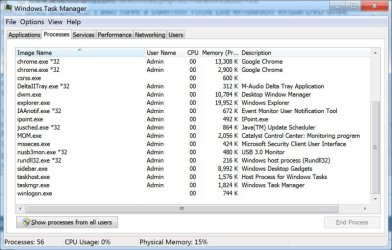
This is new Ultimate 64-bit install, drivers and updates all up to date, no conflicts in Device Manager, no program running that needs to access the DVD drive that I'm aware of, no networks installed; screenshot of running Taskmanager processes attached.
It seems to be a case of the OS deliberately checking the DVD drive as a built-in rule. The empty drive also blinks for a shorter duration upon entering Sleep mode and when shutting down. I don't even have the DVD drive part of the BIOS start-up sequence! Why this check, and better, how do I shut it off or at least shorten its duration, with a reg tweak perhaps? Any helpful tips appreciated.
This is new Ultimate 64-bit install, drivers and updates all up to date, no conflicts in Device Manager, no program running that needs to access the DVD drive that I'm aware of, no networks installed; screenshot of running Taskmanager processes attached.
It seems to be a case of the OS deliberately checking the DVD drive as a built-in rule. The empty drive also blinks for a shorter duration upon entering Sleep mode and when shutting down. I don't even have the DVD drive part of the BIOS start-up sequence! Why this check, and better, how do I shut it off or at least shorten its duration, with a reg tweak perhaps? Any helpful tips appreciated.
Attachments
Last edited:
My Computer
At a glance
Windows 7 64 bit Ultimate
- OS
- Windows 7 64 bit Ultimate


