DVD drive disappeared after Win 7 install

barneysmum

New member
Local time
6:20 PM
Messages
23
Hi all,

I am having this issue of a disappeared dvd drive after installing Windows 7 alongside Vista.

At the time, the drive was working fine in Vista.

Now, it has vanished.

I have done the upper / lower filters registry fix - note I only ever had the upper filters anyway, there weren't any lower filters, but the drive isn't there.

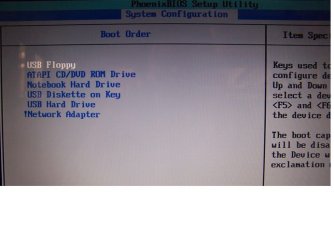
In the BIOS it shows up in the boot order. But on boot up, when it lists the HDD it doesn't list the DVD drive, I think it should....?

In Windows (Vista & 7), it isn't in device manager or disk management. I have scanned for hardware / disk changes. The folder options are not set to hide empty drives.

I have reseated the drive and I have checked that it seems connected properly to the motherboard. If I put a disc in the drive the light comes on and the disc spins round. This leads me to believe it must be ok physically...?

I have also tried another working DVD drive in this laptop but get the same story.

Laptop is a 2 year old HP dv6000 (or dv6500 as it says on the back). There are no drivers on the HP site for a dvd drive, but I don't think this is a simple driver issue.

Thanks in advance for any help.

<edit> I should also add that I reinstalled Vista yesterday in the hope of getting it back, but that didn't change anything.

I found this info in the registry: MAT****A DVD-RAM UJ-861H ATA Device

Have just run Everest and it didn't detect an optical drive.
 
Last edited:

My Computer My Computer

Computer Manufacturer/Model Number
HP dv6000 / 6500
OS
Vista / Windows 7
CPU
AMD Athlon 64 X2 Dual-Core
Motherboard
Quanta 30CF
Memory
2GB DDR2
Graphics Card(s)
NVIDIA GeForce 7150M
Try this... go to your device manager, find the offending drive and disable it... now, power down and physically remove the IDE ribbon cable from the drive ... reboot... confirm that the drive is not listed in the device manager.. now power down again and reconnect your dvd drive.. when you power up again Windows should recognize it as new hardware and install it ... let us what happens...
 

My Computer My Computer

Computer type
PC/Desktop
Computer Manufacturer/Model Number
LENOVO K450 @3.0GHZ
OS
64-bit Windows 8.1 Pro
CPU
Core(TM) i5 CPU 4330 Haswell @ 3.20GHz
Motherboard
LENOVO
Memory
12.00 GB
Graphics Card(s)
Intel(R) HD Graphics
Sound Card
Intel HD integtrated
Monitor(s) Displays
HP 25' ISP Monitor
Screen Resolution
1900/1020
Hard Drives
(1) ST1000DM003-1CH162 (2) Generic STORAGE DEVICE USB Device (3) Generic STORAGE DEVICE USB Device
Internet Speed
100mb down/10mb up
Thanks for the reply, but it isn't showing in device manager, or disk management. Plus, it's a laptop, I can't remove any IDE cable.

It has totally vanished.

I will take out the whole drive and reboot.
 

My Computer My Computer

Computer Manufacturer/Model Number
HP dv6000 / 6500
OS
Vista / Windows 7
CPU
AMD Athlon 64 X2 Dual-Core
Motherboard
Quanta 30CF
Memory
2GB DDR2
Graphics Card(s)
NVIDIA GeForce 7150M
thats ok... continue with the removal of the ribbon, etc ...
 

My Computer My Computer

Computer type
PC/Desktop
Computer Manufacturer/Model Number
LENOVO K450 @3.0GHZ
OS
64-bit Windows 8.1 Pro
CPU
Core(TM) i5 CPU 4330 Haswell @ 3.20GHz
Motherboard
LENOVO
Memory
12.00 GB
Graphics Card(s)
Intel(R) HD Graphics
Sound Card
Intel HD integtrated
Monitor(s) Displays
HP 25' ISP Monitor
Screen Resolution
1900/1020
Hard Drives
(1) ST1000DM003-1CH162 (2) Generic STORAGE DEVICE USB Device (3) Generic STORAGE DEVICE USB Device
Internet Speed
100mb down/10mb up
Thanks for the reply, but it isn't showing in device manager, or disk management. Plus, it's a laptop, I can't remove any IDE cable.

It has totally vanished.

I will take out the whole drive and reboot.
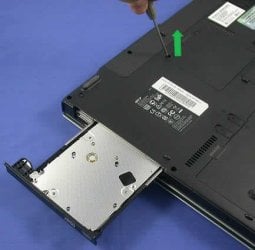
Its even more simple in case of a laptop. Just remove the screw which is holding the DVD drive. And then take the drive out. No cables, no hassle.

acer-aspire-3610-dvd-drive.jpg
 

My Computer My Computer

Computer Manufacturer/Model Number
Samsung NP530U4B-S02IN
OS
Windows® 8 Pro (64-bit)
CPU
Intel® Core™ i5 Processor 2467M (1.60GHz, 3MB L3 Cache)
Motherboard
Samsung Electronics
Memory
6GB DDR3 System Memory at 1,333MHz (on BD 4GB + 2GB x 1)
Graphics Card(s)
AMD Radeon™ HD7550M 1GB DDR3 (Ext. Graphic)
Sound Card
Realtek High Definition Audio
Monitor(s) Displays
35.56cm (14.0) SuperBright 300nit HD LED Display
Screen Resolution
1366x768
Hard Drives
1TB S-ATA II Hard Drive (5400RPM) with ExpressCache 16GB SSD
Internet Speed
sucks
Antivirus
Microsoft Security Essentials
Browser
Google Chrome (Sync enabled)
I've done that, I rebooted without the drive then shut down again.

Put the drive back in and rebooted again.

No sign of the drive anywhere.

All I can say is that it is lighting up and spinning a disc when I put one in.

Help!? :confused:
 

My Computer My Computer

Computer Manufacturer/Model Number
HP dv6000 / 6500
OS
Vista / Windows 7
CPU
AMD Athlon 64 X2 Dual-Core
Motherboard
Quanta 30CF
Memory
2GB DDR2
Graphics Card(s)
NVIDIA GeForce 7150M
I've done that, I rebooted without the drive then shut down again.

Put the drive back in and rebooted again.

No sign of the drive anywhere.

All I can say is that it is lighting up and spinning a disc when I put one in.

Help!? :confused:
Good morning Barney, would you do us a favor and reboot to the bios and tell us what the dvd drive shows as a connection?
We are looking for SATA. AHCI or IDE connection for the drive.
Regards,
Adrian
 

My Computer My Computer

Computer Manufacturer/Model Number
Custom Build
OS
Windows 7 7600 1 X64
CPU
AMD PHENOM II X 550 PROCESSOR 3.1 ghz
Motherboard
ASUS M4A78-TE
Memory
Corsair 4 gig ddr 3
Graphics Card(s)
ati radeon 3300
Sound Card
ati hd
Monitor(s) Displays
syncmaster 2033sw
Screen Resolution
1600X900 60 hz refresh
Hard Drives
twin_seagates SATA's 1 TB & 500 Gig, hitachi_slimline 160 gig
PSU
antec_550 watt
Case
cooler master GLite
Cooling
stock_heat sink
Internet Speed
20mbs up/ 1.5mbs down
Other Info
favorite child "stewie"
favorite dog "brian"
Hi there,

There are no details in the BIOS at all for the dvd drive, but then it's not very informative for anything, doesn't even list the HDD either.

The only evidence of the dvd drive in the BIOS is in the boot order list.
 

My Computer My Computer

Computer Manufacturer/Model Number
HP dv6000 / 6500
OS
Vista / Windows 7
CPU
AMD Athlon 64 X2 Dual-Core
Motherboard
Quanta 30CF
Memory
2GB DDR2
Graphics Card(s)
NVIDIA GeForce 7150M
Hi there,

There are no details in the BIOS at all for the dvd drive, but then it's not very informative for anything, doesn't even list the HDD either.

The only evidence of the dvd drive in the BIOS is in the boot order list.
Thank you Barney, I want you to go to the device manager and check and see if OS 7 recognizes the drive or if it shows a conflict.
Sorry Barney, I just woke up and did not read your initial post thouroughly.
Can you give us a picx of your bios?
When you see the bios and I'm referring to the boot priority what does it show?
 
Last edited:

My Computer My Computer

Computer Manufacturer/Model Number
Custom Build
OS
Windows 7 7600 1 X64
CPU
AMD PHENOM II X 550 PROCESSOR 3.1 ghz
Motherboard
ASUS M4A78-TE
Memory
Corsair 4 gig ddr 3
Graphics Card(s)
ati radeon 3300
Sound Card
ati hd
Monitor(s) Displays
syncmaster 2033sw
Screen Resolution
1600X900 60 hz refresh
Hard Drives
twin_seagates SATA's 1 TB & 500 Gig, hitachi_slimline 160 gig
PSU
antec_550 watt
Case
cooler master GLite
Cooling
stock_heat sink
Internet Speed
20mbs up/ 1.5mbs down
Other Info
favorite child "stewie"
favorite dog "brian"
No, it's not in device manager at all.
 

My Computer My Computer

Computer Manufacturer/Model Number
HP dv6000 / 6500
OS
Vista / Windows 7
CPU
AMD Athlon 64 X2 Dual-Core
Motherboard
Quanta 30CF
Memory
2GB DDR2
Graphics Card(s)
NVIDIA GeForce 7150M
Hi there,

There are no details in the BIOS at all for the dvd drive, but then it's not very informative for anything, doesn't even list the HDD either.

The only evidence of the dvd drive in the BIOS is in the boot order list.

boot order is where you should be looking. Make sure the dvd line is checked
 

My Computer My Computer

Computer Manufacturer/Model Number
HP Pavillion dv-7 1005 Tx
OS
Win 8 Release candidate 8400
CPU
[email protected]
Memory
4 gigs
Graphics Card(s)
Nvidia 9600M
Sound Card
HD built-in
Monitor(s) Displays
17" Wxga
Screen Resolution
1440x900
Cooling
none
Internet Speed
45Mb down 5Mb up
It's enabled in the boot order.

This bios is very limited, no settings to change.
 

My Computer My Computer

Computer Manufacturer/Model Number
HP dv6000 / 6500
OS
Vista / Windows 7
CPU
AMD Athlon 64 X2 Dual-Core
Motherboard
Quanta 30CF
Memory
2GB DDR2
Graphics Card(s)
NVIDIA GeForce 7150M
This is doing my head in. It has to be something in the registry or something?

If the drive was broken or the connection to the motherboard was broken then it wouldn't light up and spin a disc right??

At boot up, with a disc in, it will spin it.

In Windows if I put a disc in, it will spin it.

But that's it, nothing else happens.

So considering I get the same issue with a totally different drive, I am concluding that the drive is fine, and the problem lies within a setting in Windows somewhere, and therefore must be fixable.

Would you say this is correct?
 

My Computer My Computer

Computer Manufacturer/Model Number
HP dv6000 / 6500
OS
Vista / Windows 7
CPU
AMD Athlon 64 X2 Dual-Core
Motherboard
Quanta 30CF
Memory
2GB DDR2
Graphics Card(s)
NVIDIA GeForce 7150M
This is doing my head in. It has to be something in the registry or something?

If the drive was broken or the connection to the motherboard was broken then it wouldn't light up and spin a disc right??

At boot up, with a disc in, it will spin it.

In Windows if I put a disc in, it will spin it.

But that's it, nothing else happens.

So considering I get the same issue with a totally different drive, I am concluding that the drive is fine, and the problem lies within a setting in Windows somewhere, and therefore must be fixable.

Would you say this is correct?
I would say yes, its absolutley fixable.
How ever the issue is not with OS7, its in the BIOS set up.
OS 7 does not like AHCI connection for the drive!
With out the knowledge of what the bios tells us its futile.
 

My Computer My Computer

Computer Manufacturer/Model Number
Custom Build
OS
Windows 7 7600 1 X64
CPU
AMD PHENOM II X 550 PROCESSOR 3.1 ghz
Motherboard
ASUS M4A78-TE
Memory
Corsair 4 gig ddr 3
Graphics Card(s)
ati radeon 3300
Sound Card
ati hd
Monitor(s) Displays
syncmaster 2033sw
Screen Resolution
1600X900 60 hz refresh
Hard Drives
twin_seagates SATA's 1 TB & 500 Gig, hitachi_slimline 160 gig
PSU
antec_550 watt
Case
cooler master GLite
Cooling
stock_heat sink
Internet Speed
20mbs up/ 1.5mbs down
Other Info
favorite child "stewie"
favorite dog "brian"
OK, but this BIOS doesn't give me any detailed information for anything, or options to edit anything at all.

The drive also isn't working in Vista so not sure it's just a 7 thing.
 

My Computer My Computer

Computer Manufacturer/Model Number
HP dv6000 / 6500
OS
Vista / Windows 7
CPU
AMD Athlon 64 X2 Dual-Core
Motherboard
Quanta 30CF
Memory
2GB DDR2
Graphics Card(s)
NVIDIA GeForce 7150M
OK, but this BIOS doesn't give me any detailed information for anything, or options to edit anything at all.

The drive also isn't working in Vista so not sure it's just a 7 thing.
Barney, do you have a way of taking a digital picture of your screen?
 

My Computer My Computer

Computer Manufacturer/Model Number
Custom Build
OS
Windows 7 7600 1 X64
CPU
AMD PHENOM II X 550 PROCESSOR 3.1 ghz
Motherboard
ASUS M4A78-TE
Memory
Corsair 4 gig ddr 3
Graphics Card(s)
ati radeon 3300
Sound Card
ati hd
Monitor(s) Displays
syncmaster 2033sw
Screen Resolution
1600X900 60 hz refresh
Hard Drives
twin_seagates SATA's 1 TB & 500 Gig, hitachi_slimline 160 gig
PSU
antec_550 watt
Case
cooler master GLite
Cooling
stock_heat sink
Internet Speed
20mbs up/ 1.5mbs down
Other Info
favorite child "stewie"
favorite dog "brian"
Bios pic

Hey Barney, attached is a sample pic of a boot priority of a bios.
If you see the left side of the pic, AHCI is the connection setting. We had the OP change the setting to SATA/IDE.
We need to know how your connection is set in your bios.
Regards,
Adrian
 

Attachments

  • bios.jpg
    bios.jpg
    67.3 KB · Views: 99

My Computer My Computer

Computer Manufacturer/Model Number
Custom Build
OS
Windows 7 7600 1 X64
CPU
AMD PHENOM II X 550 PROCESSOR 3.1 ghz
Motherboard
ASUS M4A78-TE
Memory
Corsair 4 gig ddr 3
Graphics Card(s)
ati radeon 3300
Sound Card
ati hd
Monitor(s) Displays
syncmaster 2033sw
Screen Resolution
1600X900 60 hz refresh
Hard Drives
twin_seagates SATA's 1 TB & 500 Gig, hitachi_slimline 160 gig
PSU
antec_550 watt
Case
cooler master GLite
Cooling
stock_heat sink
Internet Speed
20mbs up/ 1.5mbs down
Other Info
favorite child "stewie"
favorite dog "brian"

My Computer My Computer

OS
XP, Vista, W7 64bit Home Premium
CPU
Intel Core Duo 6850 3.0 ghz @ 3.7 ghz
Motherboard
Asus P5E
Memory
4GB Corsair DDR 2 PC-6400
Graphics Card(s)
Ati 4870 1ghz
Sound Card
Supreme FX 11
Monitor(s) Displays
View Sonic VX1962wm
Screen Resolution
1680 X1050
Hard Drives
3 Seagate Sata Drives 160gb 250gb 500gb
PSU
Thermaltake 600 watt
Case
NZXT Alpha
Cooling
3X120cm Fans
Keyboard
Microsoft Digital Media Pro Keyboard
Mouse
Microsoft Wheel Mouse Optical
Internet Speed
1.5Mb to 8Mb/384k
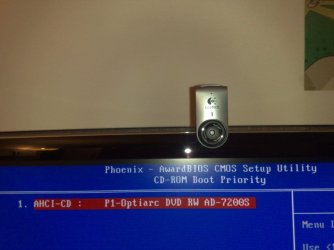
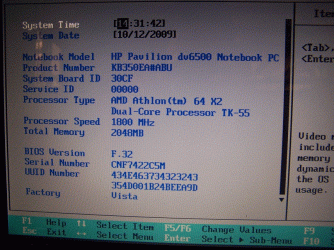
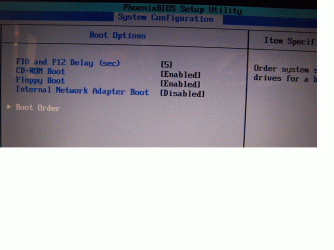
I have taken pictures of the BIOS, there really is no helpful info on there at all, it's useless:


bios1.gif

bios2.gif

bios3.jpg


Will try that Intel thing now.
 

My Computer My Computer

Computer Manufacturer/Model Number
HP dv6000 / 6500
OS
Vista / Windows 7
CPU
AMD Athlon 64 X2 Dual-Core
Motherboard
Quanta 30CF
Memory
2GB DDR2
Graphics Card(s)
NVIDIA GeForce 7150M
Go to the hp site & download the intel matrix storage manager for your laptop - if it says its a dv6500 on the back - use that to find the driver page -reply back,
as to whether it fixes it.
If its 64bit w7 go here - find it under storage.
Select software and drivers HP Pavilion dv6500 CTO Entertainment Notebook PC - HP Customer Care (Australia - English)
You can also get the latest version at the intel site
http://downloadcenter.intel.com/default.aspx

Whest

Its allways a good idea to start your own thread even if the problem is similar. It gets confusing on who is replying to which user.

thanks

Ken
 

My Computer My Computer

Computer Manufacturer/Model Number
HP Pavillion dv-7 1005 Tx
OS
Win 8 Release candidate 8400
CPU
[email protected]
Memory
4 gigs
Graphics Card(s)
Nvidia 9600M
Sound Card
HD built-in
Monitor(s) Displays
17" Wxga
Screen Resolution
1440x900
Cooling
none
Internet Speed
45Mb down 5Mb up
Back
Top