DVD drive is not working!

francocois

New member
Local time
8:07 AM
Messages
17
Location
Sydney
Hi, i recently installed the Windows 7 Ultimate x32 and my DVD drive has not responded, it has an error after a while of attempts to load with a location error. This problem has also prevented me from burning DVD's as Burnaware does not recognise a writable driver or device.

I installed it on a Acer Aspire 5738G. I have installed seven once before and the dvd drive then was laggy and slow to read my cds/dvds. But once reformatting with Vista, the hardware responded well as it works fine. Whereas this second reformat has caused my dvd to become faulty again.

Thanks for the comments and help, much appreciated! :)

PS: if there is no help i shall revert back to vista :( so much pain
 

My Computer

OS
Windows 7 Ultimate x86
CPU
AMD Phenom(tm) II X4 965 Processor, 3400 Mhz, 4 Core(s)
Memory
4GB DDR3
Graphics Card(s)
AMD Radeon HD 6900 Series
Sound Card
Realtek High Definition Audio
Monitor(s) Displays
Acer 19"
Screen Resolution
1440x900
Hard Drives
Samsung 320GB Sata Disk
Samsung 500GB Sata Disk
WD Caviar 1TB (BLUE) Sata Disk
Case
Antec

My Computer

Computer Manufacturer/Model Number
self built
OS
7600.20510 x86
CPU
P4 550 3.4 GHz HT running at 3.5 GHz
Motherboard
MSI PM8M3-V (MS-7211 v1.x) Micro-ATX mainboard
Memory
OCZ 2 GB(2x1GB) DDR400mHz running @ 414 mHz
Graphics Card(s)
HIS Radeon HD 3850 IceQ 3 Turbo HDMI Dual DL-DVI AGP
Sound Card
MOTU Traveler firewire studio interface 192 kHz 24 bit
Monitor(s) Displays
22" widescreen Acer X223W LCD, 17" Compaq P75 CRT
Screen Resolution
1680x1050 and 1280x1024
Hard Drives
SATA I x2 WD, 400 GB and 120 GB, SATA 2 WD Caviar Black 1 TB
PSU
350W generic
Case
Cybertronpc, it glows blue
Cooling
stock cpu fan, Ice-Q 3 gpu and system, many case fans
Keyboard
Logitch Classical Keyboard 200
Mouse
Logitech Mediaplay cordless
Internet Speed
1792/448 kbits/sec
Other Info
SATA II PCI fake RAID adapter, 1 GB Readyboost, original ATI Remote Wonder (even works with WMC perfectly), Logitech Rumblepad 2 game controller x2
Hey thanks for the reply, it actually WORKED! It is now running regularly but reading DVDs proficiently. Dude i am so happy, haha thought i'd have to revert abck to vista. THANKS HEAPS man

i'll update you if it can't burn things because i havent't installed a burning program

Cheers
 

My Computer

OS
Windows 7 Ultimate x86
CPU
AMD Phenom(tm) II X4 965 Processor, 3400 Mhz, 4 Core(s)
Memory
4GB DDR3
Graphics Card(s)
AMD Radeon HD 6900 Series
Sound Card
Realtek High Definition Audio
Monitor(s) Displays
Acer 19"
Screen Resolution
1440x900
Hard Drives
Samsung 320GB Sata Disk
Samsung 500GB Sata Disk
WD Caviar 1TB (BLUE) Sata Disk
Case
Antec
Hey thanks for the reply, it actually WORKED! It is now running regularly but reading DVDs proficiently. Dude i am so happy, haha thought i'd have to revert abck to vista. THANKS HEAPS man

i'll update you if it can't burn things because i havent't installed a burning program

Cheers


Congrats :thumbsup:

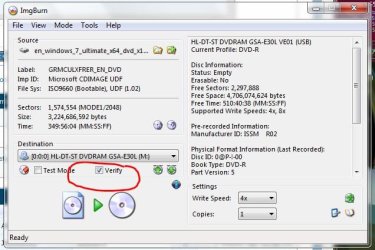
Try ImgBurn (FreeWare)
 

Attachments

  • ImgBurn.JPG
    ImgBurn.JPG
    40.3 KB · Views: 83
  • ImgBurn_Verify.JPG
    ImgBurn_Verify.JPG
    54.5 KB · Views: 57

My Computer

Computer type
PC/Desktop
Computer Manufacturer/Model Number
Built them myself, Science Experiments !
OS
Win7 Enterprise, Win7 x86 (Ult 7600), Win7 x64 Ult 7600, TechNet RTM on AMD x64 (2.8Ghz)
CPU
AMD fx8350 4ghz, AMD-32 2400mhz, AMD-64 3200mhz, AMDx64 2.8G
Motherboard
SIS 755, ECS-K8M890M-M (Ult 7600), GigaByte & others
Memory
2gb, 4gb on the Ult 7600, 4gb on Technet RTM, 32gb on FX8350
Graphics Card(s)
Draw my own Graphics, several nVidia cards
Sound Card
on motherboard
Monitor(s) Displays
19" flat scr, 28" I-Inc widescr,22" Emprex Widescr, 23" Acer
Screen Resolution
1280 x 1024, 1440 x 900, 1920 x 1080
Hard Drives
6 pata Ide HD's & 2 Sata HD's
added 80gb external on Ult 7600 computer,
numerous extra 1tb, 2TB, 3Tb SATA HD's
A collection of ext HD Docks w/ HDs
PSU
430w, 550w, 600w, 700, 800, etc
Case
All Generic Full Towers
Cooling
Open Air & a few fans, some w/ colored LEDs
Keyboard
Compaq & Dell recycled from GoodWill
Mouse
Made in China Optical Wired Mouse
Internet Speed
Fast Cable InterNet
Antivirus
AVG Free on 24 different Desktops, NO Problems!
Browser
IE 8 is preferred, but use FireFox sometimes
Other Info
Linksys Routers, switches, & Hubs
Too Many USB Flash Drives to count, Biggest is 64GB !
Eight computers in my home network.
Sixteen computers at my business network.
Linked via TeamViewer !
Lots of old used spare computer parts everywhere!
Hey I retreat my comment from above, the drive has returned to its original state after reading two dvds in succession. Im not sure what the problem still is but with Vista it was completely functional yet with the change from 7 twice, it's gone haywire. Would it be related to a OS problem with 7 and not my dvd drive?

That's the error that i'm receiving.

PS I've installed ImgBurn and it has been taking a while to search for SCSI/ATAPI device :( then it tells me device is not connected
PSS The CD drive only works for a certain amount of time after restarting or starting up then just dies out .... now after putting in another dvd it worked and imgburn recognised it :(
 

Attachments

  • error.png
    error.png
    51.6 KB · Views: 79
Last edited:

My Computer

OS
Windows 7 Ultimate x86
CPU
AMD Phenom(tm) II X4 965 Processor, 3400 Mhz, 4 Core(s)
Memory
4GB DDR3
Graphics Card(s)
AMD Radeon HD 6900 Series
Sound Card
Realtek High Definition Audio
Monitor(s) Displays
Acer 19"
Screen Resolution
1440x900
Hard Drives
Samsung 320GB Sata Disk
Samsung 500GB Sata Disk
WD Caviar 1TB (BLUE) Sata Disk
Case
Antec
I've just been to your laptops website, and noticed a sata AHCI driver (intel matrix storage manager) - when its enabled in the bios which it would be - W7 will automatically install the intel driver during installation, however for proper functionality you also need to install the latest intel matrix storage manager software - this will cause problems with your DVD Player unless it's installed.

You will find it at the intel site - http://downloadcenter.intel.com/default.aspx
Select chipsets - chipset software - intel(R) matrix storage manager - Select Operating System - select Windows 7 (64bit OR 32 bit) - select drivers - select intel(R) matrix storage manager 8.9.0.1023 - download and install.
(make sure you don't download the floppy configuration utility by mistake) - it will show up if you select utilities.
 

My Computer

OS
XP, Vista, W7 64bit Home Premium
CPU
Intel Core Duo 6850 3.0 ghz @ 3.7 ghz
Motherboard
Asus P5E
Memory
4GB Corsair DDR 2 PC-6400
Graphics Card(s)
Ati 4870 1ghz
Sound Card
Supreme FX 11
Monitor(s) Displays
View Sonic VX1962wm
Screen Resolution
1680 X1050
Hard Drives
3 Seagate Sata Drives 160gb 250gb 500gb
PSU
Thermaltake 600 watt
Case
NZXT Alpha
Cooling
3X120cm Fans
Keyboard
Microsoft Digital Media Pro Keyboard
Mouse
Microsoft Wheel Mouse Optical
Internet Speed
1.5Mb to 8Mb/384k
Mate you are a legend, it's working fine now but i will update you in a few days!
THANKS
 

My Computer

OS
Windows 7 Ultimate x86
CPU
AMD Phenom(tm) II X4 965 Processor, 3400 Mhz, 4 Core(s)
Memory
4GB DDR3
Graphics Card(s)
AMD Radeon HD 6900 Series
Sound Card
Realtek High Definition Audio
Monitor(s) Displays
Acer 19"
Screen Resolution
1440x900
Hard Drives
Samsung 320GB Sata Disk
Samsung 500GB Sata Disk
WD Caviar 1TB (BLUE) Sata Disk
Case
Antec
whest, as francocois said, you are totally a LEGEND in my folklore too! I was absolutely sure that my CD/DVD drive was not working properly and was going to send it to a service in another town, just too few days before I leave my country, so all I was seeing was dark. You brought light to my day again! Thanks again mate! :D
 

My Computer

Computer Manufacturer/Model Number
Acer Aspire 5738G
OS
Windows 7 (64-bit
CPU
Inter Core 2 Duo T6600 (2.2GHz, 800MHz, 2MB L2 cache)
Memory
2x2GB DDR2 800MHz
Graphics Card(s)
ATI Mobility Radeon HD4570 512MB VRAM
Monitor(s) Displays
15.6" HD LCD
Hard Drives
500GB SATA
Back
Top