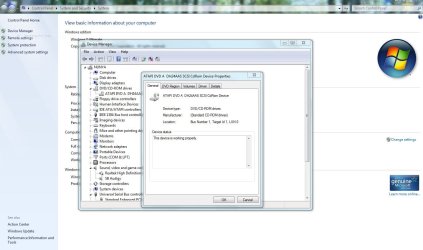
Dvd drive not working

InFlames01

New member
Local time
8:04 PM
Messages
8
I've recently bought a new computer with windows 7, and pretty much as soon as I'd installed the OS, the dvd drive stopped working

I've tried deleting the upper and lower filters, disabling the driver signature enforcement, and also tried disabling integrity checks, but nothing seems to work

It shows up in device management, but when I try to access it, it just crashes, and I have to reboot, same when I try and insert a CD, although it does sometimes work through autorun, although not 100%
 
Last edited:

My Computer

Computer Manufacturer/Model Number
Andromeda ST20
OS
Windows 7 64bit
CPU
AMD Phenom II X4 955
Motherboard
Asrock K10N78
Memory
8GB DDR2
Graphics Card(s)
ATI Radeon 5770
Monitor(s) Displays
22" HD TFT
Screen Resolution
1920X1080
Hard Drives
Hitachi HDS721010S 1Tb
Mouse
Wow MMO Steelseries
That looks like a driver problem (unless the drive itself is defunct). Try to find the latest driver from the manufacturers website.
 

My Computer

Computer Manufacturer/Model Number
HP, Dell, Gateway, Toshiba - 4 laptops and 2 desktops
OS
Vista, Windows7, Mint Mate, Zorin, Windows 8
CPU
from 1.6GHz Duo to i7
Monitor(s) Displays
2x HP w2207
Hard Drives
5x HDD, 7x SSD, 12x Externals
Keyboard
with trackball - no mices
Mouse
Trackball mice
Internet Speed
DSL 6000
Desltop or laptop computer ? Make & Model ?

DVD drive Make & Model ?
 

My Computer

Computer type
PC/Desktop
Computer Manufacturer/Model Number
Built them myself, Science Experiments !
OS
Win7 Enterprise, Win7 x86 (Ult 7600), Win7 x64 Ult 7600, TechNet RTM on AMD x64 (2.8Ghz)
CPU
AMD fx8350 4ghz, AMD-32 2400mhz, AMD-64 3200mhz, AMDx64 2.8G
Motherboard
SIS 755, ECS-K8M890M-M (Ult 7600), GigaByte & others
Memory
2gb, 4gb on the Ult 7600, 4gb on Technet RTM, 32gb on FX8350
Graphics Card(s)
Draw my own Graphics, several nVidia cards
Sound Card
on motherboard
Monitor(s) Displays
19" flat scr, 28" I-Inc widescr,22" Emprex Widescr, 23" Acer
Screen Resolution
1280 x 1024, 1440 x 900, 1920 x 1080
Hard Drives
6 pata Ide HD's & 2 Sata HD's
added 80gb external on Ult 7600 computer,
numerous extra 1tb, 2TB, 3Tb SATA HD's
A collection of ext HD Docks w/ HDs
PSU
430w, 550w, 600w, 700, 800, etc
Case
All Generic Full Towers
Cooling
Open Air & a few fans, some w/ colored LEDs
Keyboard
Compaq & Dell recycled from GoodWill
Mouse
Made in China Optical Wired Mouse
Internet Speed
Fast Cable InterNet
Antivirus
AVG Free on 24 different Desktops, NO Problems!
Browser
IE 8 is preferred, but use FireFox sometimes
Other Info
Linksys Routers, switches, & Hubs
Too Many USB Flash Drives to count, Biggest is 64GB !
Eight computers in my home network.
Sixteen computers at my business network.
Linked via TeamViewer !
Lots of old used spare computer parts everywhere!
It's a desktop, Andromeda ST20 from cube 247
DVD is Sony Optiarc AD-7240s

Just looking at the new drivers now, so I'll get back to you on how that works
 

My Computer

Computer Manufacturer/Model Number
Andromeda ST20
OS
Windows 7 64bit
CPU
AMD Phenom II X4 955
Motherboard
Asrock K10N78
Memory
8GB DDR2
Graphics Card(s)
ATI Radeon 5770
Monitor(s) Displays
22" HD TFT
Screen Resolution
1920X1080
Hard Drives
Hitachi HDS721010S 1Tb
Mouse
Wow MMO Steelseries
Well, just got an autoplay from the first disk I put in after a reboot, I'll see if it works, so it looks like drivers were out of date
 

My Computer

Computer Manufacturer/Model Number
Andromeda ST20
OS
Windows 7 64bit
CPU
AMD Phenom II X4 955
Motherboard
Asrock K10N78
Memory
8GB DDR2
Graphics Card(s)
ATI Radeon 5770
Monitor(s) Displays
22" HD TFT
Screen Resolution
1920X1080
Hard Drives
Hitachi HDS721010S 1Tb
Mouse
Wow MMO Steelseries
Good, keep us up-to-date. Would be interested whether the driver fixed it. This seems to be a pretty common problem.
 

My Computer

Computer Manufacturer/Model Number
HP, Dell, Gateway, Toshiba - 4 laptops and 2 desktops
OS
Vista, Windows7, Mint Mate, Zorin, Windows 8
CPU
from 1.6GHz Duo to i7
Monitor(s) Displays
2x HP w2207
Hard Drives
5x HDD, 7x SSD, 12x Externals
Keyboard
with trackball - no mices
Mouse
Trackball mice
Internet Speed
DSL 6000
Hmm, still causing device manager to crash, and not got an autoplay the next couple of times, might just have been a coincidence
 

My Computer

Computer Manufacturer/Model Number
Andromeda ST20
OS
Windows 7 64bit
CPU
AMD Phenom II X4 955
Motherboard
Asrock K10N78
Memory
8GB DDR2
Graphics Card(s)
ATI Radeon 5770
Monitor(s) Displays
22" HD TFT
Screen Resolution
1920X1080
Hard Drives
Hitachi HDS721010S 1Tb
Mouse
Wow MMO Steelseries
Have you tried turning off your pc and unhooking the dvd drive. Turn pc back on to allow it to see no drive. Then power back down and plug the dvd drive back in and let windows try to pick it up as new hardware and see if that helps.
 

My Computer

OS
win7 ultimate x64
CPU
Intel Core2 Duo E8400 @ 3.0
Motherboard
NVIDIA nForce 680i SLI
Memory
4gb corsair 6400 ddr2
Graphics Card(s)
Palit GTX260 Sonic 216 SP
Sound Card
sb audigy 24bit
Monitor(s) Displays
i-inc 19" lcd
Screen Resolution
1440x900
Hard Drives
seagate barracuda 7200 250 gb
PSU
ULTRA LSP Pro 750
Case
ultra midtower
Cooling
air
Just tried that, and it wasn't recognised as new hardware, although it showed up as normal, any ideas?
 

My Computer

Computer Manufacturer/Model Number
Andromeda ST20
OS
Windows 7 64bit
CPU
AMD Phenom II X4 955
Motherboard
Asrock K10N78
Memory
8GB DDR2
Graphics Card(s)
ATI Radeon 5770
Monitor(s) Displays
22" HD TFT
Screen Resolution
1920X1080
Hard Drives
Hitachi HDS721010S 1Tb
Mouse
Wow MMO Steelseries
Uninstall all drivers for it and reinstall the latest. Maybe the clean install instead of updating drivers may be helpful. After the installation of the newest drivers restart pc.
 

Attachments

  • Capture.JPG
    Capture.JPG
    110.7 KB · Views: 103

My Computer

OS
win7 ultimate x64
CPU
Intel Core2 Duo E8400 @ 3.0
Motherboard
NVIDIA nForce 680i SLI
Memory
4gb corsair 6400 ddr2
Graphics Card(s)
Palit GTX260 Sonic 216 SP
Sound Card
sb audigy 24bit
Monitor(s) Displays
i-inc 19" lcd
Screen Resolution
1440x900
Hard Drives
seagate barracuda 7200 250 gb
PSU
ULTRA LSP Pro 750
Case
ultra midtower
Cooling
air
Again, tried that just now, and seems to be no response, trying to install various disks still causes a crash
 

My Computer

Computer Manufacturer/Model Number
Andromeda ST20
OS
Windows 7 64bit
CPU
AMD Phenom II X4 955
Motherboard
Asrock K10N78
Memory
8GB DDR2
Graphics Card(s)
ATI Radeon 5770
Monitor(s) Displays
22" HD TFT
Screen Resolution
1920X1080
Hard Drives
Hitachi HDS721010S 1Tb
Mouse
Wow MMO Steelseries
Do you have a working spare dvd drive to install to see if maybe your new one is the problem? Try and see if maybe you have a bad drive and if not that then maybe something onboard. Drivers don't seem to be doing anything.
 

My Computer

OS
win7 ultimate x64
CPU
Intel Core2 Duo E8400 @ 3.0
Motherboard
NVIDIA nForce 680i SLI
Memory
4gb corsair 6400 ddr2
Graphics Card(s)
Palit GTX260 Sonic 216 SP
Sound Card
sb audigy 24bit
Monitor(s) Displays
i-inc 19" lcd
Screen Resolution
1440x900
Hard Drives
seagate barracuda 7200 250 gb
PSU
ULTRA LSP Pro 750
Case
ultra midtower
Cooling
air
Put up your system specs - there are a few other fixes, but need to know your system.
 

My Computer

OS
XP, Vista, W7 64bit Home Premium
CPU
Intel Core Duo 6850 3.0 ghz @ 3.7 ghz
Motherboard
Asus P5E
Memory
4GB Corsair DDR 2 PC-6400
Graphics Card(s)
Ati 4870 1ghz
Sound Card
Supreme FX 11
Monitor(s) Displays
View Sonic VX1962wm
Screen Resolution
1680 X1050
Hard Drives
3 Seagate Sata Drives 160gb 250gb 500gb
PSU
Thermaltake 600 watt
Case
NZXT Alpha
Cooling
3X120cm Fans
Keyboard
Microsoft Digital Media Pro Keyboard
Mouse
Microsoft Wheel Mouse Optical
Internet Speed
1.5Mb to 8Mb/384k
Don't have a spare DVD drive, but I switched it to another slot on my Motherboard, so seems to be a problem with it, I'll see if I can get hold of another one and test that, but might not be for a couple of days

About my system:
AMD Phenom II 955 Quad Core Processor 3.2GHz
8Gb DDR2 RAM
ATI Radeon 5770 graphics
Windows 7 Home Premium 64bit
Sony Optiarc AD-7240S DVD Drive

Not sure if you'll need anything else, but if so, just give me a shout about what, and I'll post it asap
 

My Computer

Computer Manufacturer/Model Number
Andromeda ST20
OS
Windows 7 64bit
CPU
AMD Phenom II X4 955
Motherboard
Asrock K10N78
Memory
8GB DDR2
Graphics Card(s)
ATI Radeon 5770
Monitor(s) Displays
22" HD TFT
Screen Resolution
1920X1080
Hard Drives
Hitachi HDS721010S 1Tb
Mouse
Wow MMO Steelseries
Product Page
AD-7240S - Sony Optiarc America
Firmware Page
Latest downloads for SONY Optiarc DVD RW Series - Sony Optiarc America

Try the firmware upgrade firstly if you havent already done so. Note this - OUR FIRMWARE UPDATES ARE NOT COMPATIBLE WITH THOSE PROVIDED BY THE OEM VENDORS (e.g. HP, DELL, FUJITSU-SIEMENS ETC.).
AD-7240S (S-ATA) version 1.03 - make sure you reboot the system

If it wont install and you get a OS mismatch error - meaning its written for vista or xp you can try installing it in compatibility mode with OS its written for :

To install a driver, program or firmware in compatibility mode - right click the setup.exe file - click properties - click compatibility - check run in compatibility with vista/xp etc - check run as administrator - leave the rest blank. Start setup.exe and install.

I was hoping you might have an intel chipset, but its more than likely nforce or amd - you could try getting the latest chipset drivers for your board - you should be able to find them at one of these 2 sites :

Drivers - Download NVIDIA Drivers
download from Guru3D.com
 

My Computer

OS
XP, Vista, W7 64bit Home Premium
CPU
Intel Core Duo 6850 3.0 ghz @ 3.7 ghz
Motherboard
Asus P5E
Memory
4GB Corsair DDR 2 PC-6400
Graphics Card(s)
Ati 4870 1ghz
Sound Card
Supreme FX 11
Monitor(s) Displays
View Sonic VX1962wm
Screen Resolution
1680 X1050
Hard Drives
3 Seagate Sata Drives 160gb 250gb 500gb
PSU
Thermaltake 600 watt
Case
NZXT Alpha
Cooling
3X120cm Fans
Keyboard
Microsoft Digital Media Pro Keyboard
Mouse
Microsoft Wheel Mouse Optical
Internet Speed
1.5Mb to 8Mb/384k
Sorry about the delay, had to get some sleep

Well, already done the firmware update, so don't think it was that, but went to the NVIDIA website and downloaded the latest drivers (Good call, was an nforce 720a), and got an autoplay from the first CD I put in again, I'll keep you posted on anything that happens

Update: No crash on putting the second disk in, don't want to curse it, but I think that worked, thanks for your help, whest, and thanks to everyone else who tried :D
 

My Computer

Computer Manufacturer/Model Number
Andromeda ST20
OS
Windows 7 64bit
CPU
AMD Phenom II X4 955
Motherboard
Asrock K10N78
Memory
8GB DDR2
Graphics Card(s)
ATI Radeon 5770
Monitor(s) Displays
22" HD TFT
Screen Resolution
1920X1080
Hard Drives
Hitachi HDS721010S 1Tb
Mouse
Wow MMO Steelseries
:) great and thks for the reply
 

My Computer

OS
XP, Vista, W7 64bit Home Premium
CPU
Intel Core Duo 6850 3.0 ghz @ 3.7 ghz
Motherboard
Asus P5E
Memory
4GB Corsair DDR 2 PC-6400
Graphics Card(s)
Ati 4870 1ghz
Sound Card
Supreme FX 11
Monitor(s) Displays
View Sonic VX1962wm
Screen Resolution
1680 X1050
Hard Drives
3 Seagate Sata Drives 160gb 250gb 500gb
PSU
Thermaltake 600 watt
Case
NZXT Alpha
Cooling
3X120cm Fans
Keyboard
Microsoft Digital Media Pro Keyboard
Mouse
Microsoft Wheel Mouse Optical
Internet Speed
1.5Mb to 8Mb/384k
Back
Top