DVD drive read as CD Driveafter clean install of win 7 x86 from vista

raj11650

New member
Pro User
VIP
Local time
3:52 PM
Messages
851
Location
India ,Chennai
DVD drive read as CD Drive after clean install of win 7 x86 from vista
i just did a clean install of windows 7 in my HP laptop but now i found that DVD drive is recognised as cd drive

can some one here help me on this issue its really hard to install few things or even watching a movie.

regards
raj1402
 

My Computer My Computer

At a glance

win 7 build 7600.16385 x64AMD Athlon Dual core 7750 2.7GHz4GB 800MhzATI HD 3200 IGP
Computer Manufacturer/Model Number
Custom Build
OS
win 7 build 7600.16385 x64
CPU
AMD Athlon Dual core 7750 2.7GHz
Motherboard
Gigabyte GA78MA s2h
Memory
4GB 800Mhz
Graphics Card(s)
ATI HD 3200 IGP
Monitor(s) Displays
Acer 15 inch
Screen Resolution
1280x720
Hard Drives
Seagate 1 TB
Keyboard
Logitech
Mouse
Logitech
Internet Speed
Airtel DSL 2Mbps
Hi raj,

You could try uninstalling the device from Device Manager then rebooting your machine. This will force Windows to re-install, hopefully as the correct device. Then try putting in a DVD and see if it has solved the issue.


OS
 

My Computer My Computer

At a glance

Windows 7 Ultimate x64AMD Sempron Dual Core3GBNVIDIA GeForce 6150SE nForce 430
Computer Manufacturer/Model Number
Compaq Desktop
OS
Windows 7 Ultimate x64
CPU
AMD Sempron Dual Core
Memory
3GB
Graphics Card(s)
NVIDIA GeForce 6150SE nForce 430
Screen Resolution
1024x768
Hard Drives
150GB Sata
Thanks for the suggestion ,i did that but even after driver installation it recognizes as CD drive and not dvd drivre. drive name is HL-DT-ST DVDRAM GSA-T20L ATA Device can some one help me

regards
 

My Computer My Computer

At a glance

win 7 build 7600.16385 x64AMD Athlon Dual core 7750 2.7GHz4GB 800MhzATI HD 3200 IGP
Computer Manufacturer/Model Number
Custom Build
OS
win 7 build 7600.16385 x64
CPU
AMD Athlon Dual core 7750 2.7GHz
Motherboard
Gigabyte GA78MA s2h
Memory
4GB 800Mhz
Graphics Card(s)
ATI HD 3200 IGP
Monitor(s) Displays
Acer 15 inch
Screen Resolution
1280x720
Hard Drives
Seagate 1 TB
Keyboard
Logitech
Mouse
Logitech
Internet Speed
Airtel DSL 2Mbps
You will need to delete the upper and lower filter from registry.
steps:
1. Tap Window key (flag key on the keyboard) and R key on the keyboard, at once.
2. You would see the Run window on the screen. Type Regedit in the open field and click OK.
3. Click plus sign (or arrow) next to HKEY_LOCAL_MACHINE
4. Click plus sign (or arrow) next to System
5. Click plus sign (or arrow) next to CurrentControlSet
6. Click plus sign (or arrow) next to Control
7. Click plus sign (or arrow) next to Class
8. In the left hand window pane click {4D36E965-E325-11CE-BFC1-08002BE10318} to select that key
9. In the right hand window pane select the UpperFilters registry key and press the delete key on the keyboard Confirm with an OK
10. In the right hand window pane select the LowerFilters registry key and press the delete key on the keyboard Confirm with an OK
11. Click on the "X" in the upper right hand corner of the Registry Editor window to close it

After that......

12. Open the device manager window Tap (Window key (flag key on the keyboard) and R key on the keyboard, at once) Type in devmgmt.msc
13. Expand DVD/CD-ROM Drives and right click on the device and select uninstall.
14. After uninstalling, plese click on the system icon on the top and select scan for new hardware changes.

The systm will update and will fix the problem. I hope this helps.

This seems to be an issue with iTunes, although I don't know if you have it installed but it should work :)

Source

ps, sorry for the late reply
 

My Computer My Computer

At a glance

Windows 7 Ultimate x64AMD Sempron Dual Core3GBNVIDIA GeForce 6150SE nForce 430
Computer Manufacturer/Model Number
Compaq Desktop
OS
Windows 7 Ultimate x64
CPU
AMD Sempron Dual Core
Memory
3GB
Graphics Card(s)
NVIDIA GeForce 6150SE nForce 430
Screen Resolution
1024x768
Hard Drives
150GB Sata
strangely it worked otherway for me i didnt install itunes so i thought it may be related to itunes and powered dvd so i planned to install both software and uninstall and see whether it works but it worked just after installing itunes and power DVD .

still cant find whats the real problem was , no i couldnt see uppeer or lower filters

regards
raj1402
 

My Computer My Computer

At a glance

win 7 build 7600.16385 x64AMD Athlon Dual core 7750 2.7GHz4GB 800MhzATI HD 3200 IGP
Computer Manufacturer/Model Number
Custom Build
OS
win 7 build 7600.16385 x64
CPU
AMD Athlon Dual core 7750 2.7GHz
Motherboard
Gigabyte GA78MA s2h
Memory
4GB 800Mhz
Graphics Card(s)
ATI HD 3200 IGP
Monitor(s) Displays
Acer 15 inch
Screen Resolution
1280x720
Hard Drives
Seagate 1 TB
Keyboard
Logitech
Mouse
Logitech
Internet Speed
Airtel DSL 2Mbps
Strange, it could have been a missing DLL or something. Keep us informed :)
 

My Computer My Computer

At a glance

Windows 7 Ultimate x64AMD Sempron Dual Core3GBNVIDIA GeForce 6150SE nForce 430
Computer Manufacturer/Model Number
Compaq Desktop
OS
Windows 7 Ultimate x64
CPU
AMD Sempron Dual Core
Memory
3GB
Graphics Card(s)
NVIDIA GeForce 6150SE nForce 430
Screen Resolution
1024x768
Hard Drives
150GB Sata
Same problem possibly.

My DVD drive is also not working. CDs seem to run fine. When I insert a DVD the drive seems to spin and random and loud speeds and never reads the disc. Not just movies but other types of DVDs as well.
-----------------------------------
Things I have tried:
I deleted the upper fliters. There were not lower filters. Then I uninstalled the driver and restarted. This did not solve my problem.

I tried to update the driver. It said that the driver was up to date. And it did not fix the problem.

I physically removed the drive and put it back. This also did not fix the problem.
---------------------------------------
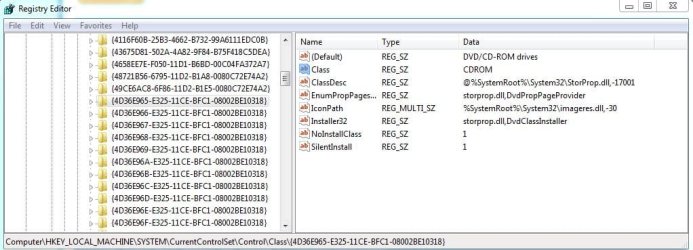
Attached is a picture of the DVD/CD {4D36E965-E325-11CE-BFC1-08002BE10318} registry. I am wondering if the wrong value is entered in Class? It says CDROM, where one may suspect it should say DVD/CD Rom or something like that.

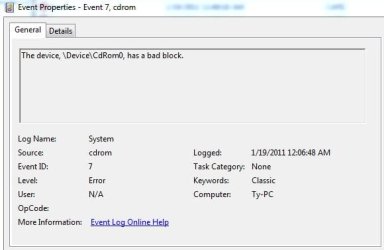
Also attached is the event ID, from the event that may be related to the problem.

Any help would be very much appreciated.

Thanks.
 

Attachments

  • redigit.JPG
    redigit.JPG
    76.6 KB · Views: 5
  • eventid.JPG
    eventid.JPG
    25.3 KB · Views: 3

My Computer My Computer

At a glance

Windows 7 Home x64Centrino 2 duo P8400 2.26Ghz4 GB
Computer Manufacturer/Model Number
HP HDX16
OS
Windows 7 Home x64
CPU
Centrino 2 duo P8400 2.26Ghz
Memory
4 GB
Hard Drives
Vertex SSD
I have heard of instances on these combo drives that one of the lasers can go bad while the other is fine, sounds like what you have.
 

My Computer My Computer

At a glance

Windows 7 Home Premium 64 bitIntel Core 2 quad Extreme Q9770 @ 3.2 GHz4x2 GB Muskin 1600 MHz ramNVidia GTX 250
Computer Manufacturer/Model Number
Dell XPS 730
OS
Windows 7 Home Premium 64 bit
CPU
Intel Core 2 quad Extreme Q9770 @ 3.2 GHz
Memory
4x2 GB Muskin 1600 MHz ram
Graphics Card(s)
NVidia GTX 250
Sound Card
Soundblaster X-Fi Fatality Champion
Monitor(s) Displays
2 Dell 2007WFP Ultrascans
Screen Resolution
3360 x 1050
Hard Drives
WD Black 1TB sata, 2-WD Black 500 sata, 2-Seagate 500 Go external
PSU
1000 Watt
Cooling
air
Keyboard
MS Natrual Keyboard Pro
Mouse
Logitech Wireless Trackball
Internet Speed
DSL Elite
Back
Top