DVD Drive replacement

Stefos

New member
Local time
4:07 AM
Messages
3
Hi,

I'm new in the forum, normally I search about my problems but now I'm very troubled.
My DVD-Recorder may have written over 500 DVDs & CDs and now it simulates to be writing but it's leaving the Disc empty. :sarc:
So, I've accepted the fact that the drive may be broken.
Now, I want to replace the drive with a Blu-Ray DVD Writer.
Of what I've searched not any DVD drive is accepted by my laptop that supports SATA connection. [Toshiba A500-1C0] [I found some info here] Of what I've read my Toshiba MIGHT take only Master DVD Drives. How can I know for sure of what my Laptop's motherboard accept as a DVD Writer and what can I get in Blu-Ray??
-We now don't get the option with the jumpers to change the hierarchy :rolleyes:

Thanks in advance,
Stefanos Constantinou
 
Last edited:

My Computer

Computer Manufacturer/Model Number
Toshiba A500-1C0
OS
Windows 7 Professional x64
Regarding the reference to a Master DVD Drive:
A drive may have SATA connectors, but it is still an IDE device, where IDE stands for Integrated Device Electronics. The drive itself does most of the control work. In a tower case, where there is room for numerous drives, an IDE cable connects 1 IDE slot to 2 IDE drives. One of them is set to be the Master (it does all the thinking) the other is set to be a Slave. This selection is done with jumpers next to the connectors on the drive.
Sometimes the wring of the cables is used to select which drive is which - this is called Cable Select or C/SEL. This is also done with a jumper.

The information regarding setting a specific drive to Master/Slave and C/SEL is normally shown on the sticker on the drive.

In a Laptop, with only 1 internal drive, it must be set to Master (there is no other drive which can do the thinking.) Whether or not you need Cable Select will depend on the system.

When you take the old drive out look at the jumpers and compare them with the method for Cable Select (C/SEL). Then look at the sticker on the new drive, set the jumper for Master and also the jumper to set C/SEL on or off, to match the setting on the old drive.

The manufacturer/model of the drive does not matter to your Laptop, you just buy the one that suits your needs and budget the best.
 

My Computer

Computer type
PC/Desktop
Computer Manufacturer/Model Number
Built-up
OS
Windows 7 Professional SP1 64-bit
CPU
Intel i3-3220 3.3GHz
Motherboard
Gigabyte
Memory
4GB
Graphics Card(s)
NVIDIA GeForce GTX650 1GB
Sound Card
On-board Realtek
Monitor(s) Displays
LGL1719S
Screen Resolution
1280 x 1024
Hard Drives
Samsung HD321HJ, Samsung HD103SI, Seagate ST2000DL, Seagate ST3100524AS
PSU
450W
Case
AOpen
Cooling
Case fan, CPU fan, PSU fanf.
Keyboard
Microsoft
Mouse
AOpen
Internet Speed
1Mb/s
Antivirus
MSSE
Browser
Firefox
A repair manual for your notebook is here:

http://www.google.com/url?sa=t&rct=...iKiJDQ&usg=AFQjCNGrkVKxsjEE8QVX6m2Q4ZtYaarxrQ

Your hard drive is SATA. I suppose that your optical drive is as well, although I haven't found any specific reference to that.

Only a single SATA device is used on a cable, so there are no master/slave/cable select considerations like for PATA (IDE). I think that the reference that you provide a link for refers only to old PATA devices.

It looks like Toshiba doesn't use any adapters, so swapping in a standard notebook Bluray drive should be straightforward.
 

My Computer

Computer Manufacturer/Model Number
homegrown
OS
Windows 7 Pro X64 SP1
CPU
Intel Core I7-3930k
Motherboard
Asus P9X79 Pro
Memory
16 GB Gskill DDR3-2133
Graphics Card(s)
eVGA GTX680
Sound Card
Creative X-Fi Titanium
Monitor(s) Displays
As PA246Q
Screen Resolution
1920 X 1200
Hard Drives
Corsair Force GT, 120 GB
WDC 1.5TB Caviar Black
PSU
PCP&C Silencer 750 Crossfire
Case
Silverstone FT02
Cooling
Noctua NH-D14
Keyboard
cheap Logitech USB
Mouse
Microsoft Intellimouse Explorer (old optical) USB
Internet Speed
6Mb cable
Other Info
Pioneer BDR-205
Samsung SH-203B
Monsoon 5.1 speakers
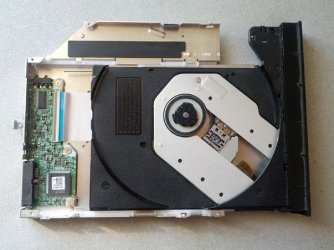
I have uploaded some images of my DVD drive to tell me if any Blu-Ray DVD drive is compatible. I'm thinking of ordering this drive. Will it be compatible? The connector at the back is just SATA. No jumpers or anything; as expected.

thanks for your replies!
 

Attachments

  • top1.jpg
    top1.jpg
    61.9 KB · Views: 8
  • top2.jpg
    top2.jpg
    75 KB · Views: 11
  • topBoth[2].jpg
    topBoth[2].jpg
    53.8 KB · Views: 8

My Computer

Computer Manufacturer/Model Number
Toshiba A500-1C0
OS
Windows 7 Professional x64
They just slot into place and then you tighten them and then your away to go, I bought a note book blue ray drive for my laptop, it's not as long as the normal drive so it isn't flush but apart from that it fits perfectly. As for the Blue Ray, well it will work as the software will make it work, and windows will automatically allow for reading and writing, but if you want to play Blue Rays then you need to buy software which costs about £60.
 

My Computer

Computer Manufacturer/Model Number
Dell Inspiron
OS
Windows 7
CPU
2.4 GHz Intel i3 cpu
Memory
8GB
Mouse
MS Explorer Mouse
Internet Speed
100 Mb/s
The drive is SATA, as expected.

You should be able to replace it with any SATA Bluray drive that's in the standard form factor.

I don't know what's readily available for purchase in Cyprus.
 

My Computer

Computer Manufacturer/Model Number
homegrown
OS
Windows 7 Pro X64 SP1
CPU
Intel Core I7-3930k
Motherboard
Asus P9X79 Pro
Memory
16 GB Gskill DDR3-2133
Graphics Card(s)
eVGA GTX680
Sound Card
Creative X-Fi Titanium
Monitor(s) Displays
As PA246Q
Screen Resolution
1920 X 1200
Hard Drives
Corsair Force GT, 120 GB
WDC 1.5TB Caviar Black
PSU
PCP&C Silencer 750 Crossfire
Case
Silverstone FT02
Cooling
Noctua NH-D14
Keyboard
cheap Logitech USB
Mouse
Microsoft Intellimouse Explorer (old optical) USB
Internet Speed
6Mb cable
Other Info
Pioneer BDR-205
Samsung SH-203B
Monsoon 5.1 speakers
I'd be happy to tell you guys that the Blu-Ray DVD drive I have ordered (Panasonic UJ-260) not only it fits like a glove on my Toshiba, but it also works as if it was its own and I don't get any errors in startup as I have read I might have (if it was set to secondary C-SEL).
But since I have bought a DVD drive that supports QL (The drive specs state that it can write Quad Layer), how does this work? Do the DVDs have 2 Dual Layer sides? Or is it a one side DVD?

Thanks again guys!
 

My Computer

Computer Manufacturer/Model Number
Toshiba A500-1C0
OS
Windows 7 Professional x64
Back
Top