DVD Drivers required

Woodssi

New member
Member
Local time
11:47 PM
Messages
48
After some System problems, I appear to have lost or corrupted the Drivers for my DVD Drives.

I require:-

NEC ND-4551A for DVD RW

LG GDR-8164B for DVD ROM

I have tried the Manufacturer's sites with no success, and Google only points me in the direction of Driver Update sites that I need to pay for.

Any help would be much appreciated.
 

My Computer

Computer Manufacturer/Model Number
Fujitsu Siemens Scaleo P
OS
Windows 7 Ultimate 32 bit
CPU
Intel P4 Dual 3.20 GHz
Motherboard
ASUS P5GD 1-FM
Memory
3MB DDR RAM
Graphics Card(s)
RADEON X700/X550
Sound Card
Intel 82801FB ICH6
Monitor(s) Displays
Generic PnP Monitor
Hard Drives
ST3200827AS ATA 2x250GB
Hi,

If you open up Device Manager you can find the CD/DVD in the list (click the + next to CD/DVD drives), right click the device and select 'Uninstall'. This will uninstall the driver for you. Reboot the machine and Windows will attempt to re-install the driver for you.

Hope it helps :)


OS
 

My Computer

Computer Manufacturer/Model Number
Compaq Desktop
OS
Windows 7 Ultimate x64
CPU
AMD Sempron Dual Core
Memory
3GB
Graphics Card(s)
NVIDIA GeForce 6150SE nForce 430
Screen Resolution
1024x768
Hard Drives
150GB Sata
Shark,

Tried that, but due to the corruption Windows couldn't do it.

I went onto the Microsoft Support site, and ran a program called 'Fix It', which appears to have solved the problem but has reconfigured the Drives under different letters (my E: is now I:).

Not a big issue, as long as it works okay, but would you know how to reconfigure this back onto the original Setting?
 

My Computer

Computer Manufacturer/Model Number
Fujitsu Siemens Scaleo P
OS
Windows 7 Ultimate 32 bit
CPU
Intel P4 Dual 3.20 GHz
Motherboard
ASUS P5GD 1-FM
Memory
3MB DDR RAM
Graphics Card(s)
RADEON X700/X550
Sound Card
Intel 82801FB ICH6
Monitor(s) Displays
Generic PnP Monitor
Hard Drives
ST3200827AS ATA 2x250GB
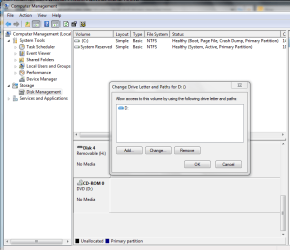
If you open up the Computer Management Console (click start then right-click computer and select 'Manage'), under Disk Management scroll down and find the CD drive and right-click and select 'Change Drive Letter and Paths...'

Capture.PNG
   Note
I've heard of this not working in some cases but it's worth a try


OS
 

My Computer

Computer Manufacturer/Model Number
Compaq Desktop
OS
Windows 7 Ultimate x64
CPU
AMD Sempron Dual Core
Memory
3GB
Graphics Card(s)
NVIDIA GeForce 6150SE nForce 430
Screen Resolution
1024x768
Hard Drives
150GB Sata
All is now well with the World...

Thank You.

S
 

My Computer

Computer Manufacturer/Model Number
Fujitsu Siemens Scaleo P
OS
Windows 7 Ultimate 32 bit
CPU
Intel P4 Dual 3.20 GHz
Motherboard
ASUS P5GD 1-FM
Memory
3MB DDR RAM
Graphics Card(s)
RADEON X700/X550
Sound Card
Intel 82801FB ICH6
Monitor(s) Displays
Generic PnP Monitor
Hard Drives
ST3200827AS ATA 2x250GB
You're welcome and enjoy the rest of the forums :)
 

My Computer

Computer Manufacturer/Model Number
Compaq Desktop
OS
Windows 7 Ultimate x64
CPU
AMD Sempron Dual Core
Memory
3GB
Graphics Card(s)
NVIDIA GeForce 6150SE nForce 430
Screen Resolution
1024x768
Hard Drives
150GB Sata
Back
Top