DVD Install doesn't work

dfs4

New member
Member
VIP
Local time
7:48 PM
Messages
199
I have burnt the windows 7 rc files onto a DVD but when I restart to install it, I get the error message 'no bootable devices -- press f1 to retry or press f2 for setup'. What is going on with the dvd here, any ideas?
 

My Computer

Computer type
Laptop
Computer Manufacturer/Model Number
Dell Inspiron
OS
Microsoft Windows 7 Home Premium 32-bit 7600 Multiprocessor Free
CPU
Intel(R) Core(TM) i3-4030U CPU @ 1.90GHz
Motherboard
Dell Inc. 0CG89M
Memory
4.00 GB
Graphics Card(s)
Intel(R) HD Graphics Family
Sound Card
High Definition Audio Device
I have burnt the windows 7 rc files onto a DVD but when I restart to install it, I get the error message 'no bootable devices -- press f1 to retry or press f2 for setup'. What is going on with the dvd here, any ideas?

RC files .... did you mean you burnt the iso ? Then it should be bootable. But if you have copied it from any installation directory (hope i am guessing wrong) it should not work.

may I ask you why the RC till now, when the retail version is available?
 

My Computer

Computer type
PC/Desktop
Computer Manufacturer/Model Number
Self Assembled
OS
Microsoft Windows 10 Pro Insider Preview 64-bit
CPU
Intel(R) Core(TM) i3-4130 CPU @ 3.40GHz
Motherboard
Gigabyte Technology Co., Ltd. B85M-D3H
Memory
Corsair Vengence 4GB x2 (8.00GB Dual-Channel DDR3 @ 798MHz)
Graphics Card(s)
2047MB GeForce GTS 450 (ZOTAC International)
Sound Card
Onboard (Realtek High Definition Audio)
Monitor(s) Displays
LG Flatron E2040T
Screen Resolution
1600x900
Hard Drives
Western Digital 1 TB
Seagate 500 GB
PSU
Corsair VS550
Case
Cooler Master K380
Cooling
Cooler Master Seidon 120V Plus
Keyboard
Logitech MK260r
Mouse
Logitech MK260r
Internet Speed
PMPL Broadband
Antivirus
Windows Defender + MBAM
Browser
Firefox
Other Info
Dell Studio 15" Laptop
You need to burn the iso file as a disk image in order for it to boot from the DVD...but I would strongly suggest the RTM version rather than the RC...the RC version has expired...
 

My Computer

Computer type
PC/Desktop
Computer Manufacturer/Model Number
LENOVO K450 @3.0GHZ
OS
64-bit Windows 8.1 Pro
CPU
Core(TM) i5 CPU 4330 Haswell @ 3.20GHz
Motherboard
LENOVO
Memory
12.00 GB
Graphics Card(s)
Intel(R) HD Graphics
Sound Card
Intel HD integtrated
Monitor(s) Displays
HP 25' ISP Monitor
Screen Resolution
1900/1020
Hard Drives
(1) ST1000DM003-1CH162 (2) Generic STORAGE DEVICE USB Device (3) Generic STORAGE DEVICE USB Device
Internet Speed
100mb down/10mb up
You need to burn the iso file as a disk image in order for it to boot from the DVD...but I would strongly suggest the RTM version rather than the RC...the RC version has expired...
I have copied the windows rc ISO file onto the dvd. there is also FLV file copied onto the dvd that can't be deleted. Apart from that when I restart I still get the error 'no bootable devices'.
 

My Computer

Computer type
Laptop
Computer Manufacturer/Model Number
Dell Inspiron
OS
Microsoft Windows 7 Home Premium 32-bit 7600 Multiprocessor Free
CPU
Intel(R) Core(TM) i3-4030U CPU @ 1.90GHz
Motherboard
Dell Inc. 0CG89M
Memory
4.00 GB
Graphics Card(s)
Intel(R) HD Graphics Family
Sound Card
High Definition Audio Device
You cannot just copy the ISO file onto the DVD, especially one which has files already on it. You must use a special image burner and a fresh DVD.

Suggest you burn image to disk using ImgBurn at 4x speed with Verify - it never fails.
 
You cannot just copy the ISO file onto the DVD, especially one which has files already on it.

Use a new DVD, burn image to disk using ImgBurn at 4x speed with Verify - it never fails.
I copied it with Nero. and there weren't any files on it, I just copied an flv file after the ISO was copied... forgot I was not supposed to and I have ran out of recordables DVDs. I will try if I can make it work otherwise I will have to get new ones tomorrow.
 

My Computer

Computer type
Laptop
Computer Manufacturer/Model Number
Dell Inspiron
OS
Microsoft Windows 7 Home Premium 32-bit 7600 Multiprocessor Free
CPU
Intel(R) Core(TM) i3-4030U CPU @ 1.90GHz
Motherboard
Dell Inc. 0CG89M
Memory
4.00 GB
Graphics Card(s)
Intel(R) HD Graphics Family
Sound Card
High Definition Audio Device
As GregRocker suggested:
Use ImgBurn. You MUST burn the ISO using ImgBurn or a similar approach and not simply copy the files.

Use ImgBurn. It works.

Now with that said, RC will only run for two hours at a time. You have waited too late. RC will shut down for good in June of this year.
 

My Computer

Computer Manufacturer/Model Number
Toshiba Satellite S875D-S7239 laptop
OS
MS Windows 7 Ultimate SP1 64-bit
CPU
AMD A10-4600M
Motherboard
AMD Pumori (Socket FT1)
Memory
6.00 GB Dual-Channel DDR3 @ 798MHz (11-11-12-28)
Graphics Card(s)
AMD Radeon HD 7660G
Sound Card
High Definition Audio Device
Monitor(s) Displays
Generic PnP Monitor (1600x900@60Hz)
Screen Resolution
1600x900@60Hz
Hard Drives
SSD 119GB Corsair CSSD-V128GB2 ATA Device
Keyboard
Standard PS/2 Keyboard
Mouse
HP Wireless Optical Mobile Mouse Model FHA-3410
Internet Speed
What the local pub, local coffee shop offers.
Other Info
Optical Drive:MATSHITA BD-CMB UJ160B ATA Device


Also have an Asus ha1002xp netbook with Win 7 Ultimate installed.
You cannot just copy the ISO file onto the DVD, especially one which has files already on it.

Use a new DVD, burn image to disk using ImgBurn at 4x speed with Verify - it never fails.
I copied it with Nero. and there weren't any files on it, I just copied an flv file after the ISO was copied... forgot I was not supposed to and I have ran out of recordables DVDs. I will try if I can make it work otherwise I will have to get new ones tomorrow.

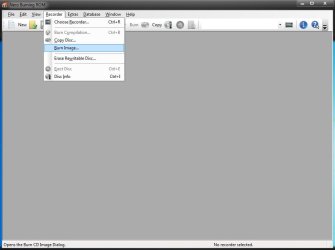
You may burn it using Nero, too. But burn it as a disk image, so that it finished product may be a bootable dvd. Please dont put any other files in the dvd.

Open nero burning rom, in the recorder tab, select burn image option , browse for the disk image and burn it.
 

Attachments

  • Untitled.jpg
    Untitled.jpg
    29.4 KB · Views: 11

My Computer

Computer type
PC/Desktop
Computer Manufacturer/Model Number
Self Assembled
OS
Microsoft Windows 10 Pro Insider Preview 64-bit
CPU
Intel(R) Core(TM) i3-4130 CPU @ 3.40GHz
Motherboard
Gigabyte Technology Co., Ltd. B85M-D3H
Memory
Corsair Vengence 4GB x2 (8.00GB Dual-Channel DDR3 @ 798MHz)
Graphics Card(s)
2047MB GeForce GTS 450 (ZOTAC International)
Sound Card
Onboard (Realtek High Definition Audio)
Monitor(s) Displays
LG Flatron E2040T
Screen Resolution
1600x900
Hard Drives
Western Digital 1 TB
Seagate 500 GB
PSU
Corsair VS550
Case
Cooler Master K380
Cooling
Cooler Master Seidon 120V Plus
Keyboard
Logitech MK260r
Mouse
Logitech MK260r
Internet Speed
PMPL Broadband
Antivirus
Windows Defender + MBAM
Browser
Firefox
Other Info
Dell Studio 15" Laptop
Arc,
You're correct about Nero. I reread my post and see where it would appear that I was saying that Nero would not work. True, that I've never been pleased with Nero which I've tried over the years. In fact, at one time I purchased Nero. But for every piece of software out there, there are people who have been pleased/displeased with the product.
 

My Computer

Computer Manufacturer/Model Number
Toshiba Satellite S875D-S7239 laptop
OS
MS Windows 7 Ultimate SP1 64-bit
CPU
AMD A10-4600M
Motherboard
AMD Pumori (Socket FT1)
Memory
6.00 GB Dual-Channel DDR3 @ 798MHz (11-11-12-28)
Graphics Card(s)
AMD Radeon HD 7660G
Sound Card
High Definition Audio Device
Monitor(s) Displays
Generic PnP Monitor (1600x900@60Hz)
Screen Resolution
1600x900@60Hz
Hard Drives
SSD 119GB Corsair CSSD-V128GB2 ATA Device
Keyboard
Standard PS/2 Keyboard
Mouse
HP Wireless Optical Mobile Mouse Model FHA-3410
Internet Speed
What the local pub, local coffee shop offers.
Other Info
Optical Drive:MATSHITA BD-CMB UJ160B ATA Device


Also have an Asus ha1002xp netbook with Win 7 Ultimate installed.
Arc,
You're correct about Nero. I reread my post and see where it would appear that I was saying that Nero would not work. True, that I've never been pleased with Nero which I've tried over the years. In fact, at one time I purchased Nero. But for every piece of software out there, there are people who have been pleased/displeased with the product.

Hi Karl !
I also dont like nero. If it is the matter of burning disks, CDBurnerXP works nice. Nero is just a heap of applications, Jack of all trades, master of none.

But I must to say, nero provides a wide burning options.
 

My Computer

Computer type
PC/Desktop
Computer Manufacturer/Model Number
Self Assembled
OS
Microsoft Windows 10 Pro Insider Preview 64-bit
CPU
Intel(R) Core(TM) i3-4130 CPU @ 3.40GHz
Motherboard
Gigabyte Technology Co., Ltd. B85M-D3H
Memory
Corsair Vengence 4GB x2 (8.00GB Dual-Channel DDR3 @ 798MHz)
Graphics Card(s)
2047MB GeForce GTS 450 (ZOTAC International)
Sound Card
Onboard (Realtek High Definition Audio)
Monitor(s) Displays
LG Flatron E2040T
Screen Resolution
1600x900
Hard Drives
Western Digital 1 TB
Seagate 500 GB
PSU
Corsair VS550
Case
Cooler Master K380
Cooling
Cooler Master Seidon 120V Plus
Keyboard
Logitech MK260r
Mouse
Logitech MK260r
Internet Speed
PMPL Broadband
Antivirus
Windows Defender + MBAM
Browser
Firefox
Other Info
Dell Studio 15" Laptop
Back
Top