DVD playback question

robertwnielsen

New member
Power User
VIP
Local time
10:23 PM
Messages
79
in Win 7 Ultimate -

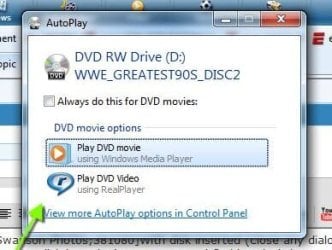
I insert a DVD, and the only options for playback are Windows Media Player and Real Player - with Vista, I used to have an option to play the DVD in Windows Media Center, which is what I want. Is there a way to get this option back?
 

My Computer

OS
Windows 7 Ultimate
CPU
AMD Sempron LE-1150 2.0 Ghz
Motherboard
Gigabyte GA-M61PME-S2
Graphics Card(s)
ATi Radeon HD 3650
Sound Card
Realtek HD Onboard Audio
Monitor(s) Displays
HP 1702
Screen Resolution
1280x1024
Keyboard
Logitech Wireless
Mouse
Logitech Wireless
Internet Speed
7 MB DSL

My Computer

Computer Manufacturer/Model Number
HP, Dell, Gateway, Toshiba - 4 laptops and 2 desktops
OS
Vista, Windows7, Mint Mate, Zorin, Windows 8
CPU
from 1.6GHz Duo to i7
Monitor(s) Displays
2x HP w2207
Hard Drives
5x HDD, 7x SSD, 12x Externals
Keyboard
with trackball - no mices
Mouse
Trackball mice
Internet Speed
DSL 6000
With disk inserted (close any dialogue that starts upon disk insertion) open WMC and find 'Movies' then scroll right to 'play dvd'.
 
With disk inserted (close any dialogue that starts upon disk insertion) open WMC and find 'Movies' then scroll right to 'play dvd'.

Yes, that's what I've been doing - what I'm saying is, that when the dialogue box opened in Vista, I had an option under "DVD Options" to play the DVD video in Windows Media Center. This option no longer seems to be there. I've enclosed a photograph of my "DVD Options" screen - there's no "Play movie using Windows Media Center" option availabe, like I had in Vista.
 

Attachments

  • example.jpg
    example.jpg
    23 KB · Views: 4

My Computer

OS
Windows 7 Ultimate
CPU
AMD Sempron LE-1150 2.0 Ghz
Motherboard
Gigabyte GA-M61PME-S2
Graphics Card(s)
ATi Radeon HD 3650
Sound Card
Realtek HD Onboard Audio
Monitor(s) Displays
HP 1702
Screen Resolution
1280x1024
Keyboard
Logitech Wireless
Mouse
Logitech Wireless
Internet Speed
7 MB DSL
I see that also

I see that also. Just out of curiousity, why does it matter if it's WMP or WMC when you play a DVD? Have you noticed anything different when playing one in either?

I did find this thread

http://www.sevenforums.com/media-center/18197-wmc-not-available-autoplay-option.html

which alters the registry, someting I choose not to do except in extreme situations. I would first investigate with MS why they made the change.
 
I see that also. Just out of curiousity, why does it matter if it's WMP or WMC when you play a DVD? Have you noticed anything different when playing one in either?

I did find this thread

http://www.sevenforums.com/media-center/18197-wmc-not-available-autoplay-option.html

which alters the registry, someting I choose not to do except in extreme situations. I would first investigate with MS why they made the change.


Swanson Photos,

I don't know why I prefer WMC over WMP - why do some people prefer Coke over Pepsi? I'm just weird, I guess. Anyway, I tried that registry hack you recommended - it restored whatever was turned off. Moderators, please mark this thread "Solved" or "Closed".
 

My Computer

OS
Windows 7 Ultimate
CPU
AMD Sempron LE-1150 2.0 Ghz
Motherboard
Gigabyte GA-M61PME-S2
Graphics Card(s)
ATi Radeon HD 3650
Sound Card
Realtek HD Onboard Audio
Monitor(s) Displays
HP 1702
Screen Resolution
1280x1024
Keyboard
Logitech Wireless
Mouse
Logitech Wireless
Internet Speed
7 MB DSL
Back
Top