DVD Problem(s)

kaybee327

New member
Local time
8:44 AM
Messages
25
Problems started with a disappearing cd/dvd drive both in explorer and device mgr.

Checked properties which said had a driver already in memory so could not start.
Believe I now have that sorted. could not read dvd data drives. Tried -r +r +rw and -rw same result. ted

Tried windows backup said unable to continue disk not empty. Formatted disk and tried again same result. Tried Nero same result. Tried dragging files to disk written OK. read ok.
removed disk put in another brand new disk same problems as before. Put first disk back in Windows Explorer properties showed 4.2 free of 4.7, opened dvd no files shown. Went to cmd prompt no files shown. reformatted under dos. back to windows explorer properties still showed 4.2 free of 4.7. open disk no files shown. reformatted under windows. then closed my computer, Restarted and drive shows 4.2 free of 4.7 no files shown same in dos. removed dvd and re inserted still same result.

Anyone got any ideas please

Keith
 

My Computer

Computer Manufacturer/Model Number
Advent 8212
OS
Windows 7 Home Premium
CPU
T7100 core 2 duo
Memory
4Gb
Graphics Card(s)
Intel 965GM
Sound Card
Realtek high definition
Screen Resolution
1280 x 800 x 59hertz
Hard Drives
Hitachi HTS541612J9SA00 ATA 120Gb
Internet Speed
8Gb
quick update.

did a chkdsk /f on c drive

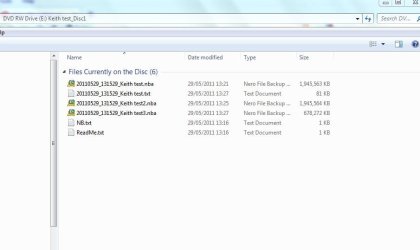
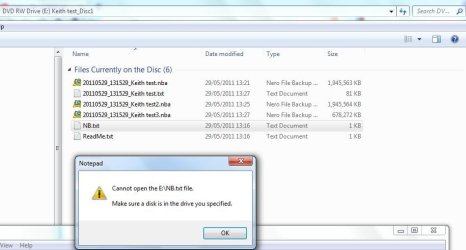
restarted and put new disk in e drive (cd/dvd) ran nero backup on a few files to test, got to about 30% drive popped oped and nero crashed. no cd in win explorer. Restarted machine e drive back showing 4.13 free of 4.7. opened drive in explorer and low and behold files showing (see dvdfiles). tried to open a txt file got error (see dvd files with error) also attached nero log.

A disillusioned

Keith
 

Attachments

  • dvd files.JPG
    dvd files.JPG
    38.5 KB · Views: 3
  • dvd files with error.JPG
    dvd files with error.JPG
    50.8 KB · Views: 2
  • nero Log.txt
    nero Log.txt
    104.8 KB · Views: 10

My Computer

Computer Manufacturer/Model Number
Advent 8212
OS
Windows 7 Home Premium
CPU
T7100 core 2 duo
Memory
4Gb
Graphics Card(s)
Intel 965GM
Sound Card
Realtek high definition
Screen Resolution
1280 x 800 x 59hertz
Hard Drives
Hitachi HTS541612J9SA00 ATA 120Gb
Internet Speed
8Gb
Again drive disappeared in explorer and device manager did a rescan in dev mgr and back it came but with error( attached )

Now giving up to see if any answers other than buy a new drive:eek:
 

Attachments

  • dvd error.JPG
    dvd error.JPG
    29.2 KB · Views: 3

My Computer

Computer Manufacturer/Model Number
Advent 8212
OS
Windows 7 Home Premium
CPU
T7100 core 2 duo
Memory
4Gb
Graphics Card(s)
Intel 965GM
Sound Card
Realtek high definition
Screen Resolution
1280 x 800 x 59hertz
Hard Drives
Hitachi HTS541612J9SA00 ATA 120Gb
Internet Speed
8Gb

My Computer

Computer Manufacturer/Model Number
Something I threw together
OS
Windows 7 Ultimate x64
CPU
Intel Core i7-2600K
Motherboard
Asus P8P67
Memory
16 GB G Skill F3-10666 CL9D-4GBRL
Graphics Card(s)
ATI Radeon HD 6870
Sound Card
ATI Radeon HDMI / Realtek ALC892
Monitor(s) Displays
2 x 22" standard monitors / LG32LC56v TV to watch films
Screen Resolution
1920 x1080
Hard Drives
2 x OCZ Vertex2 111.79GB
3 x Samsung103SJ
1 x Samsung103UJ
1 x WD3200BEVT
1 x Hitachi5K320-160
PSU
Thermaltake Toughpower Cable Management 750W
Case
Antec 300
Cooling
Noctua NH-U12P SE2 and 5 120mm Case fans
Keyboard
Microsoft Comfort Curve Keyboard 2000
Mouse
Hama M3110 / Logitech M305
Internet Speed
16000
Other Info
I have also used Fedora, Suse, Ubuntu Linux
And all other Windows from 95 to date except ME

My Computer

Computer Manufacturer/Model Number
Hewlett packard/p6512uk
OS
Microsoft Windows 7 Home Premium 64-bit 7600
CPU
IIx4 amd athelon 635 processor
Motherboard
FOXCONN 2AA9
Memory
2x2gb
Graphics Card(s)
ati radeon HD 5450
Sound Card
(1) Realtek High Definition Audio (2) AMD High Definition
Monitor(s) Displays
samsung lcd tv 32"
Screen Resolution
1360x 768
Hard Drives
(1) WDC WD10 01FAES-60Z2A0 SATA Disk Device (2) Maxtor OneTouch USB Device (3) ST310003 33AS USB Device (4) WD My Book 1111 USB Device
PSU
?
Cooling
air!
Keyboard
wireless hp
Mouse
wireless Hp,optical
Internet Speed
1.10mb/s
Antivirus
MSE
Browser
Firefox
Thanks guys

Yes run virus scans and scannow with no problems. Biggest worry is why it keeps disappearing.
I do not have another laptop to test with so a bit stuck

|Will look at Mr Fixit

Keith
 

My Computer

Computer Manufacturer/Model Number
Advent 8212
OS
Windows 7 Home Premium
CPU
T7100 core 2 duo
Memory
4Gb
Graphics Card(s)
Intel 965GM
Sound Card
Realtek high definition
Screen Resolution
1280 x 800 x 59hertz
Hard Drives
Hitachi HTS541612J9SA00 ATA 120Gb
Internet Speed
8Gb
Tried Fixit no errors found.

Tried clean start and nero backup again got to about 30% and crashed. checked explorer and dev mgr no dvd drive did a rescan drive found but could not load as driver in memory error 38 will do another clean start and a different burner

Keith
 

My Computer

Computer Manufacturer/Model Number
Advent 8212
OS
Windows 7 Home Premium
CPU
T7100 core 2 duo
Memory
4Gb
Graphics Card(s)
Intel 965GM
Sound Card
Realtek high definition
Screen Resolution
1280 x 800 x 59hertz
Hard Drives
Hitachi HTS541612J9SA00 ATA 120Gb
Internet Speed
8Gb
Try cleaning the lense with a lense cleaner CD atleast three or four times.

Does it resolve the problem? If not it is time to get a little more aggressive.

I presume yours is a lappie. If so the lense head should be accessible when you open the tray.

Get a microfiber cloth and gently wipe the lense. Repeat it each time checking whether it resolves the problem.

My brand-new SonyNEC-Optiarc external BD-ROM drive exhibited the same problem when I received it. And there seemed to be no solution on the web.

I could do nothing else except repeatedly cleaning the lense with the microfiber cloth. I was ready to dump my new baby into the dust bin.

Fortunately after ten to fifteen wipes,the drive started behaving.

I have no reasons to adduce but it happened. So try it before dumping your drive.
 

My Computer

Computer Manufacturer/Model Number
self-assembled
OS
Windows 7 Ultimate 32bit
CPU
AMD Phenom II X3 720 Processor
Motherboard
Gigabyte GA-MA78GM-S2H Revision 1.0
Memory
Transcend DDR2 (PC2 6400) 4 X 1GB
Graphics Card(s)
Integrated + ATI Radeon 4550
Sound Card
Integrated Realtek ALC 889A
Monitor(s) Displays
DELL 1704 FPT
Screen Resolution
1280 x 1024
Hard Drives
Western Digital Caviar SE16 250 GB x2 in RAID 0
PSU
Coolermaster 400 W
Case
Zebronics Cube
Cooling
stock
Keyboard
Microsoft - wired
Mouse
Microsoft - wired
Internet Speed
ADSL 256-512Kbps
ponmayilal

Thanks for your suggestion will give it a try.

What I cant understand is why the d**m thing keeps disappearing. It seems to to work OK if used as a USB drive and files are dragged across.

Keith
 

My Computer

Computer Manufacturer/Model Number
Advent 8212
OS
Windows 7 Home Premium
CPU
T7100 core 2 duo
Memory
4Gb
Graphics Card(s)
Intel 965GM
Sound Card
Realtek high definition
Screen Resolution
1280 x 800 x 59hertz
Hard Drives
Hitachi HTS541612J9SA00 ATA 120Gb
Internet Speed
8Gb
When it is showing in Device manager uninstall it, if you get the option delete the drivers. switch off your PC disconnect the drive restart the PC and switch off again, reconnect the drive and restart
 

My Computer

Computer Manufacturer/Model Number
Something I threw together
OS
Windows 7 Ultimate x64
CPU
Intel Core i7-2600K
Motherboard
Asus P8P67
Memory
16 GB G Skill F3-10666 CL9D-4GBRL
Graphics Card(s)
ATI Radeon HD 6870
Sound Card
ATI Radeon HDMI / Realtek ALC892
Monitor(s) Displays
2 x 22" standard monitors / LG32LC56v TV to watch films
Screen Resolution
1920 x1080
Hard Drives
2 x OCZ Vertex2 111.79GB
3 x Samsung103SJ
1 x Samsung103UJ
1 x WD3200BEVT
1 x Hitachi5K320-160
PSU
Thermaltake Toughpower Cable Management 750W
Case
Antec 300
Cooling
Noctua NH-U12P SE2 and 5 120mm Case fans
Keyboard
Microsoft Comfort Curve Keyboard 2000
Mouse
Hama M3110 / Logitech M305
Internet Speed
16000
Other Info
I have also used Fedora, Suse, Ubuntu Linux
And all other Windows from 95 to date except ME
Pooch,

Thanks tried that no success

Keith
 

My Computer

Computer Manufacturer/Model Number
Advent 8212
OS
Windows 7 Home Premium
CPU
T7100 core 2 duo
Memory
4Gb
Graphics Card(s)
Intel 965GM
Sound Card
Realtek high definition
Screen Resolution
1280 x 800 x 59hertz
Hard Drives
Hitachi HTS541612J9SA00 ATA 120Gb
Internet Speed
8Gb
Further to saga.

Purchased external hard drive and took an image of drive. then removed partition created and formatted. Installed Windows 7. put in known good disk works fine, eject disk put in another and drive has disappeared again. Refresh in dev man disk appears and workes fine. eject disk same problems.

Checked registry have upper limits but not lower

Keith
 

My Computer

Computer Manufacturer/Model Number
Advent 8212
OS
Windows 7 Home Premium
CPU
T7100 core 2 duo
Memory
4Gb
Graphics Card(s)
Intel 965GM
Sound Card
Realtek high definition
Screen Resolution
1280 x 800 x 59hertz
Hard Drives
Hitachi HTS541612J9SA00 ATA 120Gb
Internet Speed
8Gb
DVD Problem

:(DVD Problem:
I can commiserate w/ u. Been at it for the past 3 d.

Unfortunately MSFT put us in a viscous circle

To wit:

Do NOT, repeat do NOT buy any cd/dvd/ internal/external
problem is w/ Win 7 SW. has nothing w/ ur dirve.

When I get to FIXIT, it says, "You need additional SW to use this FixIt."

Mr. FixIt says the add. SW is .NET 2 or higher. Then it links you to it. Which is a .Net 2 ONLY.
It is 42.5 MB but in a sec it says - that you already HAVE this SW in as part of your Win 7.
I do have 3.5 and 4.0, but. all it wants is 2.0, which it won't accept.

that's the vicious circle.

Any help, direct/workaround/etc. please take it from here. Many Thanks

ameran
 

My Computer

Computer Manufacturer/Model Number
Toshiba/Protege
OS
Win 7
CPU
2 intel
Motherboard
intel
Memory
4 MG
Graphics Card(s)
Intel
Sound Card
intel
Back
Top