Dvd rom drive

buju123

New member
Local time
7:25 AM
Messages
15
I have windows XP professional (32 bit) installed laptop but I later upgrade it windows 7 home basic. I have DVD ROM drive, but before It installed windows 7 it burns DVD r easily but now it couldn't. So how will I burn DVD R now. Is there any way to burn.

:)
 

My Computer My Computer

At a glance

Windows 7 Home Basic 32 bit
OS
Windows 7 Home Basic 32 bit
There are no special or 3rd party drivers for optical devices (CD's/DVD's/Blu-Ray). Just the default built in Windows drivers.

If you have a DVD "ROM" that is not a burner - just a read only drive.

What is the status of the drive in the Device Manager? Is it shown working correctly or does it have an error code?

What program are you trying to use to burn discs? Download the free Imgburn and see if will allow you to burn discs. The Official ImgBurn Website
 

My Computer My Computer

At a glance

Windows 10 64 bitIntel i7 6700K16GB Corsair DominatorIntel CPU Graphics
Computer type
PC/Desktop
Computer Manufacturer/Model Number
My Own Build
OS
Windows 10 64 bit
CPU
Intel i7 6700K
Motherboard
ASUS ROG Maximus VIII Hero
Memory
16GB Corsair Dominator
Graphics Card(s)
Intel CPU Graphics
Sound Card
RealTek
Monitor(s) Displays
27" Dell S2719dgf
Screen Resolution
2560X1440
Hard Drives
1 TB Samsung 850 EVO SSD for Win 10 Pro
500GB Samsung 850 EVO SSD for Win 10 Insider
2 TB drive for backup
PSU
EVGA Supernova 750G2
Case
BeQuiet Silent Base 600
Cooling
Deepcool Captain 120EX
Keyboard
Microsoft Wireless 2000
Mouse
Microsoft wireless
Internet Speed
100 MB/sec (Cable)
Antivirus
Microsoft Defender and Malwarebytes
Browser
Edge/Firefox
Other Info
Cakewalk (Sonar) by BandLab and Studio One 4.1 Pro recording studio software. MOTU 896Mk3 Hybrid recording interface, Frontier Tranzport wireless control unit, Behringer X-Touch Control Surface.
Five USB connected optical drives for CD Audio production using Nero BurningROM
I have tried image burn but it doesn't work. Please tell me a way to burn. I also notices that my pc can't recognise blank dvd but it can play dvd movies
 

My Computer My Computer

At a glance

Windows 7 Home Basic 32 bit
OS
Windows 7 Home Basic 32 bit
I have tried image burn but it doesn't work. Please tell me a way to burn. I also notices that my pc can't recognise blank dvd but it can play dvd movies

Of course it wouldn't recognise blank DVDs, it's DVD-ROM drive.

You can only read DVDs on a DVD-ROM drive, you cannot burn DVDs using a DVD-ROM drive.

If you want us to confirm it for you, please take a snapshot of your my computer window showing your DVD device and upload it on the forums using these tutorials:-

To take the screenshot:-

How to Use the Snipping Tool in Vista - Vista Forums

To upload it:-

http://www.sevenforums.com/tutorials/9733-screenshots-files-upload-post-seven-forums.html
 

My Computer My Computer

At a glance

Windows 7 x64 Professional SP1Intel C2D T9550 2.66 GHz @ 2.793 GHz (Thanks ...8 GB DDR3ATI MOBILITY RADEON 4670
Computer Manufacturer/Model Number
DELL SXPS 1640
OS
Windows 7 x64 Professional SP1
CPU
Intel C2D T9550 2.66 GHz @ 2.793 GHz (Thanks ThrottleStop!!)
Motherboard
Intel PM45
Memory
8 GB DDR3
Graphics Card(s)
ATI MOBILITY RADEON 4670
Sound Card
CREATIVE XFI AUDIO NOTEBOOK
Monitor(s) Displays
16.1 WLED
Screen Resolution
1920x1080
Hard Drives
Seagate ST9500420AS 500GB (465GiBi) 7200 RPM Drive

External Drives:-
2 TB WD Essentials x 3
1 TB WD Mybook Gen 1
1 TB WD Mybook Gen 2
1 TB Seagate
1 TB Seagate
320 GB WD Scorpio Black (enclosed)
PSU
90W Dell Power Brick
Case
Dell Chassis
Cooling
Coolermaster Cooling Pad
Keyboard
Built-in backlighted Keyboard
Mouse
Logitech Wireless Mini Mouse
Internet Speed
4/0.5
The user, although he stated "DVD ROM" also stated it burned DVD R's when he had XP, which if true suggests that it is a burner drive.
 

My Computer My Computer

At a glance

Windows 10 64 bitIntel i7 6700K16GB Corsair DominatorIntel CPU Graphics
Computer type
PC/Desktop
Computer Manufacturer/Model Number
My Own Build
OS
Windows 10 64 bit
CPU
Intel i7 6700K
Motherboard
ASUS ROG Maximus VIII Hero
Memory
16GB Corsair Dominator
Graphics Card(s)
Intel CPU Graphics
Sound Card
RealTek
Monitor(s) Displays
27" Dell S2719dgf
Screen Resolution
2560X1440
Hard Drives
1 TB Samsung 850 EVO SSD for Win 10 Pro
500GB Samsung 850 EVO SSD for Win 10 Insider
2 TB drive for backup
PSU
EVGA Supernova 750G2
Case
BeQuiet Silent Base 600
Cooling
Deepcool Captain 120EX
Keyboard
Microsoft Wireless 2000
Mouse
Microsoft wireless
Internet Speed
100 MB/sec (Cable)
Antivirus
Microsoft Defender and Malwarebytes
Browser
Edge/Firefox
Other Info
Cakewalk (Sonar) by BandLab and Studio One 4.1 Pro recording studio software. MOTU 896Mk3 Hybrid recording interface, Frontier Tranzport wireless control unit, Behringer X-Touch Control Surface.
Five USB connected optical drives for CD Audio production using Nero BurningROM
The user, although he stated "DVD ROM" also stated it burned DVD R's when he had XP, which if true suggests that it is a burner drive.

The drive could be wrongly detected as a DVD ROM drive in Windows 7, but I highly doubt it.

Which is why we need some visual verification of the drive in Windows 7.. the My Computer (just Computer in 7) screen or Device Manager entries would suffice.

Buju 123, before i forget, head to your Device Manager and post another screenshot of your entry dropdown from DVD/CD-ROM devices like below:-

Capture1.PNG
 

My Computer My Computer

At a glance

Windows 7 x64 Professional SP1Intel C2D T9550 2.66 GHz @ 2.793 GHz (Thanks ...8 GB DDR3ATI MOBILITY RADEON 4670
Computer Manufacturer/Model Number
DELL SXPS 1640
OS
Windows 7 x64 Professional SP1
CPU
Intel C2D T9550 2.66 GHz @ 2.793 GHz (Thanks ThrottleStop!!)
Motherboard
Intel PM45
Memory
8 GB DDR3
Graphics Card(s)
ATI MOBILITY RADEON 4670
Sound Card
CREATIVE XFI AUDIO NOTEBOOK
Monitor(s) Displays
16.1 WLED
Screen Resolution
1920x1080
Hard Drives
Seagate ST9500420AS 500GB (465GiBi) 7200 RPM Drive

External Drives:-
2 TB WD Essentials x 3
1 TB WD Mybook Gen 1
1 TB WD Mybook Gen 2
1 TB Seagate
1 TB Seagate
320 GB WD Scorpio Black (enclosed)
PSU
90W Dell Power Brick
Case
Dell Chassis
Cooling
Coolermaster Cooling Pad
Keyboard
Built-in backlighted Keyboard
Mouse
Logitech Wireless Mini Mouse
Internet Speed
4/0.5
This the screenshot
 

Attachments

  • Untitled.jpg
    Untitled.jpg
    2.4 KB · Views: 118

My Computer My Computer

At a glance

Windows 7 Home Basic 32 bit
OS
Windows 7 Home Basic 32 bit
Thanks for your reply.

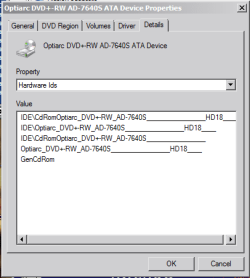
Now, I'd like you to double click on that CD-ROM drive entry, head to the details tab and under Property, open the drop down menu and select Hardware Ids. Right click on the box under Value, choose "Select All", then Copy.

Capture6.PNG

Paste the output into your next reply, please.

Thanks again.
 

My Computer My Computer

At a glance

Windows 7 x64 Professional SP1Intel C2D T9550 2.66 GHz @ 2.793 GHz (Thanks ...8 GB DDR3ATI MOBILITY RADEON 4670
Computer Manufacturer/Model Number
DELL SXPS 1640
OS
Windows 7 x64 Professional SP1
CPU
Intel C2D T9550 2.66 GHz @ 2.793 GHz (Thanks ThrottleStop!!)
Motherboard
Intel PM45
Memory
8 GB DDR3
Graphics Card(s)
ATI MOBILITY RADEON 4670
Sound Card
CREATIVE XFI AUDIO NOTEBOOK
Monitor(s) Displays
16.1 WLED
Screen Resolution
1920x1080
Hard Drives
Seagate ST9500420AS 500GB (465GiBi) 7200 RPM Drive

External Drives:-
2 TB WD Essentials x 3
1 TB WD Mybook Gen 1
1 TB WD Mybook Gen 2
1 TB Seagate
1 TB Seagate
320 GB WD Scorpio Black (enclosed)
PSU
90W Dell Power Brick
Case
Dell Chassis
Cooling
Coolermaster Cooling Pad
Keyboard
Built-in backlighted Keyboard
Mouse
Logitech Wireless Mini Mouse
Internet Speed
4/0.5
Thanks for answering and this is the information


IDE\CdRomHL-DT-ST_CDRW/DVD_GCC4244_______________B101____
IDE\HL-DT-ST_CDRW/DVD_GCC4244_______________B101____
IDE\CdRomHL-DT-ST_CDRW/DVD_GCC4244_______________
HL-DT-ST_CDRW/DVD_GCC4244_______________B101____
GenCdRom
 

My Computer My Computer

At a glance

Windows 7 Home Basic 32 bit
OS
Windows 7 Home Basic 32 bit
Now we're getting somewhere.

Based on the hardware IDs you've provided, your drive is an IDE connected,

HL-DT-ST CDRW/DVD GCC4244 drive.

This drive can burn CDs, CD-Rs and CD-RWs, but can only play DVD-ROMs and cannot burn DVDs of any kind what so ever.

Try this Microsoft Fix It program from the link below to verify what I just said for yourself.

Fix problems with CD or DVD drives that can

Here's the documentation from Dell's website about that drive and it's abilities.

Documentation

Hope that satisfies your query.
 

My Computer My Computer

At a glance

Windows 7 x64 Professional SP1Intel C2D T9550 2.66 GHz @ 2.793 GHz (Thanks ...8 GB DDR3ATI MOBILITY RADEON 4670
Computer Manufacturer/Model Number
DELL SXPS 1640
OS
Windows 7 x64 Professional SP1
CPU
Intel C2D T9550 2.66 GHz @ 2.793 GHz (Thanks ThrottleStop!!)
Motherboard
Intel PM45
Memory
8 GB DDR3
Graphics Card(s)
ATI MOBILITY RADEON 4670
Sound Card
CREATIVE XFI AUDIO NOTEBOOK
Monitor(s) Displays
16.1 WLED
Screen Resolution
1920x1080
Hard Drives
Seagate ST9500420AS 500GB (465GiBi) 7200 RPM Drive

External Drives:-
2 TB WD Essentials x 3
1 TB WD Mybook Gen 1
1 TB WD Mybook Gen 2
1 TB Seagate
1 TB Seagate
320 GB WD Scorpio Black (enclosed)
PSU
90W Dell Power Brick
Case
Dell Chassis
Cooling
Coolermaster Cooling Pad
Keyboard
Built-in backlighted Keyboard
Mouse
Logitech Wireless Mini Mouse
Internet Speed
4/0.5
So how did I burn earlier before I installed windows 7. Anyway is there any way to burn dvd in this drive ?
 

My Computer My Computer

At a glance

Windows 7 Home Basic 32 bit
OS
Windows 7 Home Basic 32 bit
You must've mistaken the DVD for a CD.

I'm sorry buju, but there's no way around it.

You'll have to get a DVD burner. They're very cheap now days....
 

My Computer My Computer

At a glance

Windows 7 x64 Professional SP1Intel C2D T9550 2.66 GHz @ 2.793 GHz (Thanks ...8 GB DDR3ATI MOBILITY RADEON 4670
Computer Manufacturer/Model Number
DELL SXPS 1640
OS
Windows 7 x64 Professional SP1
CPU
Intel C2D T9550 2.66 GHz @ 2.793 GHz (Thanks ThrottleStop!!)
Motherboard
Intel PM45
Memory
8 GB DDR3
Graphics Card(s)
ATI MOBILITY RADEON 4670
Sound Card
CREATIVE XFI AUDIO NOTEBOOK
Monitor(s) Displays
16.1 WLED
Screen Resolution
1920x1080
Hard Drives
Seagate ST9500420AS 500GB (465GiBi) 7200 RPM Drive

External Drives:-
2 TB WD Essentials x 3
1 TB WD Mybook Gen 1
1 TB WD Mybook Gen 2
1 TB Seagate
1 TB Seagate
320 GB WD Scorpio Black (enclosed)
PSU
90W Dell Power Brick
Case
Dell Chassis
Cooling
Coolermaster Cooling Pad
Keyboard
Built-in backlighted Keyboard
Mouse
Logitech Wireless Mini Mouse
Internet Speed
4/0.5
I am thinking of purchasing a dvd rw drive. If I do so then how will I change my pc dvd drive
 

My Computer My Computer

At a glance

Windows 7 Home Basic 32 bit
OS
Windows 7 Home Basic 32 bit

My Computer My Computer

At a glance

Microsoft Windows 7 Home Premium 64-bit 7601 ...Intel(R) Core(TM) i7-3770 CPU @ 3.40GHz8.00 GBIntel(R) HD Graphics 4000
Computer type
PC/Desktop
OS
Microsoft Windows 7 Home Premium 64-bit 7601 Multiprocessor Free Service Pack 1
CPU
Intel(R) Core(TM) i7-3770 CPU @ 3.40GHz
Motherboard
ASUSTeK COMPUTER INC. P8H77-M
Memory
8.00 GB
Graphics Card(s)
Intel(R) HD Graphics 4000
Sound Card
On Board
Monitor(s) Displays
Dell 24"
Screen Resolution
1920 x 1080
Hard Drives
(1) INTEL SSDSC2CT180A3 ATA Device (2) ST500DM002-1BD142 ATA Device (3) WDC WD3200AAKS-75L9A0 ATA Device (4) Generic- Compact Flash USB Device (5) Generic- MS/MS-Pro USB Device (6) Generic- SD/MMC USB Device (7) Generic- SM/xD-Picture USB
PSU
500w Corsair
Case
Cooler Master
Cooling
3 Fans
Keyboard
Logitech MK300
Mouse
Logitech WOM
Internet Speed
75Mb
Antivirus
Norton 360
Browser
Firefox, Opera, IE
I believe that you have quite an old laptop. And your current ODD has Enhanced IDE(Atapi) interface. I am not quite sure that you can get a right drive for replacement and even if, unless you can get the replacement drive directly from the manufacturer of your laptop, you may run into fitment problems, mainly the correct faceplate or bezel.

You may consider leaving the current drive in place and go in for an External USB DVD burner.
 

My Computer My Computer

At a glance

Windows 7 Home Premium 32 bit
OS
Windows 7 Home Premium 32 bit
Back
Top