DVD-rom may work only after restart

launchpad

New member
Local time
5:34 PM
Messages
7
In the last 2 days, I've installed Windows 7 Professional - 64bit
Installed Ati HD 4350 video card (which caused major audio headaches)

Now when I put in a dvd, it wont play. By that i mean wont even show up as a disc in my computer. Says the drive is empty with no disc. However, it will play if i leave the DVD in the drive and restart. Anyone with a suggestion as to what the problem might be?

Everything was working fine in Vista and the DVD-rom played and read everything
perfectly fine. I have not tried burning but the rom will find a blank disc in the drive.

The DVD-rom is an LG GSA-H20L. PC is a HP Pavillion a6010n.

New drivers from LG tried but not supported. Never thought i'd considering switching back to vista.

Thanks
 

My Computer My Computer

Computer Manufacturer/Model Number
HP Pavilion a6010n
OS
Windows 7 Professional - 64bit
CPU
Intel Core 2 Duo 4300
Motherboard
ASUS P5LP-LE
Memory
3 GB DDR2-PC5300 667 - Crucial Rendition
Graphics Card(s)
ATI Radeon HD 4350
Sound Card
Realtek High Definition (Onboard)
Monitor(s) Displays
20" Samsung LCD
Hard Drives
Western Digital 320GB
PSU
BFG GS-550
Case
HP Pavilion Case
Keyboard
Dell
Mouse
Logitech MediaPlay Cordless
Internet Speed
dsl
Other Info
Lightscribe/DVD-rom/writer - LG GSA-H20L
The ONLY drivers for CD or DVD drives is the default built in drivers. I don't know what LG drivers you tried (or was that a firmware update)?

One thing that fixes flakey problems is to uninstall the drive in the Device Manager then restart the PC and when Windows starts it will detect and reinstall it. Give that a try. To access the Device Manager, hold the Windows Key down and press the Pause/Break Key. Device Manager can be accessed from the top left list in the next panel. In the Device Manager, RIGHT click on the entry for the drive (to highlight it) and then LEFT click on "uninstall" (do not click the box to also uninstall the drivers).
 

My Computer My Computer

Computer type
PC/Desktop
Computer Manufacturer/Model Number
My Own Build
OS
Windows 10 64 bit
CPU
Intel i7 6700K
Motherboard
ASUS ROG Maximus VIII Hero
Memory
16GB Corsair Dominator
Graphics Card(s)
Intel CPU Graphics
Sound Card
RealTek
Monitor(s) Displays
27" Dell S2719dgf
Screen Resolution
2560X1440
Hard Drives
1 TB Samsung 850 EVO SSD for Win 10 Pro
500GB Samsung 850 EVO SSD for Win 10 Insider
2 TB drive for backup
PSU
EVGA Supernova 750G2
Case
BeQuiet Silent Base 600
Cooling
Deepcool Captain 120EX
Keyboard
Microsoft Wireless 2000
Mouse
Microsoft wireless
Internet Speed
100 MB/sec (Cable)
Antivirus
Microsoft Defender and Malwarebytes
Browser
Edge/Firefox
Other Info
Cakewalk (Sonar) by BandLab and Studio One 4.1 Pro recording studio software. MOTU 896Mk3 Hybrid recording interface, Frontier Tranzport wireless control unit, Behringer X-Touch Control Surface.
Five USB connected optical drives for CD Audio production using Nero BurningROM
This is interesting and a little strange; lets try to get some more information and try a few know solutions to DVD issues.

Known Solutions to DVD/CD ROM issues
1. Run an SFC /SCANNOW from an elevated CMD prompt to ensure that all windows system files are intact.
2. Open Regedit and navigate to the following string
HKEY_LOCAL_MACHINE\SYSTEM\CurrentControlSet\Control\Class\{4D36E965-E325-11CE-BFC1-08002BE10318}
In the right hand pane, delete anything called 'Upperfilters' or 'lowerfilters'. Reboot and test.

Further testing for more information
1. If you were to kill Explorer.exe in Taskmanager it should restart explorer (or you can restart it manually by typing explorer.exe into run). Try this and see if you disk reads correctly.
2. Do you have any virtual CD/DVD drives installed?
3. Does disabling and re-enabling the device in device manager allow for the data to be read?
 

My Computer My Computer

Computer Manufacturer/Model Number
Custom Hack job
OS
Windows 7 Ultimate 64 bit
CPU
Intel(R) Core(TM)2 Quad CPU Q8200 @ 2.33GHz
Motherboard
GigaByte EP45-UD3
Memory
8 GB Kingston
Graphics Card(s)
Nvidia GeForce 9600GT
Sound Card
Soundblaster Audigy
Monitor(s) Displays
AOC x2 22"
Hard Drives
2 x Samsung 500GB (RAID)
2 x Samsung 2TB
1 x WD Green 2TB
1 x Seagate 1TB
1 x Samsung 500GB
PSU
Thermaltake QFan 750W
Case
CM Scout Gaming
Cooling
Coolermaster V10
Keyboard
Microsoft Wireless Keyboard 1000
Mouse
Microsoft Wireless Optical 2000
Internet Speed
320
Other Info
Winfast PVR2000CP
LG DVD-RAM DVD/RW/DL Super Multi
Linksys WMP300Nx2 Wireless Adapter
Thanks for the help everyone. Yes, sorry I meant firmware not drivers.

I've tried uninstalling/re-install under device manger and it didn't help. I thought it was reading discs everytime again with the device manager tip but it failed to read again after more tests. Leave the disc in, restart and almost 90% chance it'll show up as a disc in my computer and autoplay popup with appear.

I'm currently trying scannow but it wont let me b/c its say i dont have admin rights but I do so trying to figure out that now.

No other cd/dvd drives installed - physical or virtual. Just one
 

My Computer My Computer

Computer Manufacturer/Model Number
HP Pavilion a6010n
OS
Windows 7 Professional - 64bit
CPU
Intel Core 2 Duo 4300
Motherboard
ASUS P5LP-LE
Memory
3 GB DDR2-PC5300 667 - Crucial Rendition
Graphics Card(s)
ATI Radeon HD 4350
Sound Card
Realtek High Definition (Onboard)
Monitor(s) Displays
20" Samsung LCD
Hard Drives
Western Digital 320GB
PSU
BFG GS-550
Case
HP Pavilion Case
Keyboard
Dell
Mouse
Logitech MediaPlay Cordless
Internet Speed
dsl
Other Info
Lightscribe/DVD-rom/writer - LG GSA-H20L
I'm currently trying scannow but it wont let me b/c its say i dont have admin rights but I do so trying to figure out that now.

For elevated CMD (i.e. with admin access), right click on CMD before you open and select 'Run as Administrator'. When the window opens in the top left on the title bar it should say "Administrator: cmd.exe".
Then run SFC /SCANNOW from the elevated CMD prompt window.

Let us know how you go with this and the other suggestions posted above.

Good luck.
 
Last edited:

My Computer My Computer

Computer Manufacturer/Model Number
Custom Hack job
OS
Windows 7 Ultimate 64 bit
CPU
Intel(R) Core(TM)2 Quad CPU Q8200 @ 2.33GHz
Motherboard
GigaByte EP45-UD3
Memory
8 GB Kingston
Graphics Card(s)
Nvidia GeForce 9600GT
Sound Card
Soundblaster Audigy
Monitor(s) Displays
AOC x2 22"
Hard Drives
2 x Samsung 500GB (RAID)
2 x Samsung 2TB
1 x WD Green 2TB
1 x Seagate 1TB
1 x Samsung 500GB
PSU
Thermaltake QFan 750W
Case
CM Scout Gaming
Cooling
Coolermaster V10
Keyboard
Microsoft Wireless Keyboard 1000
Mouse
Microsoft Wireless Optical 2000
Internet Speed
320
Other Info
Winfast PVR2000CP
LG DVD-RAM DVD/RW/DL Super Multi
Linksys WMP300Nx2 Wireless Adapter
Thanks for the tips/help.

- SFC/SCANNOW result - Did not find any integrity violations
- Your CD drive or DVD drive is missing or is not recognized by Windows or other programs "FIX IT"- Wont run on Windows 7 Pro b/c it has a built in troubleshooter. The "built in" troubleshooter on Windows 7 could not find any problems with the DVD-drive.
- un-installed/re-installed on restart under Device Manger - No change

DVD drive still will not work when i put in a disc. Again, I just have to leave the disc in and reboot. After a restart with the disc in the drive still, it'll work 90% of time and read the disc, autoplay prompt, disc shows up in the drive, etc.

Boy do i ever regret switching to Windows 7 Professional 64-bit :mad:
 

My Computer My Computer

Computer Manufacturer/Model Number
HP Pavilion a6010n
OS
Windows 7 Professional - 64bit
CPU
Intel Core 2 Duo 4300
Motherboard
ASUS P5LP-LE
Memory
3 GB DDR2-PC5300 667 - Crucial Rendition
Graphics Card(s)
ATI Radeon HD 4350
Sound Card
Realtek High Definition (Onboard)
Monitor(s) Displays
20" Samsung LCD
Hard Drives
Western Digital 320GB
PSU
BFG GS-550
Case
HP Pavilion Case
Keyboard
Dell
Mouse
Logitech MediaPlay Cordless
Internet Speed
dsl
Other Info
Lightscribe/DVD-rom/writer - LG GSA-H20L
Thanks for the tips/help.

1)SFC/SCANNOW result - Did not find any integrity violations
2) Your CD drive or DVD drive is missing or is not recognized by Windows or other programs "FIX IT"- Wont run on Windows 7 Pro b/c it has a built in troubleshooter. The "built in" troubleshooter on Windows 7 could not find any problems with the DVD-drive.
3) un-installed/re-installed on restart under Device Manger - No change

DVD drive still will not work when i put in a disc. Again, I just have to leave the disc in and reboot. After a restart with the disc in the drive still, it'll work 90% of time and read the disc, autoplay prompt, disc shows up in the drive, etc.

Boy do i ever regret switching to Windows 7 Professional 64-bit :mad:
What are your system specs? Please fill out in the lower left of your screen. Did you install the optical drive your self and how did you connect it?
And last did you make any changes within the bios?
 

My Computer My Computer

Computer Manufacturer/Model Number
Custom Build
OS
Windows 7 7600 1 X64
CPU
AMD PHENOM II X 550 PROCESSOR 3.1 ghz
Motherboard
ASUS M4A78-TE
Memory
Corsair 4 gig ddr 3
Graphics Card(s)
ati radeon 3300
Sound Card
ati hd
Monitor(s) Displays
syncmaster 2033sw
Screen Resolution
1600X900 60 hz refresh
Hard Drives
twin_seagates SATA's 1 TB & 500 Gig, hitachi_slimline 160 gig
PSU
antec_550 watt
Case
cooler master GLite
Cooling
stock_heat sink
Internet Speed
20mbs up/ 1.5mbs down
Other Info
favorite child "stewie"
favorite dog "brian"
^ filled out.

I did not install the optical drive myself as it was a store bought HP PC. I forget to mention that that I did install a BFG GS-550 power supply and an Ati Radeon HD 4350 right after installing Windows 7. I was extremely gentle when pulling out the power and plugging in the new lead to the disc drive. I checked the connections and nothing is loose or improperly connected.

I've even pulled out the new video card and still the same problem. Only Bios setting i've changed is the onboard sound to enabled for the video card. Everything else is untouched from factory. If i messed up the power supply install, i'm sure the DVD drive wouldn't work at all.

Machine was bought as a refurb but worked flawlessly up until i made the switch to Win 7 and minor hardware upgrade. I burned discs to back up my data from when I was still running Vista Home Premium 32bit about 2 days ago and it never failed to read or write. Thanks
 

My Computer My Computer

Computer Manufacturer/Model Number
HP Pavilion a6010n
OS
Windows 7 Professional - 64bit
CPU
Intel Core 2 Duo 4300
Motherboard
ASUS P5LP-LE
Memory
3 GB DDR2-PC5300 667 - Crucial Rendition
Graphics Card(s)
ATI Radeon HD 4350
Sound Card
Realtek High Definition (Onboard)
Monitor(s) Displays
20" Samsung LCD
Hard Drives
Western Digital 320GB
PSU
BFG GS-550
Case
HP Pavilion Case
Keyboard
Dell
Mouse
Logitech MediaPlay Cordless
Internet Speed
dsl
Other Info
Lightscribe/DVD-rom/writer - LG GSA-H20L
I suspect you maybe having issues with your motherboard.
Have you updated the chipset drivers?
 

My Computer My Computer

Computer Manufacturer/Model Number
Custom Build
OS
Windows 7 7600 1 X64
CPU
AMD PHENOM II X 550 PROCESSOR 3.1 ghz
Motherboard
ASUS M4A78-TE
Memory
Corsair 4 gig ddr 3
Graphics Card(s)
ati radeon 3300
Sound Card
ati hd
Monitor(s) Displays
syncmaster 2033sw
Screen Resolution
1600X900 60 hz refresh
Hard Drives
twin_seagates SATA's 1 TB & 500 Gig, hitachi_slimline 160 gig
PSU
antec_550 watt
Case
cooler master GLite
Cooling
stock_heat sink
Internet Speed
20mbs up/ 1.5mbs down
Other Info
favorite child "stewie"
favorite dog "brian"

My Computer My Computer

Computer Manufacturer/Model Number
Custom Build
OS
Windows 7 7600 1 X64
CPU
AMD PHENOM II X 550 PROCESSOR 3.1 ghz
Motherboard
ASUS M4A78-TE
Memory
Corsair 4 gig ddr 3
Graphics Card(s)
ati radeon 3300
Sound Card
ati hd
Monitor(s) Displays
syncmaster 2033sw
Screen Resolution
1600X900 60 hz refresh
Hard Drives
twin_seagates SATA's 1 TB & 500 Gig, hitachi_slimline 160 gig
PSU
antec_550 watt
Case
cooler master GLite
Cooling
stock_heat sink
Internet Speed
20mbs up/ 1.5mbs down
Other Info
favorite child "stewie"
favorite dog "brian"

My Computer My Computer

Computer Manufacturer/Model Number
Custom Build
OS
Windows 7 7600 1 X64
CPU
AMD PHENOM II X 550 PROCESSOR 3.1 ghz
Motherboard
ASUS M4A78-TE
Memory
Corsair 4 gig ddr 3
Graphics Card(s)
ati radeon 3300
Sound Card
ati hd
Monitor(s) Displays
syncmaster 2033sw
Screen Resolution
1600X900 60 hz refresh
Hard Drives
twin_seagates SATA's 1 TB & 500 Gig, hitachi_slimline 160 gig
PSU
antec_550 watt
Case
cooler master GLite
Cooling
stock_heat sink
Internet Speed
20mbs up/ 1.5mbs down
Other Info
favorite child "stewie"
favorite dog "brian"
How did you go with my other two suggestions?

This one is a known DVD problem solution
Open Regedit and navigate to the following string
HKEY_LOCAL_MACHINE\SYSTEM\CurrentControlSet\Control\Class\{4D36E965-E325-11CE-BFC1-08002BE10318}

This one will provide us with more information
If you were to kill Explorer.exe in Taskmanager it should restart explorer (or you can restart it manually by typing explorer.exe into run). Try this and see if you disk reads correctly.
:)
 

My Computer My Computer

Computer Manufacturer/Model Number
Custom Hack job
OS
Windows 7 Ultimate 64 bit
CPU
Intel(R) Core(TM)2 Quad CPU Q8200 @ 2.33GHz
Motherboard
GigaByte EP45-UD3
Memory
8 GB Kingston
Graphics Card(s)
Nvidia GeForce 9600GT
Sound Card
Soundblaster Audigy
Monitor(s) Displays
AOC x2 22"
Hard Drives
2 x Samsung 500GB (RAID)
2 x Samsung 2TB
1 x WD Green 2TB
1 x Seagate 1TB
1 x Samsung 500GB
PSU
Thermaltake QFan 750W
Case
CM Scout Gaming
Cooling
Coolermaster V10
Keyboard
Microsoft Wireless Keyboard 1000
Mouse
Microsoft Wireless Optical 2000
Internet Speed
320
Other Info
Winfast PVR2000CP
LG DVD-RAM DVD/RW/DL Super Multi
Linksys WMP300Nx2 Wireless Adapter
Forgot to mention that i have tried locating the "lower" and "upper" but they dont appear. I can locate HKEY_LOCAL_MACHINE\SYSTEM\CurrentControlSet\Control\Class\{4D36E965-E325-11CE-BFC1-08002BE10318}
but there is no upper or lower.

As for killing explorer.exe, it made my screen useless with just my desktop background left and i had to reboot.

Thanks everyone for the advice. !@#$ Windows 7. What a horrible waste of time and money.
 

My Computer My Computer

Computer Manufacturer/Model Number
HP Pavilion a6010n
OS
Windows 7 Professional - 64bit
CPU
Intel Core 2 Duo 4300
Motherboard
ASUS P5LP-LE
Memory
3 GB DDR2-PC5300 667 - Crucial Rendition
Graphics Card(s)
ATI Radeon HD 4350
Sound Card
Realtek High Definition (Onboard)
Monitor(s) Displays
20" Samsung LCD
Hard Drives
Western Digital 320GB
PSU
BFG GS-550
Case
HP Pavilion Case
Keyboard
Dell
Mouse
Logitech MediaPlay Cordless
Internet Speed
dsl
Other Info
Lightscribe/DVD-rom/writer - LG GSA-H20L
There is a good chance this will work - sorry i didnt see your post earlier i live in Australia :)

You may need to download and install the latest intel matrix storage manager software/driver because AHCI would be enabled in your bios, and what happens during installation of W7 is W7 installs the Intel driver, but for correct functionality you need to install the intel matrix storage manager after installation is complete if you dont it will cause the problems with your DVD DRIVE.

You will find it at the intel site - http://downloadcenter.intel.com/default.aspx
Select chipsets - desktop chipsets - select chipset (express 975)- skip OS - select drivers(10) - select intel(R) matrix storage manager 8.9.0.1023 - download and install.
There is a mix up with download site so you need to skip OS to get to it now - once there you will see it supports Windows 7.

Hers the latest ati drivers if you havent already installed them - http://game.amd.com/us-en/drivers_catalyst.aspx?p=win7/windows-7-64bit
 

My Computer My Computer

OS
XP, Vista, W7 64bit Home Premium
CPU
Intel Core Duo 6850 3.0 ghz @ 3.7 ghz
Motherboard
Asus P5E
Memory
4GB Corsair DDR 2 PC-6400
Graphics Card(s)
Ati 4870 1ghz
Sound Card
Supreme FX 11
Monitor(s) Displays
View Sonic VX1962wm
Screen Resolution
1680 X1050
Hard Drives
3 Seagate Sata Drives 160gb 250gb 500gb
PSU
Thermaltake 600 watt
Case
NZXT Alpha
Cooling
3X120cm Fans
Keyboard
Microsoft Digital Media Pro Keyboard
Mouse
Microsoft Wheel Mouse Optical
Internet Speed
1.5Mb to 8Mb/384k
Forgot to mention that i have tried locating the "lower" and "upper" but they dont appear. I can locate HKEY_LOCAL_MACHINE\SYSTEM\CurrentControlSet\Control\Class\{4D36E965-E325-11CE-BFC1-08002BE10318}
but there is no upper or lower.

As for killing explorer.exe, it made my screen useless with just my desktop background left and i had to reboot.

Thanks everyone for the advice. !@#$ Windows 7. What a horrible waste of time and money.

Ok, Filters are ruled out. thanks for letting us know.

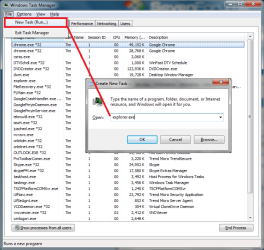
RE: Killing explorer, you can restart it through the task manager (see pic) but I need to stress that this isn't a solution, it just gives us more information.

I'll have another read through the post and see what else I can come up with.
 

Attachments

  • restart explorer.png
    restart explorer.png
    39 KB · Views: 28

My Computer My Computer

Computer Manufacturer/Model Number
Custom Hack job
OS
Windows 7 Ultimate 64 bit
CPU
Intel(R) Core(TM)2 Quad CPU Q8200 @ 2.33GHz
Motherboard
GigaByte EP45-UD3
Memory
8 GB Kingston
Graphics Card(s)
Nvidia GeForce 9600GT
Sound Card
Soundblaster Audigy
Monitor(s) Displays
AOC x2 22"
Hard Drives
2 x Samsung 500GB (RAID)
2 x Samsung 2TB
1 x WD Green 2TB
1 x Seagate 1TB
1 x Samsung 500GB
PSU
Thermaltake QFan 750W
Case
CM Scout Gaming
Cooling
Coolermaster V10
Keyboard
Microsoft Wireless Keyboard 1000
Mouse
Microsoft Wireless Optical 2000
Internet Speed
320
Other Info
Winfast PVR2000CP
LG DVD-RAM DVD/RW/DL Super Multi
Linksys WMP300Nx2 Wireless Adapter
Hi folks,

This is an old thread but I have the exact same problem! It's bazzarre!! Did this ever get solved? I've been living with it for 5months. Don't ask me how....

Asus G53JW running windows 7 64. Exactly the same symptoms (see first post)

thanks
 

My Computer My Computer

Computer Manufacturer/Model Number
Asus G53JW
OS
Windows 7 home premium 64bit
CPU
Core i7
Motherboard
no idea
Memory
12gig
Graphics Card(s)
Geforce 460M
Sound Card
sounds good
Monitor(s) Displays
3D 15inch
Hard Drives
when drunk
Cooling
by beer
Back
Top