
skybluesky
New member
- Local time
- 3:16 AM
- Messages
- 3
I have read through the forums and haven't seen anything exactly as this problem, so i thought I'd see what you guys think.
Shortly after installing win7 (about 24hrs after) my DVD-RW drive on my laptop stopped working. It no longer recognizes that a cd is present. If I completely remove the drive (drivers and physically) and start from stratch, it works for a short period of time (not fullly, just recognizes cd's) I have yet to successfully burn any cd's or dvd's. Attempting to burn usually triggers the cdrom become inoperative (although it goes inop anyways even if i dont try to burn)
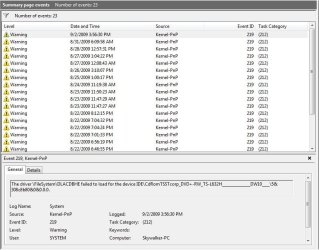
After browsing the event logs i found an event that seems to happen anytime i turn my computer from a full power down state. (screenshot included) but it says:
Log Name: System
Source: Microsoft-Windows-Kernel-PnP
Date: 9/2/2009 3:56:30 PM
Event ID: 219
Task Category: (212)
Level: Warning
User: SYSTEM
The driver \FileSystem\DLACDBHE failed to load for the device IDE\CdRomTSSTcorp_DVD+-RW_TS-L632H_______________DW10____\5&308c8b80&0&0.0.0.
So, any takers? oh and the drive worked fine in xp and vista ultimate, also worked fine for the install of win7.
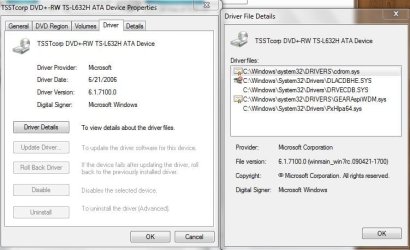
Update: The status of the drive seems to fluctuate...sometimes it has no errors, other times it does...i'll include some extra pics of the error when it does show. Also the drive name changes sometimes its just "CD ROM DRIVE" or "DVD-RW Drive" or the full model name TSSTcorp...etc
Shortly after installing win7 (about 24hrs after) my DVD-RW drive on my laptop stopped working. It no longer recognizes that a cd is present. If I completely remove the drive (drivers and physically) and start from stratch, it works for a short period of time (not fullly, just recognizes cd's) I have yet to successfully burn any cd's or dvd's. Attempting to burn usually triggers the cdrom become inoperative (although it goes inop anyways even if i dont try to burn)
After browsing the event logs i found an event that seems to happen anytime i turn my computer from a full power down state. (screenshot included) but it says:
Log Name: System
Source: Microsoft-Windows-Kernel-PnP
Date: 9/2/2009 3:56:30 PM
Event ID: 219
Task Category: (212)
Level: Warning
User: SYSTEM
The driver \FileSystem\DLACDBHE failed to load for the device IDE\CdRomTSSTcorp_DVD+-RW_TS-L632H_______________DW10____\5&308c8b80&0&0.0.0.
So, any takers? oh and the drive worked fine in xp and vista ultimate, also worked fine for the install of win7.
Update: The status of the drive seems to fluctuate...sometimes it has no errors, other times it does...i'll include some extra pics of the error when it does show. Also the drive name changes sometimes its just "CD ROM DRIVE" or "DVD-RW Drive" or the full model name TSSTcorp...etc
Attachments

My Computer
- Computer Manufacturer/Model Number
- Dell Inspiron 1501
- OS
- Windows 7 RC Build 7100
- CPU
- AMD Turion64 X2 TL-60 (DualCore), ~2.0Ghz
- Memory
- 4GB Ram
- Graphics Card(s)
- ATI Radeon Xpress [128MB]
- Hard Drives
- 120GB
 i'll see if anyone else can come up with something...its not a huge deal, i have to other computers with working cd-drives, so its not urgent.