
You are using an out of date browser. It may not display this or other websites correctly.
You should upgrade or use an alternative browser.
You should upgrade or use an alternative browser.
DVD Shrink and Autorun
- Thread starter Giskard
- Start date

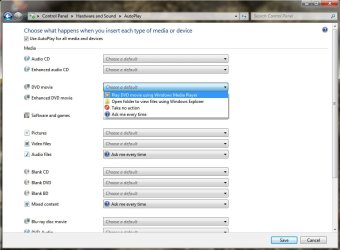
Try This.. (This came from Microsoft Support LINK)
Follow these steps to specify what should happen when you insert different types of digital media into your computer.
Follow these steps to specify what should happen when you insert different types of digital media into your computer.
- Open AutoPlay by clicking the Start button
, clicking Control Panel, clicking Hardware and Sound, and then clicking AutoPlay.

- Under Media, find the type of media that you want to change the AutoPlay setting for.
- Click the action that you want AutoPlay to take when you insert that type of media into your computer.
- Click Save.
Attachments
My Computer
- Computer Manufacturer/Model Number
- HP Pavilion dv5 Notebook PC
- OS
- Windows Seven x64
- CPU
- 2.2 GHz Dual Core
- Motherboard
- Quanta 3600
- Memory
- 4GB
- Graphics Card(s)
- ATI Mobility RADEON HD 3470
- Sound Card
- ATI
- Monitor(s) Displays
- Laptop
- Hard Drives
- ATA Hitachi HTS543215 (5400RPM)
- Case
- Laptop
- Cooling
- Fan
- Internet Speed
- Basic DSL 1.5 up and Down

Those instructions are correct as far as they go, but DVD Shrink doesn't appear as an option in the dropdown windows. He would need a method to add it. I have DVD Shrink and DVD Decrypter both installed, and only the latter appears in the options.
My Computer
- Computer Manufacturer/Model Number
- DIY
- OS
- W7x64 Pro, SuSe 12.1/** W7 x64 Pro, XP MCE
- CPU
- Phenom II 1090T w/Noctua NH-D14 /**4400+ X2 w/CM Hyper TX 3
- Motherboard
- ASRock 890FX Deluxe 4/**A8N-SLI
- Memory
- 2 x 2GB Patriot PGS34g1600LLKA/**4x1GB Corsair VS
- Graphics Card(s)
- EVGA GTX460 SC/**EVGA 8800GTS
- Sound Card
- Asus Xonar D2X/**Xonar D1
- Monitor(s) Displays
- Acer X233H, Dell E152FPc /**LG M237-WD
- Screen Resolution
- 1920x1080 & 1024x768/**1980x1080
- Hard Drives
- WDC 2TB, 1.5TB, 1TB, 500GB,Seagate 500GB , Maxtor 80GB /**500GB Seagate & WDC 1TB Black
- PSU
- CM RS600 w/ APC BX1000G/**Antec 500 TP w/ APC BX1000
- Case
- HAF922/**Antec 1040IIB
- Cooling
- 3x200mm, 1x140 and 1x120mm/**5x80mm fans
- Keyboard
- Logitech Media USB/**Saitek Eclipse
- Mouse
- Cordless Trackman Wheel/**Ditto
- Internet Speed
- 3.3Mbps
- Other Info
- SB 560 5.1 w/ Sennheiser RS140/**Creative T20 speakers, Dvico FusionHDTV7 Gold RT, Cisco E3000, HP 5510V AIO, Linksys E3000, Belkin F5U237 hub and **F5D8055 adapter
(** = 2nd rig)
Yeah. I am a customizing freak and I hate having taskbar icons that I don't really need. Since I only use dvd shrink to back up my dvds, I never have a reason to click on it, when a new dvd has not been inserted. Seems like this may require a registry hack.
-Giskard
-Giskard
My Computer
- OS
- Windows 7 Ultimate 64
If you wanted to attempt the registry hack, this might be of some help:
Obsolete devices in Autoplay list & multiple entries for same devices
Checkout Gloria's posts. There are some edits that I would like to make, but this looks a bit deep for me.
Obsolete devices in Autoplay list & multiple entries for same devices
Checkout Gloria's posts. There are some edits that I would like to make, but this looks a bit deep for me.
My Computer
- Computer Manufacturer/Model Number
- DIY
- OS
- W7x64 Pro, SuSe 12.1/** W7 x64 Pro, XP MCE
- CPU
- Phenom II 1090T w/Noctua NH-D14 /**4400+ X2 w/CM Hyper TX 3
- Motherboard
- ASRock 890FX Deluxe 4/**A8N-SLI
- Memory
- 2 x 2GB Patriot PGS34g1600LLKA/**4x1GB Corsair VS
- Graphics Card(s)
- EVGA GTX460 SC/**EVGA 8800GTS
- Sound Card
- Asus Xonar D2X/**Xonar D1
- Monitor(s) Displays
- Acer X233H, Dell E152FPc /**LG M237-WD
- Screen Resolution
- 1920x1080 & 1024x768/**1980x1080
- Hard Drives
- WDC 2TB, 1.5TB, 1TB, 500GB,Seagate 500GB , Maxtor 80GB /**500GB Seagate & WDC 1TB Black
- PSU
- CM RS600 w/ APC BX1000G/**Antec 500 TP w/ APC BX1000
- Case
- HAF922/**Antec 1040IIB
- Cooling
- 3x200mm, 1x140 and 1x120mm/**5x80mm fans
- Keyboard
- Logitech Media USB/**Saitek Eclipse
- Mouse
- Cordless Trackman Wheel/**Ditto
- Internet Speed
- 3.3Mbps
- Other Info
- SB 560 5.1 w/ Sennheiser RS140/**Creative T20 speakers, Dvico FusionHDTV7 Gold RT, Cisco E3000, HP 5510V AIO, Linksys E3000, Belkin F5U237 hub and **F5D8055 adapter
(** = 2nd rig)