
You are using an out of date browser. It may not display this or other websites correctly.
You should upgrade or use an alternative browser.
You should upgrade or use an alternative browser.
DVD Writer issue
- Thread starter dipa
- Start date
Try flashin the firmware of the unit to most recent version, also if possible, try another media brand.
My Computer
- Computer type
- PC/Desktop
- OS
- Microsoft Windows 10 Professional / Windows 7 Professional
- CPU
- Intel i5-3570
- Motherboard
- Lenovo Mahobay
- Memory
- 16GB DDR3
- Graphics Card(s)
- AMD Radeon HD 7850 2GB
- Sound Card
- (1) Realtek HD Audio (2) AMD HD Audio
- Monitor(s) Displays
- LG LS192WS
- Screen Resolution
- 1440 x 900 @ 32bit color
- Hard Drives
- (1) SUV300S37A/120G (2) ST3500413AS SATA Disk Device AHCI mode enabled.
- PSU
- Corsair HX620
- Case
- Thermaltake V4 Black Edition
- Cooling
- Cooler Master Hyper 212 + Artic Silver 5 on CPU/GPU
- Keyboard
- Dell SK-8115
- Mouse
- Razer Copperhead with MAPED mat (awesome!)
- Internet Speed
- 100 Mbps up/down
- Browser
- Chrome

My Computer
- Computer Manufacturer/Model Number
- DIY
- OS
- W7x64 Pro, SuSe 12.1/** W7 x64 Pro, XP MCE
- CPU
- Phenom II 1090T w/Noctua NH-D14 /**4400+ X2 w/CM Hyper TX 3
- Motherboard
- ASRock 890FX Deluxe 4/**A8N-SLI
- Memory
- 2 x 2GB Patriot PGS34g1600LLKA/**4x1GB Corsair VS
- Graphics Card(s)
- EVGA GTX460 SC/**EVGA 8800GTS
- Sound Card
- Asus Xonar D2X/**Xonar D1
- Monitor(s) Displays
- Acer X233H, Dell E152FPc /**LG M237-WD
- Screen Resolution
- 1920x1080 & 1024x768/**1980x1080
- Hard Drives
- WDC 2TB, 1.5TB, 1TB, 500GB,Seagate 500GB , Maxtor 80GB /**500GB Seagate & WDC 1TB Black
- PSU
- CM RS600 w/ APC BX1000G/**Antec 500 TP w/ APC BX1000
- Case
- HAF922/**Antec 1040IIB
- Cooling
- 3x200mm, 1x140 and 1x120mm/**5x80mm fans
- Keyboard
- Logitech Media USB/**Saitek Eclipse
- Mouse
- Cordless Trackman Wheel/**Ditto
- Internet Speed
- 3.3Mbps
- Other Info
- SB 560 5.1 w/ Sennheiser RS140/**Creative T20 speakers, Dvico FusionHDTV7 Gold RT, Cisco E3000, HP 5510V AIO, Linksys E3000, Belkin F5U237 hub and **F5D8055 adapter
(** = 2nd rig)

Ponmayilal
Banned
- Local time
- 7:40 AM
- Messages
- 441
hello...
i am unable to write CD and DVDs from my DVD Writer..
Burn Process stars and suddenly fails..
please check log..
thank you!
1. How old is your optical drive?
2. Were you able to burn CDs and DVDs successfully before? How many?
3. What brand media do you use for CDs and DVDs?
4. Do you stick to one brand or keep changing on the price factor?
5. Have you checked for any new firmware availability and updated?
6. Have you tried burning the media with some other burner like Img Burner, CD XP Pro etc.?
My Computer
- Computer Manufacturer/Model Number
- self-assembled
- OS
- Windows 7 Ultimate 32bit
- CPU
- AMD Phenom II X3 720 Processor
- Motherboard
- Gigabyte GA-MA78GM-S2H Revision 1.0
- Memory
- Transcend DDR2 (PC2 6400) 4 X 1GB
- Graphics Card(s)
- Integrated + ATI Radeon 4550
- Sound Card
- Integrated Realtek ALC 889A
- Monitor(s) Displays
- DELL 1704 FPT
- Screen Resolution
- 1280 x 1024
- Hard Drives
- Western Digital Caviar SE16 250 GB x2 in RAID 0
- PSU
- Coolermaster 400 W
- Case
- Zebronics Cube
- Cooling
- stock
- Keyboard
- Microsoft - wired
- Mouse
- Microsoft - wired
- Internet Speed
- ADSL 256-512Kbps
hello...
i am unable to write CD and DVDs from my DVD Writer..
Burn Process stars and suddenly fails..
please check log..
thank you!
1. How old is your optical drive?
2. Were you able to burn CDs and DVDs successfully before? How many?
3. What brand media do you use for CDs and DVDs?
4. Do you stick to one brand or keep changing on the price factor?
5. Have you checked for any new firmware availability and updated?
hi..thanks for reply
i have bought my laptop about 1 year ago.. and i could be able to write it before successfully
and last i burnt one dvd successfully .. bt now i can't burn any of DVDs.. is there any hardware issue?
My Computer
- OS
- Windows 7 x64
i checked that link.. its related to nero.. i tried to burn it with another software, but no any luck..
My Computer
- OS
- Windows 7 x64

try this soloution from mr fixit ,
Your CD or DVD drive can't read or write media
Your CD or DVD drive can't read or write media
My Computer
- Computer Manufacturer/Model Number
- Hewlett packard/p6512uk
- OS
- Microsoft Windows 7 Home Premium 64-bit 7600
- CPU
- IIx4 amd athelon 635 processor
- Motherboard
- FOXCONN 2AA9
- Memory
- 2x2gb
- Graphics Card(s)
- ati radeon HD 5450
- Sound Card
- (1) Realtek High Definition Audio (2) AMD High Definition
- Monitor(s) Displays
- samsung lcd tv 32"
- Screen Resolution
- 1360x 768
- Hard Drives
- (1) WDC WD10 01FAES-60Z2A0 SATA Disk Device (2) Maxtor OneTouch USB Device (3) ST310003 33AS USB Device (4) WD My Book 1111 USB Device
- PSU
- ?
- Cooling
- air!
- Keyboard
- wireless hp
- Mouse
- wireless Hp,optical
- Internet Speed
- 1.10mb/s
- Antivirus
- MSE
- Browser
- Firefox
try this soloution from mr fixit ,
Your CD or DVD drive can't read or write media
could not solve from this link too

My Computer
- OS
- Windows 7 x64
Ponmayilal
Banned
- Local time
- 7:40 AM
- Messages
- 441
........ is there any hardware issue?
It can be a hardware issue or a media related issue. That is exactly why I asked what brand media you use and you have not answered.
A remote diagnosis is especially difficult, if you do not provide complete details on your own accord or when asked.
First we have to eliminate the media related issue. Try writing an ISO to a Verbatim/JVC/JVC Taiyo Yuden RW media. Report the result. Are you getting the same burn failure?
Also from your Nero log, I presume you are using Windows XP. Am I right? ( also i think Nero 7 is incompatible with Windows 7)
The next process you may have to do is to completely uninstall all burning software from your system and try using the the Windows native burning.
If you are using XP, do this.
Click Start, click Run, type services.msc /s, and then click OK.
- Double-click IMAPI CD-Burning COM Service.
- Under Service Status, click Start.
- Try to write data to a CDRW. and remember Verbatim/blah blah

If none of the above resolves the issue.......hmmmm...........you have a hardware issue. How to confirm?
Plug in a known good CD/DVD external USB2 writer and try to burn your Verbatim/...../...... RW. All is well? Replace your internal optical drive.
Good luck. (I have to take a break *sighs*)
My Computer
- Computer Manufacturer/Model Number
- self-assembled
- OS
- Windows 7 Ultimate 32bit
- CPU
- AMD Phenom II X3 720 Processor
- Motherboard
- Gigabyte GA-MA78GM-S2H Revision 1.0
- Memory
- Transcend DDR2 (PC2 6400) 4 X 1GB
- Graphics Card(s)
- Integrated + ATI Radeon 4550
- Sound Card
- Integrated Realtek ALC 889A
- Monitor(s) Displays
- DELL 1704 FPT
- Screen Resolution
- 1280 x 1024
- Hard Drives
- Western Digital Caviar SE16 250 GB x2 in RAID 0
- PSU
- Coolermaster 400 W
- Case
- Zebronics Cube
- Cooling
- stock
- Keyboard
- Microsoft - wired
- Mouse
- Microsoft - wired
- Internet Speed
- ADSL 256-512Kbps
........ is there any hardware issue?
It can be a hardware issue or a media related issue. That is exactly why I asked what brand media you use and you have not answered.
A remote diagnosis is especially difficult, if you do not provide complete details on your own accord or when asked.
First we have to eliminate the media related issue. Try writing an ISO to a Verbatim/JVC/JVC Taiyo Yuden RW media. Report the result. Are you getting the same burn failure?
Also from your Nero log, I presume you are using Windows XP. Am I right? ( also i think Nero 7 is incompatible with Windows 7)
The next process you may have to do is to completely uninstall all burning software from your system and try using the the Windows native burning.
If you are using XP, do this.
Click Start, click Run, type services.msc /s, and then click OK.Have a look at this MS article. How to troubleshoot issues that occur when you write data to a CD-R or CD-RW optical disc in Windows XP
- Double-click IMAPI CD-Burning COM Service.
- Under Service Status, click Start.
- Try to write data to a CDRW. and remember Verbatim/blah blah
If none of the above resolves the issue.......hmmmm...........you have a hardware issue. How to confirm?
Plug in a known good CD/DVD external USB2 writer and try to burn your Verbatim/...../...... RW. All is well? Replace your internal optical drive.
Good luck. (I have to take a break *sighs*)
Hi.. i am not using XP i am using Windows 7 home edition..
and i dont knw which brand it is.. how to check the brand name of my dvd writer..
My Computer
- OS
- Windows 7 x64

DownLoad System Info for Windows to look at your system items
(Free Version)
:ar: Buy SIW Pro or Download SIW Freeware
(Free Version)
:ar: Buy SIW Pro or Download SIW Freeware
My Computer
- Computer type
- PC/Desktop
- Computer Manufacturer/Model Number
- Built them myself, Science Experiments !
- OS
- Win7 Enterprise, Win7 x86 (Ult 7600), Win7 x64 Ult 7600, TechNet RTM on AMD x64 (2.8Ghz)
- CPU
- AMD fx8350 4ghz, AMD-32 2400mhz, AMD-64 3200mhz, AMDx64 2.8G
- Motherboard
- SIS 755, ECS-K8M890M-M (Ult 7600), GigaByte & others
- Memory
- 2gb, 4gb on the Ult 7600, 4gb on Technet RTM, 32gb on FX8350
- Graphics Card(s)
- Draw my own Graphics, several nVidia cards
- Sound Card
- on motherboard
- Monitor(s) Displays
- 19" flat scr, 28" I-Inc widescr,22" Emprex Widescr, 23" Acer
- Screen Resolution
- 1280 x 1024, 1440 x 900, 1920 x 1080
- Hard Drives
- 6 pata Ide HD's & 2 Sata HD's
added 80gb external on Ult 7600 computer,
numerous extra 1tb, 2TB, 3Tb SATA HD's
A collection of ext HD Docks w/ HDs
- PSU
- 430w, 550w, 600w, 700, 800, etc
- Case
- All Generic Full Towers
- Cooling
- Open Air & a few fans, some w/ colored LEDs
- Keyboard
- Compaq & Dell recycled from GoodWill
- Mouse
- Made in China Optical Wired Mouse
- Internet Speed
- Fast Cable InterNet
- Antivirus
- AVG Free on 24 different Desktops, NO Problems!
- Browser
- IE 8 is preferred, but use FireFox sometimes
- Other Info
- Linksys Routers, switches, & Hubs
Too Many USB Flash Drives to count, Biggest is 64GB !
Eight computers in my home network.
Sixteen computers at my business network.
Linked via TeamViewer !
Lots of old used spare computer parts everywhere!
DownLoad System Info for Windows to look at your system items
(Free Version)
:ar: Buy SIW Pro or Download SIW Freeware
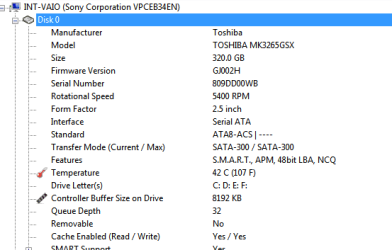
hey thanks.. using this software i found the brand is TOSHIBA
Attachments
My Computer
- OS
- Windows 7 x64
Ponmayilal
Banned
- Local time
- 7:40 AM
- Messages
- 441
.........and i dont knw which brand it is.. how to check the brand name of my dvd writer..
I did not mean the brand of your DVD writer but the CD/DVD media you use to burn. Is it Verbatim or a Memorex or a Sony or TDK or Tiyo Yuden or JVC etc.
(And what you have posted is the the manufacturer of your HDD.I already know that you have a Sony-Optiarc DVD RW AD-7700H from the Nero log)
If you are using Windows 7 just skip Windows XP specific info. The troubleshooting procedure is the same. You may uninstall all the burning programs and use the Windows 7 native burner to burn an ISO to a Verbatim CDRW and check whether it works.
My Computer
- Computer Manufacturer/Model Number
- self-assembled
- OS
- Windows 7 Ultimate 32bit
- CPU
- AMD Phenom II X3 720 Processor
- Motherboard
- Gigabyte GA-MA78GM-S2H Revision 1.0
- Memory
- Transcend DDR2 (PC2 6400) 4 X 1GB
- Graphics Card(s)
- Integrated + ATI Radeon 4550
- Sound Card
- Integrated Realtek ALC 889A
- Monitor(s) Displays
- DELL 1704 FPT
- Screen Resolution
- 1280 x 1024
- Hard Drives
- Western Digital Caviar SE16 250 GB x2 in RAID 0
- PSU
- Coolermaster 400 W
- Case
- Zebronics Cube
- Cooling
- stock
- Keyboard
- Microsoft - wired
- Mouse
- Microsoft - wired
- Internet Speed
- ADSL 256-512Kbps
If you are running pre SP1 and have problems with explorer drag & drop writing to the DVD look at issue 3 here
An update is available for the UDF file system driver (Udfs.sys) for Windows 7 and Windows Server 2008 R2
This hotfix was essential for my LG DVD writer to function correctly.
An update is available for the UDF file system driver (Udfs.sys) for Windows 7 and Windows Server 2008 R2
This hotfix was essential for my LG DVD writer to function correctly.
My Computer
- Computer type
- PC/Desktop
- Computer Manufacturer/Model Number
- Own build
- OS
- Windows 7x64 Home Premium SP1
- CPU
- Intel i7 2600k
- Motherboard
- ASUS P8Z68 Deluxe
- Memory
- G.Skill Ripjaws (DDR3-1600) 2x4GB
- Graphics Card(s)
- Nvidia GeForce GTS 450; Intel HD Graphics 3000(GT2+)
- Monitor(s) Displays
- Dell Ultrasharp IPS panel U2311H, Samsung SyncMaster P2350
- Screen Resolution
- 1920x1080
- Hard Drives
- Samsung 850 Pro SSD 256GB, Samsung SSD 840 120GB, Seagates 1TB Barracuda ST31000528AS x2
- PSU
- Seasonic M12II 520W
- Case
- Lian Li Lancool PC-K60
- Cooling
- Case: 1x120mm, 3x140mm CPU: Hyper 212+
- Keyboard
- Logitech MK520 (wireless)
- Mouse
- Logitech MK520
- Internet Speed
- 6-7 Mbps
- Antivirus
- Norton Security Premium, Malwarebytes on 2 (MSE on 3rd PC)
- Browser
- FireFox
- Other Info
- Audio: Logitech Z523 2.1
.........and i dont knw which brand it is.. how to check the brand name of my dvd writer..
I did not mean the brand of your DVD writer but the CD/DVD media you use to burn. Is it Verbatim or a Memorex or a Sony or TDK or Tiyo Yuden or JVC etc.
(And what you have posted is the the manufacturer of your HDD.I already know that you have a Sony-Optiarc DVD RW AD-7700H from the Nero log)
If you are using Windows 7 just skip Windows XP specific info. The troubleshooting procedure is the same. You may uninstall all the burning programs and use the Windows 7 native burner to burn an ISO to a Verbatim CDRW and check whether it works.
sorry but i am not getting what you saying this dvd media.. from where i get the detail of it..
and i am using windows 7 home edition.. everthing was working properly no wt happend suudenly i dont knw
My Computer
- OS
- Windows 7 x64
The first place to have looked is on the packaging that they came in. Failing that, you may find the info on the hub of the disks. Failing that, you could use a program, such as DVD ID or DVD Info for more complete information.
My Computer
- Computer Manufacturer/Model Number
- DIY
- OS
- W7x64 Pro, SuSe 12.1/** W7 x64 Pro, XP MCE
- CPU
- Phenom II 1090T w/Noctua NH-D14 /**4400+ X2 w/CM Hyper TX 3
- Motherboard
- ASRock 890FX Deluxe 4/**A8N-SLI
- Memory
- 2 x 2GB Patriot PGS34g1600LLKA/**4x1GB Corsair VS
- Graphics Card(s)
- EVGA GTX460 SC/**EVGA 8800GTS
- Sound Card
- Asus Xonar D2X/**Xonar D1
- Monitor(s) Displays
- Acer X233H, Dell E152FPc /**LG M237-WD
- Screen Resolution
- 1920x1080 & 1024x768/**1980x1080
- Hard Drives
- WDC 2TB, 1.5TB, 1TB, 500GB,Seagate 500GB , Maxtor 80GB /**500GB Seagate & WDC 1TB Black
- PSU
- CM RS600 w/ APC BX1000G/**Antec 500 TP w/ APC BX1000
- Case
- HAF922/**Antec 1040IIB
- Cooling
- 3x200mm, 1x140 and 1x120mm/**5x80mm fans
- Keyboard
- Logitech Media USB/**Saitek Eclipse
- Mouse
- Cordless Trackman Wheel/**Ditto
- Internet Speed
- 3.3Mbps
- Other Info
- SB 560 5.1 w/ Sennheiser RS140/**Creative T20 speakers, Dvico FusionHDTV7 Gold RT, Cisco E3000, HP 5510V AIO, Linksys E3000, Belkin F5U237 hub and **F5D8055 adapter
(** = 2nd rig)
Ponmayilal
Banned
- Local time
- 7:40 AM
- Messages
- 441
.........sorry but i am not getting what you saying this dvd media.. from where i get the detail of it......
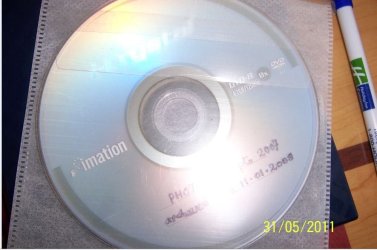
This is a DVD-R media (disc) which I had used to archive (burn) my photos. It is an Imation brand.
My Computer
- Computer Manufacturer/Model Number
- self-assembled
- OS
- Windows 7 Ultimate 32bit
- CPU
- AMD Phenom II X3 720 Processor
- Motherboard
- Gigabyte GA-MA78GM-S2H Revision 1.0
- Memory
- Transcend DDR2 (PC2 6400) 4 X 1GB
- Graphics Card(s)
- Integrated + ATI Radeon 4550
- Sound Card
- Integrated Realtek ALC 889A
- Monitor(s) Displays
- DELL 1704 FPT
- Screen Resolution
- 1280 x 1024
- Hard Drives
- Western Digital Caviar SE16 250 GB x2 in RAID 0
- PSU
- Coolermaster 400 W
- Case
- Zebronics Cube
- Cooling
- stock
- Keyboard
- Microsoft - wired
- Mouse
- Microsoft - wired
- Internet Speed
- ADSL 256-512Kbps
.........sorry but i am not getting what you saying this dvd media.. from where i get the detail of it......
This is a DVD-R media (disc) which Ihad used to archive (burn) my photos. It is an Imation brand.
View attachment 157425
ohh god you mean the black cd... i am using the sony cd and for dvd i tried moseraer..
thanks for reply..
My Computer
- OS
- Windows 7 x64

- Local time
- 3:10 AM
- Messages
- 299
2 things to try:
- Buy a lense cleaner
- Try burning at a lower speed than maximum
My Computer
- Computer type
- PC/Desktop
- OS
- openSUSE 13.1 64bit
- CPU
- i7
- Motherboard
- Gigabyte UD5
- Memory
- 6gb Gskill matched DDR3
- Graphics Card(s)
- Radeon HD4600
- Sound Card
- All onboard
- Monitor(s) Displays
- HP 2159v
- Hard Drives
- 120gb Samsung SSD for the OS
2 * 1tb WD Caviar Black for storage
- PSU
- Corsair 750w
- Case
- Antec 920
- Cooling
- Aksas Nero
Ponmayilal
Banned
- Local time
- 7:40 AM
- Messages
- 441
OK, now go get a lense cleaner CD and a JVCTaiyo-yuden/ JVC/ Verbatim CD-RW disc (made in Japan/Taiwan only)
Uninstall all third-party burning programs from your system and burn an ISO file using Windows native Image burner. ( Just right click on the ISO image and in the context menu click on Copy image to CD/DVD and start the burn process. (If you do not have an ISO image file, download the 163 MB pmagic-6.1.iso (md5sum: b2e2a71bca53f99be3abde56ffcf837b) and burn it to the CD-RW)
Report if your burn is not completed successfully with the error messge you get.
As a final effort you may clean the lense with the lense cleaner CD (two or three times) and repeat the trial.
If burning still fails, one may more or less write the final verdict that the drive has given up. (unless someone else comes up with some other ideas/solution. i am brain-dead here. )
Uninstall all third-party burning programs from your system and burn an ISO file using Windows native Image burner. ( Just right click on the ISO image and in the context menu click on Copy image to CD/DVD and start the burn process. (If you do not have an ISO image file, download the 163 MB pmagic-6.1.iso (md5sum: b2e2a71bca53f99be3abde56ffcf837b) and burn it to the CD-RW)
Report if your burn is not completed successfully with the error messge you get.
As a final effort you may clean the lense with the lense cleaner CD (two or three times) and repeat the trial.
If burning still fails, one may more or less write the final verdict that the drive has given up. (unless someone else comes up with some other ideas/solution. i am brain-dead here.
)My Computer
- Computer Manufacturer/Model Number
- self-assembled
- OS
- Windows 7 Ultimate 32bit
- CPU
- AMD Phenom II X3 720 Processor
- Motherboard
- Gigabyte GA-MA78GM-S2H Revision 1.0
- Memory
- Transcend DDR2 (PC2 6400) 4 X 1GB
- Graphics Card(s)
- Integrated + ATI Radeon 4550
- Sound Card
- Integrated Realtek ALC 889A
- Monitor(s) Displays
- DELL 1704 FPT
- Screen Resolution
- 1280 x 1024
- Hard Drives
- Western Digital Caviar SE16 250 GB x2 in RAID 0
- PSU
- Coolermaster 400 W
- Case
- Zebronics Cube
- Cooling
- stock
- Keyboard
- Microsoft - wired
- Mouse
- Microsoft - wired
- Internet Speed
- ADSL 256-512Kbps