DWM.exe Disabled?

Dadinictus

New member
Member
Local time
9:07 PM
Messages
30
hello.

ive had problems with windows aero recently. aero effects used to work some time ago, but for some reason it wont work and im stuck using windows 7 basic visual effects. when i open up the troubleshooter for aero it says than the Desktop Window Manager is disabled, but dwm.exe is still active in my task manager;

ive tried regedit fixes (highlighted)
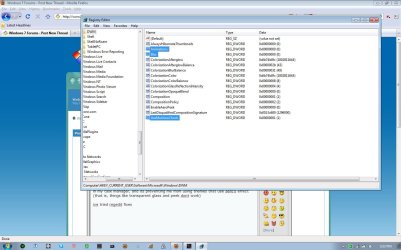
7f27c.jpg

ive tried disabling and enabling, stopping and restarting dwm.exe, and nothing seems to work.

my graphics card is an intel 965 express chipset, and aero effects used to work.
help with this would be appreciated.
 

My Computer

Computer Manufacturer/Model Number
Acer Aspire 8943G
OS
Windows 7 Home Premium 64 bit
CPU
Intel Core i3 350M 2.27GHz
Motherboard
?
Memory
4 GB DDR3
Graphics Card(s)
Ati Mobility Radeon HD 5650
Sound Card
?
Monitor(s) Displays
18.4" Full HD 1080p LED LCD
Screen Resolution
1920x1080
Hard Drives
500GB HDD
PSU
?
Case
?
Cooling
?
Mouse
Razer Mamba
Internet Speed
15 Mbps
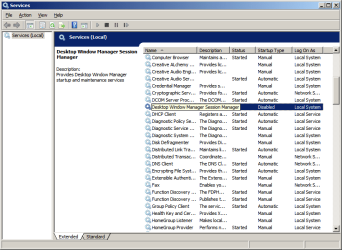
You should check to see if Desktop Window Manager somehow got disabled in services.

Start > Search for "services.msc" > Enter
Confirm UAC
Scroll down to Desktop Window Manager, check to see that it is enabled.
services.msc.png
 

My Computer

Computer Manufacturer/Model Number
Apple Macbook Pro (April 2009)
OS
W7 Ult. x64 | OS X
CPU
Intel Mobile Core 2 Duo 2.93Ghz [T9800 Penryn]
Motherboard
NVIDIA nForce 730i Rev. B1 [Mac-F2268EC8 (U2E1)]
Memory
4096MB Samsung DDR3 Dual Channel [PC3-8500F 1066Mhz]
Graphics Card(s)
NVIDIA GeForce 9600M GT 512MB [G96M Rev. C1]
Sound Card
SB X-Fi Surround 5.1 USB | Onboard Realtek (Disabled)
Monitor(s) Displays
Acer x223wbd 22" | Apple Anti-Glare 17" (Disabled)
Screen Resolution
{Current} 1440x900 {Acer} 1680x1050 {Apple} 1920x1200
Hard Drives
{Internal}
Seagate Momentus 320GB 2.5" 7200RPM [ST9320421AS]

{Externals}
LaCie 320GB USB 2.0 HDD [301284UR]
LaCie 750GB USB 2.0 FW400 eSATA HDD [301314U]
LaCie 1TB USB 2.0 HDD [301304UR]
PSU
Magsafe
Case
Aluminum/Unibody (MBP52)
Cooling
2 x 6000 RPM Fans
Keyboard
Logitech G-15v2 [PN 920-000379]
Mouse
Logitech G-9 [PN 910-000338]
Internet Speed
12Mbps/2.5Mbps w/ 24Mbps Speed Boost [Comcast]
Other Info
Logitech X-540 Speakers [PN 970223-0122]
Sennheiser PC-151 Headset
You should check to see if Desktop Window Manager somehow got disabled in services.

Start > Search for "services.msc" > Enter
Confirm UAC
Scroll down to Desktop Window Manager, check to see that it is enabled.
View attachment 67235
its set to automatically start, and it is running in task manager:
7f342.jpg
 

My Computer

Computer Manufacturer/Model Number
Acer Aspire 8943G
OS
Windows 7 Home Premium 64 bit
CPU
Intel Core i3 350M 2.27GHz
Motherboard
?
Memory
4 GB DDR3
Graphics Card(s)
Ati Mobility Radeon HD 5650
Sound Card
?
Monitor(s) Displays
18.4" Full HD 1080p LED LCD
Screen Resolution
1920x1080
Hard Drives
500GB HDD
PSU
?
Case
?
Cooling
?
Mouse
Razer Mamba
Internet Speed
15 Mbps
bump
 

My Computer

Computer Manufacturer/Model Number
Acer Aspire 8943G
OS
Windows 7 Home Premium 64 bit
CPU
Intel Core i3 350M 2.27GHz
Motherboard
?
Memory
4 GB DDR3
Graphics Card(s)
Ati Mobility Radeon HD 5650
Sound Card
?
Monitor(s) Displays
18.4" Full HD 1080p LED LCD
Screen Resolution
1920x1080
Hard Drives
500GB HDD
PSU
?
Case
?
Cooling
?
Mouse
Razer Mamba
Internet Speed
15 Mbps
I have a very same problem.

Aero worked all the time around 2 weeks ago, then (without doing anything significant, such as installing new software) it just stopped. After re-booting it had a 50/50 chance of working, and it sometimes worked, sometimes didn't for about a week.

After that week, it stopped working altogether.

Yesterday (10th of April 2010), there were 6 important Microsoft updates [KB980232, KB979309, KB981332, KB978601, KB890830]. They all prevented a remote attacker hijacking the computer, except for the last, which was a Malicious software remover. After rebooting, Aero magically worked again. EDIT: The significance of this is that it configured the updates during the boot-up, therefore changing the boot-up process that one time. I think that the problem is something to do with something (maybe dwm.exe, or Uxsms) not starting on boot.

I booted up the computer today and aero is gone again. I have rebooted numerous times but the problem persists.

In Dadinictus' screenshots, he shows aero working but with no effects, yet mine resorts to the 'Windows classic style' - a windows 98 look-alike.

After running the troubleshooter for aero effects, 'Desktop Windows Manager is disabled', and 'the current theme does not support aero' messages are shown, the former with a yellow exclamtion sign, the latter with a red cross.

It is impossible to switch to an aero-enabled theme, they are greyed out.

Every time I switch on my computer, the message 'A Windows service is not running' is shown by the taskbar, it started doing this the first times aero stopped working yet the message continued to show even on the few times it enabled itself. I do not remember the exact name, but it disabled normal users from logging in. The only account on my computer is my admin one. This may be a different problem altogether, but I'm posting it just in case it does have something to do with it. EDIT: It is called 'System Event Notification Service'

I've tried the registary fixes, and ran services.mxc, yet it still doesn't work even though Desktop Window Manager is auto-enabled in services.msc (and in msconfig).

I'll add more details if needed, and if this is too different a problem, then I'll start a new thread.

And also, in the first screenshot (the one in the OP), UseMachineCheck should be set to '0', not '1', because you don't want the computer checking to see whether your computer is able to run aero.
 
Last edited:

My Computer

OS
Windows 7
I run the scan, it says it found corrupt files and fixed them, I rebooted but the problem persists.
 

My Computer

OS
Windows 7
You need to run sfc at least 3 times. It doesnt repair everything in one go.
 

My Computer

Computer Manufacturer/Model Number
Too many to describe...
OS
Windows 7 x64 pro/ Windows 7 x86 Pro/ XP SP3 x86
'Windows Resource Protection did not find any integrity violations' has appeared on the second scan, does that mean I should still scan in case it finds a problem that it missed, and after each scan, must I restart the computer?

EDIT Third scan showed 'Windows Resource Protection did not find any integrity violations' as well, and the problem still persists.
 

My Computer

OS
Windows 7
In the event of sfc not finding any corrupt files in the 2nd pass, there doesnt really seem any point in doing it the 3rd time. OK, try updating your graphics card drivers.
 

My Computer

Computer Manufacturer/Model Number
Too many to describe...
OS
Windows 7 x64 pro/ Windows 7 x86 Pro/ XP SP3 x86
I've done so, many times, I've reverted back to older ones, tried different ones, etc. It still doesn't solve it. And it wouldn't have worked yesterday if the drivers didn't allow it to.
 

My Computer

OS
Windows 7
cbz,

Since nothing seems to be working, try restoring to a point of time earlier to when the problem occurred. In case you dont have any restore points or restore doesnt help, the only option i can think of is to back up your data, then do a repair install.
 

My Computer

Computer Manufacturer/Model Number
Too many to describe...
OS
Windows 7 x64 pro/ Windows 7 x86 Pro/ XP SP3 x86
I'm going to have to repair install because I have no restore points - will this erase all of my 3rd party software before I try this though?
 

My Computer

OS
Windows 7

My Computer

Computer Manufacturer/Model Number
Too many to describe...
OS
Windows 7 x64 pro/ Windows 7 x86 Pro/ XP SP3 x86
Thank you for all of your help.

Welcome, mate. Wish could have helped solve your problem without going through the repair install, though.
 

My Computer

Computer Manufacturer/Model Number
Too many to describe...
OS
Windows 7 x64 pro/ Windows 7 x86 Pro/ XP SP3 x86
A repair install will preserve your personal settings, data and programs but keep your device drivers and app cds handy just in case. Heres a tutorial to walk you through the process.

http://www.sevenforums.com/tutorials/3413-repair-install.html

sfc /scannow found some corrupt files, but was unable to fix some of them. i looked through the logs and found this:
2010-04-15 15:04:58, Info CSI 000001bb [SR] Cannot repair member file [l:16{8}]"uDWM.dll" of Microsoft-Windows-DesktopWindowManager-uDWM, Version = 6.1.7600.16385, pA = PROCESSOR_ARCHITECTURE_INTEL (0), Culture neutral, VersionScope = 1 nonSxS, PublicKeyToken = {l:8 b:31bf3856ad364e35}, Type neutral, TypeName neutral, PublicKey neutral in the store, hash mismatch

i got my version of 7 online through an offer for students, and i still have the .iso files and everything on my other partition, so would a repair install using the .iso work in the same way? and if so, would it rectify this problem?
 
Last edited:

My Computer

Computer Manufacturer/Model Number
Acer Aspire 8943G
OS
Windows 7 Home Premium 64 bit
CPU
Intel Core i3 350M 2.27GHz
Motherboard
?
Memory
4 GB DDR3
Graphics Card(s)
Ati Mobility Radeon HD 5650
Sound Card
?
Monitor(s) Displays
18.4" Full HD 1080p LED LCD
Screen Resolution
1920x1080
Hard Drives
500GB HDD
PSU
?
Case
?
Cooling
?
Mouse
Razer Mamba
Internet Speed
15 Mbps
bump
 

My Computer

Computer Manufacturer/Model Number
Acer Aspire 8943G
OS
Windows 7 Home Premium 64 bit
CPU
Intel Core i3 350M 2.27GHz
Motherboard
?
Memory
4 GB DDR3
Graphics Card(s)
Ati Mobility Radeon HD 5650
Sound Card
?
Monitor(s) Displays
18.4" Full HD 1080p LED LCD
Screen Resolution
1920x1080
Hard Drives
500GB HDD
PSU
?
Case
?
Cooling
?
Mouse
Razer Mamba
Internet Speed
15 Mbps
Yes, a repair install should solve your problem. You just need to burn that iso to dvd and run repair install from that.
 

My Computer

Computer Manufacturer/Model Number
Too many to describe...
OS
Windows 7 x64 pro/ Windows 7 x86 Pro/ XP SP3 x86
Yes, a repair install should solve your problem. You just need to burn that iso to dvd and run repair install from that.
sounds easy enough, thank you :D
 

My Computer

Computer Manufacturer/Model Number
Acer Aspire 8943G
OS
Windows 7 Home Premium 64 bit
CPU
Intel Core i3 350M 2.27GHz
Motherboard
?
Memory
4 GB DDR3
Graphics Card(s)
Ati Mobility Radeon HD 5650
Sound Card
?
Monitor(s) Displays
18.4" Full HD 1080p LED LCD
Screen Resolution
1920x1080
Hard Drives
500GB HDD
PSU
?
Case
?
Cooling
?
Mouse
Razer Mamba
Internet Speed
15 Mbps
Back
Top