
Solved DXDiag shows DirectX 11 but Windows Experience Index shows DirectX 10

RETierney

New member
Local time
12:01 AM
Messages
5
Hello,

I just did a clean install on my laptop after installing a new SSD. I installed the drivers that I had to install manually, and then I did a Windows update for anything else. After getting everything setup I ran my first Windows Experience Index.

Surprising, the graphics score was only 5.0, but I am almost sure it was higher with the factory installation. I am runnng Aero but with most of the visual effects turned off. I viewed the assessment details and it showed this:
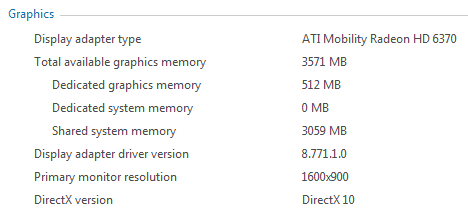
PFI.png

If you notice, the DirectX version is 10. But when I run dxdiag the version number in the report is 11. Here is my configuration, and please let me know if more information is needed. Thank you very much.

HP Pavilion dv7-4285dx
Windows 7 Home Premium 64-bit made from ISO image: X17-58997.iso
Graphics Adapter: ATI Mobility Radeon HD 6370
 

My Computer My Computer

At a glance

Windows 7 Home Premium x64 SP1Intel Core i5 M460 2.53 GHz8GB
Computer Manufacturer/Model Number
HP Pavilion dv7-4285dx Laptop
OS
Windows 7 Home Premium x64 SP1
CPU
Intel Core i5 M460 2.53 GHz
Memory
8GB
I believe that WinSAT only test for DirectX 10 and 9, not 11. That's why it only shows DirectX 10. If your card fails to do the DirectX 10 test, then WinSAT will only display DirectX 9. Don't worry about it. If DxDiag shows DirectX 11, then your card can support it.
 

My Computer My Computer

At a glance

Windows 7 Professional x64 SP1Intel® Pentium® 4 @ 2.26 GHz, Intel Core i7-2...512MB Dual channel DDR SDRAM @ 400MHz 2.5-3-3...Intel 82865G, Nvidia GeForce 520M Graphics
Computer type
Laptop
Computer Manufacturer/Model Number
Dell Optiplex SX270, Lenovo Z470
OS
Windows 7 Professional x64 SP1
CPU
Intel® Pentium® 4 @ 2.26 GHz, Intel Core i7-2670QM @ 2.20 GH
Motherboard
Dell, Lenovo
Memory
512MB Dual channel DDR SDRAM @ 400MHz 2.5-3-3-7, 8 GB DDR3
Graphics Card(s)
Intel 82865G, Nvidia GeForce 520M Graphics
Sound Card
SoundMax Integrated Audio, Integrated HD Audio
Monitor(s) Displays
LG W1952
Screen Resolution
1440x900, 1366 x 768
Hard Drives
40 GB 2.5" IDE 4200 RPM HDD, 500 GB 5400 RPM Sata 1.5 + 32 GB SSD
PSU
Dell 145 Watt, Lenovo 120 Watt Power Adapter
Case
Optiplex SX270 Small Form Factor, Laptop
Cooling
Dell Proprietary Air Cooling, Stock laptop cooling
Keyboard
Dell SK-8125 USB Keyboard
Mouse
Dell PS/2 2 button ball mouse with wheel scroll
Internet Speed
300 Mbit down / 20 Mbps up Time Warner Cable
Antivirus
MSE, Malwarebytes Scanner
Browser
Internet (Aizawa) Explorer 11
Other Info
Running Windows Server 2012 Datacenter on a virtual machine to run Metro Apps.
Ok, sounds good to me. Thanks...
 

My Computer My Computer

At a glance

Windows 7 Home Premium x64 SP1Intel Core i5 M460 2.53 GHz8GB
Computer Manufacturer/Model Number
HP Pavilion dv7-4285dx Laptop
OS
Windows 7 Home Premium x64 SP1
CPU
Intel Core i5 M460 2.53 GHz
Memory
8GB
Below Hotfix is still needed for WinSAT, for me at least on Windows 7 pro 64 bit as of June 2015. Hotfix will make Winsat display DirectX version correctly as 11 not 10 in "print / details".

Only need to apply the hotfix once. All post runs of Winsat will be correct for Directx in "details" after:

Request Hotfix Windows 6.1-KB2461631-x64.msu (or x86 for 32 bit) from Microsoft it will fix the "Experience Index" too correctly read Directx 11 and not 10 in "print/view details".

Comes via email as.... 433577_intl_x64_zip.exe and unzips too the above .msu.


Hot Fix for Microsoft Knowledge Base article number(s) 2461631
Knowledge Base Article
======================
To view the contents of the knowledge base article for this update, visit
http://support.microsoft.com/?kbid=2461631 directly, or
visit http://support.microsoft.com and query the Knowledge base
for the product and the KB number of this update.
Installation Instructions
=========================
1. If this hotfix was delivered with hfx.exe then it can be installed by running
hfx.exe from the appropriate platform directory.
2. Install and run
 

My Computer My Computer

At a glance

Windows 7 Pro x64i7 3770k @ 4.216GB Intel Masters Limited Ed. Patriot @ 2133MSI GTX 980 Gaming 4G ..MSI 650ti boosts Gami...
Computer type
PC/Desktop
Computer Manufacturer/Model Number
Custom
OS
Windows 7 Pro x64
CPU
i7 3770k @ 4.2
Motherboard
Gigabyte Sniper 3 rev 1
Memory
16GB Intel Masters Limited Ed. Patriot @ 2133
Graphics Card(s)
MSI GTX 980 Gaming 4G ..MSI 650ti boosts Gaming OC in sli
Hard Drives
2 Intel 240 GB 730's in Raid 0,
3 Western Digital Blacks I TB's in Raid 0 (working storage)
Various Long term Storage solutions.
Antivirus
MSE / Malwarebytes / and whatever the blank I need
Browser
IE 11 / Firefox / Vivaldi /Microsoft Edge
Hello and welcome to SevenForums.

Thank you Eachthighearna this Hotfix worked perfect on my x64 Ultimate.

Thank you for your knowledge.
 

My Computer My Computer

At a glance

Windows 7 Ultimate x64 SP1 OEMIntel i7 3930KKingston Genesis KHX2133C11D3K4/32GAsus RTX 2070 Ti Turbo fan series
Computer type
PC/Desktop
Computer Manufacturer/Model Number
Owner Builder
OS
Windows 7 Ultimate x64 SP1 OEM
CPU
Intel i7 3930K
Motherboard
Asus X79 Deluxe
Memory
Kingston Genesis KHX2133C11D3K4/32G
Graphics Card(s)
Asus RTX 2070 Ti Turbo fan series
Sound Card
Creative Sound Blaster ZXR
Monitor(s) Displays
Samsung U32J39 UHD
Screen Resolution
3840 x 2160
Hard Drives
Samsung 860 Pro 256 GB
OCZ Vertex 4 512GB
Western Digital Black 4TB
PSU
Corsair AX850
Case
Gigabyte
Cooling
Push - Pull 120 mm Noctua PWM, Scythe Big Shuriken 2 Rev. B
Keyboard
Logitech K800 Backlit
Mouse
Logitech MX2 Master
Internet Speed
NBN 25 Mbps
Antivirus
Kaspersky Internet Security
Browser
Mozilla FireFox
Other Info
TP-Link Archer VR600v
Sennheiser TR220 WiFi Head Phones.
Back
Top