Dynamic Disk conversion help (HxD hex editer shows 01C2 is a 0??)

MasterCreate66

New member
Local time
9:27 PM
Messages
30
Hi i have recently accidently converted my disk from basic to dynamic. I realised that doing this is bad because it does not allow me to install other operating systems on other partitions. After browsing google for a couple days i came across that you can change your disk by using a hex editer called HxD. I thought this was great so i downloaded HxD. I continued to the next step "Go to the offset 01C2 and change to a 7" here there should be a 47 (Dynamic disk)...... It was a zero (0).


Messed%2520up.dib.jpg


Yeah i just wanted some help......
 

My Computer My Computer

OS
Windows 7 Professional 64x
Easus Partiton master home edition. Easier, free, and not as likely to screw everything up. Altering anything with a hex editor can be very bad if you don't know what you're doing.
 

My Computer My Computer

Computer type
PC/Desktop
Computer Manufacturer/Model Number
Apple 17" iMac MA199LL (Early 2006)
OS
Windows 8 Pro (32-bit)
CPU
1.83GHz Intel Core Duo
Memory
2GB 667MHz DDR2 SDRAM (PC2-5300) (upgrade)
Graphics Card(s)
ATI Radeon X1600 with 128MB GDDR3 memory
Monitor(s) Displays
17-inch TFT active-matrix LCD, millions of colors
Screen Resolution
1440 x 900
Hard Drives
Hitachi 320GB HDT721032SLA360 7200RPM SATA II (upgrade)
Keyboard
Microsoft Wired Keyboard 600
Mouse
Microsoft Basic Optical Mouse v2.0
Internet Speed
4 Mbps
Antivirus
Microsoft Security Essentials
Browser
Google Chrome
Other Info
WEI:
Base Score: 3.9 Processor: 4.4 Memory 4.7
Graphics: 3.9 Gaming Graphics: 4.1 Primary HD: 5.9
But i have a windows 7 professional will this work??
 

My Computer My Computer

OS
Windows 7 Professional 64x
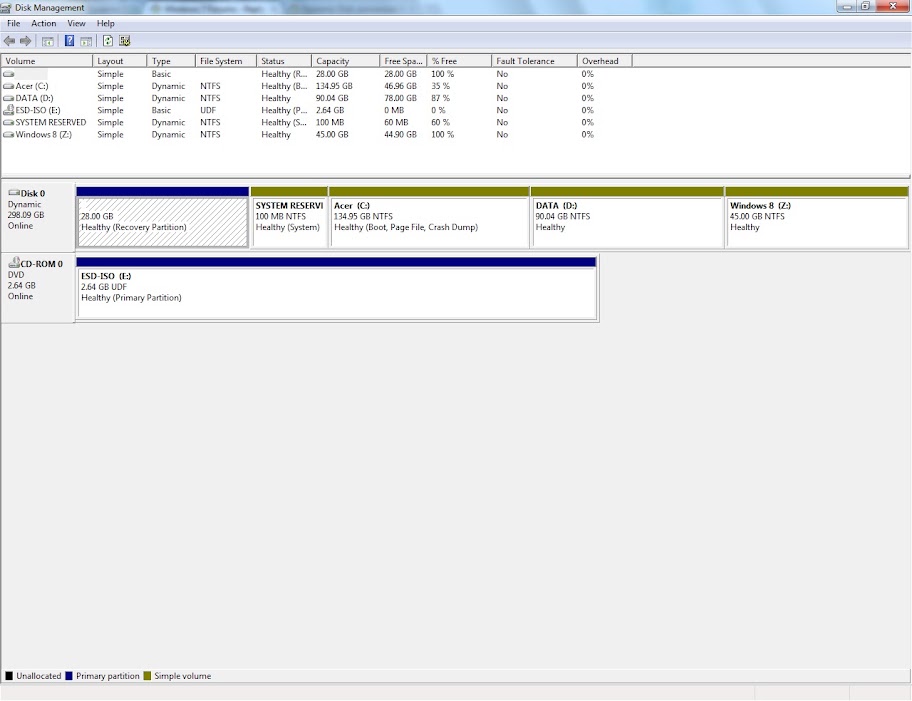
please post full screen screenshot of "disk management" in win7. With all fields visible
 

My Computer My Computer

Computer type
Laptop
Computer Manufacturer/Model Number
ACER ASPIRE 5742G
OS
Microsoft Windows 7 Home Premium 64-bits 7601 Multiprocessor Free Service Pack 1
CPU
Intel(R) Core(TM) i3 CPU M 370 @ 2.40GHz
Motherboard
Acer Aspire 5742G
Memory
4,00 GB
Graphics Card(s)
ATI Mobility Radeon HD 5400 Series
Sound Card
(1) AMD High Definition Audio Device (2) Realtek High Defi
Screen Resolution
1366 x 768 x 32 bits (4294967296 colors) @ 60 Hz
Hard Drives
WDC WD5000BEVT-22ZAT0
Sorry thats a little small...... here
screen.jpg
 

My Computer My Computer

OS
Windows 7 Professional 64x

My Computer My Computer

Computer type
Laptop
Computer Manufacturer/Model Number
ACER ASPIRE 5742G
OS
Microsoft Windows 7 Home Premium 64-bits 7601 Multiprocessor Free Service Pack 1
CPU
Intel(R) Core(TM) i3 CPU M 370 @ 2.40GHz
Motherboard
Acer Aspire 5742G
Memory
4,00 GB
Graphics Card(s)
ATI Mobility Radeon HD 5400 Series
Sound Card
(1) AMD High Definition Audio Device (2) Realtek High Defi
Screen Resolution
1366 x 768 x 32 bits (4294967296 colors) @ 60 Hz
Hard Drives
WDC WD5000BEVT-22ZAT0
As you may have seen here
<~~~~~ I have a Windows 7 professional 64 bit

Which some reason there is only a free version for the home edition of easeus partition maneger. And right now i was trying to install windows 8 on the z partition. Which i can only install on basic partitions. That is the whole reason i am trying to use a hex editer to convert it back so i can install windows 8.
 

My Computer My Computer

OS
Windows 7 Professional 64x
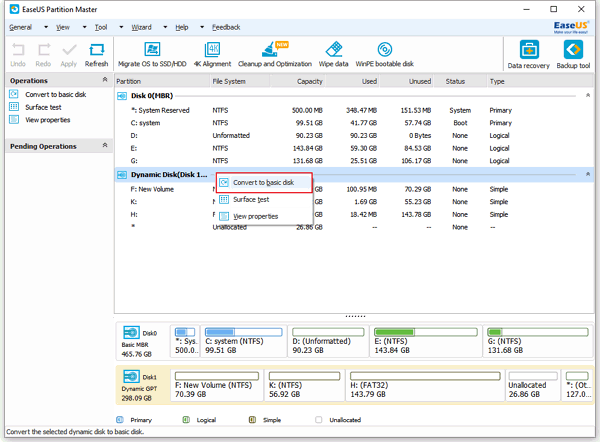
after installing the software:
Case 1: Convert dynamic disk containing simple volumes to a basic disk.

EaseUS Partition Master can change dynamic disk containing simple volumes into a basic disk directly.
1. Launch EaseUS Partition Master Home Edition, and go to main screen.
2. Select dynamic disk which you want to Convert to basic disk on the disk map, Disk becomes available on the toolbar. Click "Disk" and choose "Convert to basic disk" or right click the dynamic disk and choose "Convert to basic disk".
convert-dynamic-to-basic-1.gif

3. After you choose "Convert to basic disk", you will see the dynamic disk has become basic disk on the disk map.
convert-dynamic-to-basic-2.gif


Now set DATA and win8 as logical http://www.partition-tool.com/easeus-partition-manager/convert-primary-to-logical.htm

Now set "system reserved" and win7 as primary http://www.partition-tool.com/easeus-partition-manager/convert-logical-to-primary.htm

Now flag "system reserved" as active http://www.partition-tool.com/easeus-partition-manager/help/setting-active.htm

Apply all changes. Post "disk management" again
 

My Computer My Computer

Computer type
Laptop
Computer Manufacturer/Model Number
ACER ASPIRE 5742G
OS
Microsoft Windows 7 Home Premium 64-bits 7601 Multiprocessor Free Service Pack 1
CPU
Intel(R) Core(TM) i3 CPU M 370 @ 2.40GHz
Motherboard
Acer Aspire 5742G
Memory
4,00 GB
Graphics Card(s)
ATI Mobility Radeon HD 5400 Series
Sound Card
(1) AMD High Definition Audio Device (2) Realtek High Defi
Screen Resolution
1366 x 768 x 32 bits (4294967296 colors) @ 60 Hz
Hard Drives
WDC WD5000BEVT-22ZAT0
use the free version
 

My Computer My Computer

Computer type
Laptop
Computer Manufacturer/Model Number
ACER ASPIRE 5742G
OS
Microsoft Windows 7 Home Premium 64-bits 7601 Multiprocessor Free Service Pack 1
CPU
Intel(R) Core(TM) i3 CPU M 370 @ 2.40GHz
Motherboard
Acer Aspire 5742G
Memory
4,00 GB
Graphics Card(s)
ATI Mobility Radeon HD 5400 Series
Sound Card
(1) AMD High Definition Audio Device (2) Realtek High Defi
Screen Resolution
1366 x 768 x 32 bits (4294967296 colors) @ 60 Hz
Hard Drives
WDC WD5000BEVT-22ZAT0
Wait a minute can i use the home edition on my windows 7 professional
 

My Computer My Computer

OS
Windows 7 Professional 64x

My Computer My Computer

Computer type
Laptop
Computer Manufacturer/Model Number
ACER ASPIRE 5742G
OS
Microsoft Windows 7 Home Premium 64-bits 7601 Multiprocessor Free Service Pack 1
CPU
Intel(R) Core(TM) i3 CPU M 370 @ 2.40GHz
Motherboard
Acer Aspire 5742G
Memory
4,00 GB
Graphics Card(s)
ATI Mobility Radeon HD 5400 Series
Sound Card
(1) AMD High Definition Audio Device (2) Realtek High Defi
Screen Resolution
1366 x 768 x 32 bits (4294967296 colors) @ 60 Hz
Hard Drives
WDC WD5000BEVT-22ZAT0
Thx everyone you helped me so much...
Lolz i didnt know
"yes... why not"
 

My Computer My Computer

OS
Windows 7 Professional 64x
post screenshot "disk management" afterwards
 

My Computer My Computer

Computer type
Laptop
Computer Manufacturer/Model Number
ACER ASPIRE 5742G
OS
Microsoft Windows 7 Home Premium 64-bits 7601 Multiprocessor Free Service Pack 1
CPU
Intel(R) Core(TM) i3 CPU M 370 @ 2.40GHz
Motherboard
Acer Aspire 5742G
Memory
4,00 GB
Graphics Card(s)
ATI Mobility Radeon HD 5400 Series
Sound Card
(1) AMD High Definition Audio Device (2) Realtek High Defi
Screen Resolution
1366 x 768 x 32 bits (4294967296 colors) @ 60 Hz
Hard Drives
WDC WD5000BEVT-22ZAT0
You will need to delete the extra primary partition which tipped it to convert to Dynamic before it will allow reconversion to Basic. If you've already set up Win8 then you can move data off of Data partition to delete it.

After conversion create a Logical partition there so you don't have more than 4 Primary partitions again.

If you lose bootability, download and burn to CD the last PW version with this feature free: pw422.zip ISO - Windows Live. How to convert dynamic disk to basic disk with Partition Wizard?
 
Lost Bootability

Ummmmmmmm well
I did a little of this
https://picasaweb.google.com/118422738769353875835/Urls#5752948908939243762

https://picasaweb.google.com/118422738769353875835/Urls#5752949072913717170
???
And then when it said that and i said ok it then went bact to selecting what partition to use...... I held down the power butten planning to restart my computer and boot windows 7 and fool around making partitions and that stuff. But when i rebooted i got this....

https://picasaweb.google.com/118422738769353875835/Urls#5752949253534644162

Yeah i didnt touch the c drive so how can i boot it and fix this???
 

My Computer My Computer

OS
Windows 7 Professional 64x
This is why I provided you with the bootable ISO of PW. A Dynamic Disk will often not boot the OS. Hopefully it wasn't corrupted beyond repair using the Hex editor.

Burn PW version 4.2 to CD using Windows Image Burner or ImgBurn, boot and follow the video tutorial I also posted to convert it after deleting a Primary partition.

You can copy the files off of the Data partition using Copy & Paste - in Windows Recovery Console or delete Win8 partition and later recreate either one as a Logical partition.
 
My system right now i believe is fine and has all the data. I converted the dynamic dsik back to a basic and everything worked fine...... Some how in the windows 8 installation so it doesnt boot on the C partition and it trys to boot on the Z partition or Unallocated space........
 

My Computer My Computer

OS
Windows 7 Professional 64x
Back
Top