Solved Dynamic Disk Type?

The only thing that I see that I can do is convert but I haven't gotten to delete that partition yet.

Then try the conversion as it may prompt to you delete. If not delete R in Disk Mgmt then reboot PW CD to Convert.
 
Once its all done can I extend the volume of my C: drive back to what is originally was?
 

My Computer

OS
Windows Home Premium x64
CPU
Intel Pentium E5400
Motherboard
Dell 0J190T
Graphics Card(s)
Intel G41 Express Chipset
I think I've just done it but just checking.
 

My Computer

OS
Windows Home Premium x64
CPU
Intel Pentium E5400
Motherboard
Dell 0J190T
Graphics Card(s)
Intel G41 Express Chipset
Thanks gregrocker! You have helped me with 2 problems so far. But for some reason I just got an extra 40 MB of unallocated space that wasn't there before.
 

My Computer

OS
Windows Home Premium x64
CPU
Intel Pentium E5400
Motherboard
Dell 0J190T
Graphics Card(s)
Intel G41 Express Chipset
Did you extend C with Disk Mgmt? Try again.

PW was known to do this sometimes in the older versions. Disk Mgmt should close the gap.
 
Did you extend C with Disk Mgmt? Try again.

PW was known to do this sometimes in the older versions. Disk Mgmt should close the gap.

I extended it, but it only prompted me to extend it by exactly how much I had on X:
 

My Computer

OS
Windows Home Premium x64
CPU
Intel Pentium E5400
Motherboard
Dell 0J190T
Graphics Card(s)
Intel G41 Express Chipset
It should offer you all of the available space, so try Extending C again all that it offers.

If this fails you can install the latest Partition Wizard version to Resize C all the way over.
 
It should offer you all of the available space, so try Extending C again all that it offers.

If this fails you can install the latest Partition Wizard version to Resize C all the way over.

I also have 3 partitions now, went from 5 to 3 O.o
 

My Computer

OS
Windows Home Premium x64
CPU
Intel Pentium E5400
Motherboard
Dell 0J190T
Graphics Card(s)
Intel G41 Express Chipset
When I right click on C: drive I only get the option to shrink the drive, not extend.
 

My Computer

OS
Windows Home Premium x64
CPU
Intel Pentium E5400
Motherboard
Dell 0J190T
Graphics Card(s)
Intel G41 Express Chipset
According to Partition Wizard it says its unallocated space, BUT when I'm at the resize thing it says: "Unallocated Space Before: 0.00 MB".
 

My Computer

OS
Windows Home Premium x64
CPU
Intel Pentium E5400
Motherboard
Dell 0J190T
Graphics Card(s)
Intel G41 Express Chipset
Did you delete the 39mb partition shown here on the left side of your HD:


Depending upon your make or model this is likely an (HP?) OEM tools partition, possibly holding Hardware diagnostics. Try running them now from the key given on first boot screen to see if you have them.

If you want to try to recover the partition, from the PW Wizards tab select "Partition Recovery Wizard."
I would use the latest version of PW. If it finds the lost partition you can select it and it will restore.

I would also make sure your Recovery partition still runs by triggering it from the All Programs menu, then once you see that it will cue up Cancel it.

 
Did you delete the 39mb partition shown here on the left side of your HD:


Depending upon your make or model this is likely an (HP?) OEM tools partition, possibly holding Hardware diagnostics. Try running them now from the key given on first boot screen to see if you have them.

If you want to try to recover the partition, from the PW Wizards tab select "Partition Recovery Wizard."
I would use the latest version of PW. If it finds the lost partition you can select it and it will restore.

I would also make sure your Recovery partition still runs by triggering it from the All Programs menu, then once you see that it will cue up Cancel it.

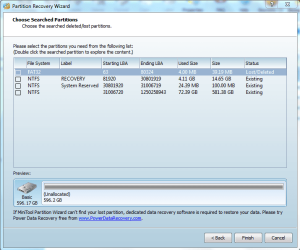
Actually I have a Dell. I have a clean install of Windows 7. I didn't delete the partition after using Partition Wizard it just said it was unallocated space.

I have a screenshot of what PW gave me.
 

Attachments

  • Lost or Deleted Partition.PNG
    Lost or Deleted Partition.PNG
    87.8 KB · Views: 9

My Computer

OS
Windows Home Premium x64
CPU
Intel Pentium E5400
Motherboard
Dell 0J190T
Graphics Card(s)
Intel G41 Express Chipset

Attachments

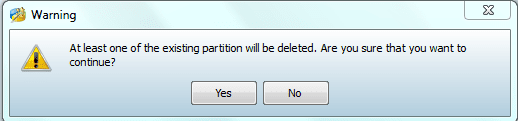
  • Existing Partition Deleted.PNG
    Existing Partition Deleted.PNG
    15.7 KB · Views: 2

My Computer

OS
Windows Home Premium x64
CPU
Intel Pentium E5400
Motherboard
Dell 0J190T
Graphics Card(s)
Intel G41 Express Chipset
If you Resized Recovery to the left to take up the 39mb space then it has to be put back first, so that the Partition Recovery Wizard can put that partition in the space.

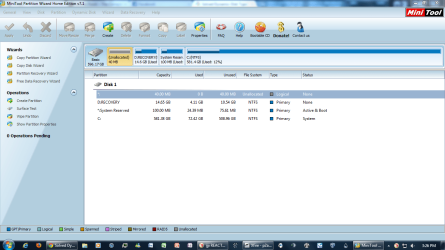
Post up a screenshot of your maximized PW Drive map and listings.
 
You mean this?
 

Attachments

  • Partition Wizard.PNG
    Partition Wizard.PNG
    234.6 KB · Views: 8

My Computer

OS
Windows Home Premium x64
CPU
Intel Pentium E5400
Motherboard
Dell 0J190T
Graphics Card(s)
Intel G41 Express Chipset
Back
Top