Dynamic disk?

bertie11

New member
Member
VIP
Local time
10:23 PM
Messages
254
I've just bought an HP DV6 2113-SA laptop. It has Win7 HP 64 bit installed. As it has a 500 GB hdd I wanted to create a backup partition, leaving about 100gb for the C:\Windows partition. This is so that when I run Acronis True Image 2010 it kept the image to a more manageable size and I needed the backup partition to store the images (I would have also kept a copy elsewhere as well). I also wanted to get as much space on the backup partition so I could do some (basic) video editing.
It wasn't until I installed Acronis that I found that it did not support dynamic disks. Is this due to the Win 7 64 bit version as I also have 32 bit Win 7 which is fine?
I see that Acronis do a Plus pack which give support to dynamic disks but is that the only solution?
I'm normally quite happy with disk imaging but I would hate to foul something up here. I have already shrunk C:\ and created a partition in the unallocated space. Is that OK to do or should I revert back to just C:\? I should also mention that there are D:\Recovery and E:\HP Tools partitions.
I'm confused by this dynamic disk thing as I didn't expect that at all!
Hoping someone can advise.
 

My Computer

Computer type
Laptop
Computer Manufacturer/Model Number
HP Envy 15
OS
Windows 8.1.1
CPU
AMD A10-5750M APU with Radeon(tm) HD Graphics
Memory
8gb
Hard Drives
1TB Serial ATA 16mb buffer
You need to use a External Hd for your backups, as if the HD goes down you will loose the backups.
 

My Computer

OS
ME/XP/Vista/Win7
Yes, I did say I would have kept a copy elsewhere.
 

My Computer

Computer type
Laptop
Computer Manufacturer/Model Number
HP Envy 15
OS
Windows 8.1.1
CPU
AMD A10-5750M APU with Radeon(tm) HD Graphics
Memory
8gb
Hard Drives
1TB Serial ATA 16mb buffer
How did you get into this dynamic disk mess in the first place. You can use Partition Wizard to convert to a simple logical disk.
 

My Computer

Computer Manufacturer/Model Number
HP, Dell, Gateway, Toshiba - 4 laptops and 2 desktops
OS
Vista, Windows7, Mint Mate, Zorin, Windows 8
CPU
from 1.6GHz Duo to i7
Monitor(s) Displays
2x HP w2207
Hard Drives
5x HDD, 7x SSD, 12x Externals
Keyboard
with trackball - no mices
Mouse
Trackball mice
Internet Speed
DSL 6000
Good question. I don't know! I've never used 64 bit Win 7 before so I assumed it would behave like 32 bit only maybe faster. When I got to where I wanted to shrink the C:\ partition It allowed me to use 212Gb as being available from the original 500gb disk. When I told it to create a new partition from the unallocated space it did say something about not being able to use another operating system other than the one already on the boot partition.
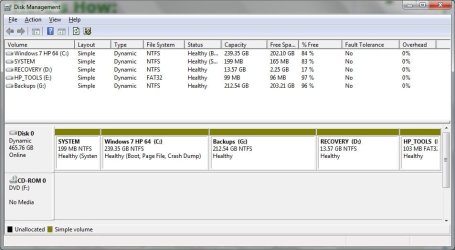
As I had no intention of using dual boot in the future I went ahead and it was then I think that things went pear shaped as (this is in Disk Management), all the bars along the top of the disk 0 row turned olive green and all the partitions are now marked dynamic.
All this took me by surprise as I had never heard of this.
So, Acronis won't recognise my disk 0. If I hook up an external disk Acronis will see that and offers to back that up. Not what I want. I just want to back up my C: drive.
I did try Partition Magic but that wouldn't recognise my disk either. But I'm not sure at what point I tried it.
Can I recover from this? I know that I can buy the Plus pack from Acronis which does recognise dynamic disks so all is not lost.
I would like to know what this dynamic stuff is all about. Does it only affect 64 bit?
Thanks for any advice.
 

My Computer

Computer type
Laptop
Computer Manufacturer/Model Number
HP Envy 15
OS
Windows 8.1.1
CPU
AMD A10-5750M APU with Radeon(tm) HD Graphics
Memory
8gb
Hard Drives
1TB Serial ATA 16mb buffer
A bit more.
I remember now that I used _free_ Partition Wizard which can't convert dynamic disks. Sorry, I've got a lot going on here!

Now I've had a proper look at PW is there likely to be any particular problems I need to be aware of or will it be nice a easy? I need a break here! This is a screenshot of my Disk layout:

disks.jpg

Theog.
I'm sorry for my somewhat terse reply to you, I was struggling with this brand new HP system!

Many thanks
 

My Computer

Computer type
Laptop
Computer Manufacturer/Model Number
HP Envy 15
OS
Windows 8.1.1
CPU
AMD A10-5750M APU with Radeon(tm) HD Graphics
Memory
8gb
Hard Drives
1TB Serial ATA 16mb buffer
Back
Top